Sketchware Pro: Java Source for an Android App Builder
Sketchware Pro's sources in Java. Now anyone can contribute to Sketchware Pro.
At a glance
- What is it?
- Sketchware Pro is a community-maintained mod of Sketchware whose Java sources can be built with Gradle and contributed through pull requests. It suits developers who want to inspect or modify the Android project builder, but the repository does not provide complete installation or first-use instructions for the finished app.
- Who is it for?
- Adopt Sketchware Pro if you need to study or contribute to its Java implementation of the Sketchware project builder. Do not treat it as a turnkey Android development environment without confirming the Gradle configuration, generated project behavior, app distribution terms, and custom LICENSE.md.
- Can I use it commercially?
- Check first. The repository uses a licence we do not classify automatically, so read its LICENSE file before any commercial use.
- Is it still maintained?
- Yes. The repository last received commits 5 days ago.
- What is it written in?
- Mainly Java, according to GitHub's language statistics.
Answers come from the project's GitHub data, last synced on November 7, 2026, and from our analysis. They are not legal advice.
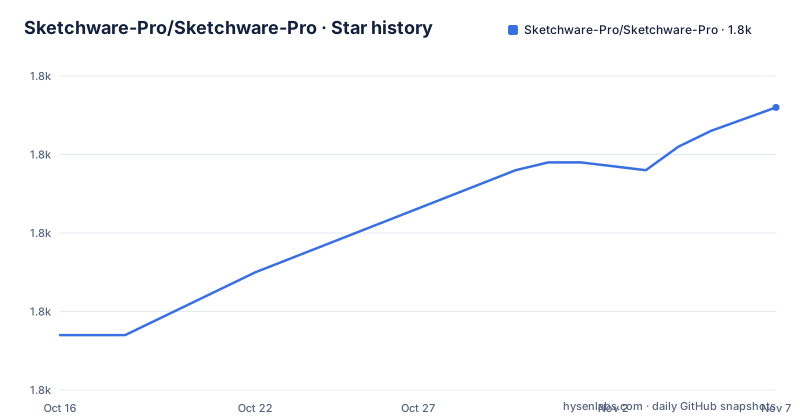
Star history
- Sketchware-Pro/Sketchware-Pro1,836 ★ · +29
| Repository | 2026-10-16 | 2026-11-07 |
|---|---|---|
| Sketchware-Pro/Sketchware-Pro | 1.8k | 1.8k |
29 Stars in the last 22 days, measured from the daily GitHub snapshot. Compare with other projects
Editorial analysis
What Sketchware Pro Changes
Sketchware Pro addresses a specific continuity problem: the original Sketchware application has not received updates for a long time, according to the project disclaimer. This repository presents a community mod intended to keep that application available for its user community. It is aimed at contributors who want to read the Java source, repair behavior, add features, or maintain the mod rather than people looking for a conventional library to import into a separate app.
The repository describes itself as the source code of many Sketchware Pro classes, not as a complete independent SDK. Its main language is Java, while the README explicitly asks contributors to prefer Java for new work when practical. Contributions that do not require edits outside `pro.sketchware` are expected to remain in that package and follow the existing directories, files, and naming conventions. This boundary suggests that contributors should inspect package ownership before moving code between modules.
The project also preserves a clear distribution boundary. The disclaimer says that Sketchware Pro must not be published, unchanged or modified, on the Play Store or another app store. That restriction is not a minor packaging note. It means adoption depends on using the source or obtaining an authorized build through the project’s own channels, rather than assuming that the repository can be turned into a store-distributed application.
The Project Builder’s Java Architecture
The source map gives a useful view of the build pipeline because it identifies the classes responsible for compiling an entire Sketchware project and producing Android artifacts. `a.a.a.ProjectBuilder` is described as the helper for compiling a project. During that process, `a.a.a.Ix` generates `AndroidManifest.xml`, `a.a.a.Jx` generates activity source code, `a.a.a.Lx` generates component source such as listeners, and `a.a.a.Ox` generates XML layout files.
That division separates compilation coordination from artifact generation. The README does not expose method signatures, execution order, or the input format accepted by these classes, so the precise data flow cannot be confirmed from the documentation alone. Based on the source map, a project is compiled through a builder that works with generated manifest, Java, component, and layout outputs. The exact implementation remains in the repository.
Three other classes document supporting responsibilities. `a.a.a.qq` acts as a registry for dependencies belonging to built-in libraries. `a.a.a.tq` manages quizzes displayed by the compiling dialog. `a.a.a.yq` organizes file paths used by Sketchware projects. These entries also reveal that project compilation includes dependency registration and user-facing progress behavior, not just source generation.
The `mod` package contains the majority of contributors’ changes according to the README. That makes it the first place to examine for recent work, but it does not prove that every change is isolated there. Contributors still need to understand imports, generated-code dependencies, and the Android build configuration before editing a generator.
Building Sketchware Pro with Gradle
The only documented build requirement is Gradle, and the README recommends Android Studio for the intended development experience. The repository includes `build.gradle`, `settings.gradle`, `gradle.properties`, a `gradle/` directory, `gradlew`, and `gradlew.bat`. These entries indicate an Android Gradle project with Unix and Windows wrapper entry points.
A new contributor can start by cloning the repository and opening its root directory in Android Studio. Gradle should then be used to build the app. The README does not state the required JDK version, Android Gradle Plugin version, Android SDK level, Gradle task name, signing configuration, or command-line invocation. It also does not document an APK destination. As a result, this page cannot give a verified command such as `./gradlew assembleDebug` or promise a particular output file.
Before changing code, check whether Android Studio can synchronize the existing Gradle configuration without replacing project-controlled versions. The repository contains `testkey.keystore`, but its purpose and suitability for a release build are not explained. Do not infer that this key is appropriate for production signing. The README’s contribution process only says to test changes before opening a pull request; it does not define automated tests, connected-device tests, or required Gradle tasks.
For a first real use, the safest activity is therefore a source-level build rather than a new Sketchware project. Confirm that the app compiles, identify the generated component from Android Studio’s build output, and then make one isolated Java change. The README says contributions will be reviewed, so test evidence matters even though it does not prescribe a test format.
Contributing Through Java and Pull Requests
The documented contribution path is conventional GitHub work: fork the repository, modify the fork, test the changes, create a pull request in the main repository, and wait for review. Accepted contributions are recorded in the “About Team” activity, initially using the contributor’s GitHub name and profile picture, although the README says both can later be changed.
Commit messages should be short and detailed. The supported prefixes are `feat:`, `fix:`, `style:`, `refactor:`, `test:`, `docs:`, and `chore:`. Examples include `fix: Fix crash during launch on certain phones` and `refactor: Reformat code in File.java`. Although the README notes that emojis may represent commit types in `chore` commits, plain type prefixes are easier to inspect and match the documented convention.
The strongest package constraint is also the contribution constraint. If a feature does not require changes outside another package, place it in `pro.sketchware`, respect existing structure, and use Java unless Kotlin is genuinely necessary. This can prevent contributors from scattering a localized change across unrelated modules. It can also make review harder when a feature genuinely crosses package boundaries, because the README does not define an exception or approval process for those cases.
A useful review sequence is to search for every caller of a changed generator, confirm that generated names and file paths still align, and keep each pull request centered on one behavior. That sequence follows from the documented responsibilities of `Ix`, `Jx`, `Lx`, `Ox`, and `yq`; it is not a claim about undocumented test coverage.
Maintenance, Licensing, and Distribution Constraints
The repository is not archived, and the last push was on 2026-10-15. Recent release records include `v7.0.0` dated 2025-10-10 and `v7.0.0-beta-01` dated 2025-09-19. These dates support recent project activity, but the gap between releases means contributors should not assume that every branch receives a release.
The license is listed as “Other,” and GitHub cannot classify the custom license. The repository points contributors to `LICENSE.md`. The README does not reproduce that file’s terms, so it would be inaccurate to claim a particular open-source license, redistribution permission, patent grant, or warranty disclaimer. Anyone preparing to modify, redistribute, or ship code must inspect `LICENSE.md` directly. This review is especially important because the README separately prohibits publication through the Play Store or other app stores.
Upgrade cost depends on what is changed. Adding isolated UI or utility behavior inside `pro.sketchware` may remain localized, but changing a compiler or generator can affect generated manifests, activities, listeners, layouts, dependency registration, and project paths. The README provides no compatibility matrix, migration guide, stable API guarantee, or release branch policy. `public-stable-ids.txt` may relate to identifier stability, but its role is not documented and should not be treated as a formal compatibility contract.
Why the Mod Is Not a Drop-in Alternative
A regular Android application module does not offer the same target. Sketchware Pro contains project-specific compilers and source generators that create Android artifacts from Sketchware project definitions. An ordinary Android project begins with checked-in source and Gradle configuration, whereas this project must coordinate dynamic code, manifest, XML layout, component, and dependency output according to the classes listed in the source map.
This difference makes Sketchware Pro relevant to developers studying code-generation systems or maintaining this mod. It is a poor fit for someone who wants a conventional Android UI framework, expects a documented public API, or needs a build whose JDK, SDK, signing, and artifact requirements are specified. The repository describes a mod and invites source contributions, but it does not present those operational details in the README.
It is also the wrong choice where app-store publication is a requirement. The disclaimer expressly disallows distributing the project through the Play Store or another app store. An organization needing a store policy, signed release process, and supported update path must resolve those requirements before adopting this codebase.
Editorial conclusion
Adopt Sketchware Pro if you need to study or contribute to its Java implementation of the Sketchware project builder. Do not treat it as a turnkey Android development environment without confirming the Gradle configuration, generated project behavior, app distribution terms, and custom LICENSE.md. The first adoption check should be whether Android Studio can open the repository and complete the documented Gradle build on your target environment.
Frequently asked questions
How do I build Sketchware Pro from source?
The README says to use Gradle and recommends Android Studio. It does not publish a specific Gradle task, JDK version, Android SDK level, or APK output path.
Which packages should I edit when adding a feature to Sketchware Pro?
If a feature does not require edits outside other packages, the README says to place it in `pro.sketchware`, follow the existing directory and naming structure, and prefer Java unless Kotlin is necessary.
Can Sketchware Pro be published on the Play Store?
No. The README explicitly prohibits publishing Sketchware Pro, unchanged or modified, on the Play Store or any other app store.
Official sources
Add this badge to your README
If you maintain this project, the badge below links readers to this analysis and shows its maintenance status from the daily GitHub snapshot. Paste the markdown into your README; add ?metric=license or ?metric=stars to the image URL for a different field.

[](https://hysenlabs.com/projects/sketchware-pro-sketchware-pro)Star history chart for your README
[](https://hysenlabs.com/projects/sketchware-pro-sketchware-pro)Was this useful?