Four upstreams behind one domain, a token bucket keyed by IP, and a README that tells you not to expose port 5000
A multi-function acceleration service for Docker image pulls, GitHub access, and offline image downloads. Lightweight and uses no storage space.
At a glance
- What is it?
- HubProxy is a single Go binary that sits in front of Docker registries, GitHub downloads and Hugging Face files, and routes everything through one domain by putting the upstream URL into the path; the interesting material is in the packaging and the defaults, from a runtime image with no unprivileged user and a config baked in at build time to a compose file that publishes port 5000 in exactly the way the documentation warns against.
- Who is it for?
- HubProxy fits someone running their own network or team who wants Docker and GitHub downloads to go through hardware they control rather than a public mirror, and the Registry API v2 compatibility and token caching are the parts that make it usable for real pulls. Four things to check before you put it on a network.
- Can I use it commercially?
- Yes. MIT is a permissive licence: you can use, modify and sell software built on it, as long as you keep its copyright and licence notices.
- Is it still maintained?
- Yes. The repository last received commits 105 days ago.
- What is it written in?
- Mainly Go, according to GitHub's language statistics.
Answers come from the project's GitHub data, last synced on November 15, 2026, and from our analysis. They are not legal advice.
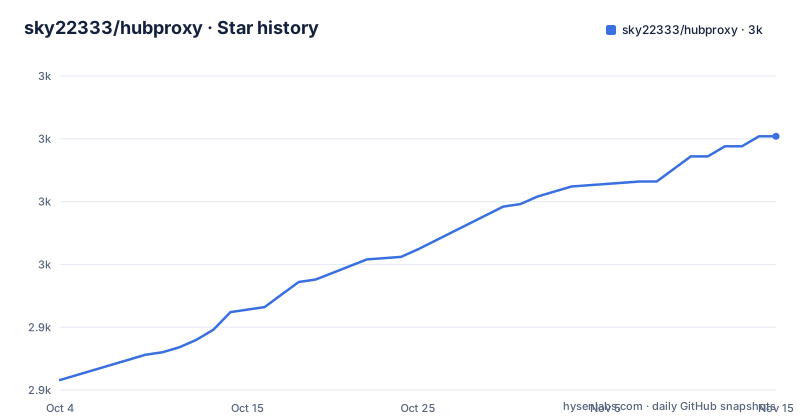
Star history
- sky22333/hubproxy3,001 ★ · +97
| Repository | 2026-10-04 | 2026-11-15 |
|---|---|---|
| sky22333/hubproxy | 2.9k | 3k |
97 Stars in the last 42 days, measured from the daily GitHub snapshot. Compare with other projects
Editorial analysis
One program in front of four upstreams
The service covers more than its name suggests. The Docker side speaks the Registry API version 2 and fronts Docker Hub, GHCR, Quay, GCR and the Kubernetes registry, with streaming transfer and caching for manifests and tokens, so a pull walks through the same protocol it would without the proxy.
The GitHub side covers release downloads, raw files, git clone and the API host. The Hugging Face side covers model files and the large files that come through LFS. And there is a search interface, both a web page and an API, for finding Docker Hub images and browsing their tags.
All four share one program, one configuration file and one listening port, which is the argument the feature list makes: deploying one thing instead of three separate proxies. The configuration is a TOML file with environment variables able to override it, and the shipped packages include deb, rpm and apk builds alongside the container image.
There is also an optional outbound SOCKS5 proxy in the configuration, for the case where the proxy itself needs to reach its upstreams through another hop.
The upstream URL travels in the path after your own domain
The routing scheme is what lets one domain serve four services. The quick start tells you to replace a placeholder domain with your own address, and then shows three shapes:
# Docker 镜像加速
docker pull yourdomain.com/nginx

# GitHub Release 加速
wget "https://yourdomain.com/https://github.com/owner/repo/releases/download/v1.0.0/app.tar.gz"

# Git clone 加速
git clone https://yourdomain.com/https://github.com/sky22333/hubproxy.git
In each case the upstream address follows the domain as the rest of the path, unmodified. There is no per-service hostname and no separate port, so anything that can be expressed as a URL can be proxied, including a clone of the proxy's own repository.
The GitHub feature list adds one more detail: URLs inside shell and PowerShell scripts are rewritten automatically, which is aimed at the installers people download and run without reading.
That flexibility is also why the access control in the next section exists. If the path decides where the request goes, then deciding where a request is allowed to go has to be a path decision too.
The documentation warns against the default compose file
The README contains a production note, and it is worth reading before the deployment commands rather than after:
> bind your own domain, reverse proxy through Caddy or Nginx and enable HTTPS, and do not expose a bare http://IP:5000 for a long period.
The bundled compose file does the opposite of that by default:
services:
  hubproxy:
    image: ghcr.io/sky22333/hubproxy
    container_name: hubproxy
    restart: always
    ports:
      - "5000:5000"
    volumes:
      - ./src/config.toml:/app/config.toml:ro
Three details. The image reference carries no tag, so it floats on whatever the registry serves as the default. The port mapping publishes on every interface. And the configuration is mounted read only from a path inside the source tree, which means a deployment expects a config.toml to be sitting in src/ on the host, the same file the image build copies in.
The log settings are the one piece of restraint: the json file driver with a 200 megabyte cap and three files. Nothing else in the file limits who can reach the service, so the reverse proxy in the note is doing all of that work.
Rate limiting counts IPv6 addresses by their /64
Two access mechanisms are described, each in one line.
The first is a token bucket keyed on the real client address rather than on a forwarded header, with a configurable period and quota. The detail worth noticing is the IPv6 handling: addresses are counted by their /64 prefix, so a single subscriber with a routed prefix is treated as one client rather than as the billions of addresses that prefix can hold. A limiter that counted individual IPv6 addresses would be trivially evaded and would also lock out a legitimate user, so this is a considered choice rather than an omission.
The second is a pair of lists. There is an IP allow and deny list, where an allowed address is exempt from rate limiting and a denied one is blocked. And there are separate allow and deny lists for images and for GitHub repositories, both of which accept wildcards.
What the README does not give is a single line of the configuration file. The feature list names the keys in prose, the TOML file itself is not shown, and the documentation site is where the syntax lives, so the practical first step for anyone restricting this service is to go read that.
The install route is a shell script piped from a branch
Two installation routes are documented. The recommended one is a container, run detached with a name, a port mapping and an always restart policy, and then verified with a single request:
curl http://127.0.0.1:5000/readyThe second is a script fetched from the repository and executed:
curl -fsSL https://raw.githubusercontent.com/sky22333/hubproxy/main/install.sh | shThat script is said to detect the processor architecture between amd64 and arm64 and the package manager among apt, dnf and apk, install accordingly, place the configuration at /etc/hubproxy/config.toml and start the service. The deb, rpm and apk packages the project publishes are what that script ends up using.
Two things follow from the form of the command. The URL points at a branch rather than at a tag, so the script fetched today is whatever is on main today, and there is a release page with three recent tags if a reader would rather pin one. And the script installs a service that starts itself, which on a shared machine is worth knowing before running it.
A static binary in a bare alpine image with the config baked in
The Dockerfile has three stages and the runtime one is deliberately thin.
A Node stage builds the web interface, a Go stage compiles the binary and the final stage is plain alpine with two copies: the executable and a config.toml taken from the build context:
RUN CGO_ENABLED=0 GOOS=linux GOARCH=${TARGETARCH} go build -ldflags="-s -w -X main.Version=${VERSION}" -trimpath -o hubproxy . && upx -9 hubproxyThat one line carries four decisions. Cgo is disabled, so the binary is static. The architecture comes from a build argument, which is how one Dockerfile serves multiple platforms. The version is stamped in at link time from a build argument whose default is the string dev, so a local build with no arguments reports itself as a development build. And the result is compressed with the executable packer at its highest setting, which trades a slower start for a smaller image.
Two smaller observations. The configuration file that ships in the image is the one from the source tree, so the defaults are the project's defaults until you mount over them. And the final stage creates no unprivileged user, so the service runs as root inside the container unless something else stops it.
An empty preview section and a disclaimer about legal use
The README is short and its last third is not documentation.
There is a section for interface previews, and it contains no images. There is a pointer to the documentation site, in Chinese and in English, covering deployment architecture, the full configuration, Kubernetes and NAS use, transfer characteristics and questions, and that site is where the configuration syntax lives.
Then there is a disclaimer with three lines: the program is for learning and exchange only and must not be used for illegal purposes, users must comply with local law, and the author accepts no responsibility for what users do with it.
For a service whose entire function is fetching other people's content on your behalf, that paragraph is the part a reader has to take seriously rather than skim. The repository homepage is also recorded as a plain HTTP address while every documentation link in the file is HTTPS, which is a small inconsistency in a project that tells you to turn on TLS before exposing the service.
Editorial conclusion
HubProxy fits someone running their own network or team who wants Docker and GitHub downloads to go through hardware they control rather than a public mirror, and the Registry API v2 compatibility and token caching are the parts that make it usable for real pulls. Four things to check before you put it on a network. The project's own note says not to leave a bare HTTP port exposed and to front it with a domain and a reverse proxy, while the bundled compose file publishes port 5000 with no image tag. The configuration file is baked into the image at build time from the source tree, so the shipped defaults are the repository's defaults rather than yours. Rate limiting and the allow and deny lists are described in one line each, with no example of the configuration syntax in the README. And the install route is a script piped from a branch. The newest release is v1.2.5 from 2026-07-12 and the branch was pushed on 2026-08-02.
Frequently asked questions
What does HubProxy actually do?
It is a Go proxy that accelerates Docker image pulls, GitHub downloads and Hugging Face model and LFS files, and it adds a web interface and an API for searching Docker Hub images and browsing tags. The registry side is compatible with the Registry API v2 and covers Docker Hub, GHCR, Quay, GCR and registry.k8s.io, with streaming transfer and manifest and token caching.
How do I run HubProxy?
With Docker, by running ghcr.io/sky22333/hubproxy detached with port 5000 published and an always restart policy, then checking it with curl http://127.0.0.1:5000/ready. Or with the install script, which detects the architecture and the package manager and leaves the configuration at /etc/hubproxy/config.toml with the service started.
How does HubProxy control who can use it?
Rate limiting is a token bucket keyed on the real client address, counting IPv6 by its /64 prefix, with a configurable period and quota. There are IP allow and deny lists that either exempt an address from rate limiting or block it, and separate allow and deny lists for images and for GitHub repositories, both of which accept wildcards.
Is it safe to expose HubProxy on a port directly?
The project's own note says to bind your own domain, reverse proxy it through Caddy or Nginx with HTTPS enabled, and not to leave a bare http://IP:5000 exposed for long. The bundled compose file publishes 5000:5000 with no image tag and mounts the configuration file read only from the source tree.
Official sources
Add this badge to your README
If you maintain this project, the badge below links readers to this analysis and shows its maintenance status from the daily GitHub snapshot. Paste the markdown into your README; add ?metric=license or ?metric=stars to the image URL for a different field.

[](https://hysenlabs.com/projects/sky22333-hubproxy)Star history chart for your README
[](https://hysenlabs.com/projects/sky22333-hubproxy)Was this useful?