mtproto.zig: a 177 KB Telegram proxy wearing a TLS 1.3 costume
Keep the people you love connected — a tiny self-hosted Telegram proxy that hides in plain HTTPS
At a glance
- What is it?
- sleep3r/mtproto.zig relays Telegram traffic as ordinary HTTPS so deep packet inspection sees a web page, and ships the mtbuddy CLI that installs it. The disguise is thorough, but calls never work, media needs MiddleProxy, and the lean numbers depend on CPU flags the documented build command does not set.
- Who is it for?
- Adopt mtproto.zig if you run a Linux server for one specific group of people who need Telegram and nothing else, and you can live without voice and video calls. Do not adopt it as a general VPN, and do not promise a relative that videos will always load, because media without MiddleProxy is documented as unavailable rather than flaky.
- Can I use it commercially?
- Yes. MIT is a permissive licence: you can use, modify and sell software built on it, as long as you keep its copyright and licence notices.
- Is it still maintained?
- Yes. The repository last received commits 22 days ago.
- What is it written in?
- Mainly Zig, according to GitHub's language statistics.
Answers come from the project's GitHub data, last synced on October 23, 2026, and from our analysis. They are not legal advice.
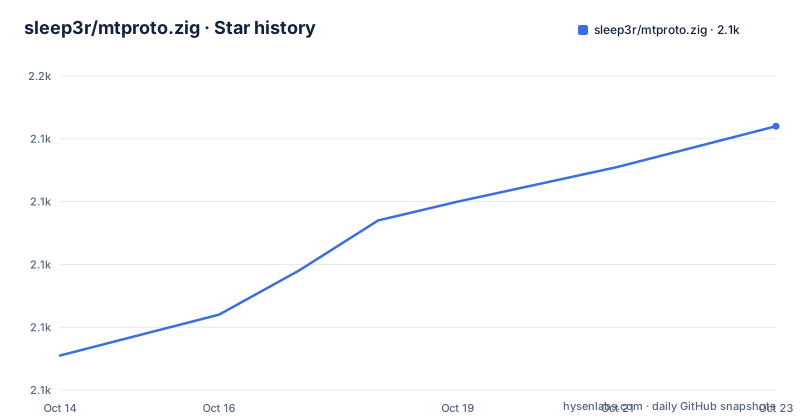
Star history
- sleep3r/mtproto.zig2,144 ★ · +73
| Repository | 2026-10-14 | 2026-10-23 |
|---|---|---|
| sleep3r/mtproto.zig | 2.1k | 2.1k |
73 Stars in the last 9 days, measured from the daily GitHub snapshot. Compare with other projects
Editorial analysis
Telegram traffic disguised as TLS 1.3, without the VPN tax
A VPN announces itself. Censoring middleboxes learn the protocol by its packets and block it, and routing an entire phone through one costs throughput and battery. mtproto.zig takes the opposite route. Written in Zig, it is a self-hosted MTProto proxy that carries nothing but Telegram traffic and presents it as standard TLS 1.3 HTTPS, so the people you hand the link to install nothing and tap once. The audience is narrow and stated without hedging: readers living where Telegram is throttled or blocked, plus whoever in a family gets asked for help with this sort of thing. Everything sits under MIT, and the last push landed on 2026-10-01. It runs on a server you control, which is the entire point, since there is no service to register with and no operator standing between you and the bytes.
The record-shaping stack: DRS, Split-TLS and a six-packet ClientHello
Four techniques decide what the socket actually emits. Fake TLS 1.3 wraps the MTProto frames inside a TLS record stream. DRS then picks record sizes that mimic what Chrome and Firefox produce, so the size distribution does not betray the payload. Split-TLS pushes the opposite extreme, sending one-byte Application records to defeat passive signature matching. TCPMSS=88 fragments the ClientHello across six TCP packets, which breaks inspection that reassembles the handshake before deciding what it is. Stateful inspection gets a second layer through nfqws TCP desync, which sends decoy packets and splits traffic at TTL-limited boundaries to corrupt the reassembler's view. All of this is enabled by default, and passing `--no-dpi` to `mtbuddy install` produces a bare proxy with none of it. What that bare mode presents to a censor is not addressed anywhere in the project.
Active-probe masking answers a censor with a real handshake
Blocking alone is not enough for a determined censor, who will connect to a suspected proxy and poke it. A server that answers with silence or a bare TCP reset has already confessed. This project answers such a probe with a real TLS handshake served by a local web backend. If you own the domain, that backend presents a genuine certificate; if you do not, it falls back to a self-signed one. Fronting the real `tls_domain:443` is offered as optional for single-round-x25519 domains, and a separate anti-replay layer rejects replayed handshakes while detecting ТСПУ Revisor probes. One detail deserves a second look. The install example the project ships uses `--domain rutube.ru`, and nothing in that command supplies a certificate you hold, so the documented first run lands on the self-signed branch rather than the real-certificate one.
Bootstrap, minisign, and the mtbuddy install shapes
Every install, update and management step runs through `mtbuddy`, a Zig CLI that ships beside the proxy. One pipeline fetches the binary, verifies a minisign signature plus a SHA-256 checksum, then prints the next command:
curl -fsSL https://raw.githubusercontent.com/sleep3r/mtproto.zig/main/deploy/bootstrap.sh | sudo bashUnsigned bootstrap exists and the project marks it not recommended; it is reachable through `--insecure` or through `MTPROTO_INSECURE=1`. With the CLI on the box, four ordinary install forms cover most cases:
sudo mtbuddy install --port 443 --domain rutube.ru --yes
sudo mtbuddy install --port 443 --domain rutube.ru --no-dpi --yes
sudo mtbuddy install --config /path/to/config.toml --yes
The first auto-generates a secret and switches on every DPI bypass module. The second strips the stack back to a bare proxy. The third reads an existing config file and maps port and domain from it. A fourth variant takes your own material through `--secret` and `--user alice`. Either way the command ends by printing a ready-to-use `tg://` link, and that link is the entire distribution mechanism handed to a non-technical relative.
Bare zig build leaves the CPU profile and target unset
There is a contradiction inside the project worth naming. The README argues for Zig on the grounds that you can run `zig build` on macOS and receive a statically linked Linux binary, with no Docker and no `glibc` version mismatch. The repository's own Makefile spells out something else:
build: ## Cross-compile proxy + mtbuddy for Linux x86_64 (AES-enabled)
	zig build -Doptimize=ReleaseFast -Dtarget=x86_64-linux -Dcpu=x86_64_v3+aes

test: ## Run unit tests
	zig build test
Three flags there are missing from the bare form: optimisation mode, target triple and CPU profile. Type `zig build` on a Mac exactly as written and the result is a native macOS debug build, nothing like the optimised Linux build whose figures populate the size table. The CPU flag is not cosmetic either. The Dockerfile states that every relayed byte passes through AES-CTR twice, so a build missing the hardware backend falls back to the bitsliced software AES in the standard library and turns CPU-bound under load. On x86-64 it adds that `+aes` alone is not enough, because the standard library only selects AES-NI when the target carries both aes and avx features. On arm64 the same trap exists, where the `generic` model ships a scheduling hint named `fuse_aes` rather than the feature itself.
Blocked DCs send traffic through WireGuard and a rotating IPv6
When Telegram's own datacentres cannot be reached, the proxy needs a different exit. One path routes through WireGuard or AmneziaWG using explicit socket policy routing via `SO_MARK`, so only this program's sockets get marked and the rest of the host is untouched. IPv6 hopping is the other fallback: on ban detection the address rotates inside the /64 the hosting provider assigned, using the Cloudflare API. That needs credentials, and the repository keeps them in a two-line file:
CF_TOKEN=cfat_...
CF_ZONE=...
None of the documented `mtbuddy install` commands set either value, so the rotation path has no credential step anywhere in the install flow. Deployment carries a second trap. The Makefile `deploy` target copies only the two binaries and leaves config and environment files local unless you pass `PUSH_CONFIG=1`, because pushing a drifted `config.toml` over a live install breaks every share link already handed out, secrets and `tls_domain` included.
Calls never work here, and media depends on MiddleProxy
Two gaps are documented without hedging. Telegram calls are not supported at all, because Telegram routes calls through SOCKS-style paths and masking SOCKS traffic as ordinary HTTPS is outside what this proxy does. No flag changes that. The second gap is quieter. MiddleProxy, described as ME transport with auto-refreshed Telegram metadata, is what makes promotion tags work and what carries media for accounts without a Telegram Premium subscription. Without it, the guidance is not to expect intermittent failures but to treat photos, videos and stories as unavailable. Multi-user operation gives each person an independent secret, which is what lets one server serve a family without a single shared link, and it is also why the Makefile warns that a drifted config invalidates every link at once.
How the 177 KB claim stacks up against C, Rust and Go proxies
The published comparison reads as data rather than as marketing. The project's own row claims a 177 KB binary, 0.75 MB baseline RSS, startup under 10 ms and zero dependencies. Official MTProxy in C is 524 KB and 8.0 MB with openssl and zlib, matching it on startup time. Telemt in Rust is 15 MB and 12.1 MB across 423 crates, with startup in the five to six second range. mtg in Go is 13 MB and 11.6 MB over 78 modules. The Python and Node.js entries both put baseline RSS in the tens of megabytes. The structural difference is dependency count rather than size alone: a statically linked binary with an empty dependency list is one file to ship and one process to supervise. The Dockerfile pins `ZIG_VERSION=0.16.0`, so the same toolchain is expected on every build host.
Editorial conclusion
Adopt mtproto.zig if you run a Linux server for one specific group of people who need Telegram and nothing else, and you can live without voice and video calls. Do not adopt it as a general VPN, and do not promise a relative that videos will always load, because media without MiddleProxy is documented as unavailable rather than flaky. Before handing out links, check which `mtbuddy install` flags you passed, confirm the domain you own, and verify AES hardware support in the binary you deploy. The `--no-dpi` path gives up every record-shaping trick.
Frequently asked questions
Does mtproto.zig support Telegram voice and video calls?
No. Telegram only routes calls through SOCKS-style paths, and exposing SOCKS traffic cannot be masked by mtproto.zig as normal HTTPS, so calls are simply unavailable through this proxy.
Why does mtproto.zig ask for a domain during install, and what if I do not own it?
Active-probe masking answers censors with a real TLS handshake from a local web backend, using a real certificate when you own the domain and a self-signed one otherwise. The install example the project ships uses `--domain rutube.ru` without asking for a certificate you hold, so that first run takes the self-signed path.
What does mtproto.zig need in order to rotate its IPv6 address?
IPv6 hopping rotates the address out of the provider-assigned /64 on ban detection through the Cloudflare API, which needs a token and a zone id. Those live in `.env.example` as `CF_TOKEN` and `CF_ZONE`, and none of the documented `mtbuddy install` commands supply either one.
How do I build mtproto.zig from source on a Mac?
The README says a bare `zig build` on macOS produces a statically linked Linux binary, while the Makefile `build` target passes `-Doptimize=ReleaseFast`, `-Dtarget=x86_64-linux` and `-Dcpu=x86_64_v3+aes`. A bare `zig build` sets none of those three, so the cross-compiled release build needs the explicit flags.
Can mtproto.zig replace a VPN for a whole household?
No. It carries only Telegram traffic, and Telegram calls do not pass through it at all, so it does nothing for other applications or for voice and video. A VPN covers the whole device but announces its protocol to censorship.
Official sources
Add this badge to your README
If you maintain this project, the badge below links readers to this analysis and shows its maintenance status from the daily GitHub snapshot. Paste the markdown into your README; add ?metric=license or ?metric=stars to the image URL for a different field.

[](https://hysenlabs.com/projects/sleep3r-mtproto-zig)Star history chart for your README
[](https://hysenlabs.com/projects/sleep3r-mtproto-zig)Was this useful?