SLIME puts a live Common Lisp process inside Emacs
The Superior Lisp Interaction Mode for Emacs
At a glance
- What is it?
- SLIME is the Emacs minor mode that attaches a running Common Lisp process to your Lisp source buffers for compilation, debugging and documentation lookup, and its repository splits the work between elisp at the root and a Lisp backend loaded through swank-loader.lisp. The README installs it from NonGNU ELPA or MELPA in three steps, while the repository's own elpa-slime packaging target is still an unimplemented stub.
- Who is it for?
- SLIME fits one specific job, editing Common Lisp in Emacs while a real implementation runs behind the buffer, and for that job the package install plus M-x slime is all the setup there is. It does not fit a team that only wants syntax highlighting, since lisp-mode already edits files, and it does not fit anyone hoping for a documented upgrade path, because the Makefile's help output lists no upgrade target and the README's contributor route is building master yourself.
- Can I use it commercially?
- Not without permission. GitHub finds no licence file in the repository, and without a licence all rights are reserved by default: you may read the code but not reuse it. Check the README, or ask the authors, before using it.
- Is it still maintained?
- Yes. The repository last received commits 6 days ago.
- What is it written in?
- Mainly Common Lisp, according to GitHub's language statistics.
Answers come from the project's GitHub data, last synced on October 23, 2026, and from our analysis. They are not legal advice.
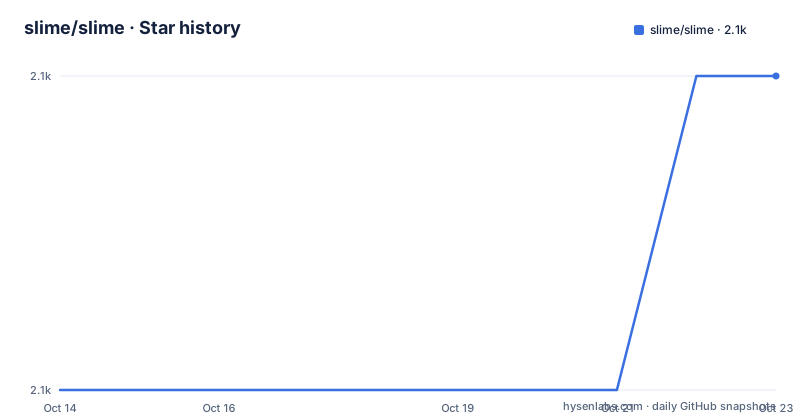
Star history
- slime/slime2,094 ★ · +1
| Repository | 2026-10-14 | 2026-10-23 |
|---|---|---|
| slime/slime | 2.1k | 2.1k |
1 Stars in the last 9 days, measured from the daily GitHub snapshot. Compare with other projects
Editorial analysis
slime-mode rides on top of lisp-mode in Emacs
SLIME is aimed at programmers who write Common Lisp and edit it inside Emacs: the repository describes it as the Superior Lisp Interaction Mode for Emacs, and its topic tags are common-lisp and emacs. The centre of the package is slime-mode, an Emacs minor mode that sits alongside the standard lisp-mode. lisp-mode handles source text on its own; slime-mode adds a running Common Lisp process behind the same buffer, so a file you are reading can be compiled, debugged and asked for documentation, among other things.
That split dictates the shape of the whole tree. The editor half is elisp, with slime.el as the entry point, slime-autoloads.el and slime-tests.el beside it and the rest under lib/. The process half is Lisp, loaded into your implementation through swank-loader.lisp. Nothing in the setup needs a patched or rebuilt Emacs, and the project presents itself at common-lisp.net, where the manual lives. The README stops at that division and hands everything past the three-step setup to the manual.
Three steps from a package archive to a connected Lisp
Installing SLIME does not require a fork of Emacs. Emacs 28 ships NonGNU ELPA, and the README places SLIME in that archive alongside MELPA, so the shortest route is the ordinary package command:
(setq inferior-lisp-program "sbcl")The snippet above is step two, pointing inferior-lisp-program at the implementation you already use; the README's own example is SBCL. Step one is M-x package-install RET slime RET, and step three is M-x slime, which starts the inferior Lisp and connects to it, after which slime-mode is available automatically in Lisp source buffers. No load path, build directory or compiler gets touched on that route.
Two badges sit in the README header, one for melpa.org and one for stable.melpa.org. That is the real difference between the channels: the same package name resolves against a rolling archive or a frozen one, depending on what the user has enabled. Contributors are sent somewhere else entirely. The README tells anyone who wants to work on SLIME to follow the manual's installation-from-Git page instead of the package command, which means your editor runs whatever master happens to contain.
The Makefile byte-compiles every elisp file with batch Emacs
The repository's own build is a plain Makefile driven by 3 variables, with no dependency on any Lisp package system:
EMACS=emacs
LISP=sbcl
LOAD_PATH=-L .
EMACS and LISP name the two programs the file shells out to, and LOAD_PATH puts the current directory on Emacs' search path. The compile target byte-compiles ELFILES, which is slime.el, slime-autoloads.el and slime-tests.el plus everything the wildcard picks out of lib/. One dependency line carries more weight than the rest: slime.elc waits on lib/hyperspec.elc, so that file is compiled before the main entry point, and the generic `%.elc` rule orders everything else.
Each file goes through a fresh batch Emacs with $(EMACS) -Q $(LOAD_PATH) --batch -f batch-byte-compile, and the -Q flag means your init file is never read during a build. Contributors who build locally can override EMACS and LISP on the make command line instead of editing the file, which is how a test run gets pointed at a different Emacs or Lisp.
elpa-slime is a stub beside a package-install README
The README's setup step sends users to a package archive, and the Makefile also carries a target named elpa-slime for building the package. That target builds nothing. Its recipe is a single echo line reading Not implemented yet, and the file is truncated right there, so the in-repo packaging path is a placeholder and the archives the README names are maintained somewhere else entirely.
That gap has a concrete cost for anyone tracking Git. The default branch is master, the last push was on 2026-10-01, and the most recent tag, v2.32, is dated 2025-12-08, so master carries close to 10 months of commits that no archive entry contains.
Redistribution has a matching wrinkle. The README states that SLIME is free software and that all files, unless explicitly stated otherwise, are public domain, and the Makefile header says the same of itself, yet the licence field shown for the project reads unknown, which leaves a packager reading each file's own header instead of trusting one string.
The interactive test target carries its own FIXME
Testing runs through two targets, and one of them comes with a disclaimer. check compiles first, then runs the ERT suite in batch mode with SELECTOR=t, the selector defined on the line just above it. test runs the same slime-batch-test call in an interactive Emacs, and the Makefile's own comment above that target says it is not terribly useful until bugs in ert-run-tests-interactively are fixed. A contributor who runs make test therefore gets a real window onto a suite the file itself calls unreliable until Emacs changes underneath it.
There is a second gap in the same file. The help output printed by the help target advertises 7 targets, all, compile, check, clean, doc-help, help-vars and help, and it leaves out test, compile-swank, run-swank and elpa-slime. 4 working targets are invisible from make help, including the one that starts a Swank server. Anyone building this from memory of the Makefile rather than from its printed help will miss them.
Swank is byte-compiled with setup skipped, then started
The process half is Swank, and the Makefile shows how it gets into a Lisp. swank-loader.lisp drives it, swank.asd holds the system definition, and the implementation is split between swank.lisp and the swank/ directory at the root. Two targets call the loader with different arguments. compile-swank pipes it into $(LISP) with `:setup nil`, so no setup phase runs while byte-compiling. run-swank drops that argument and adds the server call:
{ echo \
	'(load "swank-loader.lisp")' \
	'(swank-loader:init)' \
	'(swank:create-server)' \
	&& cat; } \
	| $(LISP)
The cat at the end is what keeps the process alive. Echoing those three forms and then handing the pipe to cat means stdin never reaches end of file after the start-up forms are read, so the Lisp keeps running and the Swank server stays up. Whatever you type at that Lisp is read from the same stdin, which is what makes the target usable for poking at a backend by hand.
The root also holds packages.lisp, start-swank.lisp, metering.lisp, nregex.lisp, xref.lisp and sbcl-pprint-patch.lisp, 6 Lisp files sitting beside the 3 top-level elisp entry points rather than under lib/ or swank/.
Workarounds live in closed issues, not in the manual
When something breaks, the README does not route you to a troubleshooting chapter. It points at the issue tracker filtered to the workaround label with state=closed, so the project's fix record is a set of closed GitHub issues rather than a page in the documentation. Two prose artefacts sit in the tree as well, PROBLEMS and NEWS, both at the repository root, and the single manual link in the README is the general one at common-lisp.net.
Questions and comments go to [email protected], and the README is explicit that you have to subscribe before you can post, so there is no way to read the list archive without joining it. Contributors get a separate file, CONTRIBUTING.md, linked from the README, and the Git installation instructions live in the manual rather than in either document. Support here is spread across a filtered issue list, a subscription-gated mailing list and a manual, with no single page that collects known failure modes.
Two documented routes, and no comparison to anything else
SLIME has two documented ways onto your machine, and they differ in what you get. The package route hands you whatever the archive maintainers baked in: a frozen point build from the stable archive, or whatever master looked like when the rolling recipe was last updated. The Git route in the manual, the one the README points contributors at, tracks the default branch directly, so it moves continuously and carries the commits after v2.32 that no archive has yet.
If you only want to read and edit Lisp files, plain lisp-mode already does that and a live process buys nothing. slime-mode earns its place when you are working against a running implementation rather than against text on a screen.
Beyond those two, the README names no other Common Lisp integration to compare against and offers no feature matrix, benchmark or migration guide, so nothing in the project tells you how SLIME stacks up against a different approach or what breaks when you switch. Picking it means taking its trade-offs on documentation rather than on comparison.
Editorial conclusion
SLIME fits one specific job, editing Common Lisp in Emacs while a real implementation runs behind the buffer, and for that job the package install plus M-x slime is all the setup there is. It does not fit a team that only wants syntax highlighting, since lisp-mode already edits files, and it does not fit anyone hoping for a documented upgrade path, because the Makefile's help output lists no upgrade target and the README's contributor route is building master yourself. Before adopting, run make check with EMACS and LISP set to your own toolchain, then read PROBLEMS.
Frequently asked questions
How do I install SLIME in Emacs?
Run M-x package-install RET slime RET, since SLIME ships in NonGNU ELPA, which is included by default since Emacs 28, and in MELPA. Then point inferior-lisp-program at your implementation, the README example being "sbcl", and start a session with M-x slime.
Which Common Lisp implementations does SLIME work with?
The setup step only asks you to point inferior-lisp-program at a favourite Common Lisp implementation, and the Makefile defaults LISP=sbcl, so nothing in the setup ties you to SBCL. No other implementation is named in the README, and the manual it links to is where that detail would live.
How do I install SLIME from Git instead of a package archive?
The README sends contributors to the manual's installation-from-Git page rather than to package-install. That page sits at common-lisp.net/project/slime/doc/html/Installation.html#Installing-from-Git and is the route that tracks the default branch master.
Where do I find SLIME workarounds when something breaks?
The README points at the issue tracker filtered to the workaround label with closed state, so known fixes sit in closed GitHub issues instead of a manual page. Questions go to [email protected], and the README notes that you must subscribe first.
How do I run SLIME's own test suite?
make check compiles the elisp first and then runs the ERT suite in batch mode with SELECTOR=t. An interactive make test target exists too, but the Makefile's own comment says it is not terribly useful until bugs in ert-run-tests-interactively are fixed.
Official sources
Add this badge to your README
If you maintain this project, the badge below links readers to this analysis and shows its maintenance status from the daily GitHub snapshot. Paste the markdown into your README; add ?metric=license or ?metric=stars to the image URL for a different field.

[](https://hysenlabs.com/projects/slime-slime)Star history chart for your README
[](https://hysenlabs.com/projects/slime-slime)Was this useful?