EFAK: the compose file needs the database the README says it starts
A AI-Driven, Distributed and high-performance monitoring system, for comprehensive monitoring and management of kafka cluster.
At a glance
- What is it?
- EFAK-AI is a Java platform for monitoring Kafka clusters, with an assistant that can call backend functions on your behalf, Spring Boot on JDK 17 and Redis-backed task sharding. Its quickstart says the compose file starts MySQL and Redis, its compose file says both must already be running, and one password string serves as the login, the database credential and the compose default.
- Who is it for?
- EFAK-AI fits a team already running Kafka that wants a dashboard, alert routing to chat channels, and an assistant that can query cluster state for them, and it does not fit anyone who expects the shipped container configuration to be safe to run unchanged. Verify four things before the first start.
- Can I use it commercially?
- Not without permission. GitHub finds no licence file in the repository, and without a licence all rights are reserved by default: you may read the code but not reuse it. Check the README, or ask the authors, before using it.
- Is it still maintained?
- Yes. The repository last received commits 64 days ago.
- What is it written in?
- Mainly Java, according to GitHub's language statistics.
Answers come from the project's GitHub data, last synced on November 15, 2026, and from our analysis. They are not legal advice.
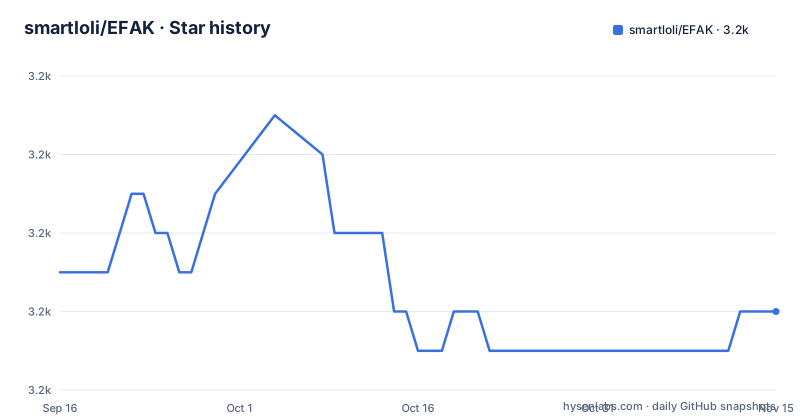
Star history
- smartloli/EFAK3,180 ★ · -1
| Repository | 2026-09-16 | 2026-11-15 |
|---|---|---|
| smartloli/EFAK | 3.2k | 3.2k |
-1 Stars in the last 60 days, measured from the daily GitHub snapshot. Compare with other projects
Editorial analysis
The quickstart and the compose file disagree about who runs the database
The quickstart says one command starts everything including MySQL and Redis. The compose file that command points at opens with the opposite instruction: make sure an external MySQL and Redis are already running, edit the connection settings below, then start. Its service block declares one service, the application itself, and the connection settings point at a fixed private address with a password and a comment asking you to change it. So the one-line start in the README cannot work against that file as written. The invocation also changes three times. The requirements ask for Compose 2.0 or newer, the compose file's own header tells you to use the space-separated form with a build flag, and the README uses the hyphenated form without one, which on a Compose 2 install is the legacy path.
One string is the login, the database password and the compose default
The default account is printed twice, once under the container instructions and once under the package instructions, and it is a five-digit numeric password that anyone who has read the file knows. The same string also appears as the database password in the configuration reference and as the default value in the environment variable table. The configuration reference block itself looks like this:
# 数据库配置
spring:
  datasource:
    url: jdbc:mysql://localhost:3306/efak_ai?useUnicode=true&characterEncoding=UTF-8&serverTimezone=Asia/Shanghai
    username: root
    password: admin123

# Redis 配置
  data:
    redis:
      host: localhost
      port: 6379
      database: 0

# 服务端口
server:
  port: 8080
Separately, the two configuration examples in the file disagree with each other: the deployment step tells you to put a placeholder password in the data source block, and this reference shows the default account's password in the same field, under a root database account. Underneath all of it, the compose file commits a specific private address for both the database and the cache, while the environment variable table documents the defaults for those two variables as compose service names that the provided file never uses.
Host networking on Linux and plain HTTP through the optional proxy
The compose file sets the container to host networking, and its comment explains the benefit as being able to reach host services on localhost without port mapping, with a note that host mode is only fully supported on Linux and that bridge mode is advised elsewhere. Two things follow. On Linux there is no port mapping at all, so the application binds directly on the host's interfaces, which means the exposed port declaration in the Dockerfile has no effect in the configuration you are most likely to run. And the optional reverse proxy is started as a separate profile and reached over plain HTTP on port 80. Putting an administrative login with a known default password behind an unencrypted listener on a published interface is the combination to avoid, and neither the compose comment nor the README mentions it.
The chat endpoint is a GET with the question in the query string
The assistant's streaming endpoint is documented as a GET whose parameters include the model identifier, the user's message, the cluster identifier and a flag for charts. Putting conversation text in a query string means it lands in the access log of whatever sits in front of the application, in any intermediate proxy log, and in the browser's history. For an endpoint whose whole purpose is to carry natural language questions about a cluster, that is an avoidable choice, and the file does not discuss it. The response is a server-sent event stream with four named event types: a thinking type, a content type, a chart type carrying nested escaped JSON, and an end type. The thinking type means intermediate model output is sent to the browser as it arrives. Models are selected by a numeric identifier rather than by name, so the file never says how many are configured or what they are.
Function calling is promised and the callable surface is not described
One of the assistant's listed capabilities is that it can automatically call backend functions to query live data. That is the capability with consequences, because whatever those functions can do, a language model decides when to do it. The file does not list the functions, does not say whether they are read-only, does not mention an allowlist, and does not mention a confirmation step before a call executes. It is fair to read the omission as brevity rather than as intent, and it is also fair to say that a team deploying this has to find out for itself. One piece of evidence sits in the other direction and one in this direction: the source tree has a package for security configuration under the web module, so authentication is implemented somewhere, while the API section documents six cluster and topic endpoints as bare GET requests with no authentication mentioned at all.
Six places still carry the name the product had before two renames
The product has been renamed more than once and the file cannot agree on the new name either. The heading expands the acronym one way and the introduction expands it another, with an extra word in the heading. The old name survives in the website domain, in the built archive's filename, in the process name the verification step greps for, in the application identifier the compose file sets, in the schema file's name, and in the Java package path. The log file the instructions tell you to tail uses the current name instead, so within one deployment you get both. The clone instructions are worse: every one of them points at a repository whose name is not the one you are reading.
Every documented build skips the tests the standards ask contributors to write
The development standards list writing unit and integration tests as a requirement. Not one documented build command runs them: the local compile skips tests, the container build skips tests, and the run command does not invoke them at all. There is also no test directory among the repository's fifteen top-level entries, no workflow directory and no continuous integration configuration, so nothing runs them either. The contribution guide compounds the impression with two placeholder strings left exactly as a repository template generates them, down to a branch name and a commit message both reading as an example feature. It also asks contributors to use a compile-time annotation processor to remove boilerplate, which appears in no dependency list the file shows.
Apache 2.0 is claimed, a licence file is linked, and neither is in the tree
The licence section states the project is open source under version two of the Apache licence and directs you to a licence file, and the badge row at the top links to one. Neither exists: the repository's recorded licence field is empty and there is no licence file among the fifteen top-level entries. So the terms are asserted, not shipped, and anyone redistributing this has nothing in the checkout to read. The same pattern shows up in versioning. The build produces an archive named for version five point one, the compose file pins an image tag to the same version, the container label declares the same version, and none of it corresponds to a published release, because the repository has none.
Editorial conclusion
EFAK-AI fits a team already running Kafka that wants a dashboard, alert routing to chat channels, and an assistant that can query cluster state for them, and it does not fit anyone who expects the shipped container configuration to be safe to run unchanged. Verify four things before the first start. Treat the container file as a template, because it carries a committed private address and a placeholder password, and change both. Change the default account, which is printed in the file in two places and is not unique to the login. Decide who may use the assistant, because function calling is claimed and no callable surface or confirmation step is described. And read the compose and start-up instructions against each other, because they disagree about who provides the database.
Frequently asked questions
What is smartloli/EFAK?
A Java platform for monitoring and managing Kafka clusters, built on Spring Boot and JDK 17 with MySQL as its primary database and Redis for distributed locking and task scheduling. It covers broker state, topic partitions, consumer groups, throughput and latency, adds alert routing to email and two chat platforms with dynamic thresholds and aggregation, and adds an assistant that can call backend functions to query live data.
How do I deploy smartloli/EFAK?
Two routes. A container route that starts the application with a compose file and expects MySQL and Redis to be running already, plus an optional reverse proxy profile. A package route that builds a tar archive with a script, copies it to the server, imports a SQL schema into a database, edits a YAML configuration file, and starts it with a shell script. Both are documented as quick to set up.
What are the default credentials for smartloli/EFAK?
The file prints a default administrative account in both the container instructions and the package instructions, using the same short numeric password. That same string also appears as the database password in the configuration reference and as the default value in the environment variable table, so changing the login does not by itself change the database credential.
Can the smartloli/EFAK assistant run commands on my cluster?
The file states the assistant can automatically call backend functions to query live data. It does not list the functions, say whether they are read-only, mention an allowlist, or describe a confirmation step before a call runs. A source package for security configuration exists, but the API section documents the cluster and topic endpoints as plain requests with no authentication described.
Does smartloli/EFAK have tests?
The development standards ask contributors to write unit and integration tests, and none of the documented build commands run them, since each passes a skip flag. There is also no test directory among the repository's top-level entries and no continuous integration configuration.
Official sources
Add this badge to your README
If you maintain this project, the badge below links readers to this analysis and shows its maintenance status from the daily GitHub snapshot. Paste the markdown into your README; add ?metric=license or ?metric=stars to the image URL for a different field.

[](https://hysenlabs.com/projects/smartloli-efak)Star history chart for your README
[](https://hysenlabs.com/projects/smartloli-efak)Was this useful?