Nubase: one container holding Postgres, Redis, a backend and the Studio on a single port
🔥🔥🔥 Turn AI-written code into real apps. Nubase is an open-source, AI-native backend platform for AI Coding, agentic applications, and modern product teams: Memory, Database, Storage, and Auth in one self-hostable service.
At a glance
- What is it?
- Nubase is a self-hostable backend aimed at coding agents, with eight modules covering database, auth, storage, static assets, edge functions, an AI gateway, memory and scheduled jobs. The deployment story is one Docker image and one port, and the details worth reading are the secret handling, the exposed database port, and a placeholder where the image name should be.
- Who is it for?
- Nubase suits a team that wants a Supabase-shaped backend an agent can drive directly, and that needs several isolated projects behind one control plane rather than one project per install. Before you run it, replace the image namespace placeholder, decide whether you want the database port published at all, and pin the two secrets that govern encrypted project credentials rather than relying on the ones generated on first boot.
- Can I use it commercially?
- Yes. Apache-2.0 is a permissive licence: you can use, modify and sell software built on it, as long as you keep its copyright and licence notices.
- Is it still maintained?
- Yes. The repository last received commits 7 days ago.
- What is it written in?
- Mainly Java, according to GitHub's language statistics.
Answers come from the project's GitHub data, last synced on November 14, 2026, and from our analysis. They are not legal advice.
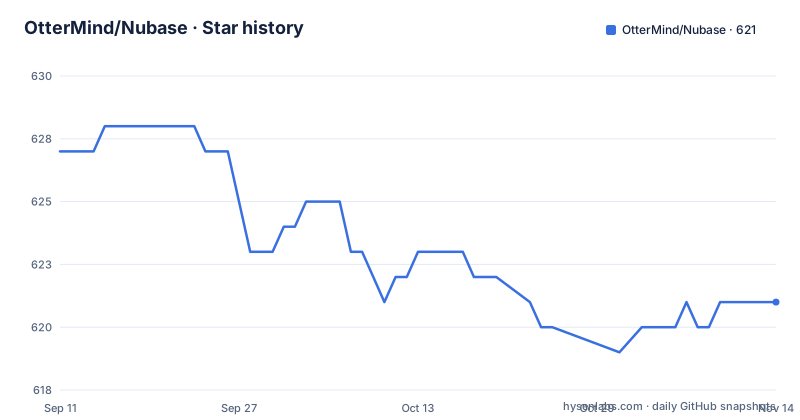
Star history
- OtterMind/Nubase621 ★ · -6
| Repository | 2026-09-11 | 2026-11-14 |
|---|---|---|
| OtterMind/Nubase | 627 | 621 |
-6 Stars in the last 64 days, measured from the daily GitHub snapshot. Compare with other projects
Editorial analysis
The quick start prints a placeholder where the image name belongs
The install command cannot be pasted as printed. Both the quick start and the self-host section end the image reference with a namespace placeholder followed by the image name and a floating tag:
docker run -d --name nubase \
  -p 9999:9999 -p 5432:5432 \
  -v nubase_data:/data \
  <your-namespace>/nubase:latest
The instruction to substitute the namespace appears further down the page rather than beside the command, which means a reader who stops at the quick start has a command that will fail on the image pull. The second thing in that command is worth a decision rather than a copy. Port 9999 is the application, and it needs publishing. Port 5432 is the bundled Postgres, and publishing it exposes your database to the network whether or not anything else in the container is public. The named volume is not optional: first-boot secrets are generated into it, and the projects inside it are lost with it.
First-boot secrets live in the volume, production pins two of them
Secret handling is split into a convenience path and a durable one. On first boot the container generates its own secrets and writes them into the data volume, which is why the documentation says to keep the volume to retain your projects. That is fine for a trial and wrong for a deployment, because generated secrets that change on a fresh volume leave stored project credentials unreadable. The production form of the same command pins two variables from the host, one for the REST layer's encryption master key and one for the metadata service role key, each generated with a different byte length. Everything else in the stack, including the database, the cache, object storage, mail, OAuth providers and model providers, is configured through environment variables, with the full list and a note on multi-architecture builds kept in a separate document.
Four services in one container, one port for all of them
The all-in-one image bundles the database, the cache, the backend and the Studio interface, which is why the deployment is described as needing no Compose file and no external services. The unusual part is the port. The Studio is not a separate container on a separate port: the interface is bundled into the backend and served from the same port as the API, with the console living under a path. So one published port carries both the administrative UI and the programmatic surface, and anything that reaches the container on 9999 reaches the Studio too. For the backend image itself, the build is a two-stage Maven build on a Java 17 toolchain producing a JAR that runs on a Java 17 runtime, under a non-root user with a fixed numeric identity.
One Studio, many isolated projects
The positioning argument is about project count. The comparison drawn in the readme is with an existing open-source stack that is designed around a single project, and Nubase's answer is one Studio, one backend service and many isolated projects on your own hardware. The mechanism is stated plainly: each project gets its own isolated Postgres database, and a single control plane provisions them and routes to them. Isolation extends past the data. Each project has its own JWT secrets, its own roles, its own schema cache, and its own token tiers for anonymous, signed-in and service-level access. Row-level security keys off JWT claims, and the database API is compatible with the familiar REST shape, supporting select, filter, order, pagination, insert, update, upsert and delete against a per-project path.
Agents reach it through named tools, not through a dashboard
The agent path is the primary path, and getting there is one command. Running the CLI's skill installer fetches the skills for two agents at once, writes the model-context-protocol server configuration, and opens a browser to authorise and choose a project. What happens next differs by agent: in one you restart the tool, open its protocol command and confirm the server is connected; in the other the configuration is written into a file in your home directory and you simply start it. The same installer accepts flags for a Studio URL and an API URL, so the agent can be pointed at a hosted instance or at the one you just started. Beyond schema work, the exposed tools cover deploying edge functions and uploading static assets, which is what turns the platform from a database into a deploy target.
Two web surfaces with different contracts
The web-facing features are specified in enough detail to be useful. Edge functions live under a versioned path and come with per-function secrets, invocation logs, rate limits and a verification flag that makes the function check the caller's token; they execute on a local executor or on a cloud edge runtime, and agents can scaffold, deploy and invoke them. Static assets live under a different versioned path and carry caching semantics rather than security semantics: cache headers, entity tags, conditional responses, a per-project default policy and the option of a custom domain, with agents uploading through a named tool. Neither surface is a general web host. The stated purpose of the assets surface is publishing a generated frontend, and anything beyond that is outside what the readme claims.
The image build skips its own tests, and the tags lag the commits
Two loose ends sit outside the feature list. The backend image is assembled with the packaging step told to skip tests, so a green image build says nothing about the suite passing; the health check it does include is a request to a single endpoint every thirty seconds with a short start window, which will catch a dead process and not much else. The second is versioning. The three most recent releases are v0.1.2 and v0.1.3 on the same afternoon in June 2026 and v0.1.4 the following day, while the last commit to the default branch came on 2026-09-28. So the repository has moved months past its newest tag, which matters if you are reading the readme for features and installing the tag. The tree also holds a second Dockerfile for the bundled image and a Compose file for running Postgres on its own.
Editorial conclusion
Nubase suits a team that wants a Supabase-shaped backend an agent can drive directly, and that needs several isolated projects behind one control plane rather than one project per install. Before you run it, replace the image namespace placeholder, decide whether you want the database port published at all, and pin the two secrets that govern encrypted project credentials rather than relying on the ones generated on first boot. Remember that the container image builds its own artefact with tests skipped, so run the project's own suite before trusting a release. And read the version gap: the newest tag is from June while the repository has been committed to since.
Frequently asked questions
What does the Nubase Docker image include?
PostgreSQL, Redis, the backend and the Studio interface in one image, with the Studio served from the same port as the API under a path. First-boot secrets are generated into the data volume, so the volume must be kept.
How do I connect Claude Code or Codex to Nubase?
Run the CLI skill installer once. It installs the skills for both agents, writes the MCP server configuration and opens a browser to authorise and pick a project. Flags let you point it at your own Studio and API URLs instead of a hosted instance.
How does Nubase differ from a self-hosted Supabase stack?
The stated difference is project count. Nubase is built around one Studio, one backend service and many isolated projects, each with its own Postgres database, JWT secrets, roles and schema cache, provisioned by a single control plane.
What should I set before running Nubase in production?
Pin the REST encryption master key and the metadata service role key as environment variables so encrypted project credentials survive restarts, and replace the image namespace placeholder in the run command. The default Postgres password is not mentioned in the quick start.
Official sources
Add this badge to your README
If you maintain this project, the badge below links readers to this analysis and shows its maintenance status from the daily GitHub snapshot. Paste the markdown into your README; add ?metric=license or ?metric=stars to the image URL for a different field.

[](https://hysenlabs.com/projects/ottermind-nubase)Star history chart for your README
[](https://hysenlabs.com/projects/ottermind-nubase)Was this useful?