smartwalle/alipay: one Go client, and the callback trap inside it
Alipay SDK for Go: easy to integrate, feature-complete and actively maintained, supporting signing and verification with both public key certificates and plain public keys, plus file upload and API content encryption.
At a glance
- What is it?
- smartwalle/alipay puts Alipay's trade, fund, bill and identity APIs behind a single Go struct that signs with RSA2, loads either certificates or a plain public key, and verifies what Alipay sends back. Its sharp edge is not the crypto but the callback contract, where a query parameter you added yourself fails the signature check.
- Who is it for?
- Adopt it when your Go service already talks to Alipay and you want signing, form encoding and response verification handled in one place, and you accept RSA2 as the only algorithm. Pass on it if your platform still issues RSA credentials, or if your callback URLs carry query parameters, because VerifySign checks every parameter it receives.
- Can I use it commercially?
- Yes. MIT is a permissive licence: you can use, modify and sell software built on it, as long as you keep its copyright and licence notices.
- Is it still maintained?
- Yes. The repository last received commits 105 days ago.
- What is it written in?
- Mainly Go, according to GitHub's language statistics.
Answers come from the project's GitHub data, last synced on November 7, 2026, and from our analysis. They are not legal advice.
Star history
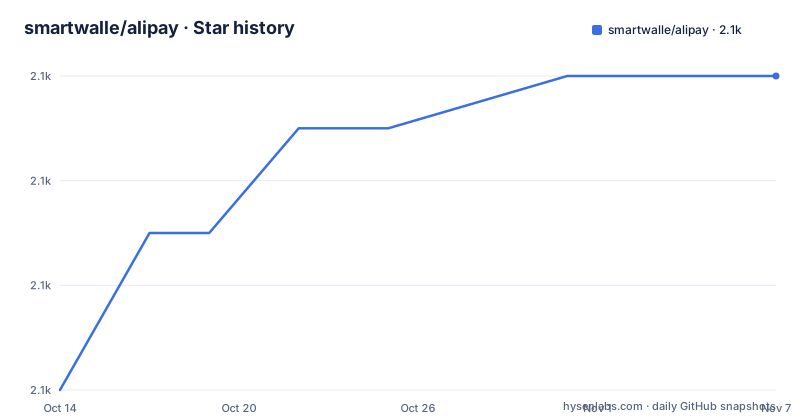
- smartwalle/alipay2,124 ★ · +6
| Repository | 2026-10-14 | 2026-11-07 |
|---|---|---|
| smartwalle/alipay | 2.1k | 2.1k |
6 Stars in the last 24 days, measured from the daily GitHub snapshot. Compare with other projects
Editorial analysis
One client struct hides the signing and gateway plumbing
smartwalle/alipay exists so a Go service can call the Alipay open platform gateway without assembling a signed form post by hand. Every call goes through one value returned by `alipay.New(appID, privateKey, isProduction)`: the application id, the application private key, and a flag saying which environment the client talks to. Requests get signed for you and responses coming back from Alipay are verified inside the client, so an ordinary API call needs no verification code at the call site.
With Go modules enabled, installation is one command:
go get github.com/smartwalle/alipay/v3and one import:
import github.com/smartwalle/alipay/v3`go.mod` at the repository root declares module `github.com/smartwalle/alipay/v3` and language version 1.18, and requires three dependencies that all live under the same author: ncrypto 1.0.4, ngx 1.1.2 and nsign 1.0.9.
The branch table is worth reading twice. Version 1 and version 2 are marked as stopped, version 3 is the branch that gets updates, and master is described as synchronised with it. The default branch is still master while the module path ends in v3, and next to that the README keeps a `go get github.com/smartwalle/alipay` line for codebases without modules, even though the repository root carries a go.mod declaring the /v3 path. The package is MIT licensed, the last push landed on 2026-07-26, and the repository has no GitHub releases to diff versions against. Integration questions go to QQ group 203357977 rather than to an issue tracker.
The production flag is bound to the credentials you pass
The third argument to `alipay.New` decides more than it looks. Alipay runs a sandbox environment next to production, that sandbox is separate, and every application gets its own merchant account and buyer account inside it. The separation is why the README's instruction is blunt: pass false for the sandbox environment and true otherwise. The app id and the key pair you hold belong to one environment only, so the flag has to agree with them.
Mismatch handling is where the documentation goes quiet. It says nothing about a check that would catch a sandbox key passed with the production flag, and nothing about changing the flag on a live client, which means covering both environments means holding a client per environment rather than flipping a setting.
The private key has its own trap. If you generate the CSR with the Alipay developer tool, the matching private key file is written into the directory holding that CSR, and that file, not the CSR, is what goes into `privateKey`. The README flags this in bold before showing the constructor, because signing with the wrong file produces a request Alipay will refuse without telling you which half of the pair is wrong.
Certificate mode and plain public key mode cannot mix
Verifying what Alipay sends back happens in one of two ways, and only one of the two may be present at a time. Certificate mode loads three files, all downloaded from the application page of the app you created on the Alipay platform:
client.LoadAppCertPublicKeyFromFile("/路径/appCertPublicKey_2017011104995404.crt") // 加载应用公钥证书
client.LoadAliPayRootCertFromFile("/路径/alipayRootCert.crt")                // 加载支付宝根证书
client.LoadAlipayCertPublicKeyFromFile("/路径/alipayCertPublicKey_RSA2.crt") // 加载支付宝公钥证书
Plain public key mode takes a single string, and the README bolds the trap around it: the key passed here is the Alipay public key, not the application public key your own tooling generated.
client.LoadAliPayPublicKey("aliPublicKey")Interface content encryption is a third switch, independent of the two above. Turn it on by calling `SetEncryptKey` once with your key; leave it off by not calling the method at all. Nothing else in the client changes either way, which is the cheapest of the three decisions to reverse.
Callback handlers are yours to verify, not the client's
Signature checking is not automatic where it matters most to you. The client verifies API responses, and the README names the two places you handle yourself: the synchronous callback (`return_url`) and the asynchronous notification (`notify_url`), because both arrive as ordinary HTTP requests in your own service.
http.HandleFunc("/return", func (writer http.ResponseWriter, request *http.Request) {
request.ParseForm()
if err := client.VerifySign(request.Form); err != nil {
// 如果 err 不为空,则表示验签失败
fmt.Println(err)
return
}
// 业务处理
})
The notification path calls `DecodeNotification`, which runs VerifySign internally, so verifying that same form a second time is redundant:
http.HandleFunc("/notify", func (writer http.ResponseWriter, request *http.Request) {
request.ParseForm()

// DecodeNotification 内部已调用 VerifySign 方法验证签名
var noti, err = client.DecodeNotification(request.Form)
if err != nil {
// 错误处理
fmt.Println(err)
return
}
// 业务处理
// 如果通知消息没有问题,我们需要确认收到通知消息,不然支付宝后续会继续推送相同的消息
alipay.ACKNotification(writer)
})
That acknowledgement line is not optional. Without `alipay.ACKNotification(writer)` the same notification keeps arriving, so an unpaid order stays unsettled in Alipay's ledger until you answer it.
Query parameters on a callback URL break verification
Alipay signs what it sends, and the address your browser lands on is a different matter. The README warns that the parameters in your URL are left out of the signature Alipay generates, while `VerifySign` folds every parameter it receives into the check. A callback URL carrying your own query string therefore fails verification, and the documented fix is to delete those parameters from `request.Form` before calling VerifySign, or to keep the callback URL bare.
The examples carry a second detail that only shows up when you paste both snippets into one file. `TradeWapPay` receives `p.ReturnURL` in the return_url section and `p.NotifyURL` in the notify_url section, and both are set to the same local placeholder address ending in `/return`, while the handlers in the two snippets register at `/return` and `/notify` respectively. Copying them as they stand routes the asynchronous notification into the return handler. Both values are placeholders holding a local address, which has to become your public one before any of this is reachable at all.
Sandbox has two gateways and the SDK picks one
The sandbox side has two gateway addresses. The old one is `https://openapi.alipaydev.com/gateway.do`, the new one is `https://openapi-sandbox.dl.alipaydev.com/gateway.do`, with the SDK defaulting to the new address. Reaching the old one means passing `alipay.WithPastSandboxGateway()` at initialisation, and the README's own phrasing puts the choice there and nowhere else.
Which address your application was issued against is something you confirm yourself, since the same isProduction flag and the same app id and key pair cover both sides. Because the gateway choice is fixed when the client is built, test traffic and production traffic differ at construction time rather than at the moment a request goes out. A service that has to run against both without rebuilding would need two clients, and nothing in the README describes switching the gateway in place.
Hand-rolled signing versus letting the client sign
The real alternative is signing every Alipay request yourself, which is what the Alipay document on implementing verification yourself, linked from the README, describes. The scheme is the same one; the defaults are what differ. The client builds the form, signs with RSA2 and checks the signature on the response without being asked, while hand-written code reproduces all three at every endpoint.
That inheritance has a hard edge. RSA support is gone from this branch, and the README says so directly: RSA2 is used and RSA is no longer provided. There is no option flag for the old algorithm anywhere in the constructor or the loaders, so RSA-only credentials are out of reach rather than merely inconvenient. Optional interface content encryption through `SetEncryptKey` is a second default you take or leave.
The author's other repositories, smartwalle/apple, smartwalle/paypal and smartwalle/unionpay, cover other payment channels rather than standing in for this one, so they are companions in the same catalogue and not substitutes for the Alipay gateway.
Bundled certificate files do not match your application's cert
Three certificate files sit at the repository root, `appPublicCert.crt`, `alipayRootCert.crt` and `alipayPublicCert.crt`, and `examples/` carries the same three names again next to `main.go`. None of them is what your own application produces. The loading snippet names a file called `appCertPublicKey_2017011104995404.crt`, a different filename whose digits are an app id, 2017011104995404, belonging to whoever generated it. The certificates you use are downloaded from the application you created on the Alipay platform.
What the committed copies are for is not documented anywhere in the README, and nothing in the tree names the application they belong to. Treat them as sample data wired into `examples/main.go`, not as material to hand to `LoadAppCertPublicKeyFromFile`. A failure from a mismatched certificate and a failure from a wrong private key look the same from the call site, so downloading your own three files first removes one of the two.
Editorial conclusion
Adopt it when your Go service already talks to Alipay and you want signing, form encoding and response verification handled in one place, and you accept RSA2 as the only algorithm. Pass on it if your platform still issues RSA credentials, or if your callback URLs carry query parameters, because VerifySign checks every parameter it receives. Before going live, run one transaction in the sandbox, confirm the gateway address matches your application, and download the three certificates from your own Alipay application instead of reusing the ones committed at the repository root.
Frequently asked questions
Does smartwalle/alipay support both the sandbox and production Alipay environments?
Yes. alipay.New(appID, privateKey, isProduction) takes the app id, the application private key and a flag, and the README states that the flag should be false for the sandbox environment and true otherwise, because the sandbox is separate and has its own accounts per application. The README documents no check that the credentials match the environment named in the flag.
Can I load an Alipay public key certificate and a plain public key at the same time?
No. The README states that certificate mode and plain public key mode cannot coexist and that only one of them may be chosen. It does not describe what the client does if both are configured, so treat the choice as a startup decision rather than a runtime toggle.
Why does VerifySign fail when my return_url carries query parameters?
Alipay leaves URL parameters out of the signature it generates, while VerifySign validates every parameter it receives. The README's fix is to delete your own parameters from request.Form before calling VerifySign, or to keep the NotifyURL and ReturnURL free of parameters.
Which signing algorithms does smartwalle/alipay implement?
RSA2 only. The README states that RSA signing is no longer provided in this branch. There is no constructor option or loader for the older algorithm.
Does smartwalle/alipay handle Alipay payment notifications for me?
Only the parsing and the verification. Your own HTTP handlers for return_url and notify_url have to call VerifySign or DecodeNotification, and the README states that DecodeNotification calls VerifySign internally. You must also call alipay.ACKNotification(writer), otherwise Alipay keeps pushing the same message.
Official sources
Add this badge to your README
If you maintain this project, the badge below links readers to this analysis and shows its maintenance status from the daily GitHub snapshot. Paste the markdown into your README; add ?metric=license or ?metric=stars to the image URL for a different field.

[](https://hysenlabs.com/projects/smartwalle-alipay)Star history chart for your README
[](https://hysenlabs.com/projects/smartwalle-alipay)Was this useful?