snes9x: seventeen build targets and two different AppVeyor account names
Snes9x - Portable Super Nintendo Entertainment System (TM) emulator
At a glance
- What is it?
- This is the official source repository for the Snes9x emulator, and its readme is almost entirely two tables of continuous integration badges. What those tables expose is the shape of the project: one Windows target on one CI system, seventeen targets on another, four of them consoles, and an AppVeyor badge and an AppVeyor link that point at two different accounts.
- Who is it for?
- Snes9x suits someone who wants to read or build emulator source rather than install a packaged emulator, and it suits a libretro front end needing a core for one of the seventeen documented targets. It does not suit someone looking for instructions, since the readme contains none and defers to the wiki.
- Can I use it commercially?
- Check first. The repository uses a licence we do not classify automatically, so read its LICENSE file before any commercial use.
- Is it still maintained?
- Yes. The repository last received commits 52 days ago.
- What is it written in?
- Mainly C++, according to GitHub's language statistics.
Answers come from the project's GitHub data, last synced on November 15, 2026, and from our analysis. They are not legal advice.
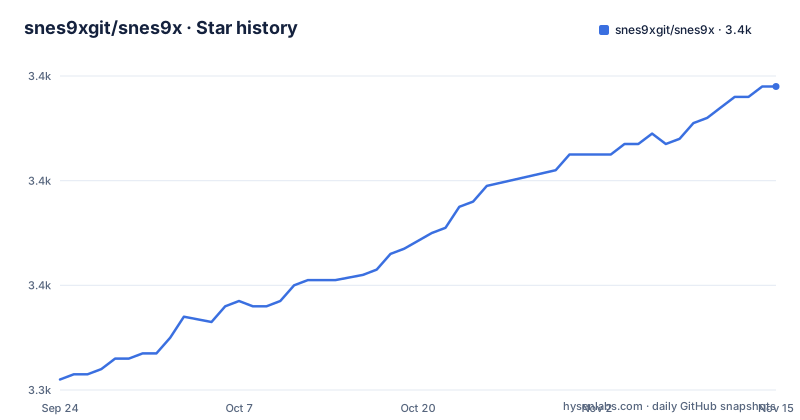
Star history
- snes9xgit/snes9x3,398 ★ · +56
| Repository | 2026-09-24 | 2026-11-15 |
|---|---|---|
| snes9xgit/snes9x | 3.3k | 3.4k |
56 Stars in the last 52 days, measured from the daily GitHub snapshot. Compare with other projects
Editorial analysis
The AppVeyor badge and the AppVeyor link name two different accounts
The build status section splits across two continuous integration systems, and the two definitions for the Windows service do not agree:
[appveyor]: https://ci.appveyor.com/project/snes9x/snes9x
[s9x-win-all]: https://ci.appveyor.com/api/projects/status/github/snes9xgit/snes9x?branch=master&svg=true
The first is the human-facing link, and its path segment reads snes9x. The second is the badge image the page actually renders, and its path reads snes9xgit, matching the GitHub organisation that hosts this repository.
So the Windows row of the table points a reader at one account and draws its status from another. The badge is the thing that works, since it is generated from the GitHub-linked endpoint. The link is the thing a person clicks when a build fails, and it resolves under the older account name.
That pattern is a fossil of the project's history. The repository lives under the snes9xgit organisation on GitHub, and the AppVeyor project it consults for status is still addressed under snes9x. Nothing here is broken, and a reader who only watches the badges would never notice. A reader who needs to reach the build detail has to discover which of the two URLs is the live one.
The same section also shows that the two systems are not interchangeable. Windows is the only target on AppVeyor. Everything else, on both artifacts, is on Cirrus.
Four console targets and a web target live in the libretro core
The second status table covers the libretro core rather than the standalone application, and it is three times the length of the first.
Thirteen targets are listed. Five are desktop or server Linux: amd64, i386, armhf, armv7 with neon and hard float, and arm64. Two are Android, one for arm and one for arm64. One is macOS on amd64. One is Emscripten, which is the browser target.
The remaining four are consoles: Nintendo Wii, Nintendo Switch built against libnx, Nintendo GameCube, and PlayStation Portable.
That is the single most useful fact in the readme. The standalone application builds for desktop operating systems, five targets in total. The core builds for four consoles that are not desktop platforms at all, which means the same emulation code is exercised on hardware with very different constraints, and that anyone shipping a libretro front end for one of those consoles is running this code rather than a separate port.
It also explains why the two tables exist separately. They are different products from the same source tree, with different platform matrices, and a green row in one says nothing about the other.
The naming is inconsistent in a small way worth noting for anyone scripting against these badges. The desktop targets prefix their task names with the project name, while the core targets do not. The Switch target additionally carries the library it builds against in its name, and that suffix is the only place a toolchain detail appears in either table.
Seventeen targets, and only one 32-bit x86 build
Adding the two tables gives seventeen build targets across two artifacts, and the architecture coverage is uneven in an instructive way.
Only one target is 32-bit x86: the i386 build of the libretro core. The standalone application ships amd64 only, on all five of its platforms. There is no 32-bit Windows build and no 32-bit macOS build in either table.
ARM is better served, with three core targets: armhf, armv7 with neon and hard float, and arm64. The two hard-float suffixes are meaningful rather than decorative, since a soft-float build will not run correctly on the hardware these target, and naming them precisely means the matrix distinguishes the cases it actually builds.
Android appears twice, for 32-bit and 64-bit, so a phone or tablet target exists for both, but only as a core rather than as a standalone application.
The gap worth naming is x86 32-bit on desktop. A 32-bit Linux distribution on an older machine, which is not an exotic configuration, has no standalone build and would have to run the core through a front end. That may be a deliberate choice and it may simply be that nobody maintains such a target, but the table is the only place the question can be answered.
Every status badge in both tables is generated from a continuous integration service rather than from a build run by a user, so the matrix reflects what is tested rather than what is known to compile.
The newest release is two years older than the newest commit
The release list shows 1.63 published on 2024-07-09, preceded by 1.62.3 on 2023-03-30 and 1.62.2 on 2023-03-27.
Two intervals are visible. The two patch releases are three days apart, which is the shape of a pair of quick fixes. Then fifteen months pass before the minor release. So the project shipped a burst of patches and then went quiet on releases for over a year.
The more important comparison is against the source. The most recent commit recorded on the default branch master is dated 2026-09-24, more than two years after 1.63 was published.
So development has continued well past the last tagged build. Anyone who wants the current state of the emulator is building from the branch head, not installing a release, and there is no artefact corresponding to those commits.
The version numbering itself is conventional: a major and minor pair, then patch releases within a minor. Nothing about the scheme is unusual, and nothing about it is being held back.
For a project whose readme points nightly builds at continuous integration rather than at release artefacts, that gap is less surprising than it looks. The documented distribution channel is the badge table, and the tags are a secondary record.
Emulator sources sit at the repository root with no src directory
The top of the tree is the source tree. There is no src directory, and no lib directory either. Alongside the configuration and documentation files, the emulator's translation units sit directly at the root as parallel pairs:
cpu, cpuexec, cpuops, dma, dsp, gfx, controls, conffile, cheats, debug, clip, crosshairs, bsx, fscompat, bml, globals, and more.
A 65816 header, named for the processor the machine used, is also at the root rather than in an include directory.
The coprocessor files deserve a mention. There are four of them, numbered one through four, which correspond to the auxiliary chips the console shipped in its cartridge slot. Having them as root-level siblings rather than in a hardware subdirectory means the layout follows neither the hardware nor a module boundary; it follows the order in which files were added over the project's history.
There are two similarly paired families that show the same thing. A pair of cheats files exists alongside a single cheats header, and a c4 file sits next to a c4 emulator file, the latter presumably for the corresponding cartridge type. Directories are used where a subsystem has enough files to need one, including directories for audio, common code, data, documentation, filters, and external material.
It is a working layout rather than a designed one, and it has one practical consequence: a reader looking for where a subsystem begins has to read the file list rather than infer it from a directory.
Submodules and an external directory hold code this repository does not own
Two entries in the tree indicate code that lives elsewhere: a gitmodules file and a directory called external.
A gitmodules file means at least one dependency is referenced as a submodule rather than vendored directly, so a clone does not contain that code until submodules are initialised. For anyone building from the branch head, that is a step the readme does not mention, and a build that fails on a missing header is the usual symptom.
The external directory serves a related and different purpose. It is where third-party code that is copied in rather than referenced lives, which is the pattern for code that needs to be built as part of this tree rather than as a separate package.
Neither entry is explained anywhere in the readme, because the readme does not describe the build at all. It contains a title, one line identifying the repository as the official source for the project, a pointer to the wiki, and then the two badge tables. Everything a builder needs is on the wiki or in the configuration files at the root, of which there are two: one for each continuous integration system.
For a project of this age and size, that is a normal division. A wiki that carries the documentation and a repository that carries the code is the arrangement many long-lived emulator projects settled on. It does mean the readme on its own answers none of the practical questions a new user arrives with.
The index asserts no licence while a licence file is present
The repository index records the licence field as not determined. A licence file is present at the root of the tree. The readme does not state terms.
Three signals, and the only one carrying information is the file, whose contents are not part of what can be read here. The index value in particular is not a statement that the code is unlicensed; it is a statement that nobody filled the field in.
That matters more for this project than for a typical library, because of what the tree contains. What is at the root is emulator implementation: processor execution, memory and direct memory access, graphics, sound, coprocessors, cartridge and controller handling, configuration parsing, cheats, and a debugger. There is no game data in the repository, no title list, and no content.
So the repository is the machinery and not what that machinery operates on. That is worth stating plainly rather than inferring, because it is the fact that determines what someone can do with a checkout of this source.
The homepage is given as an http address rather than https, and the wiki is the destination for anything beyond the badge tables. Neither point adds a licence answer.
Editorial conclusion
Snes9x suits someone who wants to read or build emulator source rather than install a packaged emulator, and it suits a libretro front end needing a core for one of the seventeen documented targets. It does not suit someone looking for instructions, since the readme contains none and defers to the wiki. Three things are worth checking before you build. Which artifact you actually want, because the standalone application and the libretro core have different platform lists and only the core reaches the console targets. Where the Windows build is hosted, since the badge and the human-facing link name two different AppVeyor accounts. And what licence terms apply, because the index asserts none while a licence file is present at the root. The tree holds emulator source and no game data.
Frequently asked questions
What is snes9xgit/snes9x?
It is the official source code repository for the Snes9x project, a portable Super Nintendo emulator written in C++. It produces two distinct artifacts: a standalone snes9x application and a libretro core.
Which platforms does snes9x build for?
The standalone application targets Windows, Linux with GTK, Linux with X11, FreeBSD and macOS, all on amd64. The libretro core targets thirteen platforms including Linux on five architectures, Android on two, macOS, Emscripten, and the Nintendo Wii, Switch, GameCube and PlayStation Portable.
What is the newest snes9x release?
Version 1.63, published on 2024-07-09. It followed 1.62.3 and 1.62.2, which were published three days apart in March 2023. The most recent commit on the default branch is dated 2026-09-24, so the branch head is more than two years newer than the last release.
How do I build snes9x?
The readme contains no build instructions and points to the project wiki instead. The repository root carries two continuous integration configuration files, one for each service used, and a gitmodules file, so submodules are likely needed for a full build.
What licence is snes9x released under?
The terms are not stated in the metadata. The repository index records the licence field as not determined, and a licence file is present at the root of the tree, but the readme does not summarise them.
Official sources
Add this badge to your README
If you maintain this project, the badge below links readers to this analysis and shows its maintenance status from the daily GitHub snapshot. Paste the markdown into your README; add ?metric=license or ?metric=stars to the image URL for a different field.

[](https://hysenlabs.com/projects/snes9xgit-snes9x)Star history chart for your README
[](https://hysenlabs.com/projects/snes9xgit-snes9x)Was this useful?