SocketCluster's main repo is a project generator, not the pub/sub engine
Highly scalable realtime pub/sub and RPC framework
At a glance
- What is it?
- The socketcluster package is a global CLI that scaffolds a working realtime app and a three-dependency toolset around it. The pub/sub and RPC implementation lives in the client and server repositories instead.
- Who is it for?
- Adopt the SocketCluster CLI when you want a runnable SocketCluster app in one command and you already intend to use the client and server packages. Skip it when you want to see how pub/sub and RPC work, or you want a protocol implementation in a language other than JavaScript, because none of that code is here.
- Can I use it commercially?
- Yes. MIT is a permissive licence: you can use, modify and sell software built on it, as long as you keep its copyright and licence notices.
- Is it still maintained?
- Yes. The repository last received commits 36 days ago.
- What is it written in?
- Mainly JavaScript, according to GitHub's language statistics.
Answers come from the project's GitHub data, last synced on November 14, 2026, and from our analysis. They are not legal advice.
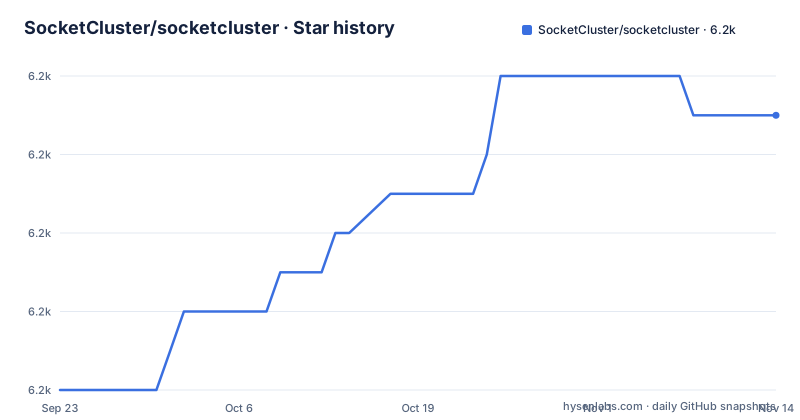
Star history
- SocketCluster/socketcluster6,199 ★ · +7
| Repository | 2026-09-23 | 2026-11-14 |
|---|---|---|
| SocketCluster/socketcluster | 6.2k | 6.2k |
7 Stars in the last 52 days, measured from the daily GitHub snapshot. Compare with other projects
Editorial analysis
socketcluster create myapp writes a server, not an engine
This repository holds a command line tool and a project template. It does not hold the realtime engine. package.json registers one binary, `socketcluster`, pointing at `bin/cli.js`, and it carries exactly three runtime dependencies: `@maartennnn/cli-builder` at `^2.3.0`, `fs-extra` at `^7.0.1` and `yaml` at `^2.9.1`. Nothing in that list subscribes to a channel, routes an RPC call or holds a websocket open.
The engine lives in the two repositories the README points to for documentation, socketcluster-client and socketcluster-server. That division is the first thing to settle before reading anything else, because the README here opens by calling itself a toolset and boilerplate for creating systems using SocketCluster, not the system itself.
The top-level layout follows the split. `app/` and `bin/` are what the generator and the command line live in, `scc-guide.md` covers the horizontally scalable cluster, and `socketcluster-protocol.md` describes the wire format.
node server on http://localhost:8000/
The whole first run is three commands. Node.js has to be on the machine first, then the CLI goes on globally:
npm install -g socketclusterA machine where the global prefix needs root takes the sudo variant the README also offers:
sudo npm install -g socketclusterWith the binary in place, the generator writes the project:
socketcluster create myappMove into `myapp/` and start it with:
node serverThe README's expectation for that last step is the URL `http://localhost:8000/`. No port flag is documented, so 8000 is where the generated server is expected to listen.
Node v10 is the floor, and for-await-of is the reason
The README recommends Node.js `v10.0.0` or above and then makes an unusual offer: older Node.js versions work too, as long as you replace `for-await-of` loops with `while` loops. That sentence is the clearest statement of what the framework relies on in the runtime, and it is worth taking seriously, because it means async iteration is load-bearing in the generated code rather than a stylistic preference.
The trade is clear. You can run on a Node.js release older than the recommended floor, and the cost is that any generated code using `for-await-of` has to be rewritten by hand. That is a source edit inside the project the CLI just created, not a setting.
package.json describes the package as a realtime framework with support for async/await, and the keyword list is `socketcluster`, `async`, `await`, `realtime`. The README's Node.js note is the only guidance on runtime versions in the entire file.
protocolVersion 1 is the switch for clients that predate the current protocol
There is one documented compatibility escape hatch, and it is a two-option object passed to `socketClusterServer.attach`:
let agServer = socketClusterServer.attach(httpServer, {
  protocolVersion: 1,
  path: '/socketcluster/'
});
`protocolVersion: 1` targets existing SocketCluster clients, and the note next to it is that `path` has to match the path your old client expects. Both settings travel together: change the protocol version without moving the path and the old client stops connecting.
Two things follow from this being the only server-side option in the README. Authentication options, worker counts, channel options and scaling parameters are all documented elsewhere, in socketcluster-server. And the migration path is a downgrade in protocol version, which is the shape you want when an existing client cannot change.
20.1.0 in package.json, v17.3.1 on the releases page
The two version numbers in this repository do not line up. package.json declares `21.0.1`, with the description "Highly scalable realtime framework with support for async/await". The releases listed for the repository are v17.3.1 from 2023-03-11, v16.0.1 from 2020-12-22 and v14.3.0 from 2018-10-09.
So the packaged version has moved four majors past the newest published tag while the release history stopped in 2023. The README points you at the releases section for the change log, which means the log is four major versions behind the number in package.json. Anyone diffing releases to work out what changed between two published versions has to reconcile that gap themselves.
The last push to this repository was on 2026-10-09, so the commits continue without a matching tag. The licence is MIT and the copyright line reads 2013-2023 SocketCluster.io.
npm test exits 1 before running anything
The test script in package.json is the npm default placeholder:
"test": "echo \"Error: no test specified\" && exit 1"Running the suite prints that message and returns a failure status without touching any code. There is no tests directory in the top-level layout and no test framework among the dependencies, so this repository ships no way to check that the generator still produces a working project.
The same gap applies to the generated app. The CLI gives you a server, and the repository gives you no signal about whether the templates in `app/` are current. A `.github/` directory exists, so the workflows are in the tree, but nothing in the README describes what they check.
There is also a SECURITY.md in the root with no policy text in the README. Reporting a vulnerability means reading that file directly.
Implementing from socketcluster-protocol.md instead of installing the CLI
There is a second route that shares no code with the generator: the protocol spec. `socketcluster-protocol.md` sits in this repository, and a team that needs a client in another language can implement the wire format directly instead of taking the npm package. That is the real alternative to `socketcluster create myapp`, and the difference in approach is large. The generator gives you a Node.js server, a client library and a localhost port in one command. The spec gives you a document and leaves channel semantics, RPC handling and reconnection behaviour to you.
Between those two sits the ordinary route: use the client and server packages from their own repositories and generate only the boilerplate here. That is what the toolset is for.
What none of the three routes supplies from this repository is a distributed cluster walkthrough. `scc-guide.md` covers the horizontally scalable cluster and is linked from the README, but the README itself documents none of it, and the guide is a document rather than something the CLI sets up for you.
Editorial conclusion
Adopt the SocketCluster CLI when you want a runnable SocketCluster app in one command and you already intend to use the client and server packages. Skip it when you want to see how pub/sub and RPC work, or you want a protocol implementation in a language other than JavaScript, because none of that code is here. Before you build on the generated project, check package.json, where the version reads 21.0.1 while the newest release tag is v17.3.1 from 2023-03-11, and read socketcluster-protocol.md if you plan to implement a client yourself.
Frequently asked questions
What is SocketCluster?
It is a highly scalable realtime pub/sub and RPC framework. This repository holds the npm package that installs the socketcluster command line tool and generates a project from it, while the framework's own documentation lives in the socketcluster-client and socketcluster-server repositories.
How do I install SocketCluster and start a project?
Install the CLI globally with npm install -g socketcluster, or the sudo variant, then run socketcluster create myapp and start the generated project with node server. The README expects the app to answer on http://localhost:8000/.
Which Node.js version does SocketCluster need?
Node.js v10.0.0 or above is recommended. Older releases work if you use while loops instead of for-await-of loops, which is the one runtime dependency the README names.
Official sources
Add this badge to your README
If you maintain this project, the badge below links readers to this analysis and shows its maintenance status from the daily GitHub snapshot. Paste the markdown into your README; add ?metric=license or ?metric=stars to the image URL for a different field.

[](https://hysenlabs.com/projects/socketcluster-socketcluster)Star history chart for your README
[](https://hysenlabs.com/projects/socketcluster-socketcluster)Was this useful?