unblockneteasemusic: a TLS proxy, two ports, and twelve candidate sources
Revive unavailable songs for Netease Cloud Music (Refactored & Enhanced version)
At a glance
- What is it?
- UnblockNeteaseMusic revives songs that the Netease Cloud Music client shows as unavailable, by matching each request against other music services and rewriting the URL. It does that by terminating TLS with a certificate of its own, which is why ca.crt, server.key and a renew script sit in the repository root, and why some sources need your cookie or a foreign IP address.
- Who is it for?
- UnblockNeteaseMusic suits someone whose Netease client shows tracks as unavailable and who is willing to route that app's traffic through a proxy on their own machine, with the awareness that the replacement audio comes from services with their own regional limits. It does not suit a device you cannot install a trusted certificate on, and it does not promise anything for a track none of the sources carry.
- Can I use it commercially?
- Yes, with conditions. LGPL-3.0 is a weak copyleft licence: you can use it inside commercial and closed-source software, but if you distribute changes to its own files, you must publish those changes under the same licence.
- Is it still maintained?
- Yes. The repository last received commits 4 days ago.
- What is it written in?
- Mainly JavaScript, according to GitHub's language statistics.
Answers come from the project's GitHub data, last synced on November 13, 2026, and from our analysis. They are not legal advice.
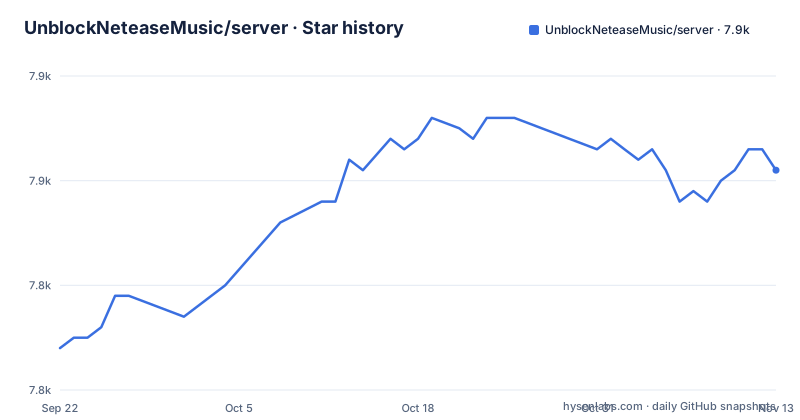
Star history
- UnblockNeteaseMusic/server7,851 ★ · +17
| Repository | 2026-09-22 | 2026-11-13 |
|---|---|---|
| UnblockNeteaseMusic/server | 7.8k | 7.9k |
17 Stars in the last 52 days, measured from the daily GitHub snapshot. Compare with other projects
Editorial analysis
It terminates TLS with its own certificate, which is why ca.crt is in the tree
The mechanism is not a plugin. It is a proxy that sits between the music client and Netease's servers, and to do that over HTTPS it has to be trusted by the client.
The repository root carries the pieces for that: `ca.crt`, `server.crt` and `server.key`, plus `generate-cert.sh` and `renew-cert.sh` for creating and rotating them, and `bridge.js`. The Dockerfile makes the same requirement explicit by setting `SIGN_CERT /app/server.crt` and `SIGN_KEY /app/server.key` as environment variables, and copies every `.crt` and `.key` file from the root into the image. The `pkg` configuration in package.json bundles `server.key` and `server.crt` as assets into the standalone binaries.
So the first thing any installation involves is trusting a certificate authority on the machine or device running the client. The README also points to separate projects for BetterNCM, Android Xposed and OpenWrt LuCI.
Two ports, and it can become the system proxy
The service listens on two ports and the mapping is explicit everywhere it is configured. The Dockerfile exposes 8080 and 8081, and the compose file maps `${HTTP_PROXY_PORT:-8080}:8080` and `${HTTPS_PROXY_PORT:-8081}:8081`, so both are overridable from the environment.
The Windows service route documents the same thing from the client's side: the HTTP proxy uses `127.0.0.1` with port `8080` by default.
Beyond that it describes itself as a complete traffic proxy for HTTP and HTTPS, usable directly as a system proxy, with PAC also supported. The X-Real-IP header is added to requests, which the README credits with unlocking overseas restrictions, and `-f` can force a specific Netease server IP when DNS gives you the wrong one.
The consequence is scope. Pointing a system proxy at it sends other applications' traffic through the same process, not just the music client's.
The source table is the product, and cookies and regions are its price
Matching happens against a list of alternative services, and the README is candid about what each one needs of you.
Four are enabled by default: `kugou`, `bodian`, `migu` and `ytdlp`. Several need preparation. `qq` requires your own `QQ_COOKIE` and QQ login, `migu` requires `MIGU_COOKIE`, and `joox` requires `JOOX_COOKIE` and only covers Hong Kong, Macau, Thailand, Malaysia and Indonesia. The `youtube` source, which parses in pure JavaScript, needs an IP address in a region Google does not treat as mainland China, while `youtubedl` and `ytdlp` need `youtube-dl` or `yt-dlp` installed separately, with `ytdlp` described as the actively maintained fork.
Two entries have caveats rather than requirements. `bilivideo` may fail to find some copyright videos, such as music videos uploaded by Sony, from an IP outside mainland China. And `pyncmd` goes through a third-party Netease API whose service is provided by GD studio at music.gdstudio.xyz.
Read together, the list says the same thing twice: the availability of a given track depends on a source you may not be able to reach.
Matching order is a flag, and it takes more than one source
The order is yours to choose with `-o`, which is spelled `--match-order` in the help output and takes a list rather than a single value:
node app.js -o bilibili ytdlpThe usage block shows the rest of the surface. `-p` takes `http[:https]`, so one flag can set the HTTP port and the HTTPS port together, `-a` sets the server address, `-u` sends requests through an upstream proxy, `-f` forces the Netease server IP, `-t` takes a token, `-e` takes a URL, `-s` and `-v` and `-h` close out the list.
The same flags work through Docker, where anything after the image name is passed to the program:
docker run pan93412/unblock-netease-music-enhanced -o kuwo -p 1234And the compose file leaves the equivalent line commented out for you to edit, which is the intended way to make the choice permanent rather than per run.
Five ways to run it, and macOS is missing from the binary route
The README documents six routes and one gap.
The first is a prebuilt binary from the Releases page: download the asset that matches your architecture and run it. The gap is macOS, where the README says no runnable file is provided for now because of signing issues, and to use another approach instead. The `pkg` configuration confirms the omission: the targets are node18-linux-arm64, node18-win-arm64, node18-linux-x64 and node18-win-x64, with no macOS entry.
The second is npm or Yarn, as a dependency or run through npx:
npm install @unblockneteasemusic/server
yarn add @unblockneteasemusic/server # for Yarn usersnpx -p @unblockneteasemusic/server unblockneteasemusicThe third registers a Windows service by running `node ./nw.js` in a checkout, with start arguments and environment variables configured through `scriptOptions` and `env` in that same file, logs in a generated `daemon` folder, and the same command uninstalls it.
The fourth and fifth are Docker, either the pan93412 image from Docker Hub or `docker-compose up` on your own build. The sixth is cloning the repository and running `node app.js` directly.
engines says node 12, the binaries are node 18, and main is not the entry point
Three small inconsistencies in package.json are worth reading before you build anything.
`engines` asks for Node 12 or newer, while the packaged binaries are built against Node 18 targets. That is a wide gap between what the manifest permits and what is actually shipped, and it means the binary and the source build are not the same runtime promise.
`main` points at `src/provider/match.js`, the matching module, while `bin` points at `./precompiled/app.js`, the actual program. So requiring the package as a library gets you the matcher, and the command line gets you the proxy.
The development scripts explain the two ways to run from a checkout. `yarn` then `yarn build` compiles the latest source with webpack, while `yarn` then `DEVELOPMENT=true yarn node app.js` uses the latest published package without building. The regular `start` script runs `node src/app.js` with `-e https://music.163.com`, so the Netease endpoint is passed as an argument rather than hardcoded, and `pkg . --out-path=dist/` is what produces the standalone binaries. The package manager is pinned to Yarn 3.8.7.
Environment variables change what the client thinks you own
The environment variable table is where the project reaches past matching and into playback.
`ENABLE_FLAC` is a boolean that activates lossless quality retrieval. `ENABLE_LOCAL_VIP` is a string that activates a local vinyl VIP status, with the accepted values `true`, which is described as equal to CVIP, plus `cvip` and `svip`. `LOCAL_VIP_UID` narrows that to a list of user ids, and by default it applies to all users, so the tier is not per account unless you make it one.
`ENABLE_HTTPDNS` is the odd one out, because the table recommends against it: it activates Netease's HTTPDNS lookup, described as faulty.
Together these describe client-side behaviour rather than upstream negotiation. Whether lossless playback then works depends on what the source actually returns, which is the same boundary the source table draws.
Licensing is LGPL-3.0, with COPYING and COPYING.LESSER both in the root, authored by nondanee, 1715173329 and pan93412, and the last release was v0.28.0 on 2025-09-23 with the last push on 2026-10-29.
Editorial conclusion
UnblockNeteaseMusic suits someone whose Netease client shows tracks as unavailable and who is willing to route that app's traffic through a proxy on their own machine, with the awareness that the replacement audio comes from services with their own regional limits. It does not suit a device you cannot install a trusted certificate on, and it does not promise anything for a track none of the sources carry. Verify two things before you rely on it: which sources you enable and what each one demands, since QQ, Migu and JOOX need your own cookie and the YouTube sources need an IP outside mainland China, and whether your client can be pointed at a proxy on ports 8080 and 8081.
Frequently asked questions
How do I install and run UnblockNeteaseMusic?
Four documented routes. Install it from npm or Yarn with `npm install @unblockneteasemusic/server` or run it with `npx -p @unblockneteasemusic/server unblockneteasemusic`. Use a prebuilt binary from the Releases page for Linux or Windows. Run the pan93412/unblock-netease-music-enhanced Docker image, where `latest` tracks the enhanced branch and `release` tracks the newest tag. Or clone the repository and run `node app.js`, with screen or tmux recommended to background it.
Which music sources does UnblockNeteaseMusic use by default?
Four are enabled by default: kugou, bodian, migu and ytdlp. Others are opt-in through the -o flag, including qq, which needs your own QQ_COOKIE and QQ login, joox, which needs JOOX_COOKIE and only covers Hong Kong, Macau, Thailand, Malaysia and Indonesia, and youtube, which needs an IP address outside mainland China. The youtubedl and ytdlp sources require those tools installed separately.
Does UnblockNeteaseMusic have a macOS build?
Not as a runnable file. The README states that macOS temporarily does not provide a runnable file because of signing issues, and asks you to use one of the other approaches instead. The packaged targets in package.json list Linux and Windows on both x64 and arm64, with no macOS entry.
Official sources
Add this badge to your README
If you maintain this project, the badge below links readers to this analysis and shows its maintenance status from the daily GitHub snapshot. Paste the markdown into your README; add ?metric=license or ?metric=stars to the image URL for a different field.

[](https://hysenlabs.com/projects/unblockneteasemusic-server)Star history chart for your README
[](https://hysenlabs.com/projects/unblockneteasemusic-server)Was this useful?