action-gh-release turns a tag push into a GitHub Release
📦 :octocat: GitHub Action for creating GitHub Releases
At a glance
- What is it?
- action-gh-release is a TypeScript GitHub Action that creates or updates a GitHub Release when a tag is pushed, uploading assets matched by glob patterns and optionally reading notes from a file in the build. Its v2 line is finished, and v3 requires Node 24.
- Who is it for?
- Use action-gh-release when releases have to be cut by a tag and the artifacts are already on disk, because it handles the tag gate, glob matching, and note files in one step, and it updates an existing release rather than colliding with one on a re-run. Do not stay on v2.6.2: it is the final v2 release, it is no longer maintained or supported, and it uses the Node 20 runtime that GitHub Actions deprecated.
- Can I use it commercially?
- Yes. MIT is a permissive licence: you can use, modify and sell software built on it, as long as you keep its copyright and licence notices.
- Is it still maintained?
- Yes. The repository last received commits 5 days ago.
- What is it written in?
- Mainly TypeScript, according to GitHub's language statistics.
Answers come from the project's GitHub data, last synced on October 20, 2026, and from our analysis. They are not legal advice.
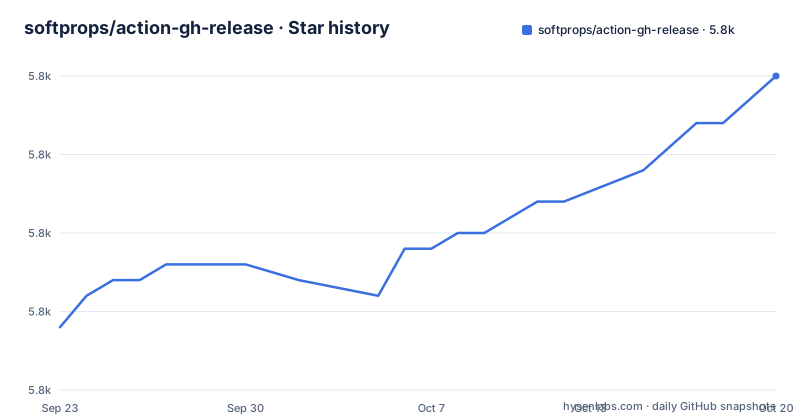
Star history
- softprops/action-gh-release5,780 ★ · +16
| Repository | 2026-09-23 | 2026-10-20 |
|---|---|---|
| softprops/action-gh-release | 5.8k | 5.8k |
16 Stars in the last 27 days, measured from the daily GitHub snapshot. Compare with other projects
Editorial analysis
The workflow decides when a release happens, not the action
This action does not decide when a release fires. Your workflow file does, and the action is simply the step that runs once you have decided. The documented common case is adding a step to an existing build that is gated on pushes to git tags, and the `if` field on a step is the mechanism for that. The stated benefit is reuse: the same workflow keeps doing its ordinary job on branch pushes, and only the tagged run reaches the release step.
name: Main

on: push

jobs:
  build:
    runs-on: ubuntu-latest
    steps:
      - name: Checkout
        uses: actions/checkout@v6
      - name: Release
        uses: softprops/action-gh-release@v3
        if: github.ref_type == 'tag'
The other option moves the gate into the trigger itself and filters tags by pattern, which removes the per-step condition but hardcodes your tag naming scheme into the workflow. Keep the rule in one place. If you filter by a literal pattern, a tag that does not match it has no release step to run at all, which is a quieter failure than an error you can read.
A re-run updates the release instead of colliding with it
The `files` input takes a newline-delimited list of glob expressions, and naming your files directly works too. Every input on this action is optional, so a release carrying no assets is a valid configuration rather than a mistake.
      - name: Release
        uses: softprops/action-gh-release@v3
        if: github.ref_type == 'tag'
        with:
          files: |
            Release.txt
            LICENSE
The behavior worth understanding is what happens on a second run against the same tag. If a tag already has a GitHub release, the existing release is updated with the release assets, rather than the action attempting to create a second release and failing. That is what makes a re-run after a failed or amended build safe, and it is the single most useful thing to know before wiring this into a pipeline.
The `|` in that block is ordinary YAML block scalar syntax, and the action reads the result as one pattern per line. Get the indentation right or the patterns end up outside the block, and the release is created with no assets rather than an error telling you so.
files globs resolve against working_directory, not the repository root
When a build writes its artifacts into a subdirectory, the patterns in `files` are resolved relative to `working_directory`, so the two have to agree. Set the directory and write your patterns as if you were standing inside it:
- name: Release
  uses: softprops/action-gh-release@v3
  if: github.ref_type == 'tag'
  with:
    working_directory: dist
    files: |
      Release.txt
      checksums/*.txt
Two limits follow from that design. Patterns cannot reach outside the directory you named, so a layout that scatters artifacts across several top-level folders means choosing the parent and writing longer patterns, or running the step more than once. And the patterns are globs, not paths: metacharacters are interpreted rather than matched literally.
That second point has a Windows wrinkle worth knowing before you hit it. Both `\` and `/` are accepted as path separators in `files` globs on Windows, so a workflow written on Linux does not need rewriting for that reason. What does need care is a literal metacharacter such as `[` or `]`: to match one of those characters as itself rather than as a character class, the metacharacter itself must stay escaped in the pattern.
v2.6.2 is the last v2 line and it runs on a retired runtime
The versioning history is short and the older branch is closed. v2.6.2 is the final v2 release, and it is no longer maintained or supported. The reason given is concrete: it uses the Node 20 runtime that GitHub Actions deprecated. The supported path is v3, which runs on Node 24. That constraint is visible in the build configuration too, since the bundler targets node24 and the package declares a Node engine floor:
"build": "esbuild src/main.ts --bundle --platform=node --format=cjs --target=node24 --outfile=dist/index.js --minify",
"typecheck": "tsc --noEmit",
"test": "vitest --coverage"
On the v3 line the releases are v3.0.1 on 2026-06-19, v3.0.2 on 2026-07-13, and v3.0.3 on 2026-08-30. The last push to the repository was on 2026-09-30, the repository is not archived, the license is MIT, and the default branch is master.
If a problem still reproduces on the latest v3, the project asks for a new issue carrying the exact action ref, the workflow run URL, the runner, and the relevant logs. That list is worth copying exactly, because a report missing the action ref cannot be tied to a build and a report missing the runner cannot be compared against the others.
previous_tag is what keeps generated notes from comparing the wrong range
Release notes come from one of two places. The first is a file: `body_path` points at a path in your repository's build, which lets any changelog generator produce the text, or lets a person write it. The second is GitHub's own generator, enabled with `generate_release_notes`. That option accepts a companion input, `previous_tag`, which pins the comparison base explicitly. It exists because the default comparison range does not always match the release series you are publishing:
- name: Release
  uses: softprops/action-gh-release@v3
  with:
    tag_name: stage-2026-03-15
    target_commitish: ${{ github.sha }}
    previous_tag: prod-2026-03-01
    generate_release_notes: true
What the action cannot do is publish across repositories on the runner's own credentials. When you set `repository` to a different owner and name, the example in the usage docs carries a note that you will need a personal access token with permissions to create releases. So the second thing this action will not do for you is widen its own token scope; that credential has to come from your workflow configuration.
The build bundles to dist/index.js while main still points at lib/main.js
The repository layout explains how a TypeScript project ships as a GitHub Action. `action.yml` is the entry point runners read, `src/` holds the TypeScript sources, and `dist/` holds the bundled output that gets committed rather than built at run time, which is why there is no install or build step in the workflows above. `package.json` is marked private and its `main` field still points at `lib/main.js`, a path the build script does not write, while the bundler writes `dist/index.js`. For a repository consumed through `uses:` rather than as a package, that mismatch is harmless, but it will mislead anyone who installs it from a registry.
The runtime dependencies are the Octokit and Actions toolkit packages, a glob matcher, and a mime type table, alongside the Octokit retry and throttling plugins. Formatting is prettier with its own ignore file and config, TypeScript is checked with `--noEmit`, tests run under vitest with coverage, and the Node types sit on major 24. Two test directories exist side by side, `__tests__/` and `tests/`, and the prettier script covers only the first.
One script deserves a second look before you copy it: `updatetag` force-moves the floating v3 tag by deleting it locally and on the remote before re-creating it.
"updatetag": "git tag -d v3 >/dev/null 2>&1 || true; git push origin :v3 >/dev/null 2>&1 || true; git tag -a v3 -m '' && git push origin v3"That is how a floating major tag gets updated. Run it only in the action's own repository, since it rewrites a tag other people may already depend on.
Editorial conclusion
Use action-gh-release when releases have to be cut by a tag and the artifacts are already on disk, because it handles the tag gate, glob matching, and note files in one step, and it updates an existing release rather than colliding with one on a re-run. Do not stay on v2.6.2: it is the final v2 release, it is no longer maintained or supported, and it uses the Node 20 runtime that GitHub Actions deprecated. Before adopting it, check three things that decide whether it works for you: whether your tag naming matches the rule you gate on, whether your asset paths resolve inside working_directory, and whether the token has permission to create releases in the target repository, which matters when you set repository to a different one.
Frequently asked questions
What does action-gh-release do when a tag is pushed?
It creates a GitHub Release for that tag and uploads assets matched by the newline-delimited glob patterns given in the files input, or listed by name. If the tag already has a release, that existing release is updated with the assets instead of a duplicate being attempted. Notes can come from a file through body_path, or from GitHub's own generator with generate_release_notes.
What is the action-gh-release action and how does it get used?
It is a MIT licensed TypeScript GitHub Action for creating GitHub Releases on Linux, Windows, and macOS runners. The common setup adds a step to an existing build and gates it on tag pushes, either with the if field and github.ref_type == 'tag', or with a push trigger filtered by a tag pattern such as v*.*.*. That is what keeps one workflow file serving both branch pushes and tagged releases.
What should replace action-gh-release if you are still on v2?
The stated answer is a version, not another project. v2.6.2 is the final v2 release, is no longer maintained or supported, and uses the Node 20 runtime that GitHub Actions deprecated, so the supported path is v3 on Node 24. Any problem that still reproduces there should be filed as a new issue with the exact action ref, the workflow run URL, the runner, and the relevant logs. The repository names no alternative action.
Official sources
Add this badge to your README
If you maintain this project, the badge below links readers to this analysis and shows its maintenance status from the daily GitHub snapshot. Paste the markdown into your README; add ?metric=license or ?metric=stars to the image URL for a different field.

[](https://hysenlabs.com/projects/softprops-action-gh-release)Star history chart for your README
[](https://hysenlabs.com/projects/softprops-action-gh-release)Was this useful?