Ofetch's parsers, its retry rules and the alpha sitting on main
😱 A better fetch API. Works everywhere.
At a glance
- What is it?
- unjs/ofetch wraps fetch with automatic JSON parsing, throwing errors, retries and interceptors, and its main branch now carries v2 alpha code that does not match the v1 docs most posts quote.
- Who is it for?
- Ofetch is a good fit when you want fetch with JSON parsing, status errors and one place to hang auth headers, and it runs on node, browser and workers. Pin your version deliberately, because main is alpha while the newest stable release is v1.5.1.
- Can I use it commercially?
- Yes. MIT is a permissive licence: you can use, modify and sell software built on it, as long as you keep its copyright and licence notices.
- Is it still maintained?
- Yes. The repository last received commits 1 day ago.
- What is it written in?
- Mainly TypeScript, according to GitHub's language statistics.
Answers come from the project's GitHub data, last synced on November 15, 2026, and from our analysis. They are not legal advice.
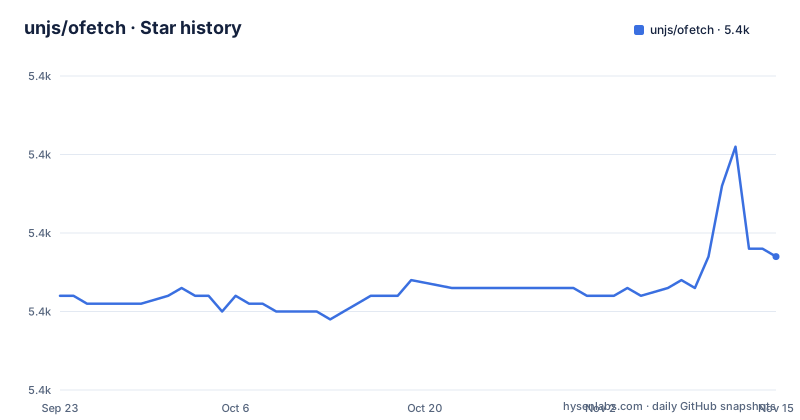
Star history
- unjs/ofetch5,367 ★ · +5
| Repository | 2026-09-23 | 2026-11-15 |
|---|---|---|
| unjs/ofetch | 5.4k | 5.4k |
5 Stars in the last 53 days, measured from the daily GitHub snapshot. Compare with other projects
Editorial analysis
main carries v2 alpha while the v1 docs sit on another branch
Install is one command and the import is one line:
npx nypm i ofetchimport { ofetch } from "ofetch";Which version you actually get depends on which line you are reading. The README opens with a notice that you are on the v2 alpha development branch and sends v1 users to a separate v1 tree for their documentation, and package.json sits at 2.0.0-alpha.3. The release script publishes with --publishTag alpha, so the alpha line goes out under the alpha tag rather than as the default install, and v1.5.1 is the newest stable release. That mismatch is the first thing to check when behaviour differs from an older post.
The manifest also describes a very small package: exports and main both point at ./dist/index.mjs, types come from ./dist/index.d.mts, sideEffects is false, and files ships dist alone. No CommonJS entry is declared, so require() is not a path this manifest sets up for you.
One call parses JSON, binary content types come back as a Blob
ofetch parses JSON responses on its own, so destructuring is all you need:
const { users } = await ofetch("/api/users");For binary content types the result is a Blob rather than parsed JSON. You can replace the parser entirely by passing parseResponse, which receives the text and returns whatever you want, or pin the shape with responseType set to blob, arrayBuffer, text or stream, each mapped to the matching FetchResponse method:
await ofetch("/movie?lang=en", { parseResponse: (txt) => txt });
await ofetch("/api/generate-image", { responseType: "blob" });
await ofetch("/api/generate-image", { responseType: "stream" });
The consequence is that the return type follows the response and your option together: a JSON endpoint hands back an object, an image endpoint hands back a Blob, and a mistyped responseType changes what your code has to handle without raising anything at the call site. Generics do not check that choice for you: ofetch<Article> only tells your editor what you asked for.
JSON.stringify fills body, and POST, PUT and PATCH gain JSON headers
An object passed to body is converted with JSON.stringify. A class instance works when it has a .toJSON() method; without one it has to be turned into a string value before it reaches the body option, since there is no other conversion path:
const { users } = await ofetch("/api/users", {
  method: "POST",
  body: { some: "json" },
});
For PUT, PATCH and POST, when a string or object body is set, ofetch adds the default "content-type": "application/json" and accept: "application/json" headers, and both can be overridden. Binary bodies are supported too, with Buffer, ReadableStream, Stream and other compatible body types accepted, and duplex: "half" set automatically so streaming uploads work without you writing it.
Two gaps to keep in mind. The automatic headers belong to those three methods only, so a body on GET or DELETE arrives without them. And the headers appear for a string or object body, which leaves FormData and Blob payloads to carry their own content type.
A non-ok response throws with the parsed body on error.data
When response.ok is false, ofetch throws rather than returning the response, with a friendly message and a compact stack that hides internals. The parsed error body sits on error.data, and FetchError is exported as a type for narrowing:
await ofetch("/url").catch((error) => error.data);That single shape is why the catch in most ofetch code returns error.data instead of inspecting the response, and why code that only wanted a status code has to reach into the error object. One option turns the throw off for calls where failure is an expected outcome:
await ofetch("/url", { ignoreResponseError: true });Set it per call when one endpoint is meant to fail, and set it everywhere when you are writing a wrapper that decides error policy itself, because otherwise the throw happens before your await resolves. Retry shares the same status codes: 408, 429 and the 5xx entries appear both in the throw path and in the retry list, so understanding one without the other gives you the wrong picture of a flaky call.
Retry skips POST, PUT, PATCH and DELETE until you set a number
A retry happens when an error occurs and the status code is in retryStatusCodes. The shipped list is 408, 409, 425, 429, 500, 502, 503 and 504, with 425 marked experimental. The default count is 1 retry, and retryDelay defaults to 0 ms, so the untouched behaviour is one immediate second attempt and nothing more:
await ofetch("http://google.com/404", {
  retry: 3,
  retryDelay: 500, // ms
  retryStatusCodes: [404, 500], // response status codes to retry
});
The sharp edge is per method. POST, PUT, PATCH and DELETE are not retried by default because ofetch avoids introducing side effects, and setting any custom retry value makes it always retry for all requests. A number tuned for idempotent reads therefore also decides what happens to your writes, and inside an ofetch.create instance that decision applies to every call made through it.
The second sharp edge is the zero delay. Out of the box a failing dependency is hit again immediately, with no growing gap between attempts, so add retryDelay whenever the second try has a real chance of behaving differently from the first.
baseURL and query are stitched by ufo, not by concatenation
baseURL is prepended for you, with trailing and leading slashes and query search params handled by ufo instead of string pasting:
await ofetch("/config", { baseURL });The query option, with params as an alias, adds search params while preserving the query already present in the request itself:
await ofetch("/movie?lang=en", { query: { id: 123 } });Two habits follow from routing both through ufo. Prefixing is a library decision rather than string concatenation, so an absolute URL combined with a baseURL is a case to check in your own tests instead of assuming it wins. And because query is an ordinary option, interceptors rewrite it: the onRequest example sets options.query.t to a date, which is how you add a cache buster without touching the URL at the call site, and the same trick adds a token or a signature without a wrapper function.
Four interceptor hooks, and create clones defaults one level deep
Four async hooks cover the call. onRequest runs as soon as ofetch is called, which lets you modify options or log before anything goes out:
await ofetch("/api", {
  async onRequest({ request, options }) {
    options.query = options.query || {};
    options.query.t = new Date();
  },
});
onRequestError fires when the fetch request fails, onResponse fires after the fetch call and after body parsing, and onResponseError is the onResponse case for a response whose ok is not true. Each hook also accepts an array of functions, and those run sequentially:
await ofetch("/api", {
  onRequest: [
    () => {
      /* Do something */
    },
    () => {
      /* Do something else */
    },
  ],
});
ofetch.create bundles shared interceptors and default options into one callable, which is how a single baseURL and a single auth hook reach every call site.
The warning attached to create is the one to keep: defaults are cloned at one level and inherited, so nested options such as headers are shared rather than copied. Merge headers yourself when instances need to differ.
The tarball is one ESM file, built by obuild and checked by vitest
package.json shows how little ships. files contains dist, exports points at ./dist/index.mjs, and the build script is obuild src/index.ts:
"build": "obuild src/index.ts",
"test": "pnpm lint && vitest run --coverage"
Tests run vitest with coverage, and the test script runs lint first, with eslint over the project and a prettier check across src, test and examples, so a formatting slip fails the run before a single assertion executes. The repository pins [email protected] as its package manager.
The examples directory is a working index of the API rather than prose: body.mjs, error-handling.mjs, first-request.mjs, headers.mjs, methods.mjs, proxy.mjs, query-string.mjs and the TypeScript type-safety.ts.
License is MIT, and the last push on the default branch main is dated 2026-10-31.
Editorial conclusion
Ofetch is a good fit when you want fetch with JSON parsing, status errors and one place to hang auth headers, and it runs on node, browser and workers. Pin your version deliberately, because main is alpha while the newest stable release is v1.5.1. Before you rely on it, check whether your POSTs should retry, whether shared headers leak between instances created with ofetch.create, and whether the v2 options you read about still match the release you lock.
Frequently asked questions
What is Fetch used for, and what does ofetch add to it?
ofetch is a fetch wrapper that works on node, browser and workers. It parses JSON responses on its own, returns a Blob for binary content types, throws when response.ok is false with the parsed body on error.data, and adds retries, a timeout option and interceptors around the call.
Which is better, Ajax or Fetch when you use ofetch?
No comparison with Ajax is written down. The ofetch behaviour specified on top of fetch is automatic JSON parsing, a throw on a non-ok response, retries for 408, 409, 425, 429, 500, 502, 503 and 504, and a timeout in milliseconds that is disabled by default.
Why do people use axios instead of fetch, and what does ofetch do?
No axios comparison exists in the docs. The axios style pieces ofetch ships are four interceptor hooks (onRequest, onRequestError, onResponse, onResponseError), shared defaults through ofetch.create, automatic JSON stringifying of body, and default content-type and accept headers added for PUT, PATCH and POST.
What are the disadvantages of Fetch API that ofetch papers over?
Two limits are written down for ofetch itself: defaults passed to ofetch.create are cloned at one level, so nested options such as headers are inherited by reference, and POST, PUT, PATCH and DELETE are not retried by default. Setting any custom retry value makes every method retry.
ofetch vs ky or axios: what are the ofetch defaults?
No comparison table exists, so compare the defaults instead: 1 retry, a retryDelay of 0 ms, no timeout unless you set one, JSON parsing on the response, and a throw on any non-ok response unless ignoreResponseError is true. package.json declares 2.0.0-alpha.3 on main.
Official sources
Add this badge to your README
If you maintain this project, the badge below links readers to this analysis and shows its maintenance status from the daily GitHub snapshot. Paste the markdown into your README; add ?metric=license or ?metric=stars to the image URL for a different field.

[](https://hysenlabs.com/projects/unjs-ofetch)Star history chart for your README
[](https://hysenlabs.com/projects/unjs-ofetch)Was this useful?