Solid Primitives: Installation and Package Usage
A library of high-quality primitives that extend Solid reactivity.
At a glance
- What is it?
- Solid Primitives is a TypeScript monorepo of community-contributed reactive building blocks for Solid applications. Its package-per-primitive model supports selective adoption, but consumers need to check each package's stage and compatibility before depending on it.
- Who is it for?
- Solid application teams should consider individual packages when they need a focused reactive abstraction and can verify the package stage, API, browser requirements, and release compatibility. Teams seeking one standardized application framework should first compare the primitive model with a higher-level framework.
- Can I use it commercially?
- Yes. MIT is a permissive licence: you can use, modify and sell software built on it, as long as you keep its copyright and licence notices.
- Is it still maintained?
- Yes. The repository last received commits 2 days ago.
- What is it written in?
- Mainly TypeScript, according to GitHub's language statistics.
Answers come from the project's GitHub data, last synced on November 6, 2026, and from our analysis. They are not legal advice.
Star history
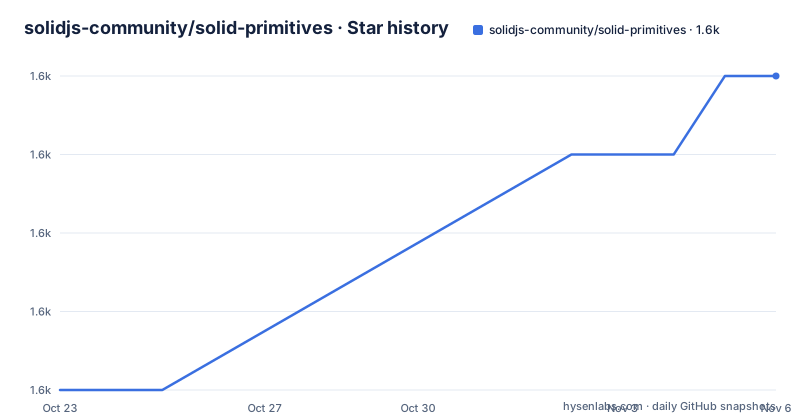
- solidjs-community/solid-primitives1,564 ★ · +4
| Repository | 2026-10-23 | 2026-11-06 |
|---|---|---|
| solidjs-community/solid-primitives | 1.6k | 1.6k |
4 Stars in the last 14 days, measured from the daily GitHub snapshot. Compare with other projects
Editorial analysis
Solid Primitives fills gaps between Solid reactivity and browser APIs
Solid Primitives addresses a specific gap in Solid development: applications often need reusable behavior around inputs, browser state, networking, storage, scheduling, and other platform features. The project describes these utilities as tertiary primitives, meaning building blocks intended to sit above Solid's primary and secondary primitives. The target audience is Solid developers who want reactive wrappers around client-side and server-side functionality rather than a new application framework or a replacement for Solid Core.
The collection is intentionally broad. The visible package table includes `createActiveElement`, `createFocusSignal`, `createInputMask`, `createMaskPattern`, and keyboard functions such as `createShortcut`. The repository also links packages for cookies, filesystem access, i18n, resources, storage, WebSockets, workers, state machines, and other concerns. This makes the collection relevant to both focused components and broader application infrastructure.
That breadth also requires careful package selection. An application should not install `solid-primitives` as though it were one runtime dependency. The repository is a monorepo containing separate packages under `packages/`, and the README links each primitive to its own npm package. Consumers can adopt only the packages that correspond to a real requirement, which supports the project's stated tree-shaking objective without turning the repository into an all-purpose framework.
The monorepo maps each reactive abstraction to an independent npm package
Based on the repository layout, each capability is developed as a package beneath `packages/`. The root `package.json` marks `solid-primitives` as `private`, so the root package name is not presented as the consumer installation target. Individual packages use the `@solid-primitives` npm namespace instead. Examples visible in the README include `@solid-primitives/active-element`, `@solid-primitives/autofocus`, `@solid-primitives/input-mask`, and `@solid-primitives/keyboard`.
This arrangement separates publication and adoption at the primitive level. An application can use a keyboard abstraction without taking a dependency on input masking, focus handling, or unrelated browser APIs. The README explicitly connects reusable package foundations with smaller aggregate trees and more concise application code. Tree shaking still depends on the application's bundler, module format, and actual imports, so the repository description states an architectural intention rather than guaranteeing a fixed bundle size for every build.
The root repository is organized as an ES module TypeScript project. Its `package.json` contains package build, test, lint, documentation, versioning, and release scripts. `pnpm-workspace.yaml` and `pnpm-lock.yaml` identify pnpm as the workspace system, while `.changeset/` supports the Changesets-based release workflow. This is useful for contributors because each primitive has a defined place in a shared quality and release process.
Contributor setup starts with building packages or starting the documentation site
The root package configuration does not provide a consumer installation command or a complete setup command for installing workspace dependencies. For application developers, it directs readers to the npm links attached to individual primitives in the README table. No guessed `npm install` or `pnpm add` command is needed here. The selected package's own repository README is the authoritative source for its installation command and peer requirements.
For repository contributors, the root `package.json` exposes concrete commands for building the packages and starting the documentation site. Build the package sources first with `pnpm run build`; a successful build produces the output expected by the subsequent documentation build, although not every generated file or directory is specified.
After building, start the local site with `pnpm run dev`.
The documentation site should then be available through the local development setup configured by the repository. The local development port is not documented in the root package configuration, so a specific address should not be claimed. The repository also defines `pnpm run test`, but that script runs both client and server-side test modes. It is a broader validation command rather than the shortest first interaction.
Package stages make maturity a per-primitive adoption decision
The README does not present every package as equally settled. Each package links to a stage badge whose definition points to the contribution process in `CONTRIBUTING.md`. In the visible examples, `active-element` is marked at stage 3, while `autofocus`, `input-mask`, and `keyboard` are marked at stage 1. The exact technical meaning of those stages should be checked in `CONTRIBUTING.md` before making a production decision.
This is a concrete limitation of reading the collection as one library. A repository-wide maintenance statement does not answer whether a particular API has stable semantics, complete tests, or compatibility guarantees. The package table exposes a stage, bundle-size badge, npm version badge, and links to package documentation, which provides a useful selection path, but the badges themselves are not a substitute for reading the selected package's README.
The recent package releases also require attention. The listed versions include `@solid-primitives/[email protected]`, `@solid-primitives/[email protected]`, and `@solid-primitives/[email protected]`. A `next` release should not be treated as equivalent to a stable release merely because it is the latest listed publication. Consumers should inspect its published package documentation and determine whether prerelease dependencies are acceptable for their deployment.
Client and server reactivity brings explicit test modes but leaves browser boundaries intact
The project philosophy is to wrap client-side and server-side functionality in a fully reactive API layer. That goal explains why server-side behavior receives attention rather than treating every primitive as a browser-only hook. The root scripts provide two distinct test paths: `pnpm run test:client` and `pnpm run test:ssr`. The aggregate `pnpm run test` executes the client suite and then the server-side suite through the script definitions.
However, a library can support both rendering modes without making every browser capability safe or available during server rendering. Packages involving `active-element`, focus, keyboard input, filesystem access, permission, workers, or WebSockets still depend on platform behavior and may require lifecycle-specific handling. Guards, fallback behavior, and server compatibility must be checked in each package's documentation because they cannot be generalized across the collection.
The same caution applies to shared application state. A storage primitive may expose reactive persistence behavior, but the visible repository information does not confirm serialization rules, cross-tab synchronization, privacy behavior, or failure handling. Likewise, the WebSocket package name does not establish reconnect policy or authentication behavior. Those questions must be answered from the individual package documentation before adoption.
The MIT monorepo lowers licensing friction but does not flatten package-level review
The repository declares the MIT license, which is the confirmed licensing basis for the reviewed project. For teams evaluating Solid Primitives, that avoids an unknown top-level license choice. It does not eliminate the need to inspect the files actually published for a selected package, especially when code, assets, generated documentation, or dependencies may have separate terms. This is a scope boundary rather than legal advice.
Maintenance is visible at both repository and package levels. The repository is not archived, and its last push was on 2026-10-15. The listed release activity includes package publications on 2026-10-15 and 2026-10-14. Those facts support recent development activity, but they do not establish that every package has the same release cadence or support policy.
The upgrade cost is shaped by modular dependencies and Changesets versioning. A team may need to review only the primitives it imports, but major prerelease versions can still require migration work in those selected packages. Shared repository tooling also means that contributors deal with workspace linting, builds, client tests, SSR tests, and package publication scripts rather than a single library build.
Direct framework utilities are a different choice from Solid's package-level primitives
A real alternative is a higher-level Solid application framework or utility layer that bundles coordinated conventions for routing, data loading, forms, server rendering, and project structure. Such a framework aims to prescribe how an application is assembled. Solid Primitives instead exposes lower-level reactive building blocks, with package selection and integration left to the application developer.
This difference affects review and dependency management. A framework may reduce decisions because it defines an integrated path, while Solid Primitives can supply only a focused primitive when an application already has its own architecture. The trade-off is that consumers must inspect stage, version, documentation, browser assumptions, and upgrade requirements for each selected package themselves.
It is also different from copying a local utility into an application. A copied helper has a small immediate code surface, but it lacks the package's release history and any future updates. A published primitive creates a versioned dependency and a migration decision. Solid Primitives is the better fit when a team values a shared reactive abstraction but not a full framework, provided that package-level due diligence is acceptable.
Editorial conclusion
Solid application teams should consider individual packages when they need a focused reactive abstraction and can verify the package stage, API, browser requirements, and release compatibility. Teams seeking one standardized application framework should first compare the primitive model with a higher-level framework. The first adoption check is the selected package's own README and current npm version, not the repository-wide collection label.
Frequently asked questions
How do I install a package from Solid Primitives?
Consumer installation commands are documented with the individual npm packages. It links each primitive to its own npm package, so use the README entry for the required primitive and follow that package's documented installation instructions.
Is Solid Primitives part of the official SolidJS Core library?
The README says Solid Primitives is not officially maintained by the SolidJS Core Team. It is managed by members of the SolidJS core and ecosystem teams.
Are all Solid Primitives packages at the same maturity stage?
No. The visible package table shows `active-element` at stage 3, while `autofocus`, `input-mask`, and `keyboard` are marked at stage 1. Check the selected package's stage and its linked documentation.
Official sources
Add this badge to your README
If you maintain this project, the badge below links readers to this analysis and shows its maintenance status from the daily GitHub snapshot. Paste the markdown into your README; add ?metric=license or ?metric=stars to the image URL for a different field.

[](https://hysenlabs.com/projects/solidjs-community-solid-primitives)Star history chart for your README
[](https://hysenlabs.com/projects/solidjs-community-solid-primitives)Was this useful?