DashPlayer moves by subtitle sentence, not by timestamp
A video player built for English learners, helping you improve your English by watching videos and immersing yourself in authentic context. #AmericanTVShows #Player #Listening
At a glance
- What is it?
- A TypeScript Electron player built for English study, where the subtitle line is the unit of playback, hover lookup answers from a bundled ECDICT subset, and missing subtitles are written by a local Parakeet v3 model. The trade is that it plays local files only, ships unsigned, and sends every AI feature through an OpenAI key you supply.
- Who is it for?
- Use DashPlayer when your study library is a folder of downloaded video with subtitle files and you want to repeat one sentence at a time rather than browse a streaming catalog. Skip it when you need a URL player, when machine policy blocks unsigned applications, or when you will not add an OpenAI key and still expect sentence analysis to work.
- Can I use it commercially?
- Yes, with strict conditions. AGPL-3.0 is a network copyleft licence: if people use a modified version over a network, for example as a hosted service, you must offer them its source code under the same licence.
- Is it still maintained?
- Yes. The repository last received commits 7 days ago.
- What is it written in?
- Mainly TypeScript, according to GitHub's language statistics.
Answers come from the project's GitHub data, last synced on November 15, 2026, and from our analysis. They are not legal advice.
Star history
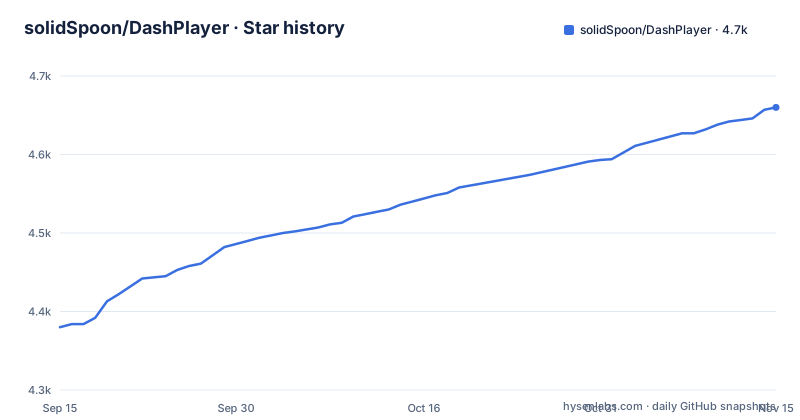
- solidSpoon/DashPlayer4,660 ★ · +280
| Repository | 2026-09-15 | 2026-11-15 |
|---|---|---|
| solidSpoon/DashPlayer | 4.4k | 4.7k |
280 Stars in the last 61 days, measured from the daily GitHub snapshot. Compare with other projects
Editorial analysis
DashPlayer moves by subtitle sentence, not by timestamp
The player treats a subtitle line as the unit of playback rather than a second counter. `←` or `a` steps back one sentence, `→` or `d` steps forward, and `s` repeats the current sentence. Pressing `r` puts the player into single sentence repeat mode, and `u` turns on automatic pause so playback stops the moment the current sentence ends, which is the setup for intensive listening practice. Word level subtitles toggle with `l`, playback speed with `p`, the dark or light theme with `t`, and the AI chat window opens with `?` or `/`. Timing for the sentence you are looking at moves in 0.2 second steps: `z` and `x` shift its start earlier or later, `n` and `m` do the same for its end, and `v` discards the adjustments. A clip goes to your list with `Shift + L`, the control panel opens with `Shift + P`, and every binding above can be reassigned in the settings center.
Hover lookup answers from a bundled ECDICT subset
Pointing the mouse at an unfamiliar word opens a lookup without stopping playback. The dictionary that ships inside the app is an offline subset of ECDICT under the MIT License, and it carries phonetic transcription, definitions, Collins star ratings, word frequency, and exam tags, so a common word can be checked before you configure anything at all. Clicking an entry plays the pronunciation. The AI side is separate: subtitle translation, AI powered word lookup, and whole sentence learning all run against an OpenAI interface that you configure before first use. That split decides what you get without a key and what you do not. The bundled data covers everyday vocabulary but carries no sentence grammar, and the AI features are the part that breaks a long sentence into grammar, phrases, and unfamiliar words, or answers a free question about the line on screen.
Parakeet v3 writes the subtitles you do not have
When a file arrives without subtitles, the player can make its own. A local speech recognition model, Parakeet v3, is downloaded from the settings center, and after that a video can be turned into subtitled study material in one click with no API configured and no charge. Playback covers the common video and audio formats plus srt, vtt, and ass subtitle files, loaded either through `打开文件` for one video with its subtitle or through `打开文件夹` for a whole directory. The vocabulary workshop automatically clips the video segments that contain unfamiliar words, so review clips come out of footage you already have instead of out of a separate flashcard deck. Two limits follow from doing recognition locally. The model has to be fetched before the first attempt, and everything you study rests on the accuracy of that transcription rather than on a human written subtitle track. The author also names Memo for Windows and macOS and MacWhisper for macOS as outside tools that can produce subtitles instead.
No URL bar: online video has to be downloaded first
The player is built for local playback. There is no address field for a network stream, no remote library, and nothing that fetches a playlist. Anything you want to watch has to exist on disk first, and for that step the author recommends Internet Download Manager on Windows and Downie on macOS. That single decision reshapes a study routine. You own where the files sit, how much disk a course takes, whether a saved file ships with a matching subtitle in the same folder, and whether you are allowed to keep a copy at all. Remembering half a phrase from yesterday means opening the file again instead of typing into a search box. Long material is meant to be consumed in pieces, since the project advertises splitting a long video so a finished section can be deleted, and that habit also means the original file and your cut pieces can drift apart if you trim them by hand.
Unsigned builds make you clear the OS warning by hand
The application is not signed, so every operating system stops and asks before it opens. Windows ships two formats, and the difference decides whether you need administrator rights:
| Format | What you get | |---|---| | `.exe` (recommended) | Double click to install, no administrator rights needed | | `.msi` | Has an install wizard, can customize the install path, needs administrator rights |
When Windows calls the file unsafe, the documented route is `更多信息` then `仍要运行`. On macOS you pick the `.dmg` for your chip, `arm64` for Apple Silicon M series and `x64` for Intel, then drag `DashPlayer` into Applications. A refused launch shows a dialog saying the developer cannot be verified, and the path is `Cancel`, then 设置, then 隐私与安全性, then `仍要打开`, then `打开` in the popup, after which the warning stops appearing. When macOS instead reports the app as damaged, the console fixes it:
xattr -c /Applications/DashPlayer.appBoth routes mean you switch off a protection layer on your own machine, and an unsigned build leaves you no signature to verify first.
The dash-player rename can leave two copies installed
Linux gets an AppImage plus .deb and .rpm packages. The AppImage needs no install at all:
chmod +x DashPlayer-*.AppImage
./DashPlayer-*.AppImage
If it refuses to start with `dlopen(): error loading libfuse.so.2`, either install `libfuse2` with `sudo apt install libfuse2` on Debian and Ubuntu, or run `./DashPlayer-*.AppImage --appimage-extract-and-run`. The repository packages split by distribution family:
# Debian/Ubuntu 系
sudo dpkg -i dashplayer_*.deb

# Fedora/RHEL 系
sudo rpm -i dashplayer-*.rpm
The package name changed from `dash-player` to `dashplayer` so it matches the desktop window identity. Anyone who installed 6.12.x or earlier has to remove the old package first:
# Debian/Ubuntu 系
sudo apt remove dash-player

# Fedora/RHEL 系
sudo rpm -e dash-player
Skip that step and both versions stay on the machine, leaving two DashPlayer entries and no clear signal about which one you just opened.
Bluetooth controllers reach the player as keyboards
Handheld playback control rests on gamepads that enumerate as keyboards. The Micro and Zero2 controllers from 8BitDo are the models named in the documentation, chosen because they are small enough to hold in one hand. You link the controller in keyboard mode, open the shortcut settings inside DashPlayer, and map its buttons to the keys you care about, usually the ones that repeat a sentence and step through lines. Because the mapping is the whole mechanism, anything your controller never emits as a keystroke cannot be bound, and a controller that drops out of keyboard mode mid session stops delivering the assignments you configured. The same panel rebinds the ordinary keyboard shortcuts, so a controller profile and a keyboard profile are the same list of assignments rather than a separate subsystem.
AGPL-3.0, Electron Forge, and Node 22.x in the repository
The repository shows the packaging shape directly. `forge.config.ts` drives the build, `vite.main.config.ts`, `vite.preload.config.ts`, and `vite.renderer.config.ts` split the three processes, and `package.json` names the entry point `.vite/build/main.js` with `dashplayer.desktop` as the desktop file. `engines` asks for Node 22.x and `yarn.lock` is the lockfile, while every Electron Forge script first runs build:mobile and the download script:
"start": "yarn run build:mobile && yarn run download && electron-forge start",
"make": "yarn run build:mobile && yarn run download && electron-forge make",
"lint": "eslint -c .eslintrc.json --ext .ts,.tsx,.mjs qa src",
"test:base": "cross-env ELECTRON_RUN_AS_NODE=1 electron node_modules/vitest/vitest.mjs"
Unit tests run through Vitest inside Electron with `ELECTRON_RUN_AS_NODE=1`. `drizzle.config.ts` and `drizzle/` indicate a database layer, `Writerside/` and `docs/` hold documentation sources, and `.env.example` exposes only log levels through `DP_LOG_LEVEL` and `VITE_DP_LOG_LEVEL`, with the AI endpoint settings living on the project documentation site. Under AGPL-3.0, handing a modified build to other people requires passing along the corresponding source.
Editorial conclusion
Use DashPlayer when your study library is a folder of downloaded video with subtitle files and you want to repeat one sentence at a time rather than browse a streaming catalog. Skip it when you need a URL player, when machine policy blocks unsigned applications, or when you will not add an OpenAI key and still expect sentence analysis to work. Before installing on Linux, check whether an older dash-player package is still on the machine. The last push is dated 2026-11-01 and v6.16.0 shipped 2026-10-28, so the release line is moving quickly.
Frequently asked questions
what is dash player
In this repository DashPlayer is a desktop video player for English study: bilingual subtitles, navigation by subtitle sentence, hover word lookup, and subtitle generation from a local speech recognition model. It plays local files through 打开文件 or 打开文件夹 rather than network streams.
Does DashPlayer need an API key to make subtitles?
No for subtitles, yes for the AI parts. Subtitle generation runs on a local Parakeet v3 model downloaded from the settings center and costs nothing, while subtitle translation, AI word lookup, and whole sentence learning need an OpenAI interface configured first.
Why does macOS refuse to open DashPlayer?
The build is unsigned, so Gatekeeper blocks it. Cancel the dialog, open 设置 then 隐私与安全性, click 仍要打开, then confirm with 打开. A damaged app message is cleared from the console with xattr -c /Applications/DashPlayer.app.
Can DashPlayer stream a video from a URL?
No. The player is built for local playback, so you save the file first with a download tool. The author recommends Internet Download Manager on Windows and Downie on macOS for that step.
What happens if I install the new Linux package over the old one?
The package name moved from dash-player to dashplayer, so installing over 6.12.x or earlier leaves both versions installed. Remove the old one first with sudo apt remove dash-player or sudo rpm -e dash-player.
How do I start the AppImage on Linux?
chmod +x DashPlayer-*.AppImage, then run ./DashPlayer-*.AppImage. A missing FUSE error (dlopen(): error loading libfuse.so.2) is resolved by installing libfuse2 with sudo apt install libfuse2, or by running ./DashPlayer-*.AppImage --appimage-extract-and-run.
Official sources
Add this badge to your README
If you maintain this project, the badge below links readers to this analysis and shows its maintenance status from the daily GitHub snapshot. Paste the markdown into your README; add ?metric=license or ?metric=stars to the image URL for a different field.

[](https://hysenlabs.com/projects/solidspoon-dashplayer)Star history chart for your README
[](https://hysenlabs.com/projects/solidspoon-dashplayer)Was this useful?