CloudCLI binds 0.0.0.0 by default and keeps your auth database there
Use Claude Code, OpenCode, Cursor CLI, and Codex on mobile and web with CloudCLI (aka Claude Code UI). CloudCLI is a free open source webui/GUI that helps you manage your Claude Code session and projects remotely.
At a glance
- What is it?
- CloudCLI, formerly Claude Code UI, is an AGPL-3.0 web and mobile front end that drives the Claude Code, Cursor CLI and Codex command line agents. It ships as an npm package requiring Node.js v22+, as an experimental Docker sandbox, and as the open source UI layer behind a paid cloud service, and its default configuration listens on every interface.
- Who is it for?
- CloudCLI fits an individual who wants to reach an agent session from a phone and accepts hosting the server on their own machine, since the self-hosted and sandbox tiers are free and the cloud tier starts at a monthly fee for teams. Before exposing it, set HOST to 127.0.0.1 and put it behind your own authentication, because the default binds all interfaces and the database holds credentials and tokens.
- Can I use it commercially?
- Yes, with strict conditions. AGPL-3.0 is a network copyleft licence: if people use a modified version over a network, for example as a hosted service, you must offer them its source code under the same licence.
- Is it still maintained?
- Yes. The repository last received commits 1 day ago.
- What is it written in?
- Mainly TypeScript, according to GitHub's language statistics.
Answers come from the project's GitHub data, last synced on November 14, 2026, and from our analysis. They are not legal advice.
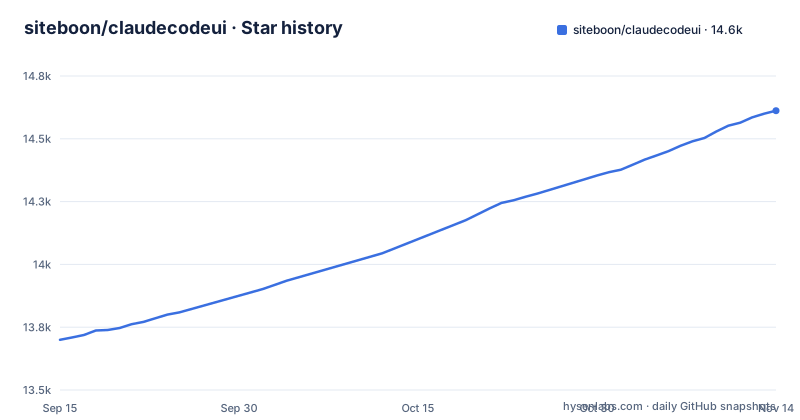
Star history
- siteboon/claudecodeui14,612 ★ · +912
| Repository | 2026-09-15 | 2026-11-14 |
|---|---|---|
| siteboon/claudecodeui | 13.7k | 14.6k |
912 Stars in the last 60 days, measured from the daily GitHub snapshot. Compare with other projects
Editorial analysis
The default HOST is 0.0.0.0 and the auth database sits behind it
The environment template is explicit about its own defaults. The host line reads 0.0.0.0 for all interfaces, with a comment telling you to use 127.0.0.1 to restrict to localhost only. The same file describes the database path as the location where user credentials, API keys and tokens are stored. Put those two facts side by side and the default posture is clear: a service whose credential store is reachable from every network interface, on a machine that the project's own comparison table says must stay on. The quick start opens http://localhost:3001, which hides this, because a local browser only exercises one of the bound addresses. If you follow the documentation's remote setup for your phone, you are the one who has to notice the bind address, so change it before the first remote session rather than after.
Two context window variables have to be kept in agreement by hand
The context window budget appears twice in the configuration template, once as VITE_CONTEXT_WINDOW and once as CONTEXT_WINDOW, both set to 160000. The duplication is not an accident: one is the value the frontend sees and the other is the value the server sees, and the file documents the setting as the Claude Code context window size, described as the maximum tokens per session. Nothing in the template states that the two must match. The template also calls both values a fallback only: a Claude session uses the window the SDK reports for its model once a turn completes. If you tune this for a particular model, change both values in the same edit, and confirm the effective limit from the running service rather than from the template file.
Every Claude Code tool is disabled until you turn it on by hand
The security notice says plainly that all Claude Code tools are disabled by default, with the stated reason that this prevents potentially harmful operations from running automatically. Enabling them is a three step manual path: open the gear icon in the sidebar, switch on only the tools you need, and apply. The preferences are saved locally, so they persist on that installation and travel nowhere else. The consequence is a first run that looks inert. An agent that can read and write nothing may look broken rather than locked down, and the fix is a settings panel you have to know exists. The README also recommends starting with basic tools and adding more as needed, which is sound advice for a server reachable from a phone. Worth doing deliberately on a shared machine, since a tool you enabled once stays enabled for every later session.
The Docker sandbox path supports Claude Code and Codex but drops Cursor CLI
Three ways to run the same UI are compared in a table, and one row breaks the pattern. The self-hosted npm option and the cloud option both list Claude Code, Cursor CLI and Codex. The Docker sandbox, marked experimental, lists Claude Code and Codex only. That path is also the only one with a hypervisor-level microVM isolation story, which is precisely why the omission matters: the mode you would choose to sandbox an agent is the mode that cannot drive Cursor. Running it takes a command that targets a project directory and requires the sbx CLI from Docker's sandbox tooling, and the README says it starts Claude Code by default.
npx @cloudcli-ai/cloudcli@latest sandbox ~/my-projectIf your agent workflow is Cursor-based, isolation is not available to you here and the choice is between the host process and the paid cloud tier.
Self-hosted means your machine stays on; the managed tier starts at a monthly fee
The comparison table keeps a row for whether the machine has to stay on, and both self-hosted answers are yes. Reaching either one starts from the same npm entry point, which needs Node.js v22 or newer.
npx @cloudcli-ai/cloudcliInstalling it globally for regular use is the alternative.
npm install -g @cloudcli-ai/cloudcli
cloudcli
CloudCLI Cloud is the only row marked no, because the environment runs elsewhere. Access differs with it: the npm option is reached by browser at your IP and a port, the sandbox option through localhost and a port, and the cloud option through a browser, any IDE, a REST API and n8n. Cost follows the same split, with the two self-hosted rows labelled free and open source and the cloud row starting at seven euros per month. Team sharing is the other dividing line, marked no for both self-hosted rows and yes for the cloud. So the practical question for an individual is whether their own machine being a server is acceptable, and for a team it is whether the missing sharing and the always-on host are worth the fee.
MCP configuration is a synced dotfile in one mode and app-managed in the others
The MCP configuration row is the one that quietly breaks continuity when you move between environments. In the self-hosted npm mode, configuration is synced with the dotfile in your home directory, which means your server list follows the same file your terminal agents already use. In the sandbox mode and in the cloud mode, configuration is described as managed through the UI, so the list lives in whatever storage the interface writes to. The consequence appears the first time you switch a task from your laptop to an isolated sandbox: the servers you configured are not the servers the sandbox sees, and the difference is not an error message but a silently shorter tool list. Decide where your MCP definitions are meant to live before you rely on them across modes.
The published package carries the Electron app and the server bundle together
The package metadata describes one artefact that contains several products. It is an ES module package named @cloudcli-ai/cloudcli with a main entry in the built server output, and the cloudcli binary resolves to a script inside that same built server tree. The files list includes the electron directory, the server directory, a shared directory, the built client, the built server, the scripts directory and a single API documentation page. So the desktop companion and the web server ship in one tarball, and the README says the desktop app is optional. Development reflects the same split, with separate scripts for the Vite client, the tsx server and Electron, plus release scripts that stage the desktop app and produce a dmg on macOS and an nsis installer on Windows. The consequence for anyone vendoring or auditing is that you download more than a server, and the AGPL-3.0 licence with its NOTICE file applies to the whole bundle.
The list of models you can pick is fetched at runtime, not pinned
Model compatibility is claimed for the Claude and GPT families, and then the actual list is deferred to an endpoint: the README points at GET /api/providers/:provider/models as the runtime source of the full list of supported models. That design keeps the UI current as providers add models, and it removes any offline answer to the question of what the interface can actually use. The set you get depends on what that endpoint returns at the moment your client asks, which is not pinned in the repository and not visible in a changelog. If you write configuration or documentation that names specific models, that list will drift without notice. If you pin model identifiers in automation, check them against the endpoint rather than against a copy of the README, because the two answers are not guaranteed to agree.
Editorial conclusion
CloudCLI fits an individual who wants to reach an agent session from a phone and accepts hosting the server on their own machine, since the self-hosted and sandbox tiers are free and the cloud tier starts at a monthly fee for teams. Before exposing it, set HOST to 127.0.0.1 and put it behind your own authentication, because the default binds all interfaces and the database holds credentials and tokens. Also, if you rely on Cursor CLI, stay on the npm path or the cloud tier, since the Docker sandbox does not support it.
Frequently asked questions
how to install claude code ui
CloudCLI runs through npm and needs Node.js v22 or newer. Either run it once with npx, or install it globally with npm and then run the cloudcli command, after which you open http://localhost:3001 and existing sessions are discovered. CloudCLI Cloud needs no setup, and the Docker sandbox option is experimental.
what is claude code ui
It is CloudCLI, a free open source web and GUI for managing Claude Code sessions and projects remotely, licensed AGPL-3.0 and written in TypeScript. The same interface drives Cursor CLI and Codex, and it also powers the hosted CloudCLI Cloud product.
Does Claude Code have UI?
Claude Code is reached through its command line interface, and CloudCLI is the web layer built on top of that CLI. It is a separate project, published to npm as @cloudcli-ai/cloudcli, and it can be run on your own machine or reached remotely from a browser or phone.
claude code ui vs cursor
They are not alternatives inside this project. CloudCLI presents a CLI selection screen and can drive Claude Code, Cursor CLI and Codex from one interface. The one restriction is the experimental Docker sandbox mode, which supports Claude Code and Codex but not Cursor CLI.
Official sources
Add this badge to your README
If you maintain this project, the badge below links readers to this analysis and shows its maintenance status from the daily GitHub snapshot. Paste the markdown into your README; add ?metric=license or ?metric=stars to the image URL for a different field.

[](https://hysenlabs.com/projects/siteboon-claudecodeui)Star history chart for your README
[](https://hysenlabs.com/projects/siteboon-claudecodeui)Was this useful?