Sourcebot's compose file ships five placeholder secrets and leaves the web port off loopback
Sourcebot is a self-hosted tool that helps humans and agents understand your codebase.
At a glance
- What is it?
- A self-hosted code search, navigation and question answering tool where the app binds to every interface while Postgres and Redis bind to loopback only, the auth secret defaults to a row of zeros, and the telemetry disclosure links to a code search on the vendor's own demo.
- Who is it for?
- Sourcebot suits a team that wants code search, cross-repository navigation and a grounded question answering feature on infrastructure it controls, and that is willing to read the compose file before the first start rather than after. Check five things.
- Can I use it commercially?
- Yes. MIT is a permissive licence: you can use, modify and sell software built on it, as long as you keep its copyright and licence notices.
- Is it still maintained?
- Yes. The repository last received commits 5 days ago.
- What is it written in?
- Mainly TypeScript, according to GitHub's language statistics.
Answers come from the project's GitHub data, last synced on November 15, 2026, and from our analysis. They are not legal advice.
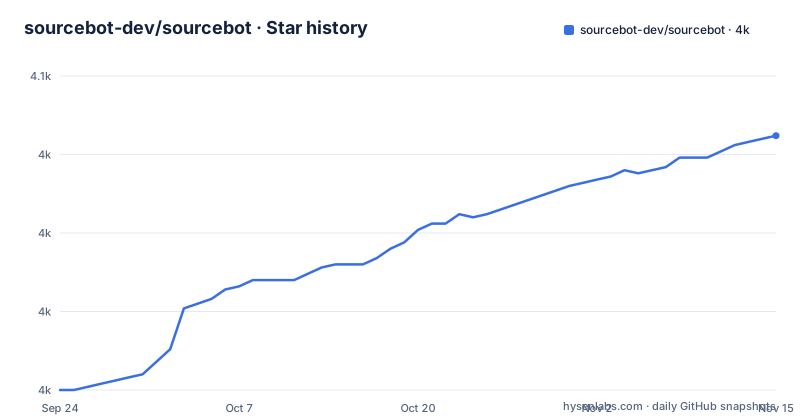
Star history
- sourcebot-dev/sourcebot4,031 ★ · +81
| Repository | 2026-09-24 | 2026-11-15 |
|---|---|---|
| sourcebot-dev/sourcebot | 4k | 4k |
81 Stars in the last 52 days, measured from the daily GitHub snapshot. Compare with other projects
Editorial analysis
The compose file's default posture in full
Five values in the app service fall back to placeholders, each carrying a comment marking it for change. The auth secret falls back to a run of zeros with a note to generate one with a command producing base64 of 33 bytes. The encryption key falls back to a run of zeros with a note to generate base64 of 24 bytes. The database URL falls back to a connection string with the username and password both set to the word postgres, and the Redis URL falls back to an unauthenticated local address. Two details are worth reading closely. The first placeholder is 33 characters long while the recipe beside it asks for base64 of 33 bytes, which is 44 characters, so the default is not the shape the tool expects. The second placeholder is 32 characters, which is exactly the length of base64 of 24 bytes, so that one matches. The second detail is the port asymmetry. Postgres and Redis both publish on 127.0.0.1, loopback only, while the app publishes 3000 on every interface. So the two backing services are deliberately kept local and the user-facing one is deliberately not, with the auth secret as the only thing in between.
Loopback for the data stores, every interface for the app, and plain HTTP for the auth URL
Follow that asymmetry one step further. The app's auth URL defaults to a plain http:// address on port 3000, not https, which is coherent for a local install and wrong for the exposure the port mapping actually provides. The container runs as a named non-root user rather than root, and it is set to restart always, and it waits on Postgres and Redis becoming healthy before starting, which are three sensible defaults that a reader should not skip past while looking at the port line. The result of putting those together is a service that is reachable from any host that can route to the machine, protected by a secret that is a row of zeros unless someone edited the file, reachable over an address scheme the file itself defaults to plain HTTP, and serving a view of every repository the operator has connected plus the answers the question answering feature produces from them. The file does mark the four values for change. It does not say that skipping the change leaves a search index of your codebase on the network.
Neither the orchestration file nor the image is pinned
The deployment instructions are four commands, and two of them reach a moving target. Step one downloads the compose file from a URL on the main branch, not from a release tag. Step three runs compose up against an image reference whose tag is latest, and the service is configured with a pull policy of always, so the image is re-pulled on every start regardless of what is already local. The result is that a self-hosted install is defined by two things the vendor can change at any moment, and neither is a fixed version. The image also does not come from Docker Hub. It is pulled from a registry host belonging to the project, under a path that repeats the organisation and repository name, so the availability of a self-hosted deployment depends on that registry continuing to serve the tag. There is no digest in the reference to pin the exact image either. For an installation you intend to rely on, the three values to replace are the image reference, the pull policy and the URL in step one.
A file called JSON whose own example contains comments
Step two creates the configuration file, and the documentation calls it a JSON file. The example it supplies is not valid JSON:
echo '{
    "$schema": "https://raw.githubusercontent.com/sourcebot-dev/sourcebot/main/schemas/v3/index.json",
    // Comments are supported.
    // This config creates a single connection to GitHub.com that
    // indexes the Sourcebot repository
    "connections": {
        "starter-connection": {
            "type": "github",
            "repos": [
                "sourcebot-dev/sourcebot"
            ]
        }
    }
}' > config.json
Two comment lines, which a strict parser rejects. The file does acknowledge this, in the first comment, so this is a deliberate format rather than a mistake, and the practical consequence is that anything you point at config.json has to accept comments, including the editor you wrote the echo command in. The schema reference is the second thing to notice. It points at a URL on the main branch, under a versioned path of v3, so editor-side validation depends on a branch that can change and on a schema major that can move. That schema is not hand written. The tree holds a schemas directory, a workspace package for it, and a watch script that regenerates it during development.
The telemetry disclosure links to a code search, not to a policy page
The note at the end of the deployment section says Sourcebot collects anonymous usage data by default, that no sensitive data is collected, and that it can be disabled by setting one environment variable to true. On by default for a tool whose selling point is that it runs on your infrastructure is a decision worth a sentence in your own deployment notes, particularly since the file describes the rest of itself as self-hosted. The link attached to the phrase about anonymous usage data is the odd part. Its target is not a documentation page. It is a search query against the project's own public demo instance, looking for a function whose name begins with an event capture call, scoped to the Sourcebot repository. So the disclosure about what is collected points at a code search you would have to run yourself to find the call site, rather than at a page that says what is collected, how long it is kept or where it goes. The opt-out variable is documented properly in prose. The scope of the data is not documented anywhere in the repository.
Search runs on a vendored Go submodule and navigation needs a ctags binary
The search engine is not a service you configure, it is source in the tree. The repository carries a gitmodules file and a vendor directory containing a project called zoekt, and the build compiles it: the Makefile target creates a bin directory and runs a Go build inside the vendored directory, and the container image has a dedicated builder stage that copies that module's manifest, downloads its dependencies, copies the source and builds its command packages with cgo disabled. Vendoring it as a pinned submodule is a good choice, since the search behaviour then cannot change under a self-hoster the way a latest tag can. Code navigation is the separate half. The feature list promises IDE level navigation, meaning goto definition and find references, and the Makefile sets an environment variable pointing at a ctags command in the same target that builds the search binary. There is a shell script at the root whose name says it installs ctags on macOS. So there are two toolchains to satisfy for a local checkout, a Go compiler for search and a ctags binary for navigation.
The Makefile builds the search binary and then discards the environment that finds it
The Makefile target that builds the search engine has four lines and the last two do nothing. Make runs each line of a recipe in its own shell, so an export on one line is gone before the next line starts. The target creates the bin directory, runs the Go build, exports a PATH entry pointing at that bin directory, and exports a variable naming the ctags command. The build on the second line runs before the PATH export on the third, so the freshly built binary is not on the path when the build happens, and nothing after the exports uses either value. The net effect is that the target produces a binary in a directory and forgets to tell anything about it, and the variable naming the ctags command is set and never read. The same repository does this correctly elsewhere. The dev scripts in the manifest run everything through a helper that prefixes the path and loads an environment file before invoking the underlying command, which is the mechanism the Makefile would need and does not use. The practical effect for a new contributor is that make succeeds, the binary exists, and the search process is not on the path afterwards.
Three build targets are not phony, and the cache flush looks for a container the compose file never names
Two problems in the same file, both invisible without reading it. The first is target declarations. The file aggregates three targets and declares exactly one phony target, a name with no recipe and no prerequisites, while the three real targets are not declared phony at all. If a file or directory named update_submodule, zoekt or yarn ever appears in the working directory, make will consider that target already satisfied and skip it, silently. The second is the reset logic, which is duplicated verbatim between two targets. Both blocks test whether a running container list contains a name, and if it does they flush that container's cache, and otherwise they run a bare cache flush command against the default local address. The name they test for is not one the compose file sets, because the compose file gives an explicit container name only to the app service and leaves the cache service to be named by compose. So on most runs the guard misses and the fallback runs, and the fallback talks to whatever is listening on that address, which is the same address the compose file publishes its cache on. A developer with an unrelated local cache on that port loses it on a make clean.
Editorial conclusion
Sourcebot suits a team that wants code search, cross-repository navigation and a grounded question answering feature on infrastructure it controls, and that is willing to read the compose file before the first start rather than after. Check five things. The authentication secret and the encryption key both default to placeholder values, and one of the two placeholders is the wrong length for the command that generates it, so a start that appears healthy may still be running on a known secret. The web port publishes on every interface while the database and cache publish on loopback, so the posture is deliberate but the exposure is real. Neither the compose file nor the image is pinned, since both point at a branch and a latest tag. Telemetry is on unless you set one variable. And the licence identifier recorded for it is undetermined, so check the licence file before you redistribute anything built on it.
Frequently asked questions
What is Sourcebot?
A self-hosted tool for understanding a codebase, written in TypeScript. It provides code search across all connected repositories and branches, IDE level code navigation, a file explorer, and a question answering feature that searches the code and answers with inline citations.
how to use sourcebot
Download the compose file, create a configuration file listing the repositories to index, set the secrets in the compose file, then run docker compose up and open http://localhost:3000. The configuration file is JSON with comments and carries a schema reference for editor validation.
Does Sourcebot send telemetry by default?
Yes, the deployment note says anonymous usage data is collected by default and that no sensitive data is collected. It can be turned off by setting the SOURCEBOT_TELEMETRY_DISABLED environment variable to true.
What database and cache services does Sourcebot require?
Postgres, default version 16, and Redis, default version 8, both declared as services in the compose file with health checks that the app waits on. Postgres and Redis publish on 127.0.0.1 only, while the app itself publishes port 3000 without a loopback restriction.
What licence is Sourcebot under?
The recorded licence identifier is undetermined, and a file named LICENSE.md is present at the root while the README states no terms in prose. The tree also contains an ee directory whose purpose the README does not explain, so check the licence file directly before redistributing anything built on it.
What does Sourcebot need to build search from source?
A Go toolchain, because the search engine is vendored as a git submodule under a directory called vendor and is compiled by a Makefile target, and a ctags binary for code navigation, with a macOS install script provided at the root. The container image builds the search engine in its own stage with cgo disabled.
Official sources
Add this badge to your README
If you maintain this project, the badge below links readers to this analysis and shows its maintenance status from the daily GitHub snapshot. Paste the markdown into your README; add ?metric=license or ?metric=stars to the image URL for a different field.

[](https://hysenlabs.com/projects/sourcebot-dev-sourcebot)Star history chart for your README
[](https://hysenlabs.com/projects/sourcebot-dev-sourcebot)Was this useful?