codex-app-mirror: probes every 15 minutes, releases only when upstream moves
Verbatim, verifiable mirror of the official Codex desktop app, probed every 15 minutes, SHA256-checked, with direct download access from within China and a Sparkle delta-update feed for Mac.
At a glance
- What is it?
- A distribution mirror for the official OpenAI Codex desktop installers, with checksums, a signed manifest contract, a geo-routing layer and a macOS incremental update feed. The interesting mechanism is that the mirror keeps the original signature and rewrites only the download address.
- Who is it for?
- Use this mirror if the official store or download route is unreliable from where you are, and if you are willing to verify what you download: the project publishes checksums with every release, a manifest with a JSON schema, and it preserves the vendor's own signature rather than replacing it. Skip it if you can reach the official download, because the official package also configures its own update channel and you would then be on two.
- Can I use it commercially?
- Yes. MIT is a permissive licence: you can use, modify and sell software built on it, as long as you keep its copyright and licence notices.
- Is it still maintained?
- Yes. The repository received new commits within the last day.
- What is it written in?
- Mainly Shell, according to GitHub's language statistics.
Answers come from the project's GitHub data, last synced on November 15, 2026, and from our analysis. They are not legal advice.
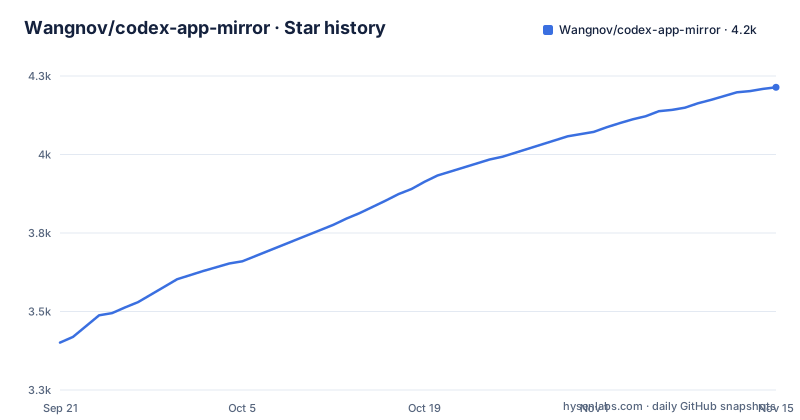
Star history
- Wangnov/codex-app-mirror4,214 ★ · +813
| Repository | 2026-09-21 | 2026-11-15 |
|---|---|---|
| Wangnov/codex-app-mirror | 3.4k | 4.2k |
813 Stars in the last 55 days, measured from the daily GitHub snapshot. Compare with other projects
Editorial analysis
It mirrors installers and promises not to touch them
The scope statement is short and it is the contract.
The project says it only mirrors. It does not build, does not modify, does not repackage. The stable channel republishes the official Windows store package and the official macOS disk image exactly as they are, attached to a GitHub release, and distributes them through short links on a content delivery network.
There is a stated reason for existing at all: when the store listing or the official download is inconvenient or unreachable, people need a stable and verifiable way to get the same bytes.
The other half of the job is narrower than the first. For macOS, the mirror also serves an incremental update feed, which downstream clients consume. So there are two deliverables: files, and a subscription endpoint.
The Linux build is the exception that proves the rule. It only ever appears as a separate prerelease during its preview period, which is the same promise with a narrower blast radius.
Three channels, and Linux is deliberately quarantined
There are three release channels and the project names them explicitly: stable, beta, and a Linux preview.
The Linux channel exists because the upstream Linux situation is different. OpenAI shipped a unified desktop application for Linux in preview in August 2026, and that application bundles the assistant, a work feature and Codex together. So the Linux artefact is not a Codex installer at all; it is a different product that happens to contain it.
The mirror therefore refuses to fold it into the stable channel. Linux packages go out as prereleases only. They do not advance the latest release pointer, they are not uploaded to the object storage origins, and they do not get a short link. To publish one you must supply the exact upstream version, and before anything is released it verifies the upstream package repository signatures with a fixed public key and then gates each of the four downloaded packages on name, version, architecture, file list, embedded key and package signature.
The last detail is the one that closes the loop. Once the official package is installed, it configures the vendor's own update repository, so subsequent automatic updates come from the vendor by default, not from this mirror.
The macOS trick: keep the signature, change only the address
Automatic updates on macOS are the most interesting thing here, because the mirror solves the problem without breaking the signature.
A client subscribes to a feed in the Sparkle format, checks for a new version, and downloads only the delta between the two versions rather than the whole installer again. The mirror builds that feed from the official one.
Here is what it changes. It copies the official archive and the vendor's signature byte for byte, and rewrites one field: the address in the enclosure element, which is where the client fetches the file from.
Why the original signature still works is the part worth understanding. That signature scheme signs the archive bytes themselves, not the feed that references them. So as long as the mirrored archive is byte-identical to the official one, the signature that came with the official archive remains valid for the copy. The project puts it plainly: the mirror does not, and cannot, forge that signature.
The consequence is a chain of trust you can check without trusting the mirror. The client verifies the signature as it always would, and if the mirror ever served different bytes the verification fails. If the client cannot find a matching delta it falls back to downloading the full archive, so a failed incremental update degrades rather than breaks.
Probe cheaply, download rarely, release once
Every run is the same three stages, and the design goal is to avoid downloading anything unless upstream actually changed.
The probe is cheap and platform specific. On Windows it asks the store's display catalogue for package metadata on both architectures, then uses a different metadata endpoint to resolve a downloadable package identifier and a temporary address on the vendor's delivery network. If the arm64 address cannot be resolved yet, the run records that architecture in the manifest with a catalogue-only status rather than failing.
On macOS the probe reads the cache validators from the official image and feed, plus the version field inside the feed. Those three headers are the whole check.
On Linux it verifies the upstream repository metadata with a fixed public key, resolves the four versioned package addresses, and only then applies the package-level gates.
Then comparison. The probe result is compared field by field against the manifest of the newest release. Nothing changed means the run ends there, with no download and no duplicate release. Any change means every downloadable installer is fetched, checksums and a manifest are produced, the macOS feed is rebuilt, and one new release is published.
One short link, two origins, selected by country header
After a release is published its assets are copied to two storage origins, and a small edge worker decides which one serves the request.
The global origin is object storage behind a content delivery network. The secondary origin is a different object store, reached through presigned addresses, and it exists for users on networks where the first origin is slow or unreachable.
The router reads a country header that the edge network attaches to every request, and sends requests originating in mainland China to the secondary origin and everything else to the global one. The short links do not change: the same address works everywhere and the routing happens behind it, which means a user pasting a link into a chat does not need to know which variant to pick.
Two restrictions keep it honest. Only the current version is reachable through the short links; anything older has to be found by browsing releases, which is deliberate, because a short link that can silently change its target is a short link you cannot bookmark.
There are also short links for the checksum file and for the manifest, so verification does not require a release page.
Fifteen minutes from a cron trigger, six hours from a fallback
Scheduling is the smallest part of the design and the one that tells you what the author is defending against.
The primary scheduler is a cron trigger on the edge platform, firing the same workflow file every fifteen minutes. That workflow can also be dispatched by hand.
The fallback is the workflow platform's own scheduled runs, every six hours on a specific schedule expression.
The reason for having two is stated: the platform's scheduled tasks can be delayed or skipped, and a mirror that misses an upstream release for six hours has failed at the only job it has. So the fast path is the one you control, and the slow path is the one that runs when you are not paying attention.
Fifteen minutes is also the interval the project's own description leads with, and it is the reason the probe is built around cache validators and metadata endpoints rather than around downloading and diffing files. You can only poll that often if polling is nearly free.
Releases are named by the app's internal version, not the store's
The release naming scheme is explained at length, and the explanation is a small lesson in package identity.
A store package has a four part version. The application inside it has its own internal version, which on Windows comes from a manifest file inside the package and on macOS from the bundle's short version string. The two are aligned with each other, and the internal version is what the release is named:
codex-app-26.623.41415
Codex App Mirror 26.623.41415
The four part store version is not discarded. It is recorded in the release body and in the manifest's per-platform package fields, so both identifiers are recoverable from the release.
Platforms that have not shipped the same internal version yet are handled by creating a prerelease first and marking the missing platform as pending, while already published architectures move on immediately. That is a small piece of release engineering that most mirrors do not bother with, and it is what makes the manifest worth having.
The verification artefacts come with every release: a checksum file and a manifest of upstream fingerprints, with the manifest's contract defined by a JSON schema kept in the repository. The repository also carries instructions for coding agents at its root, an edge worker directory for the routing and scheduling, and a scripts directory for the mirror logic itself.
Editorial conclusion
Use this mirror if the official store or download route is unreliable from where you are, and if you are willing to verify what you download: the project publishes checksums with every release, a manifest with a JSON schema, and it preserves the vendor's own signature rather than replacing it. Skip it if you can reach the official download, because the official package also configures its own update channel and you would then be on two. Before you install anything from a third-party mirror, download the checksum file and compare it, and read the manifest contract rather than trusting the filename. And if you rely on automatic updates on macOS, note that the mirror is one link in a chain of trust that already includes the vendor's signature and your client's ability to fall back to a full download.
Frequently asked questions
What does codex-app-mirror do?
It mirrors the official OpenAI Codex desktop installers to GitHub Releases unchanged, for people who cannot reach the store or the official download. The project states that it only mirrors and never builds, modifies or repackages, and it also serves a macOS incremental update feed that downstream clients consume.
How do I verify a download from codex-app-mirror?
Every release ships a checksum file and a release manifest of upstream fingerprints, and the manifest's contract is defined by a JSON schema kept in the repository. Short links for the checksums and for the manifest are published alongside the per-platform download links.
Does codex-app-mirror provide automatic updates?
On macOS, yes, through an incremental update feed that delivers only the delta between versions. The mirror copies the official archive and its signature byte for byte and rewrites only the download address, so the vendor's signature stays valid, and clients fall back to the full archive when no delta matches.
Why are the Linux packages on a separate channel?
Because upstream ships Linux as a preview of a unified desktop application that bundles several products, so it is not the same artefact as the Windows and macOS installers. Linux packages go out as prereleases only, never advancing the latest release or the storage origins, and publishing one requires an exact version plus repository signature checks.
How are codex-app-mirror releases versioned?
By the application's internal version, which comes from a manifest inside the Windows package and is aligned with the macOS bundle version string. The store's four part package version is still recorded in the release body and in the manifest's per-platform fields.
Official sources
Add this badge to your README
If you maintain this project, the badge below links readers to this analysis and shows its maintenance status from the daily GitHub snapshot. Paste the markdown into your README; add ?metric=license or ?metric=stars to the image URL for a different field.

[](https://hysenlabs.com/projects/wangnov-codex-app-mirror)Star history chart for your README
[](https://hysenlabs.com/projects/wangnov-codex-app-mirror)Was this useful?