Spaceship Prompt 4.22.6: a Zsh-only theme that assumes a patched font
🚀✨ Minimalistic, powerful and extremely customizable Zsh prompt
At a glance
- What is it?
- Spaceship is a MIT licensed Zsh prompt shipped as a plain script, a sections directory, and an async entry point, distributed through more than a dozen install paths that do not leave the same files behind. The README shows no configuration variables and links to the website for them.
- Who is it for?
- Spaceship fits people who already run Zsh 5.2 or newer on a terminal with a Powerline or Nerd Font and want segments for Git status, language runtimes, Docker, and Kubernetes. It is a poor fit for Bash, Fish, or any host with a stock font.
- Can I use it commercially?
- Yes. MIT is a permissive licence: you can use, modify and sell software built on it, as long as you keep its copyright and licence notices.
- Is it still maintained?
- Yes. The repository last received commits 6 days ago.
- What is it written in?
- Mainly Shell, according to GitHub's language statistics.
Answers come from the project's GitHub data, last synced on November 15, 2026, and from our analysis. They are not legal advice.
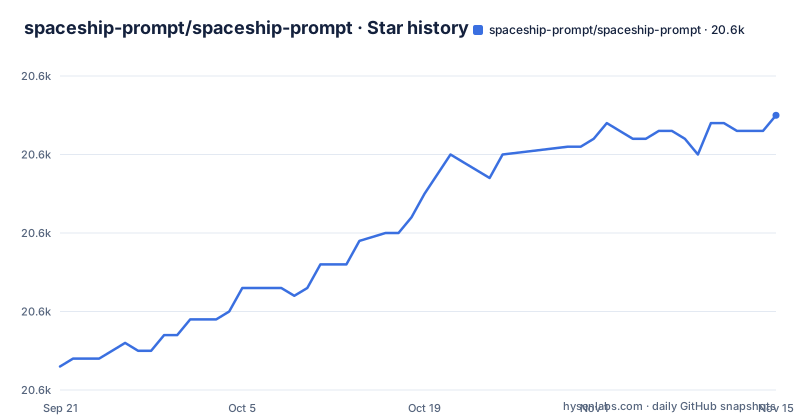
Star history
- spaceship-prompt/spaceship-prompt20,605 ★ · +32
| Repository | 2026-09-21 | 2026-11-15 |
|---|---|---|
| spaceship-prompt/spaceship-prompt | 20.6k | 20.6k |
32 Stars in the last 55 days, measured from the daily GitHub snapshot. Compare with other projects
Editorial analysis
Zsh 5.2 and a patched font are hard prerequisites, not suggestions
Two prerequisites are stated as requirements, and both are checkable. The shell floor is Zsh v5.2 or recent, verified by running `echo $ZSH_VERSION`, whose sample output in the requirements section reads 5.8.1. The font floor is a Powerline Font or a Nerd Font, with Fira Code offered as a popular choice, verified by printing the private use area glyph with `echo -e "\xee\x82\xa0"`.
Neither prerequisite is decorative. The npm package ships lib, scripts, sections, async.zsh, spaceship.zsh, spaceship.zsh-theme and prompt_spaceship_setup, and every one of those entry points is Zsh code, so there is nothing here for Bash, Fish, or a plain Bourne shell. What that costs you is concrete: connect to a host whose terminal is still on a stock bitmap font and the segments that ask for icon glyphs have nothing to draw with. The README points readers whose prompt does not look like the preview at a Frequently Asked Question entry.
sections/ holds one file per segment, and zcompile caches them all
Segment behaviour is not hardcoded into a single file. The repository root carries a sections/ directory, a lib/ directory, an async/ directory, the async.zsh entry file, and the two entry points spaceship.zsh and spaceship.zsh-theme. The Makefile wires that layout into byte-compiled caches with a zcompile pass that walks the theme file, the top-level .zsh files, and everything under lib/ and sections/:
$(ZSH) -fc 'for f in *.zsh-theme *.zsh lib/*.zsh sections/*.zsh; do zcompile -R -- $$f.zwc $$f || exit; done'A matching clean target deletes every .zwc it can find, and the tests target runs ./scripts/tests, the same script npm test invokes. The Dockerfile in the same root pins alpine:3.23, installs zsh git curl python3 py3-pip, writes export TERM=xterm-256color and source spaceship/spaceship.zsh into /root/.zshrc, then starts /bin/zsh. That container is the shortest complete example of a working .zshrc in the repository.
Homebrew, npm, and Oh-My-Zsh each leave a different copy on disk
The three common paths install different things and leave different traces. Homebrew places the theme under its own prefix, and the follow-up line is written for you:
brew install spaceshipecho "source $(brew --prefix)/opt/spaceship/spaceship.zsh" >>! ~/.zshrcnpm puts a second copy in your global node_modules and asks you to source it in ~/.zshrc during install. Oh-My-Zsh does something else entirely: it clones the repository into "$ZSH_CUSTOM/themes/spaceship-prompt" with --depth=1 and symlinks spaceship.zsh-theme beside your other themes, so the active copy is picked by ZSH_THEME="spaceship" rather than by a source line. The cost of mixing any two is that you can hold three copies at once, all sourced in whatever order your .zshrc dictates, and no documented procedure tells you which one drew the last prompt. The instructions never ask you to check for an existing copy, and none of the three cleans up what another one installed.
The npm postinstall edits your .zshrc, and no rollback is documented
package.json is explicit about lifecycle behaviour. Three scripts are declared: postinstall runs ./scripts/install, postuninstall runs ./scripts/uninstall, and test runs ./scripts/tests. The npm path is therefore not a plain download. The install script is the same one the Makefile calls under its install target, described in a comment as linking spaceship into site-functions, and the uninstall target is described as unlinking it. The README says the install command will also ask you to source Spaceship in your ~/.zshrc file.
What that leaves out is the part people hit later: how to undo it by hand. The README's install steps do not cover undoing it; package.json only declares that uninstalling runs ./scripts/uninstall. If the unlink succeeds and your configuration now sources nothing, the repository hands you only the manual install section for starting over from scratch.
Arch splits into a maintained package and an unmaintained git one
Arch users get two choices, and the README labels one of them itself. The maintained path is the AUR package spaceship-prompt, installed from a clone of its recipe:
git clone https://aur.archlinux.org/spaceship-prompt.git
cd spaceship-prompt
makepkg -si
or in one step with `yay -S spaceship-prompt`. Alongside it sits spaceship-prompt-git, which the README calls unmaintained. The behavioural difference is the ordinary one between a versioned package and a source-tracking one: the git package follows master, and master is ahead of the last tag, since the repository's most recent push on 2026-10-26 came after v4.22.6 was tagged on 2026-10-21.
A second gap sits alongside it. The Arch section shows no line that sources spaceship.zsh after makepkg.
No configuration variable appears anywhere in the checkout
Look for a configuration example and there is none in the README: the README shows no variable name, no preset file, and no per-segment switch, only links to spaceship-prompt.sh/config/intro and spaceship-prompt.sh/advanced/creating-section, plus a feature list the README itself frames as some sneak peeks. The consequences for a reader are immediate. The documentation site is built from the docs/ directory with mkdocs, so that is where option names live in the checkout.
The documentation is a separate build with its own dependencies. The root holds docs/, mkdocs.yml, netlify.toml and crowdin.yml, and requirements.txt pins mkdocs, mkdocs-material>=9.6.0, mkdocs-static-i18n>=1.0.0 and mkdocs-redirects>=1.1.0 to build it. Because translations run through Crowdin, the locale you read may lag the English source, so an option you copy from a translated page may be described differently than upstream describes it.
async.zsh ships in the root but no document explains when it loads
The repository root lists an async/ directory and an async.zsh file. Neither appears in the feature list, in the requirements, or in any of the install snippets for Homebrew, npm, Oh-My-Zsh, prezto, zim, antigen, antibody, zinit, zgen, zplug, sheldon, AUR, or the manual clone. Nothing in the README's feature list or install steps states when async.zsh is loaded, what work it moves off the prompt drawing path, or how an individual section opts in.
That gap matters for the one property a prompt cannot trade away, how long it takes to draw. The Makefile can compile, test, install, uninstall, and serve docs, and none of those targets measure rendering time, so the repository offers no timing target and no documented toggle. Someone whose shell feels sluggish under Spaceship has to read the section sources and lib/ directly, or take the website's word for it. The Dockerfile does not help either: it copies the checkout into /spaceship and sources spaceship/spaceship.zsh, which says nothing about whether async mode is active there.
Three tags in two months, and three install families that drift apart
package.json reports version 4.22.6, and the most recent tags are v4.22.4 on 2026-06-24, v4.22.5 on 2026-07-01 and v4.22.6 on 2026-10-21. The default branch is master, the repository is not archived, and the last push landed on 2026-10-26, five days after that final tag, with CHANGELOG.md, .releaserc.json, a Dockerfile and .github/ sitting in the root beside it.
What that cadence means for you depends on which install family you chose. npm holds you at whatever the registry serves, the plugin managers each take a raw repository name in one line, including zinit light, zgen load, a zplug from:github entry, antibody bundle, antigen theme, a zim zmodule and sheldon add, so those follow master rather than a tag, and the AUR package is built from its own recipe. Drift between those three can stay invisible until your prompt renders differently from the screenshots wiki.
Editorial conclusion
Spaceship fits people who already run Zsh 5.2 or newer on a terminal with a Powerline or Nerd Font and want segments for Git status, language runtimes, Docker, and Kubernetes. It is a poor fit for Bash, Fish, or any host with a stock font. Before committing, confirm the font on every machine you ssh into, pick a tagged release or master deliberately, and read the configuration page on the website, because the README links there for configuration.
Frequently asked questions
What are the differences between the Spaceship prompt and the Starship prompt?
The README makes no comparison to Starship. What it fixes for Spaceship is a Zsh requirement of v5.2 or recent, checked with echo $ZSH_VERSION, and a Powerline Font or Nerd Font, checked with echo -e "\xee\x82\xa0".
What is the best prompt for zsh?
No ranking of prompts appears in the README. The conditions Spaceship sets are Zsh v5.2 or recent plus a Powerline Font or Nerd Font, and its segments cover Git and Mercurial status, language runtimes, Docker version, Kubernetes context, package versions, battery, and background jobs.
Do I really need Oh My Zsh?
No. Spaceship installs through Homebrew, npm, prezto, zim, antigen, antibody, zinit, zgen, zplug, sheldon, the AUR, or a manual clone. Oh-My-Zsh is one path among many and needs the repository cloned into "$ZSH_CUSTOM/themes/spaceship-prompt" with spaceship.zsh-theme symlinked into place.
How do I configure the zsh prompt?
The README does not list configuration variables in its visible sections. It links to spaceship-prompt.sh/config/intro for configuration and to spaceship-prompt.sh/advanced/creating-section for building your own section, so option names live on the documentation site, whose sources sit in docs/.
what is spaceship prompt
Spaceship Prompt is a minimalistic, highly customizable Zsh prompt by Denys Dovhan, MIT licensed, at version 4.22.6 in package.json. It shows hostname and user, Git and Mercurial repository status, runtimes including Node.js, Rust, Python, Ruby, Swift, Go and PHP, Docker version, Kubernetes context, package versions, battery level, and a background job indicator.
Official sources
Add this badge to your README
If you maintain this project, the badge below links readers to this analysis and shows its maintenance status from the daily GitHub snapshot. Paste the markdown into your README; add ?metric=license or ?metric=stars to the image URL for a different field.

[](https://hysenlabs.com/projects/spaceship-prompt-spaceship-prompt)Star history chart for your README
[](https://hysenlabs.com/projects/spaceship-prompt-spaceship-prompt)Was this useful?