image-optimizer overwrites your file, runs seven external binaries, and needs npm for one of them
Easily optimize images using PHP
At a glance
- What is it?
- A MIT licensed PHP package that hands your images to whichever command line optimizers it finds on the machine. Every format has its own hardcoded flags, PNGs are compressed lossily before losslessly, and the flag sets for two formats were copied from other people's blog posts.
- Who is it for?
- Fit this if your images are files on a server rather than assets in a build pipeline, and if you would rather hand each one to a purpose built compressor than re-encode everything with an image library. The per format flags are the substance of the package and they are all visible, which is unusual and useful.
- Can I use it commercially?
- Yes. MIT is a permissive licence: you can use, modify and sell software built on it, as long as you keep its copyright and licence notices.
- Is it still maintained?
- Yes. The repository last received commits 9 days ago.
- What is it written in?
- Mainly PHP, according to GitHub's language statistics.
Answers come from the project's GitHub data, last synced on November 14, 2026, and from our analysis. They are not legal advice.
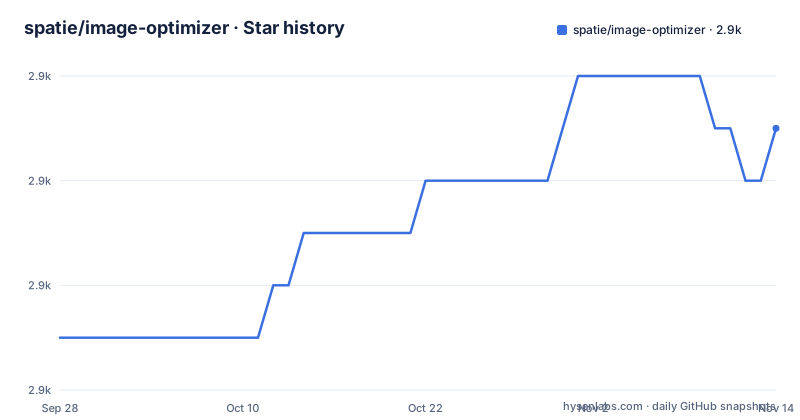
Star history
- spatie/image-optimizer2,883 ★ · +4
| Repository | 2026-09-28 | 2026-11-14 |
|---|---|---|
| spatie/image-optimizer | 2.9k | 2.9k |
4 Stars in the last 47 days, measured from the daily GitHub snapshot. Compare with other projects
Editorial analysis
The whole package is a chain that shells out to whatever is installed
The public surface is four lines of PHP and a great deal of behaviour that lives in other programs.
use Spatie\ImageOptimizer\OptimizerChainFactory;

$optimizerChain = OptimizerChainFactory::create();

$optimizerChain->optimize($pathToImage);
A factory builds a chain, and the chain is handed a path. What happens next is stated plainly twice in the documentation: the image at that path is overwritten by an optimized version which should be smaller, and the package automatically detects which optimization binaries are installed on your system and uses them.
Those two sentences are the contract and the hazard in one place. Overwriting is the default rather than an option, and the detection is silent, so a machine with three of the seven tools installed produces output from three tools and no indication that four were skipped.
Note also what is not claimed. The expected result is described as an optimized version which should be smaller, and no measurement, ratio or benchmark appears anywhere. For a package whose entire purpose is size reduction, that is an unusual amount of restraint, and it means the caller has to verify the effect rather than trust it.
The other end of the surface is format detection. The package handles six formats, and the chain picks the tool or tools for each one, so the caller does not choose an encoder.
One of seven tools is a Node package, in a PHP package's install instructions
There are seven optimizers, and six of them are native binaries you install with a system package manager. The seventh is installed with npm.
The list is JpegOptim for JPGs, Optipng and Pngquant 2 for PNGs, SVGO for SVGs, Gifsicle for GIFs, cwebp for WEBPs and avifenc for AVIFs. Each is used only if it is present on the system.
The three platform install recipes make the npm requirement impossible to miss, because the same line appears in all three. On Debian and Ubuntu it is `sudo npm install -g svgo`, on macOS through Homebrew it is `npm install -g svgo`, and on the Fedora family it is `sudo npm install -g svgo`. Everything around it is a system package: `apt-get install`, `brew install` and `dnf install` respectively.
The package names also differ per platform even where the tool is the same. The WEBP encoder is `webp` on Debian, `webp` through Homebrew, and `libwebp-tools` on Fedora. The AVIF encoder is `libavif-bin` on Debian, `libavif` on macOS, and `libavif-tools` on Fedora, and only the Debian line carries a version note, as a trailing comment giving 0.9.3 as the minimum.
So installing this package on a PHP server means installing Node as well, which on a hardened or distroless image is a decision rather than a step, and it means the smallest documented full set is a Node runtime plus six native tools.
Two SVGO plugins are left out, and the documentation warns the tool can break a file
SVGs get one treatment, and it is the only format whose configuration is described as a deviation rather than a flag list.
SVGO runs with its default configuration, with two plugins omitted: `cleanupIDs` and `removeViewBox`. The stated reason is that they are known to cause trouble when displaying multiple optimized SVGs on one page.
Both omissions point the same way. Leaving the view box in place keeps the intrinsic coordinate system, so a scaled or reused symbol still maps correctly, and leaving identifiers alone means two inlined symbols cannot collide with each other. The scenario named in the reason, several optimized SVGs on one page, is the inline sprite and icon case, and that is exactly where both plugins cause damage.
The cost of being conservative is size, and it is not quantified.
Then there is the warning, given as its own paragraph: be aware that SVGO can break your SVG. It links to a write-up by Sara Soueidan on the subject rather than attempting to enumerate the failures, which is the right call for a class of bugs that depends entirely on what the input contains.
One loose end sits in the repository rather than the documentation. The root of this PHP package carries a `svgo.config.js` file, while the documentation says SVGO's default configuration is used with two plugins omitted. Where that omission is implemented, whether in a JavaScript config that the PHP never reads or in the PHP itself, is not stated.
Two formats' flag sets are credited to other people's posts
Every format has a hardcoded command line, and the provenance of those commands is uneven.
The JPG line is three flags on JpegOptim. A quality setting of 85 percent, justified as apparently satisfying Google's PageSpeed compression rules. A flag to strip all text information such as comments and EXIF data. And a flag making the result progressive, so it downloads in multiple passes of increasing detail.
The GIF line is a single flag on Gifsicle, its maximum optimization level, described as producing the slowest but best results.
The WEBP line is four flags on cwebp, and it is followed by an attribution. The slowest compression method for the best compression, ten analysis passes, multithreading, and a quality factor described as bringing the least noticeable changes. The note underneath says the settings were originally taken from a blog post, and links it.
The AVIF line is the longest, eight flags on avifenc, and carries a second attribution to two sources, one of them a web performance article and one a GitHub repository. Constant quality at level 23 on a scale where lower is better quality and larger file, all available cores as worker threads, and then the quantizer ranges opened to their full extent: minimum and maximum for colour both spanning 0 to 63, and the same span again for alpha. Rate control is set to constant quality mode and the encoder is tuned for SSIM as its distortion metric.
So JPG, PNG and GIF flags read as this package's own choices, while WEBP and AVIF are borrowed and attributed. That difference is not explained, and it is the kind of detail worth knowing before you tune either one.
A PNG is quantised first and deflated second
The PNG path runs two tools in a fixed order, and the first one loses information.
The first is Pngquant 2, described as a lossy PNG compressor, run with no extra options at all, meaning its defaults are used as they ship. The second is Optipng, with a flag for a non-interlaced, progressively scanned image and a flag setting the optimization level to two, which the documentation glosses as multiple IDAT compression trials.
The order is the sensible one, since there is no point spending time on deflate trials for an image that is about to be palette-reduced. The consequence is that calling this package on a PNG returns a smaller file with a reduced colour palette, and the default chain gives the caller no way to ask for the lossless half on its own.
The JPG path has a comparable hidden effect. The strip-all flag is described as removing all text information such as comments and EXIF data, so anything that was in the metadata is gone after optimisation: geolocation, camera information, software tags, and any comment a workflow was relying on.
By contrast the WEBP and AVIF paths are explicit about their quality settings, one naming 90 as the factor that brings the least noticeable change and the other naming 23 on a constant quality scale. So the package is conservative about visibly degrading a file it re-encodes, and lossy by default about the one format where the first step is designed to discard colour.
There is no Laravel or WordPress binding here, only three pointers
If you arrived looking for a framework integration, this repository does not contain one.
The documentation names three, and each one is a separate project maintained elsewhere. For Laravel there is a specific integration package in the same organisation. For WordPress there is a command line command for the WordPress CLI, credited to a different author entirely. For SilverStripe there is a module, credited to a third.
That is the whole story. There is no Laravel tag in this package, no WordPress plugin, and no framework detection; the package is framework agnostic and expects you to construct the chain and call it.
The split has a practical consequence. A Laravel user installing this package directly gets the composer dependency and none of the binaries, because the binaries are a system level concern that a framework integration would normally also have to solve. Following the pointer to the Laravel package moves the question rather than answering it, and the other two pointers show that the pattern generalises: three frameworks, three separately maintained wrappers, one core.
The support section points the same way, offering paid products from the same organisation and a postcard address, which is the usual shape for a package that is free and small and maintained as one of many.
Two minor releases four days apart, and the second usage example stops mid statement
The release history is short and recent, and the usage section does not finish its second example.
Three releases are visible. Version 1.8.1 on 2025-11-26, version 1.9.0 on 2026-06-25, and version 1.10.0 on 2026-06-29. So a patch release in late November, then two minor releases four days apart in the following June, the second of which lands seventeen seconds before the last push. There is no archive marker on the repository.
The second usage example is the gap. After showing the default call, the documentation says you can pass through a second argument to `optimize` in order to keep the original image, and then opens a PHP block that stops partway through constructing the chain, mid identifier. So the sentence promises a second argument, the example begins to demonstrate it, and the argument itself is never shown in the file.
There is a small typographic companion to that: the sentence has no space between the word argument and the opening backtick of the method name.
The rest of the root is conventional for this kind of package: a style configuration for the formatter, a PHPUnit configuration, an editor configuration, a gitattributes file, a changelog, a licence and a `docs/` directory alongside the source and its tests.
Editorial conclusion
Fit this if your images are files on a server rather than assets in a build pipeline, and if you would rather hand each one to a purpose built compressor than re-encode everything with an image library. The per format flags are the substance of the package and they are all visible, which is unusual and useful. Five things to check before you point it at a directory. That you can install the binaries, because composer alone gives you a package that silently does nothing on a machine with none of them, and SVG in particular needs a Node global install. What losing the original means, since the default call overwrites the file in place and the flag that removes all metadata from JPGs also removes anything you had embedded. That a PNG comes back palette-reduced, because the first tool in that chain is a lossy compressor running on its defaults. That you have a copy of anything SVG, since the documentation itself warns the minifier can break a file. And where the real behaviour lives for your framework, because there is no Laravel or WordPress binding in this repository at all, only pointers to three projects maintained elsewhere.
Frequently asked questions
What does spatie/image-optimizer do to an image?
It optimizes PNG, JPG, WEBP, AVIF, SVG and GIF files by running them through a chain of external tools. The image at the path you pass is overwritten by an optimized version, and the package detects which optimization binaries are installed on your system and uses those.
Which optimization tools does spatie/image-optimizer call?
JpegOptim for JPGs, Pngquant 2 followed by Optipng for PNGs, SVGO for SVGs, Gifsicle for GIFs, cwebp for WEBPs and avifenc for AVIFs. Each tool is used only if it is present on the system, so a partial installation silently optimizes fewer formats.
Does spatie/image-optimizer need Node.js installed?
Yes, for one of its seven tools. All three platform install recipes install SVGO with npm install -g svgo, on Debian, on macOS through Homebrew and on the Fedora family alike, while every other optimizer comes from a system package manager.
Can spatie/image-optimizer keep the original image?
The documentation says you can pass a second argument to optimize in order to keep the original, but the example demonstrating that call stops partway through constructing the chain, so the argument itself is not shown in the file.
Is SVGO output safe for spatie/image-optimizer to produce?
SVGO runs with its default configuration and two plugins omitted, cleanupIDs and removeViewBox, because they are known to cause trouble when several optimized SVGs appear on one page. The documentation still warns that SVGO can break an SVG and links an external write-up about it.
Is there a Laravel or WordPress version of spatie/image-optimizer?
Not in this repository, which is framework agnostic. It points to a separate Laravel integration in the same organisation, a WordPress CLI command maintained by another author, and a SilverStripe module maintained by a third.
Official sources
Add this badge to your README
If you maintain this project, the badge below links readers to this analysis and shows its maintenance status from the daily GitHub snapshot. Paste the markdown into your README; add ?metric=license or ?metric=stars to the image URL for a different field.

[](https://hysenlabs.com/projects/spatie-image-optimizer)Star history chart for your README
[](https://hysenlabs.com/projects/spatie-image-optimizer)Was this useful?