spatie/laravel-cookie-consent for a Basic Laravel Consent Banner
Make your Laravel app comply with the crazy EU cookie law
At a glance
- What is it?
- spatie/laravel-cookie-consent adds a configurable cookie consent banner to Laravel applications. It is suited to sites that need a simple consent notice and cookie-based dismissal, but it does not provide a decline option, category controls, or pre-consent blocking.
- Who is it for?
- Adopt this package when a Laravel site needs a simple, customizable consent banner and only records acceptance. Do not choose it when the site requires decline-all behavior, consent categories, or scripts and trackers that must remain inactive before consent.
- Can I use it commercially?
- Yes. MIT is a permissive licence: you can use, modify and sell software built on it, as long as you keep its copyright and licence notices.
- Is it still maintained?
- Yes. The repository last received commits 2 days ago.
- What is it written in?
- Mainly PHP, according to GitHub's language statistics.
Answers come from the project's GitHub data, last synced on November 7, 2026, and from our analysis. They are not legal advice.
Star history
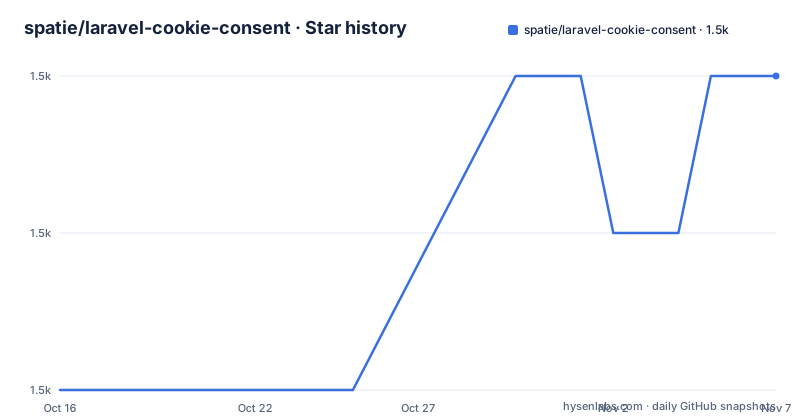
- spatie/laravel-cookie-consent1,495 ★ · +2
| Repository | 2026-10-16 | 2026-11-07 |
|---|---|---|
| spatie/laravel-cookie-consent | 1.5k | 1.5k |
2 Stars in the last 22 days, measured from the daily GitHub snapshot. Compare with other projects
Editorial analysis
A Small Consent Banner for Laravel Sites
spatie/laravel-cookie-consent addresses a narrow website requirement: showing a cookie notice and remembering that a visitor clicked the acceptance button. The README describes it as a simple, customizable message for Laravel, with a banner displayed when a site loads and hidden after consent is given. Its intended audience is Laravel developers who can add a package view to their application and who do not need a multi-category consent system.
The package has an important scope boundary. It does not include a button for declining all cookies, does not block trackers or cookies before consent, and does not provide categories such as Necessary or Marketing. Those omissions mean that installation alone does not create a complete consent-management mechanism for every site. The README also says that the project’s authors are not lawyers and advises consulting legal professionals about rules that apply to a particular project.
The basic flow is understandable from the documentation. The application includes `cookie-consent::index`, the rendered dialog presents an acceptance control, and clicking “Allow cookies” writes a cookie named `laravel_cookie_consent`. On a later request, Laravel checks for that cookie and does not render the dialog again. This is a consent record and UI suppression mechanism, not a script-blocking layer.
Package Installation and Published Configuration
The documented installation path uses Composer. The package registers itself, so the initial command does not require a separate service provider registration. The optional publish command copies its configuration into the Laravel application, where the application can control whether the dialog is enabled, which cookie stores the decision, and how long that cookie lasts.
Use the following command to install the package:
composer require spatie/laravel-cookie-consentAfter Composer completes, the README states that the package automatically registers itself. To publish the configuration, run:
php artisan vendor:publish --provider="Spatie\CookieConsent\CookieConsentServiceProvider" --tag="cookie-consent-config"The published configuration contains the following keys. The cookie lifetime is expressed in days, and the example defaults it to `365 * 20`.
return [

    'enabled' => env('COOKIE_CONSENT_ENABLED', true),

    'cookie_name' => 'laravel_cookie_consent',

    'cookie_lifetime' => 365 * 20,
];
The README identifies `COOKIE_CONSENT_ENABLED` as the environment-backed switch for the dialog. The cookie domain comes from the `domain` setting in `config/session.php`, so the application must set `SESSION_DOMAIN` appropriately. It specifically warns that a URL containing a port, such as `localhost:3000`, will not work until the domain is configured.
Adding the Banner to a Laravel View
The first use is a Blade include. Place it in the template that should contain the consent message. According to the README, this renders the package dialog, whose default styling uses TailwindCSS v2 to create a floating banner at the bottom of the page.
Add the include to the relevant Blade template:
@include('cookie-consent::index')The resulting page should show the package’s consent dialog when no acceptance cookie is present. The default button text comes from the package’s published translation structure, where the message reads “Please be informed that this site uses cookies.” and the agreement action reads “Allow cookies.”
After a visitor clicks the agreement action, the documentation states that `laravel_cookie_consent` is set and the dialog is removed from the DOM. On the next request, Laravel notices the cookie and suppresses the dialog. The package therefore relies on a client-side interaction followed by server-visible cookie state. It does not describe a server endpoint, database record, consent timestamp format, or audit export in the documented setup.
Because the cookie is the persistence mechanism, its lifetime and domain affect behavior beyond the view itself. The default lifetime is 20 years as expressed by `365 * 20` days, so an application should inspect that value rather than treating consent as a short-lived session preference.
Translating and Replacing the Dialog
The package separates text customization from structural customization. To change translated labels, publish the language files:
php artisan vendor:publish --provider="Spatie\CookieConsent\CookieConsentServiceProvider" --tag="cookie-consent-translations"This copies the English file to `resources/lang/vendor/cookie-consent/en/texts.php`. The documented file contains:
return [
    'message' => 'Please be informed that this site uses cookies.',
    'agree' => 'Allow cookies',
];
For another language, the README instructs the developer to copy this file to a language directory such as `resources/lang/vendor/cookie-consent/fr/texts.php` and provide the translated values. This is useful when the application needs localized wording without replacing the package view.
For structural changes, publish the views:
php artisan vendor:publish --provider="Spatie\CookieConsent\CookieConsentServiceProvider" --tag="cookie-consent-views"The published files go to `resources/views/vendor/cookie-consent`. The README identifies `dialogContents` as the likely file to modify for the dialog contents. Modifying `index` gives control over the package’s JavaScript. This flexibility is useful, but it also means that an application taking over the view must preserve the behavior that reads or writes the consent cookie if it changes the relevant markup or script.
Middleware Injection for Laravel 9, 10, and 11
The package offers an alternative to adding the view include manually. `Spatie\CookieConsent\CookieConsentMiddleware` can append the consent view to the response immediately before the closing body tag. This is convenient when the application wants the banner injected centrally rather than editing a shared template.
For Laravel 11, the README directs developers to register the middleware in `bootstrap/app.php`:
->withMiddleware(function (Middleware $middleware) {
    $middleware->append(\Spatie\CookieConsent\CookieConsentMiddleware::class);
})
For Laravel 9 and 10, it shows adding the class to the global middleware array in `app/Http/Kernel.php`:
protected $middleware = [
    // ...
    \Spatie\CookieConsent\CookieConsentMiddleware::class,

    // ...
];
The two integration paths solve the same rendering problem, but they differ in where the application registers the behavior. Laravel 11 uses the application bootstrap middleware configuration, while Laravel 9 and 10 use the HTTP kernel. The README does not provide a documented way to specify middleware ordering, target only selected routes, or customize the injection point beyond the automatic placement before the closing body tag.
What This Package Does Not Manage
The most consequential limitation is the absence of a decline action. The package offers an “Allow cookies” action, so a visitor has no documented path to reject all cookies through the supplied dialog. The README explicitly identifies this as something the package does not include and notes that a decline option might be required.
It also does not prevent cookies, trackers, or other scripts from running before consent. The package’s documented mechanism is a banner and a cookie that records acceptance. There is no documented integration with tag managers, analytics libraries, advertising scripts, or a consent-management platform that automatically suppresses those resources until an allowed state exists.
The absence of category controls follows from the same design. There are no documented options for Necessary, Marketing, or other purposes, and the configuration contains only the enabled switch, cookie name, and cookie lifetime. Developers who need granular choices must either customize the published views and JavaScript or choose another implementation. The README suggests `whitecube/laravel-cookie-consent` and `statikbe/laravel-cookie-consent` as alternatives for more advanced options, without describing their feature differences.
For a site that already prevents nonessential resources from loading until consent, this package can serve as the notice and acceptance record. For a site that depends on the package to enforce permission across scripts, it is the wrong tool.
Maintenance, Compatibility, and Project Boundaries
The repository is not archived. Its last push was on 2026-06-26, and the documented releases include version 3.5.0 on 2026-06-15, version 3.4.0 on 2026-02-21, and version 3.3.3 on 2025-02-21. The release history indicates recent package updates, but the README does not define a support window for Laravel versions or a compatibility matrix.
The README documents test execution with `composer test`, although it does not provide the test matrix or describe the assertions. Upgrade planning should therefore account for the package’s Composer dependency and the possibility that published configuration, translations, or views need comparison with a new release. The README does not document an automated upgrade command for package-owned resources beyond the vendor publish commands.
The project is licensed under the MIT License. The README points to `LICENSE.md` and describes the package as MIT licensed. That licensing statement does not resolve questions about the legal requirements applying to a particular website, and the README explicitly disclaims legal advice. The package’s technical behavior and a site’s legal compliance are separate concerns here.
Editorial conclusion
Adopt this package when a Laravel site needs a simple, customizable consent banner and only records acceptance. Do not choose it when the site requires decline-all behavior, consent categories, or scripts and trackers that must remain inactive before consent. Verify the session domain, cookie settings, published view behavior, and the applicable legal requirements first; this package records consent but does not determine legal compliance.
Frequently asked questions
How do I install spatie/laravel-cookie-consent in Laravel?
Install it with Composer using `composer require spatie/laravel-cookie-consent`. The README states that the package registers itself automatically. Configuration is optional and can be published with the documented `vendor:publish` command.
Does spatie/laravel-cookie-consent include a decline button?
No. The README explicitly says the package does not include an option to decline all cookies. It also says that different consent categories are not included.
Does spatie/laravel-cookie-consent block tracking scripts before consent?
No. The README says the package does not block trackers or cookies before consent. Applications must handle that behavior themselves.
Official sources
Add this badge to your README
If you maintain this project, the badge below links readers to this analysis and shows its maintenance status from the daily GitHub snapshot. Paste the markdown into your README; add ?metric=license or ?metric=stars to the image URL for a different field.

[](https://hysenlabs.com/projects/spatie-laravel-cookie-consent)Star history chart for your README
[](https://hysenlabs.com/projects/spatie-laravel-cookie-consent)Was this useful?