laravel-mail-preview: putting the mail you just sent on screen
A mail driver to quickly preview mail
At a glance
- What is it?
- Spatie's laravel-mail-preview is a Laravel mail transport that renders every outgoing message to an .html file and an .eml file, adds a small overlay with a link to the message, and exposes a SentMails facade so a test can assert on the content of a mail that was never actually sent. It is MIT licensed, currently at 6.2.3, and the README asks you to use the preview transport only in non-production environments.
- Who is it for?
- Adopt laravel-mail-preview if you develop Laravel applications that send mail and you need to see the rendered message while you work, or you want tests that assert on mail content without pulling in a full mail testing framework, since the .html and .eml artefacts are written to disk and the SentMails facade gives you assertions over what was actually rendered.
- Can I use it commercially?
- Yes. MIT is a permissive licence: you can use, modify and sell software built on it, as long as you keep its copyright and licence notices.
- Is it still maintained?
- Yes. The repository last received commits 1 day ago.
- What is it written in?
- Mainly PHP, according to GitHub's language statistics.
Answers come from the project's GitHub data, last synced on November 7, 2026, and from our analysis. They are not legal advice.
Star history
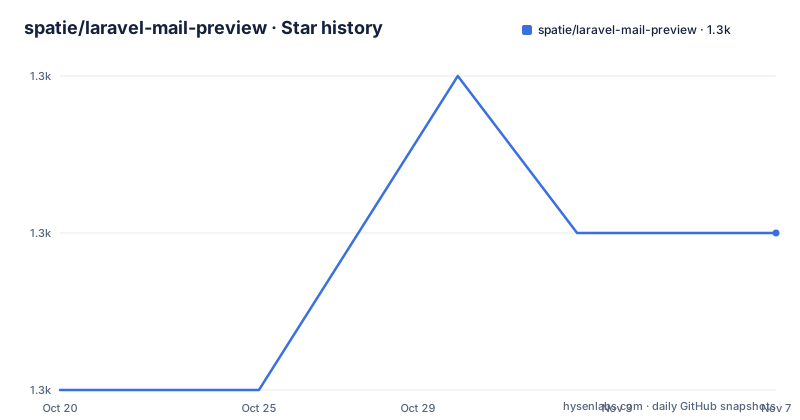
- spatie/laravel-mail-preview1,293 ★ · +1
| Repository | 2026-10-20 | 2026-11-07 |
|---|---|---|
| spatie/laravel-mail-preview | 1.3k | 1.3k |
1 Stars in the last 18 days, measured from the daily GitHub snapshot. Compare with other projects
Editorial analysis
Seeing the mail instead of guessing at it
The problem this package solves is small and extremely common. You are building a Laravel application, you trigger a mail, and nothing appears because the mail went to a real address, or to the log, or to a driver you are not looking at. The message is correct in the code and you have no idea what it looks like.
The package answers with a mail driver to quickly preview mail. It can display a small overlay whenever a mail is sent, and the overlay contains a link to the mail that was just sent. The README says this can be handy when testing out emails in a local environment, which is exactly the scope.
What it writes to disk is the more useful half. Every time an email is sent, an `.html` and an `.eml` file will be saved in the directory specified by the `storage_path` of the `mail-preview` config file, and the name includes the first recipient and the subject, which gives a file such as:
1457904864_john_at_example_com_invoice_000234.html
1457904864_john_at_example_com_invoice_000234.eml
You can open the `.html` file in a web browser to see how the email will look, and open the `.eml` file in your default email client to have a realistic look at the final output. The two together are what make the package more than a log file: one is the rendered HTML, the other is the raw message, and the raw message is what you need when the problem is headers, attachments or an encoding issue rather than a layout issue.
The primary language is PHP, the licence is MIT with `LICENSE.md` at the root, the default branch is `main`, and the last push was on 2026-05-21. The recent releases are 6.2.3 from 2026-05-21, 6.2.2 from 2026-02-23 and 6.2.1 from 2025-02-21.
The preview transport and the recommendation not to ship it
Installing the package is one Composer command:
composer require spatie/laravel-mail-previewThe package contains a mail transport called `preview`, and you enable it by changing the transport in your `config/mail.php` file:
// in config/mail.php

'mailers' => [
    'smtp' => [
        'transport' => 'preview',
        // ...
    ],
    // ...
],
The README is explicit about the environment rule. It recommends to only use this transport in non-production environments. The reason is structural rather than a caveat about maturity. A preview transport never talks to an SMTP server, so a production application running with it would deliver no mail at all, and it would also write every message to disk. Both failure modes are silent from the application's point of view, which is exactly the kind of thing that should be a configuration decision rather than a deployment accident.
The configuration file makes that decision explicit, and the default is bound to the framework's debug flag. The `enabled` option is `env('APP_DEBUG', false)`, and the comment explains that by default the overlay will only be shown and mail will only be stored when the application is in debug mode. That default is the right shape for the package, because a Laravel application that has debug mode off in production has already made the decision that this should not be running.
The other two defaults are worth understanding for the same reason. `maximum_lifetime_in_seconds` is 60, which is how long generated preview files will be kept. `show_link_to_preview` is true, which is what makes the overlay appear. And `popup_timeout_in_seconds` is 8, determining how long the preview popup should remain visible, with the note that setting it to `false` makes the popup stay visible.
The `filename_date_format` option is a small piece of care. The default `Uu` stands for seconds since the Unix epoch with microseconds, which is what produces the numeric prefix in the filenames above and keeps several mails sent in the same second apart.
The overlay, the route and the middleware
Three pieces have to be in place before a preview link appears, and the README documents each of them.
The first is the route. You add the `mailPreview` macro to your routes file, typically `routes/web.php`:
// in routes/web.php

Route::mailPreview();
That registers a route to display sent mails at `/spatie-mail-preview`, and you can customise the URL by passing the URL you want to the macro:
Route::mailPreview('custom-url-where-sent-mails-will-be-shown');The second is the middleware. To display a link to sent mails whenever they are sent, you add the `Spatie\MailPreview\Http\Middleware\AddMailPreviewOverlayToResponse` middleware to the `web` middleware group in your kernel:
// in app/Http/Kernel.php

protected $middlewareGroups = [
    'web' => [
        // other middleware

        \Spatie\MailPreview\Http\Middleware\AddMailPreviewOverlayToResponse::class,
    ],

    // ...
];
The third is the transport, covered above.
The architecture is worth noticing because the three pieces are independent. The transport decides what gets captured, the route decides where the captured mail is served, and the middleware decides whether the link is injected into the response. A team that wants the captured mail but not the overlay registers the route and the transport and leaves the middleware out, and the `show_link_to_preview` config key gives the same choice without touching the kernel.
The repository layout reflects the same split, with `src/` holding the package code, `config/` the configuration that can be published, `resources/` the views, `docs/` the documentation, and `tests/` the test suite, alongside `UPGRADING.md` and `CHANGELOG.md` for the version history.
The views are publishable, and the mail carries its own metadata
Two optional publishing steps let you take over the parts you want to change.
The configuration file is published with:
php artisan vendor:publish --provider="Spatie\MailPreview\MailPreviewServiceProvider" --tag="mail-preview-config"and the views that render the preview overlay and the mail itself with:
php artisan vendor:publish --provider="Spatie\MailPreview\MailPreviewServiceProvider" --tag="mail-preview-views"The published views land in `resources/views/vendor/mail-preview` and you can modify them to your liking. Publishing views is the way to restyle the overlay, or to change the way the mail is rendered inside the preview, without forking the package.
The other thing worth knowing is that the generated HTML file carries the message metadata as a comment at the beginning, so the file is self describing:
<!--
From:{"[email protected]":"Acme HQ"},
to:{"[email protected]":"Jack Black"},
reply-to:{"[email protected]"},
cc:[{"[email protected]":"Acme Finance"}, {"[email protected]":"Acme Management"}],
bcc:null,
subject:Invoice #000234
-->
From, to, reply-to, cc, bcc and subject. That matters because the preview is otherwise a rendering, and a rendering does not tell you whether the bcc field was populated, whether the reply-to was set, or whether the subject came out as you expected. Here the header data is in the file, and the file is what you open in a browser.
The package also fires an event every time a mail is stored on disk. The `Spatie\MailPreview\Events\MailStoredEvent` has three public properties: `message`, an instance of `Swift_Mime_SimpleMessage`, `pathToHtmlVersion`, the path to the html version of the sent mail, and `pathToEmlVersion`, the path to the email version. That event is the hook for anything you want to do with a captured message, and the presence of the raw message object, rather than only paths, means a listener can inspect the underlying MIME structure.
Asserting on mail content with the SentMails facade
This is the part of the package that reaches beyond debugging, and it addresses a real gap in Laravel's own testing story.
The README states the problem directly: currently, using Laravel's `Mail::fake` you cannot make any assertions against the content of a mail, as using the fake will not render the mail. A fake intercepts the send, and because it never renders, there is no content to assert on.
The `SentMails` facade provided by this package does allow you to make asserts against the content, and it allows you to make assertions on the content of a mail without having the mailable in scope. That last part is the design decision. A typical assertion looks like this:
// in a test

Artisan::call(CommandThatSendsMail::class);

Spatie\MailPreview\facades\SentMails::assertLastContains('something in your mail');
The `assertLastContains` shape is worth pausing on. It checks the most recently stored mail for a string, and the assertion is against what was rendered rather than against the mailable class in your test file. That means a test can send mail from a command, a job or a listener, deep inside code that has no reference to the mailable, and still assert that the right content went out. The alternative, in a codebase where the mailable is not in scope, is to assert nothing, or to reach for a mock of the mailer, which proves less about the rendered output.
The README goes on to explain the other available assertion methods using a mailable example, and the argument that runs through it is that assertions belong against the artefact that was produced rather than against the code that produced it.
Where this package is the wrong tool
There are three cases where laravel-mail-preview is the wrong answer, and the first is the most common.
The first is when you need to know whether the mail actually delivers. This transport never opens an SMTP connection, so it tells you nothing about whether your provider accepts the message, whether the SPF and DKIM records pass, whether a large attachment is rejected, or whether a recipient's server treats it as spam. That is a different class of question, answered by a real sending service against a real inbox.
The second is when you need to assert on mail in a test suite at scale. Laravel's own `Mail::fake` plus the framework's testing assertions is the simpler choice for the common case of checking that a mail was queued to a recipient, and a full mail testing framework with a dedicated transport gives you more control over the message than this package does.
The third is a project with a mail queue and a lot of asynchronous sending. The package captures what it receives, and a queued job that runs on a worker produces a captured file rather than a delivered message, which is fine for a developer looking at the mail and less useful for a system that needs to know what was actually accepted.
There is also a housekeeping point that matters in a shared environment. The storage path defaults to `storage_path('email-previews')` and the files are cleaned up after `maximum_lifetime_in_seconds`, which is 60 by default. On a shared development machine, a preview file containing a customer's name and their invoice details sitting in the storage directory for a minute is a small but real exposure, and the `enabled` flag being tied to `APP_DEBUG` is what keeps the package from writing anything at all when debug mode is off.
The alternative approach, and the one to weigh against, is to keep the real transport configured and point it at a local catcher, which gives you a message in a real inbox and therefore a real rendering, at the cost of the overlay, the on-disk artefacts and the assertion facade that this package provides. The difference in approach is between capturing the mail and receiving the mail, and for a developer who wants to look at a rendering in the browser, the capture is faster, and it is the reason this package exists.
Editorial conclusion
Adopt laravel-mail-preview if you develop Laravel applications that send mail and you need to see the rendered message while you work, or you want tests that assert on mail content without pulling in a full mail testing framework, since the .html and .eml artefacts are written to disk and the SentMails facade gives you assertions over what was actually rendered. Do not adopt it if you need to verify the SMTP conversation itself, the transport headers on the wire or a real provider's rendering, because this transport bypasses the network. Verify three things first: that the `preview` transport is only configured in the non-production mailers array, since the README recommends restricting it to non-production environments, that `enabled` is bound to `APP_DEBUG` in your configuration so the overlay and the stored mail stop appearing in production, and that the `maximum_lifetime_in_seconds` value of 60 suits how long you need to look at a preview before it is cleaned up.
Frequently asked questions
What does spatie/laravel-mail-preview do?
It is a Laravel mail transport that renders every sent message to an .html file and an .eml file in the configured storage path, and it can show a small overlay with a link to the message that was just sent. It is MIT licensed and the current release is 6.2.3.
How do I enable the preview transport in Laravel?
Install with `composer require spatie/laravel-mail-preview` and set the transport of a mailer in `config/mail.php` to `preview`. The README recommends using this transport only in non-production environments, and the configuration's `enabled` option defaults to `env('APP_DEBUG', false)`.
How do I see the preview overlay in a Laravel application?
You need three pieces. Add the `AddMailPreviewOverlayToResponse` middleware to the `web` group in your Kernel, register `Route::mailPreview()` in your routes file, and use the `preview` transport. The route serves sent mails at `/spatie-mail-preview` unless you pass a custom URL to the macro.
How do I assert on the content of a sent mail in Laravel?
Use the `SentMails` facade, for example `Spatie\MailPreview\facades\SentMails::assertLastContains('something in your mail')`. Laravel's own `Mail::fake` cannot assert on content because the fake never renders the mail, while this package captures the rendered result.
Where does laravel-mail-preview store the mail it captures?
Every sent mail is written to the `storage_path` from the config file, which defaults to `storage_path('email-previews')`, as an .html file and an .eml file named with a timestamp, the first recipient and the subject. The files are kept for `maximum_lifetime_in_seconds`, which defaults to 60.
Official sources
Add this badge to your README
If you maintain this project, the badge below links readers to this analysis and shows its maintenance status from the daily GitHub snapshot. Paste the markdown into your README; add ?metric=license or ?metric=stars to the image URL for a different field.

[](https://hysenlabs.com/projects/spatie-laravel-mail-preview)Star history chart for your README
[](https://hysenlabs.com/projects/spatie-laravel-mail-preview)Was this useful?