Spatie Laravel Settings for Typed Laravel Configuration
Store strongly typed application settings
At a glance
- What is it?
- Spatie Laravel Settings stores grouped application settings through database or Redis repositories and exposes them as typed PHP classes. It fits Laravel applications that want dependency injection and typed properties, but groups must be designed carefully.
- Who is it for?
- Adopt Spatie Laravel Settings when a Laravel application needs typed, injectable settings backed by database or Redis. Do not choose it if a flat key-value configuration file is sufficient.
- Can I use it commercially?
- Yes. MIT is a permissive licence: you can use, modify and sell software built on it, as long as you keep its copyright and licence notices.
- Is it still maintained?
- Yes. The repository last received commits 3 days ago.
- What is it written in?
- Mainly PHP, according to GitHub's language statistics.
Answers come from the project's GitHub data, last synced on November 6, 2026, and from our analysis. They are not legal advice.
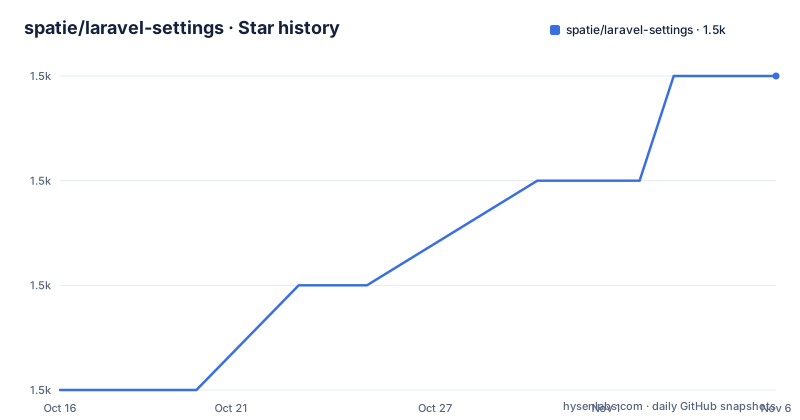
Star history
- spatie/laravel-settings1,521 ★ · +3
| Repository | 2026-10-16 | 2026-11-06 |
|---|---|---|
| spatie/laravel-settings | 1.5k | 1.5k |
3 Stars in the last 21 days, measured from the daily GitHub snapshot. Compare with other projects
Editorial analysis
Why Spatie Laravel Settings Replaces Untyped Configuration Lookups
Spatie Laravel Settings addresses applications whose settings are edited at runtime or vary by deployment, such as a site name, an active-state flag, and settings for separate application areas. Instead of reading the same configuration keys from multiple places, the package represents a group as a PHP class with public, typed properties. The README identifies the intended audience as Laravel developers who want strongly typed application settings rather than an unstructured collection of values.
The central benefit is type visibility in code. A `GeneralSettings` class declares `string $site_name` and `bool $site_active`, so the expected shapes of those values are visible in the class definition. Laravel registers settings classes in its service container, allowing a controller to receive the relevant object through method injection. The controller then accesses `$settings->site_name` and `$settings->site_active` directly.
This approach is more structured than repeatedly reading values from Laravel's configuration repository. It is not automatically a validation layer, however. The update example assigns values obtained from `GeneralSettingsRequest`, which means request validation remains the application's responsibility. Typing the settings object does not replace validation of user input, authorization for updates, or the definition of what should happen when a value is absent.
The package also avoids requiring a separate bespoke settings service for basic typed access. Teams can organize one class per logical area, inject that class where it is needed, and call `save()` after changing its values. The trade-off is that this design adds a class and a group contract that the team must maintain.
Repository, Casting, and Cache Flow in Spatie Laravel Settings
The package is built around settings classes that extend `Spatie\LaravelSettings\Settings`. Each class contains public properties and implements a static `group()` method that returns a string. The package can have multiple groups, such as `GeneralSettings` returning `general` and `BlogSettings` returning `blog`. The README allows different classes to use the same group but advises against that arrangement, because separate classes with a shared group make ownership and persistence harder to reason about.
Storage is selected through repositories in the published configuration. The default repository is `database`, backed by `DatabaseSettingsRepository`. The configuration also includes `RedisSettingsRepository`, with connection and prefix options. A settings class can use the default repository or have a repository assigned when repository details are configured. A settings class can select a configured repository by implementing the static `repository(): ?string` method; otherwise it uses the default repository.
Values are encoded and decoded when they are stored and loaded. If `encoder` and `decoder` are left as `null`, the configuration says the package uses `json_encode` and `json_decode`. PHP scalar properties have clear basic types. For properties that are not default PHP types, global casts provide conversion logic for `DateTimeInterface`, `DateTimeZone`, and `Spatie\LaravelData\Data`. The configuration includes a commented `DtoCast` entry for `Spatie\DataTransferObject\DataTransferObject`.
Caching is optional and uses a Laravel store. The cache configuration contains `enabled`, `store`, `prefix`, and `ttl`. Automatic discovery searches `app_path('Settings')` unless the paths are changed. A discovered settings cache can be written beneath `base_path('bootstrap/cache')`, reducing the need to search those paths each time the application boots.
The resulting flow is straightforward: discover or register a settings class, resolve it from Laravel, load values through its repository, cast them to declared property types, and persist changes with `save()`. The README does not describe cache invalidation across multiple application processes, so teams should verify that behavior against their update patterns before enabling it.
Installing and Publishing Spatie Laravel Settings
Install the package through Composer. The README identifies the package name as `spatie/laravel-settings` and does not prescribe a PHP or Laravel version, so the project's dependency constraints should be checked in `composer.json` before installation.
Run the documented Composer command in the Laravel project:
composer require spatie/laravel-settingsComposer should add the package to the Laravel project's dependencies. The package must then have its migrations and configuration published.
php artisan vendor:publish --provider="Spatie\LaravelSettings\LaravelSettingsServiceProvider" --tag="migrations"
php artisan migrate
The first command publishes the package migrations, and the second runs Laravel migrations. Readers should see the package's settings storage migration applied to the configured Laravel database connection.
Publish the configuration separately:
php artisan vendor:publish --provider="Spatie\LaravelSettings\LaravelSettingsServiceProvider" --tag="config"This produces the configuration containing registered settings, repository definitions, casting rules, cache options, and auto-discovery paths. In the published default configuration, `default_repository` is `database`, and `setting_class_path` points to `app_path('Settings')`. Auto-discovery also checks that path. The README also documents `php artisan make:setting SettingName --group=groupName` for generating a settings class.
Creating and Saving the GeneralSettings Class
A first settings class extends `Settings`, declares public typed properties, and returns its storage group. The following example comes directly from the README:
class GeneralSettings extends Settings
{
    public string $site_name;

    public bool $site_active;

    public static function group(): string
    {
        return 'general';
    }
}
This class defines two values with different PHP types. The group method supplies the persistence key used by the package. Classes can be placed beneath the configured `app_path('Settings')` path and found through `auto_discover_settings`, or they can be registered manually in the `settings` array. The configuration explicitly states that every settings class must be registered there when manual registration is used.
Before resolving the class, create a settings migration with `php artisan make:settings-migration CreateGeneralSettings`, add the defaults with `$this->migrator->add('general.site_name', 'Spatie')` and `$this->migrator->add('general.site_active', true)`, then run `php artisan migrate`. Without stored values or defaults for every property, resolution can throw `MissingSettings`.
Laravel can inject the resolved settings object into a controller. The README example passes the object through the controller method:
class GeneralSettingsController
{
    public function show(GeneralSettings $settings){
        return view('settings.show', [
            'site_name' => $settings->site_name,
            'site_active' => $settings->site_active
        ]);
    }
}
Reading settings requires no key-name lookup in this controller. The method depends on `GeneralSettings`, and the view receives named values derived from the typed properties.
Updates assign new values and call `save()`. The documented request object should validate or otherwise constrain incoming input before those assignments are accepted:
class GeneralSettingsController
{
    public function update(
        GeneralSettingsRequest $request,
        GeneralSettings $settings
    ){
        $settings->site_name = $request->input('site_name');
        $settings->site_active = $request->boolean('site_active');

        $settings->save();

        return redirect()->back();
    }
}
The in-memory object changes immediately, while `save()` is the explicit persistence operation. That separation matters in code that changes several properties but does not yet want to write them. It also means a missing or delayed `save()` can leave the object updated in one part of the request while storage remains unchanged.
Database and Redis Choices for Runtime Settings
The default database repository is the lower-friction choice when the application already manages persistent data through Laravel migrations. The configuration includes database repository options for a model, table, and connection, all defaulting to `null`. These options indicate that the package can defer to application defaults or accept explicit repository configuration, but the README does not document precedence rules when several values are set. The published config and source-level validation should be checked before changing the model or table fields.
Redis is a genuine alternative rather than a different feature layer. Its repository has a `type`, `connection`, and `prefix`, compared with the database repository's model and table fields. Selecting Redis changes where loading and saving occur while retaining the same settings-class interface. It may suit deployments organized around Redis-backed state, but the README gives no Redis latency, consistency, or throughput measurements. Those operational characteristics cannot be inferred from the configuration alone.
The two repositories expose another design choice: a settings class can use the configured `default_repository`, while repository definitions can exist alongside it. A class-level `repository()` selects a named repository; if it is not set, the configured default is used. Redis does not become the default merely because its configuration block exists. As published, `default_repository` remains `database`.
Caching introduces a third decision. The cache uses a Laravel store and can have a prefix and TTL, but the README says edited settings refresh their cache, but cross-process behavior still depends on the selected cache store and deployment topology. Applications with read-heavy settings may benefit from this option, but applications that require immediate cross-process reads need the invalidation behavior verified in the selected Laravel store and deployment topology.
Spatie Laravel Settings Compared with Laravel Configuration
The closest alternative is Laravel's built-in configuration system. Built-in configuration is file-backed and commonly read through calls such as `config()` during application setup. Spatie Laravel Settings instead models each settings area as a PHP class, registers or discovers that class, injects it through the container, and persists changes through database or Redis repositories. The meaningful difference is therefore not merely storage. It is the interface presented to application code: a typed object with declared properties and an explicit `save()` operation.
Built-in configuration is the wrong comparison for settings that need runtime edits and persistence through a shared repository. A file is simpler when values are deployment-time constants, but Spatie Laravel Settings provides a clear home for mutable application state such as the documented `site_name` and `site_active` flags.
The added structure is also a cost. Every settings area needs a class, a group, registration or discovery, persistence configuration, and code that calls `save()` correctly. Shared groups should be avoided because the README advises assigning groups to individual settings classes. A team with one or two deployment-only values may find this overhead larger than the benefit.
The package should not be treated as an authorization system, a complete validation strategy, or a replacement for Laravel's cache. Validation remains associated with request objects such as `GeneralSettingsRequest`. Caching is separately configurable. The package's clear scope is typed settings classes and their repositories; adjacent application concerns still need their own design.
The repository is not archived, and its last push was on 2026-06-26. Recent listed releases include `3.9.0` on 2026-05-26, `3.8.1` on 2026-05-22, and `3.8.0` on 2026-04-28. The repository includes `UPGRADING.md`, but its contents are not documented in the README. Maintainers and adopters must read that file before changing major versions. The MIT license permits reuse and modification under its terms, but license compliance still depends on following the license text.
Editorial conclusion
Adopt Spatie Laravel Settings when a Laravel application needs typed, injectable settings backed by database or Redis. Do not choose it if a flat key-value configuration file is sufficient. Before adoption, verify that every settings class has a unique group, register or discover it correctly, and decide how caching should behave during concurrent updates.
Frequently asked questions
How do I install Spatie Laravel Settings in Laravel?
Run `composer require spatie/laravel-settings`, publish the migrations and config through the documented `vendor:publish` commands, and run `php artisan migrate`.
Where can Spatie Laravel Settings be stored?
The published configuration includes database and Redis repositories. The default repository is `database`, while Redis has its own connection and prefix settings.
How does Spatie Laravel Settings save changes?
Assign new values to the injected settings object and call its `save()` method. Without that call, the README example shows changes to the object but no explicit persistence operation.
Official sources
Add this badge to your README
If you maintain this project, the badge below links readers to this analysis and shows its maintenance status from the daily GitHub snapshot. Paste the markdown into your README; add ?metric=license or ?metric=stars to the image URL for a different field.

[](https://hysenlabs.com/projects/spatie-laravel-settings)Star history chart for your README
[](https://hysenlabs.com/projects/spatie-laravel-settings)Was this useful?