spatie/laravel-tags for Laravel Tagging, Types, Translations, and Sorting
Add tags and taggable behaviour to your Laravel app
At a glance
- What is it?
- spatie/laravel-tags adds reusable tagging behaviour to Laravel Eloquent models through the HasTags trait. It covers assignment and querying, typed tags, translations, generated slugs, and sortable tag ordering, with database requirements that must be checked before adoption.
- Who is it for?
- Adopt spatie/laravel-tags when your Laravel application needs model-level tags with optional types, translations, or ordering. Do not choose it if your database cannot provide the required JSON fields and MySQL-compatible functions, or if you need features that the README does not document.
- Can I use it commercially?
- Yes. MIT is a permissive licence: you can use, modify and sell software built on it, as long as you keep its copyright and licence notices.
- Is it still maintained?
- Yes. The repository last received commits 3 days ago.
- What is it written in?
- Mainly PHP, according to GitHub's language statistics.
Answers come from the project's GitHub data, last synced on November 7, 2026, and from our analysis. They are not legal advice.
Star history
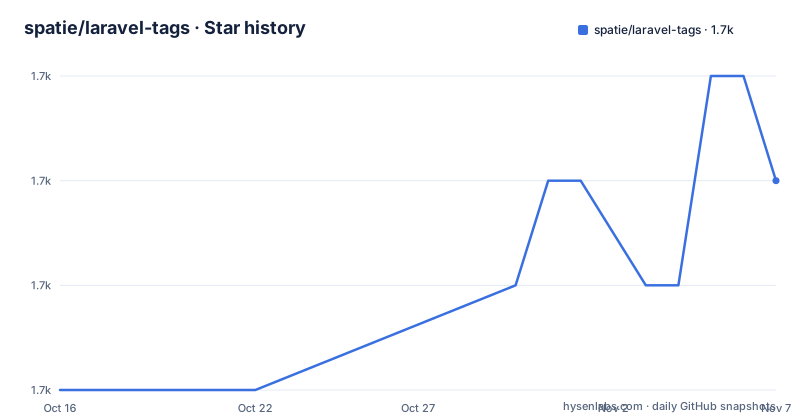
- spatie/laravel-tags1,748 ★ · +2
| Repository | 2026-10-16 | 2026-11-07 |
|---|---|---|
| spatie/laravel-tags | 1.7k | 1.7k |
2 Stars in the last 22 days, measured from the daily GitHub snapshot. Compare with other projects
Editorial analysis
What HasTags Adds to an Eloquent Model
spatie/laravel-tags solves a specific Laravel data-modelling problem: associating one or more tags with an Eloquent model without making the application responsible for the tag tables and relationship operations. It is aimed at developers building Laravel applications with content, catalogue, or record-oriented models that need labels such as categories or topics. The package is not a standalone tagging interface or a separate search service. Its primary integration point is the `HasTags` trait on an Eloquent model.
The README's minimal example adds the trait to `NewsItem`:
use Illuminate\Database\Eloquent\Model;
use Spatie\Tags\HasTags;

class NewsItem extends Model
{
    use HasTags;

    // ...
}
After the trait is present, the model supports tag assignment during creation, attachment and detachment, synchronization, tag inspection, and retrieval of models based on their tags. This makes the package useful when tagging is a property of a domain model rather than a separate application feature. The surrounding application still owns validation, authorization, user interface, and decisions about when tags can be created or removed.
The package presents a wider model than a simple string-to-record relationship. Tags can have a generated `slug`, an `order_column`, translations, and a type. That distinction matters for applications where the same label may mean different things depending on context. For example, a news application could use a tag type for `category` values and another for `topics`. The README shows typed attachment, typed synchronization, typed retrieval, and type-based model queries.
The main design choice is that tags are Eloquent records. A tag is found or created through `Tag::findOrCreate`, and the taggable model uses relationships and helper methods to manage its associations. This is more involved than storing a delimited string on the model, but it gives the application a database-level representation that can be queried and extended through the package's API.
Tag Relationships, Types, and Query Scopes
The package separates ordinary tag membership from type-specific membership. The README documents `attachTag` and `attachTags` for assigning one or many tags, with an optional second argument that identifies a type. The same type argument is available when detaching tags. A model can therefore hold tags such as `first tag` under one type and another tag under a different type without requiring the application to invent separate relationships.
The core relationship is available through `$newsItem->tags`. For synchronization, `syncTags` replaces the model's current tags, which means tags not included in the supplied array are detached. This is useful when an edit form submits the complete desired tag set, but it is a destructive operation by design. A caller that intends to add tags must use `attachTags` instead. Type-specific synchronization is available through `syncTagsWithType`, with the README showing separate calls for `categories` and `topics`.
The query helpers operate at the model level. `withAnyTags` retrieves models carrying at least one of the supplied tags, `withAllTags` retrieves models carrying every supplied tag, and `withoutTags` excludes models carrying any of them. The README also documents `withAnyTagsOfType`, accepting either one type or an array of types. These scopes provide common filtering operations without requiring the application to write its own joins.
Tag identity is not limited to the display string. `Tag::findOrCreate('yet another tag')` produces a tag with a slug such as `yet-another-tag`. The `hasTag` helper accepts a tag name and an optional type, allowing the application to test membership without first loading the full relationship. The package therefore supports both assignment and retrieval, but the README does not describe custom scopes, a tag administration interface, or a complete replacement for custom taxonomy logic.
Translations and Ordering in the Tag Model
Tag translations are stored through the `Tag` model rather than handled by the taggable model alone. The README shows `setTranslation` for a tag name and a locale, followed by `save`:
$tag = Tag::findOrCreate('my tag');
$tag->setTranslation('name', 'fr', 'mon tag');
$tag->setTranslation('name', 'nl', 'mijn tag');
$tag->save();
The `translate` method reads the default translated value or accepts an optional locale. For convenience, a taggable model exposes `tagsTranslated`, which returns tags with translated name and slug properties. Calling `tagsTranslated('fr')` requests the specified locale. This is useful for multilingual Laravel applications because tag records remain centralized while each tag can expose locale-specific values.
The translation API is explicit. The README does not state which locales are configured, how fallback behaviour works, or how missing translations are handled. Those details would need to be checked in the linked documentation or application configuration before relying on a particular fallback policy. It is also important to distinguish the translated tag value from the generated `slug` property shown in the basic example. The translated properties are exposed as separate properties on the returned tag collection.
Ordering is built into the tag record. Newly found or created tags receive an `order_column`, and `swapOrder` exchanges the order of two tags. This is narrower than a full taxonomy manager: the README documents the order field and the swap operation, but it does not describe nested hierarchies or arbitrary sort algorithms. If an application needs hierarchical categories, this feature set should not be mistaken for a tree structure.
Installing the Package and Creating the Tag Tables
The documented installation path uses Composer. The package requires Laravel 8 or higher, PHP 8 or higher, and a database that supports `json` fields and MySQL-compatible functions. Install the package with:
composer require spatie/laravel-tagsThe README states that the package registers itself automatically. Its database tables must be created through a published migration. Publish the migration with:
php artisan vendor:publish --provider="Spatie\Tags\TagsServiceProvider" --tag="tags-migrations"Then run the application migrations:
php artisan migrateThe README says this creates the `tags` and `taggables` tables. An optional configuration file controls slug generation. Publish it with:
php artisan vendor:publish --provider="Spatie\Tags\TagsServiceProvider" --tag="tags-config"The published configuration contains a `slugger` setting that is `null` by default and is described as the function used to generate a URL-friendly slug from the tag name. The default is `Str::slug`. This is the first file to inspect if tag slugs must follow an application-specific policy.
A first model use requires adding `HasTags` to the Eloquent class, as shown earlier. The application can then create a model with a `tags` array. The README states that tags are created if they do not already exist, so the first use does not require manually populating the tag table. Database permissions, migration output, and application-specific validation remain the host Laravel application's responsibility.
Operational Limits of the Tagging Model
The clearest limitation is the database requirement. The package explicitly requires JSON fields and MySQL-compatible functions. That excludes deployments or local environments whose database compatibility does not meet those conditions, even if the PHP and Laravel versions match. It also means the package is not a portable choice for every database Laravel can connect to.
There is a second boundary around tag normalization and identity. The README demonstrates `Tag::findOrCreate` and generated slugs, but it does not specify every collision rule, normalization detail, or concurrency behaviour for simultaneous tag creation. An application that allows many users to submit tags at once should review the package implementation and database constraints rather than assuming that duplicate display names are impossible.
The feature set also does not describe a complete tag administration workflow. It does not document permissions, tag merging, renaming side effects, deletion rules, cache invalidation, or a user interface. The helper methods make destructive synchronization easy to call. `syncTags` detaches every other tag, so a form or API handler that passes an incomplete list can remove existing assignments. This is a correct fit for full replacement and a common source of data loss if used for partial edits.
The package is consequently a domain-layer tagging component rather than a complete tagging product. It provides records, relationships, scopes, translations, and ordering primitives, while validation, authorization, user experience, and operational policy remain application responsibilities.
Comparing the Package with a Custom Tag Relationship
A common alternative is to write a small application-specific Eloquent relationship, usually with a model, pivot table, and several queries. That approach can be a better fit when the application needs only one simple many-to-many label relationship and already has conventions for slugs, validation, and filtering.
spatie/laravel-tags takes a more opinionated path. It supplies the `HasTags` trait, shared tag storage, automatic creation through `Tag::findOrCreate`, generated slugs, type-aware helpers, translation methods, sortable `order_column`, and model scopes such as `withAnyTags`, `withAllTags`, and `withoutTags`. A custom relationship would require the application to implement and maintain those behaviours itself or select separate packages for them.
The trade-off is shared functionality versus less direct control. The package can reduce repeated relationship code, but its conventions determine how tags are represented and queried. Applications that need a different tag lifecycle, a taxonomy with hierarchy, or a storage design outside the package schema may find that a custom implementation is clearer. The repository uses the MIT license, and the repository includes `UPGRADING.md` and `CHANGELOG.md`, but the README does not specify the upgrade procedure for a particular release.
The repository is not archived, and its last push was on 2026-06-26. Recent releases include 4.12.0 on 2026-06-20, 4.11.0 on 2026-02-21, and 4.10.2 on 2026-02-13. The repository layout includes migrations, configuration, source, tests, documentation, and upgrade files. The MIT license permits use and modification under its terms, but an application should review the license file for its own compliance needs.
Editorial conclusion
Adopt spatie/laravel-tags when your Laravel application needs model-level tags with optional types, translations, or ordering. Do not choose it if your database cannot provide the required JSON fields and MySQL-compatible functions, or if you need features that the README does not document. Verify the Laravel and PHP versions, review the published migrations, and confirm that the generated `tags` and `taggables` schema fits your application before adding the trait to production models.
Frequently asked questions
How do I install spatie/laravel-tags?
Install it with Composer, publish the tags migration, and run `php artisan migrate`. The README also documents optional publication of the package configuration.
How do I add tags to a Laravel Eloquent model?
Add the `Spatie\Tags\HasTags` trait to the Eloquent model. The model can then accept tags during creation or use `attachTag`, `attachTags`, `syncTags`, and related helpers.
Does spatie/laravel-tags support translated and typed tags?
Yes. The README documents translations through `setTranslation` and `translate`, plus typed attachment, synchronization, retrieval, and model queries with `withAnyTagsOfType`.
Official sources
Add this badge to your README
If you maintain this project, the badge below links readers to this analysis and shows its maintenance status from the daily GitHub snapshot. Paste the markdown into your README; add ?metric=license or ?metric=stars to the image URL for a different field.

[](https://hysenlabs.com/projects/spatie-laravel-tags)Star history chart for your README
[](https://hysenlabs.com/projects/spatie-laravel-tags)Was this useful?