spatie/simple-excel for Memory-Conscious PHP Imports
Read and write simple Excel and CSV files
At a glance
- What is it?
- spatie/simple-excel gives PHP applications a compact API for reading CSV and XLSX rows through Laravel LazyCollection. It fits simple imports, but its documented features focus on tabular input rather than full spreadsheet manipulation.
- Who is it for?
- Adopt it for straightforward PHP imports that must process CSV or XLSX rows without loading an entire file into memory. Do not treat it as a complete workbook editor.
- Can I use it commercially?
- Yes. MIT is a permissive licence: you can use, modify and sell software built on it, as long as you keep its copyright and licence notices.
- Is it still maintained?
- Yes. The repository last received commits 3 days ago.
- What is it written in?
- Mainly PHP, according to GitHub's language statistics.
Answers come from the project's GitHub data, last synced on November 7, 2026, and from our analysis. They are not legal advice.
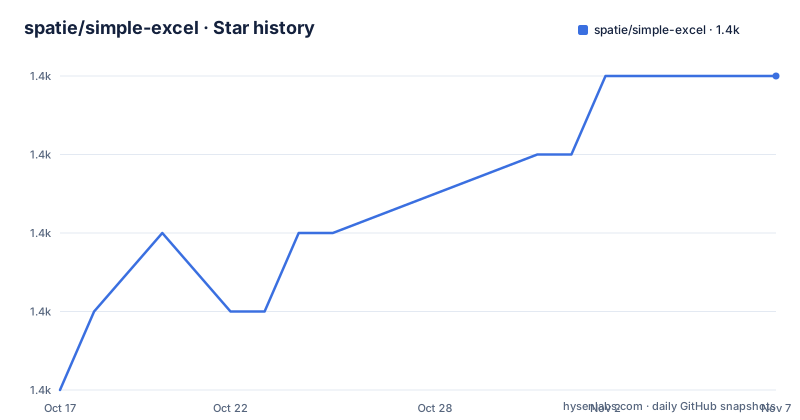
Star history
- spatie/simple-excel1,377 ★ · +4
| Repository | 2026-10-17 | 2026-11-07 |
|---|---|---|
| spatie/simple-excel | 1.4k | 1.4k |
4 Stars in the last 21 days, measured from the daily GitHub snapshot. Compare with other projects
Editorial analysis
Why spatie/simple-excel Fits Simple PHP Imports
spatie/simple-excel addresses a specific problem: a PHP application needs to read or write simple Excel and CSV files without first representing the entire dataset as a nested array. It is aimed at PHP developers working with spreadsheet imports and at Laravel users who are comfortable receiving an `Illuminate\Support\LazyCollection` from the reader.
The package description promises reading and writing, while the README focuses on reading. Documented features include CSV and XLSX input, headerless files, custom headers, filtering, and selection of an Excel worksheet. The README does not cover styles, formulas, merged cells, charts, images, or a general object model for editing workbook content. This makes simple-excel more appropriate for row-oriented data movement than for reproducing a spreadsheet application's presentation layer.
Format selection is deliberately uncomplicated. According to the README, a path ending in `.csv` is assumed to contain CSV, while a path ending in `.xlsx` is assumed to contain Excel. The extension therefore participates in deciding which parser is used. A generated download, temporary file, or upload without one of these extensions requires care because the README does not document an explicit format override.
How SimpleExcelReader Streams Rows with LazyCollection
The central read interface is `SimpleExcelReader`. Calling `create()` supplies a path, and `getRows()` returns rows represented by `Illuminate\Support\LazyCollection`. The README states that generators are used behind the scenes to keep memory usage low when working with large files.
That mechanism changes the consumption model. A conventional collection operation would first build all rows in memory. Here, application code can connect `getRows()` directly to `each()` and process one row at a time. The callback receives an associative array when the source has a header row, allowing downstream code to work with named properties instead of numeric spreadsheet columns.
The low-memory behavior belongs to lazy row iteration, not every possible use of the package. A consumer that retains each callback result, accumulates matching rows in an array, or otherwise saves processed data can increase memory use. The README also does not define behavior for a callback that throws an exception, retries a failed row, records per-row errors, or resumes an interrupted import. Those controls remain application responsibilities unless another project layer supplies them.
Reading CSV Headers and Headerless Datasets
The reader supports several header arrangements. A file beginning with `email,first_name` yields properties such as `email` and `first_name` by default. For a file without a header, `noHeaderRow()` keeps numeric indexes. The README documents the following direct iteration example, where each callback receives the row array.
use Spatie\SimpleExcel\SimpleExcelReader;

// $rows is an instance of Illuminate\Support\LazyCollection
$rows = SimpleExcelReader::create($pathToCsv)
    ->noHeaderRow()
    ->getRows()
    ->each(function(array $rowProperties) {
       // in the first pass $rowProperties will contain
       // [0 => 'john@example', 1 => 'john']
});
When application code owns the property names, `useHeaders()` can supply them. If the source already has a header row, the README says that row is ignored and replaced. If it does not, `noHeaderRow()` should be used with custom headers.
The following example maps the first two columns to `email_address` and `given_name`.
// $rows is an instance of Illuminate\Support\LazyCollection
$rows = SimpleExcelReader::create($pathToCsv)
    ->useHeaders(['email_address', 'given_name'])
    ->getRows()
    ->each(function(array $rowProperties) {
       // in the first pass $rowProperties will contain
       // ['email_address' => 'john@example', 'given_name' => 'john']
});
For files whose real header appears after introductory lines, `headerOnRow()` identifies its zero-based position. Rows above it are discarded, and blank lines are not counted. The README also documents `trimHeaderRow()` for removing extra characters from title values.
Selecting and Inspecting XLSX Worksheets
An XLSX document can contain multiple spreadsheets. simple-excel provides two selection modes and two inspection methods for this structure. `fromSheet()` selects a sheet by index, `fromSheetName()` selects it by name, `getSheetNames()` retrieves all names, and `hasSheet()` checks whether a named sheet exists.
Selecting a worksheet by name uses the same reader flow as CSV input.
$rows = SimpleExcelReader::create($pathToXlsx)
    ->fromSheetName("sheet1")
    ->getRows();
An index-based selection is also documented.
$rows = SimpleExcelReader::create($pathToXlsx)
    ->fromSheet(3)
    ->getRows();
The sheet names can be retrieved separately when the workbook layout must be inspected.
$sheets = SimpleExcelReader::create($pathToXlsx)
    ->getSheetNames();
Existence checks return a value through `hasSheet()`.
$hasSheet = SimpleExcelReader::create($pathToXlsx)
    ->hasSheet("sheet1");
The README does not document an error policy for a missing worksheet or an out-of-range index. It also does not describe iterating several sheets as one combined row stream. Applications with unpredictable workbook structure would need to inspect names and establish their own behavior before selecting data.
Installing simple-excel and Filtering Real Rows
The README documents Composer as the installation method. Run this command in a PHP project managed by Composer to add `spatie/simple-excel` as a dependency.
composer require spatie/simple-excelThe first basic read passes a CSV path to `SimpleExcelReader::create()` and attaches `each()` to `getRows()`.
use Spatie\SimpleExcel\SimpleExcelReader;

SimpleExcelReader::create($pathToFile)->getRows()
   ->each(function(array $rowProperties) {
        // process the row
    });
The callback should see the header keys described in the README. For an XLSX path ending in `.xlsx`, the same API selects Excel input; for a path ending in `.csv`, it selects CSV.
LazyCollection operations can be chained before processing. The following README example filters rows by the length of `first_name`, then passes each match to the callback.
SimpleExcelReader::create($pathToCsv)->getRows()
    ->filter(function(array $rowProperties) {
       return strlen($rowProperties['first_name']) > 5;
    })
    ->each(function(array $rowProperties) {
        // processing rows
    });
This is a suitable first use because it exercises installation, format-based reader creation, lazy row retrieval, filtering, and callback processing. It does not demonstrate validation or persistence because the README does not define either. A production import still needs to decide what malformed values mean and how a failed destination write should be reported.
Writing, Alternative Parsers, and Upgrade Boundaries
The repository description says simple-excel can write simple Excel and CSV files, but the README does not show a writer class, method signature, configuration, or output example. It would therefore be unsafe to tell adopters which exact writer call to use. The repository includes `CHANGELOG.md` and `UPGRADE.md` for migration instructions and compatibility changes.
A real alternative is to parse the source inside the application and expose normalized rows through `LazyCollection`. That avoids a separate spreadsheet package, but the application becomes responsible for CSV or XLSX parsing, field mapping, encoding rules, and failures. simple-excel centralizes these concerns behind `SimpleExcelReader` and offers header and worksheet helpers. The alternative offers more control over custom parsing paths, while simple-excel reduces the amount of package-specific code required for ordinary row imports.
Neither approach should be selected for requirements involving full workbook preservation. The README does not claim that charts, formatting, formulas, merged ranges, or metadata survive reading and writing. It also does not document streaming multiple output sheets, encoding selection, delimiter selection, or formula injection controls. These are concrete boundaries for spreadsheet ingestion, rather than claims that the package should handle every feature found in Excel files.
Maintenance has a recent basis: the repository is not archived, and the last push was on 2026-06-15. Release 3.10.0 was published on 2026-06-15, after versions 3.9.0 from 2026-02-22 and 3.8.1 from 2025-09-24. The MIT license identifies the terms under which the source is distributed, but deployments must retain any notices required by those terms.
Editorial conclusion
Adopt it for straightforward PHP imports that must process CSV or XLSX rows without loading an entire file into memory. Do not treat it as a complete workbook editor. Verify extension-based format detection, header handling, worksheet selection, error behavior, and the undocumented writing API before integrating it into a critical pipeline.
Frequently asked questions
How do I install spatie/simple-excel with Composer?
Run `composer require spatie/simple-excel`. The README lists this command as the package's installation method.
How does spatie/simple-excel process large CSV files?
Its reader returns an `Illuminate\Support\LazyCollection` backed by generators. This lets application code iterate over rows through methods such as `each()` instead of first collecting the entire dataset.
How do I read a specific worksheet from an XLSX file?
Use `fromSheetName()` to select by name or `fromSheet()` to select by index. `getSheetNames()` and `hasSheet()` can help inspect available worksheets.
Official sources
Add this badge to your README
If you maintain this project, the badge below links readers to this analysis and shows its maintenance status from the daily GitHub snapshot. Paste the markdown into your README; add ?metric=license or ?metric=stars to the image URL for a different field.

[](https://hysenlabs.com/projects/spatie-simple-excel)Star history chart for your README
[](https://hysenlabs.com/projects/spatie-simple-excel)Was this useful?