spatie/temporary-directory gives PHP code a temp folder that deletes itself
A simple class to work with a temporary directory
At a glance
- What is it?
- spatie/temporary-directory is a small PHP class for creating a temporary directory, resolving paths inside it, emptying it and deleting it, with a destructor mode that cleans up when the object goes out of scope. It does one thing, and the interesting part is the set of defaults it chooses.
- Who is it for?
- spatie/temporary-directory suits PHP code that needs a scratch directory for exports, dumps or conversions and would rather not hand-roll directory creation and recursive deletion, and it fits tests that want a directory torn down when the test object goes out of scope. It does not suit a job that must survive a process crash or needs a shared location across machines, since the directory lives in the system temporary directory and is removed with the object.
- Can I use it commercially?
- Yes. MIT is a permissive licence: you can use, modify and sell software built on it, as long as you keep its copyright and licence notices.
- Is it still maintained?
- Yes. The repository last received commits 3 days ago.
- What is it written in?
- Mainly PHP, according to GitHub's language statistics.
Answers come from the project's GitHub data, last synced on November 7, 2026, and from our analysis. They are not legal advice.
Star history
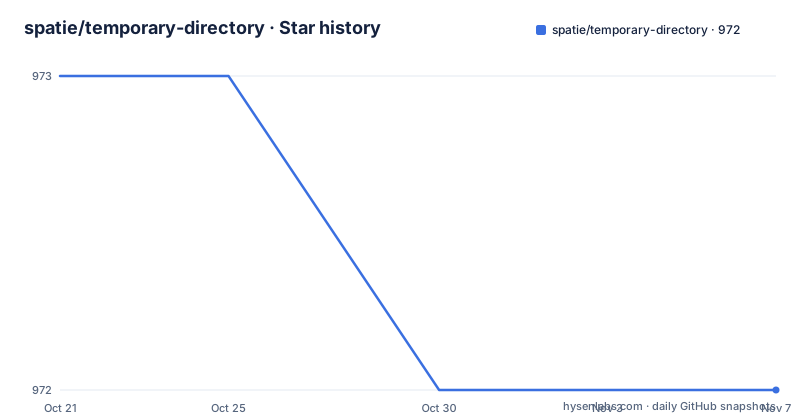
- spatie/temporary-directory972 ★ · -1
| Repository | 2026-10-21 | 2026-11-07 |
|---|---|---|
| spatie/temporary-directory | 973 | 972 |
-1 Stars in the last 17 days, measured from the daily GitHub snapshot. Compare with other projects
Editorial analysis
One class that owns a directory on disk
spatie/temporary-directory is a PHP package that lets you quickly create, use and delete a temporary directory in the system's temporary directory. The readme's own summary is a simple class to work with a temporary directory, and that is genuinely all it is.
The problem it addresses shows up in almost every PHP project that touches files. You need somewhere to write an export, a converted image, a parsed dataset or a test fixture, and you need to be sure it is gone afterwards. Doing that by hand means creating a unique directory, remembering to remove it on every exit path including the exception path, and writing a recursive delete that handles nested files.
The package wraps those three jobs. Creating the directory, building a path inside it, and deleting the whole tree are all methods on one object, and the object can also register itself for deletion when it is garbage collected.
That last part is what separates this from a helper function. A function that makes a directory and returns its path still leaves the caller responsible for cleanup. Here the directory is tied to an object, so the lifetime of the files and the lifetime of the variable that holds them can be made to match.
The repository layout is minimal, with src, tests, a composer.json, a phpunit.xml.dist and a .php-cs-fixer.dist.php configuration, which matches a package with a small surface and a test suite that covers it. The topic list includes testing, which is where the package earns its keep.
Three ways to create, and where the directory lands
Creation is the entry point. The documented approach is to call the create method on a TemporaryDirectory object.
(new TemporaryDirectory())->create();Alternatively there is a static make method, which does the same thing in one call.
TemporaryDirectory::make();By default the directory is created in a timestamped directory in the system's temporary directory, which is usually /tmp. So the default name is derived from the current time rather than being random, and the default parent is the system location.
You can point it somewhere else in two ways. A string location can be passed to the constructor, and the make method accepts the same argument.
(new TemporaryDirectory($location))
->create();TemporaryDirectory::make($location);There is also a location method for the fluent style, and the readme presents it as the third option rather than a variation on the constructor.
(new TemporaryDirectory())
   ->location($location)
   ->create();
All three routes lead to the same object, so the choice is stylistic. What matters operationally is that the parent directory is yours to choose, which is what you need when the system temporary directory is on a small tmpfs or where a policy requires scratch files on a specific volume.
A name collision throws unless you force it
If you want a predictable name instead of the timestamp, call the name method with a string before create.
(new TemporaryDirectory())
   ->name($name)
   ->create();
The behaviour on a collision is the interesting part. By default an exception is thrown if a directory already exists with the given name. That is the safe default, because a named directory that silently reuses an existing one can inherit files from an earlier run, and a job that then empties it with the empty method would delete data it never created.
You can override the behaviour by combining force with name.
(new TemporaryDirectory())
   ->name($name)
   ->force()
   ->create();
The readme does not say what force does to the contents of an existing directory. It only states that it overrides the throwing behaviour, so if you rely on it, the contents of a pre-existing directory are worth checking yourself rather than assuming they are replaced or preserved.
A timestamped default name also means two runs in the same second can collide. The readme does not describe any locking or atomic claim on the directory name, and the repository does not mention a lock file, so concurrent workers sharing one name are a scenario you should think about rather than assume is handled.
Permissions default to 0777, which is the setting to review first
By default the temporary directory is created with permissions 0777. The readme then tells you how to change it: call the permission method with an integer before create.
(new TemporaryDirectory())
   ->permission(0755)
   ->create();
This is the single most important line in the readme for a security review, and it deserves more attention than the rest of the package receives. A world writable directory in /tmp is a well known pattern for trouble, and a naive reading of this default is that anyone on the machine can write into the directory where your export or download lands.
The mitigating factor is the directory name, which by default is timestamped, and the exception thrown on an explicit name collision. That reduces the chance of another user pre-creating the exact directory. It does not change the fact that the mode the package requests is broad by default, and it says nothing about the permissions of files you then write inside the directory, which is a separate decision your code makes.
The readme does not mention an umask interaction, a setgid behaviour, or any hardening of the created path beyond the single permission argument. If your deployment writes sensitive files into a temporary directory, pass an explicit permission value rather than relying on the default, and check what the effective mode is on the target platform, since the meaning of 0777 also depends on how the filesystem interprets it.
Paths, emptying and deleting
Inside the directory, the path method resolves a relative path to a full one.
$temporaryDirectory = (new TemporaryDirectory())->create();
$temporaryDirectory->path('dumps/datadump.dat'); // return  /tmp/1485941876276/dumps/datadump.dat
The comment in that example shows the shape of the result, a system temporary path with a timestamped directory segment followed by your relative path. Note that the path method computes a path, it does not create it, so a nested directory such as dumps has to exist before you write into it. The readme does not describe any directory creation side effect for nested paths.
Emptying the directory is a separate call, which deletes all the files inside it while keeping the directory itself.
$temporaryDirectory->empty();And the full teardown removes the directory and everything in it.
$temporaryDirectory->delete();The distinction between empty and delete matters when you reuse the same directory across phases of work, and it also matters for cleanup code, since a call to empty on a directory that was never created is a different situation from a call to delete.
Deleting recursively is the part most people would otherwise write by hand, and the fact that the package handles it is a reasonable part of its value proposition, particularly on Windows where recursive removal has its own quirks.
deleteWhenDestroyed ties cleanup to object lifetime
If you want the filesystem directory removed when the object no longer has references in its defined scope, you enable deleteWhenDestroyed on the object.
function handleTemporaryFiles()
{
    $temporaryDirectory = (new TemporaryDirectory())
        ->deleteWhenDestroyed()
        ->create();

    // ... use the temporary directory

    return; // no need to manually call $temporaryDirectory->delete()!
}

handleTemporaryFiles();
The readme also notes that you can call unset on an object instance, which triggers the same path without waiting for the scope to end.
This is the feature that makes the package interesting rather than merely convenient. A function that returns after writing a file leaves the file behind; here the directory disappears when the variable goes out of scope, which turns cleanup into something structural instead of something you remember to type on the error path.
The limits are worth being clear about. This is tied to garbage collection, so the directory lives until the object is collected, not until the last statement of the function. In a long running process, or one that keeps references around, that delay can be significant. And if the process is killed, the directory stays, so this is a tidiness mechanism and not a guarantee about what is on disk after a crash. The readme also does not say whether the destructor swallows errors, so a failed delete during collection is not something you should count on noticing.
Installing, testing and the shape of the release history
The package installs through Composer.
composer require spatie/temporary-directoryThe test suite runs through the same tool.
composer testThe class lives under the Spatie\TemporaryDirectory namespace and is imported into your file before use, with the readme showing a create, a path lookup and a delete as the whole cycle.
use Spatie\TemporaryDirectory\TemporaryDirectory;

$temporaryDirectory = (new TemporaryDirectory())->create();

// Get a path inside the temporary directory
$temporaryDirectory->path('temporaryfile.txt');

// Delete the temporary directory and all the files inside it
$temporaryDirectory->delete();
On maintenance, the repository is not archived and the last push was on 2026-08-07. The releases are 2.3.0 on 2025-01-13, 2.3.1 on 2026-01-12 and 2.4.0 on 2026-06-22, so the project ships patch releases and occasional minor ones rather than frequent breaking changes, which is what you want from a package that sits in the path of your file handling. The licence is MIT, which is the permissive choice and carries no obligations beyond the notice, though this is a licensing summary and not legal advice.
The readme also documents a changelog file for what has changed recently, a security policy for reporting vulnerabilities, and the project's postcardware tradition, where you are free to use the package and asked to send a postcard if it reaches production. The credits name Alex Vanderbist and all contributors, and the homepage is spatie.be/opensource/php.
Editorial conclusion
spatie/temporary-directory suits PHP code that needs a scratch directory for exports, dumps or conversions and would rather not hand-roll directory creation and recursive deletion, and it fits tests that want a directory torn down when the test object goes out of scope. It does not suit a job that must survive a process crash or needs a shared location across machines, since the directory lives in the system temporary directory and is removed with the object. Before adopting it, confirm that the permission value you pass to the permission method matches what your platform needs, because the default is 0777, and check CHANGELOG.md before bumping past version 2.4.0.
Frequently asked questions
How do I install spatie/temporary-directory?
Install it with Composer using composer require spatie/temporary-directory. The class is then available under the Spatie\TemporaryDirectory namespace, and the test suite is run with composer test.
Where does spatie/temporary-directory create the directory by default?
By default it creates a timestamped directory inside the system's temporary directory, which is usually /tmp. You can change the parent by passing a location to the constructor, to the static make method, or through the location method.
What happens if a temporary directory with the same name already exists?
By default an exception is thrown when a directory with the given name already exists. You can override that by calling the force method together with the name method before calling create.
What permissions does spatie/temporary-directory use?
The readme states that the temporary directory is created with permissions 0777 by default. You can set a different integer with the permission method before calling create, for example permission(0755).
How do I delete the temporary directory automatically?
Call deleteWhenDestroyed on the object before create, and the filesystem directory is removed when the instance no longer has references in its defined scope. The readme also notes that you can call unset on the instance, and that a manual delete call is then unnecessary.
What is the difference between empty and delete in spatie/temporary-directory?
The empty method deletes all the files inside the temporary directory while keeping the directory itself, and the delete method removes the entire directory along with everything inside it.
Official sources
Add this badge to your README
If you maintain this project, the badge below links readers to this analysis and shows its maintenance status from the daily GitHub snapshot. Paste the markdown into your README; add ?metric=license or ?metric=stars to the image URL for a different field.

[](https://hysenlabs.com/projects/spatie-temporary-directory)Star history chart for your README
[](https://hysenlabs.com/projects/spatie-temporary-directory)Was this useful?