A 3.13 floor, an 85 column lint, and a browser test suite for the JavaScript
The Sphinx documentation generator
At a glance
- What is it?
- Sphinx is the documentation generator built on reStructuredText and Docutils, with output formats from HTML to PDF to EPUB, Pygments highlighting, Jinja2 templating and an extension ecosystem that adds many more languages. The current line requires Python 3.13 or later, and the README is short enough that it hands you straight to the website.
- Who is it for?
- Take Sphinx when your documentation source is reStructuredText, you want semantic cross references and several output formats generated from one tree, and your team already runs Python 3.12 or later. Leave it if you are pinned to Python 3.12, since pyproject declares requires-python >=3.13 and the classifiers list 3.13, 3.14, 3.15 and 3.16.
- Can I use it commercially?
- Check first. The repository uses a licence we do not classify automatically, so read its LICENSE file before any commercial use.
- Is it still maintained?
- Yes. The repository last received commits 7 days ago.
- What is it written in?
- Mainly Python, according to GitHub's language statistics.
Answers come from the project's GitHub data, last synced on November 15, 2026, and from our analysis. They are not legal advice.
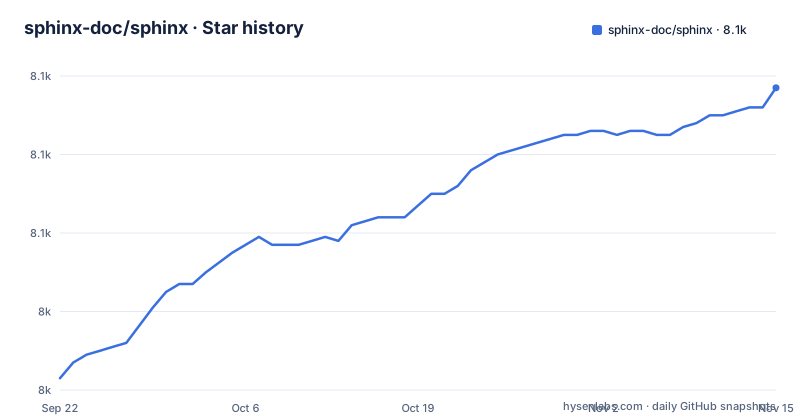
Star history
- sphinx-doc/sphinx8,097 ★ · +74
| Repository | 2026-09-22 | 2026-11-15 |
|---|---|---|
| sphinx-doc/sphinx | 8k | 8.1k |
74 Stars in the last 54 days, measured from the daily GitHub snapshot. Compare with other projects
Editorial analysis
requires-python is 3.12, and that is the hard part
The floor is written in the build metadata rather than in prose:
requires-python = ">=3.13"The classifier list agrees and goes no lower: Python 3.13, 3.14, 3.15 and 3.16, with CPython and PyPy both listed as implementations, and Operating System :: OS Independent as the only platform entry. A distribution that still ships Python 3.12 cannot install the current Sphinx at all, and there is no backport path offered in this repository.
The build backend is worth knowing too, because it explains what a contributor needs installed before anything works:
requires = ["flit_core>=3.12"]One build requirement, and the project name in the metadata is Sphinx with a capital S. The repository also carries a uv.lock at the root alongside tox.ini and .pytest.toml, so both uv and tox are set up for reproducing environments.
pip install -U sphinx, then the README hands you over
The installation section is one command and one prerequisite:
pip install -U sphinxYou need a working Python and pip, and that is the whole instruction. After it, the README's own next move is to send you to www.sphinx-doc.org, and it does the same for the contributors guide at the internals path.
So the landing page is a signpost rather than a tutorial. There is no conf.py skeleton, no directive reference, no walkthrough of a first build, and no mention of autodoc or apidoc anywhere in it. If you are deciding whether Sphinx fits, the feature list is enough. If you are trying to run your first build tonight, everything you need is either in the doc/ directory of this repository or on the documentation site.
That division is a deliberate consequence of the project's age and size. The header carries a PyPI badge, a GitHub Actions build status badge and a Read the Docs documentation status badge, which is the shape of a project whose documentation is itself a hosted, separately built artifact.
reStructuredText and Docutils are the floor, extensions are the ceiling
The design decision underneath everything is the markup language. Sphinx uses reStructuredText, and the stated reason is that many of its strengths come from the power and straightforwardness of reStructuredText together with its parsing and translating suite, Docutils.
What that buys is the cross reference machinery, which is the reason to choose Sphinx over a plain converter. Semantic markup produces automatic links for functions, classes and glossary terms. A document tree gives you automatic links to siblings, parents and children. Indices are generated, both a general index and a module index. Code highlighting is automatic through the Pygments highlighter, and HTML output is templated through Jinja 2. Output formats include HTML, PDF, plain text, EPUB, TeX and manual pages.
The ceiling is the extension ecosystem, and it is where the boundary sits. Language support is listed as Python, C, C++, JavaScript and mathematics, with many other languages through extensions. The extension list is also where automatic function documentation and Jupyter notebook support live.
make all chains ruff, mypy, sphinx-lint and pytest with dev mode on
The Makefile shows what a change has to pass. The default target is not just tests:
all: format style-check type-check doclinter testSo a full run formats the tree, lints it, type checks it, lints the reStructuredText, and then tests it. The individual tools are visible in the recipe bodies. Style is ruff, both directions:
ruff check .
ruff format .
Types are mypy, run bare. The documentation has its own linter with a house line length:
sphinx-lint --enable all --disable triple-backticks --max-line-length 85 --sort-by filename,lineAnd the test invocation turns on CPython's development mode and default encoding warnings:
$(PYTHON) -X dev -X warn_default_encoding -m pytest -v $(TEST)-X dev is what makes a stray resource leak or an unclosed file loud, and -X warn_default_encoding is what surfaces the implicit encoding assumption that bites people moving code between machines. Both matter for a generator that opens files written in many encodings.
make docs will not start without a target variable
The documentation target guards itself rather than defaulting to something and failing later:
$(info You need to provide a target variable, e.g. `make docs target=html`.)Without a target variable, make stops and prints that message instead of guessing. With one, the documented example form is make docs target=html.
That is the whole of the repository's own documentation build, and it is a fair mirror of how the project expects to be driven: targets are explicit and you say which one you want. The same philosophy shows up in check, which is style-check, type-check and doclinter with the format and test steps removed, so you can run everything except the slow parts on every save.
The clean target deserves a mention too, because it contains a rule that reads oddly:
clean: cleanA target that depends on itself, followed by the real work of deleting pyc files, caches, doc/build, doc/_build, build/sphinx, dist, build, .tox and tests/test-server.lock. Make treats the self reference as already remade rather than looping, so the cleanup runs once, and the entry is almost certainly left over from a rename.
package.json exists to run Jasmine in a browser
There is a package.json in a Python project, and it is not there for the documentation tool. It has one script and two dev dependencies:
"test": "npx jasmine-browser-runner runSpecs --config=tests/js/jasmine-browser.mjs"jasmine-browser-runner and jasmine-core are the only two things it installs. That tells you Sphinx ships JavaScript that runs in a browser and is tested there, rather than being tested in Node, which is the honest way to test code whose whole job is to execute inside a page.
The same dual-toolchain pattern shows up in the config files at the root: .ruff.toml for Python formatting and linting, .prettierrc.toml for everything else, .pytest.toml for the test runner, plus pyrefly.toml and ty.toml alongside the Makefile's mypy invocation. Three type checkers and two formatters are configured in one repository.
The reading is that the project is mid migration rather than undecided by accident. mypy still runs in make type-check while two newer checkers have configuration files, and ruff format coexists with prettier. For a contributor that means knowing which tool owns the file you are touching, and for a user it means none of this is visible in the wheel.
pyproject says BSD 2-Clause and the repository records no identifier
The licence is declared in the build metadata:
license = "BSD-2-Clause"
license-files = [
    "LICENSE.rst",
]
And the header badge agrees, pointing at opensource.org's BSD 2-Clause page, while LICENSE.rst sits at the repository root. So the terms themselves are unambiguous for a human reader.
The wrinkle is that no SPDX identifier is recorded for the repository, which means the machinery that normally answers that question automatically cannot. For anyone running a dependency scanner or a licence allowlist against Sphinx, the package metadata is the place to read from, and the repository has to be handled by hand.
The release history is worth pairing with that. The three newest releases are 9.2.0 published on 2026-10-21, 9.1.1 on 2026-10-20 and 9.1.0 on 2025-12-31. The last push to the default branch, master, was on 2026-11-02, which means there is work after the current release and CHANGES.rst is where the unreleased entries live.
Editorial conclusion
Take Sphinx when your documentation source is reStructuredText, you want semantic cross references and several output formats generated from one tree, and your team already runs Python 3.12 or later. Leave it if you are pinned to Python 3.12, since pyproject declares requires-python >=3.13 and the classifiers list 3.13, 3.14, 3.15 and 3.16. Verify three things. Run pip install -U sphinx in a scratch environment and see which version resolves, because the newest releases are 9.2.0 and 9.1.1 from October 2026 and 9.1.0 from December 2025. Then read doc/ in this repository, because the README names autodoc and apidoc nowhere and the reference you actually need is www.sphinx-doc.org. Finally check how your licence scanner reads this dependency, because pyproject declares BSD-2-Clause while no licence identifier is recorded for the repository itself.
Frequently asked questions
How do I install Sphinx?
The README gives one command, pip install -U sphinx, and says you need a working installation of Python and pip. The build metadata sets the floor higher than that implies: pyproject declares requires-python >=3.13, with classifiers for 3.13 through 3.16 and for both CPython and PyPy.
How do I use Sphinx for Python documentation?
reStructuredText is the markup, and the cross reference machinery is the reason to use it: semantic markup producing automatic links for functions, classes and glossary terms, a document tree with automatic links to siblings, parents and children, a general index plus a module index, and automatic code highlighting through the Pygments highlighter.
How do I use Sphinx autodoc?
The README does not name autodoc. Automatic function documentation is named as one example of the many extensions available, so that is where the capability is described as living. Sphinx's own markup is reStructuredText and everything beyond the README is at www.sphinx-doc.org.
How do I use Sphinx apidoc?
The README does not name apidoc either. It does say that language support covers Python, C, C++, JavaScript, mathematics and many other languages through extensions.
How do I run sphinx quickstart?
The README does not walk through a quickstart and points at www.sphinx-doc.org instead. In this repository the Makefile has a docs target that refuses to run without a variable: it prints You need to provide a target variable, e.g. make docs target=html, and the documented form is make docs target=html.
How do I install Sphinx from source?
The build backend is flit_core, with flit_core>=3.12 in the build requirements, and the Makefile has a build target that runs python -m build. For the tree itself, make all chains format, style-check, type-check, doclinter and test, and the repository carries a uv.lock plus tox.ini for reproducing environments.
Official sources
Add this badge to your README
If you maintain this project, the badge below links readers to this analysis and shows its maintenance status from the daily GitHub snapshot. Paste the markdown into your README; add ?metric=license or ?metric=stars to the image URL for a different field.

[](https://hysenlabs.com/projects/sphinx-doc-sphinx)Star history chart for your README
[](https://hysenlabs.com/projects/sphinx-doc-sphinx)Was this useful?