Spicetify CLI: a Go binary and a pnpm-built wrapper that patch the Spotify client
Command-line tool to customize Spotify client. Supports Windows, macOS, and Linux.
At a glance
- What is it?
- Spicetify injects CSS, Extensions and Custom Apps into the official Spotify client, and its repository documents almost none of the commands that drive it. Here is what the Go module, the pinned pnpm toolchain and the missing install steps actually tell you.
- Who is it for?
- Adopt Spicetify if you are willing to patch the Spotify client on the same three platforms the project names, and only if you can reach spicetify.app for the install and usage steps the repository omits. Do not adopt it for a managed or shared workstation where a client update and a restore path you cannot script would be a problem.
- Can I use it commercially?
- Yes, with conditions. LGPL-2.1 is a weak copyleft licence: you can use it inside commercial and closed-source software, but if you distribute changes to its own files, you must publish those changes under the same licence.
- Is it still maintained?
- Yes. The repository last received commits 2 days ago.
- What is it written in?
- Mainly JavaScript, according to GitHub's language statistics.
Answers come from the project's GitHub data, last synced on November 13, 2026, and from our analysis. They are not legal advice.
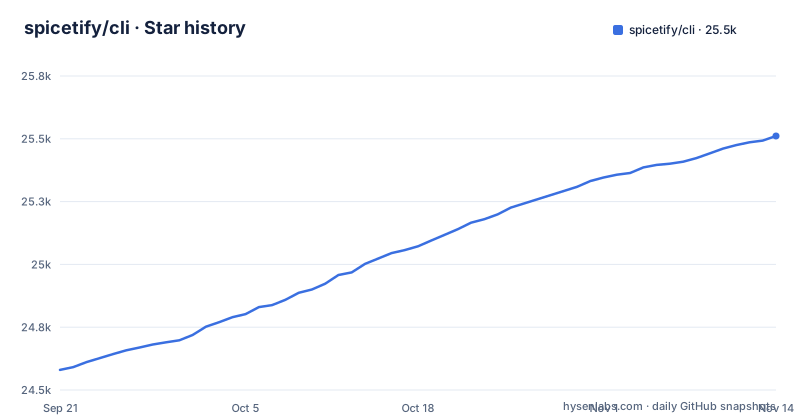
Star history
- spicetify/cli25,493 ★ · +913
| Repository | 2026-09-21 | 2026-11-13 |
|---|---|---|
| spicetify/cli | 24.6k | 25.5k |
913 Stars in the last 53 days, measured from the daily GitHub snapshot. Compare with other projects
Editorial analysis
Four injection points, not a theme picker
Spicetify's README describes five capabilities, and four of them are one operation applied to different payloads: change colors across the user interface, inject CSS, inject Extensions, inject Custom Apps. The application being customized stays the official Spotify client. What changes is the set of assets loaded into it, which is why the feature list ends with the claim that you make yourself in control of the client rather than that you replace it.
That shape has a consequence for anyone weighing it. Recolouring the interface is a text edit. Injecting an Extension is running third-party JavaScript inside a signed desktop application. The README treats both as entries in the same list and never separates them, so a reader has to accept the whole payload surface or none of it. Nothing in the repository tells you which Extensions ship by default or whether any of them are sandboxed.
CustomApps, Extensions and Themes sit in the repository root
The payload libraries are plain top-level directories: CustomApps/, Extensions/ and Themes/. Beside them sit css-map.json, manifest.json and globals.d.ts, together with jsHelper/ and src/. The README does not explain any of those three files, so a contributor cannot assemble a payload from the directory layout alone and assume the client will accept it.
The usable path is narrower than the directory names suggest. Someone adding an Extension drops it where the loader already expects and lets the CLI wire it in. Someone maintaining a look edits files under Themes/ and hands the directory to the CLI. Both routes require knowing the expected file names up front, and the README does not enumerate them. The presence of css-map.json suggests a selector mapping exists somewhere in the design, but the file itself is not explained, so treating it as a public configuration surface would be a guess.
A Go binary beside an esbuild-built JavaScript wrapper
go.mod declares the module as github.com/spicetify/cli and requires go 1.26.0, so the command that runs on your machine is Go code even though the repository is reported as JavaScript first. The JavaScript side lives in jsHelper/ and src/, and package.json builds it with a single wrapper script plus esbuild 0.25.11 from devDependencies.
module github.com/spicetify/cli

go 1.26.0"scripts": {
"build:wrapper": "node scripts/build-wrapper.mjs",
"check:wrapper": "node scripts/build-wrapper.mjs --check"
}The Go dependency list explains what the binary touches at its edges. go-ini/ini v1.67.0 is an INI parser, which is where a configuration file would be read. mattn/go-colorable v0.1.15 and pterm v0.12.82 handle terminal output, with gookit/color, go-runewidth and rivo/uniseg arriving behind them, so styled text renders on Windows consoles as well as Unix terminals. atomicgo.dev/cursor, atomicgo.dev/keyboard and atomicgo.dev/schedule, alongside lithammer/fuzzysearch v1.1.8, are the parts of an interactive fuzzy picker. The README documents neither a config file nor a command surface, so the mapping from import to behaviour stays an inference from the module list.
Installing means following spicetify.app, not the repository
The README carries no install command. It points to https://spicetify.app/docs/getting-started for Installation and to the Basic Usage anchor on that same page for the first commands. The repository does ship two installers at the top level, install.sh and install.ps1, which tells you a POSIX path and a PowerShell path exist without telling you how either is invoked, what it downloads, or what it writes into your Spotify profile.
This is the largest gap in the project for anyone evaluating it from the source. Cloning spicetify/cli hands you source, not a working command, and the only documented route to a binary runs through the documentation site rather than the repository.
package.json refuses npm and yarn on purpose
The wrapper build is pinned to one package manager. engines names node >=18 as the floor and sets both npm and yarn to the literal string please-use-pnpm, while packageManager pins [email protected] and pnpm-workspace.yaml sits at the root.
"engines": {
  "node": ">=18",
  "npm": "please-use-pnpm",
  "pnpm": ">=8",
  "yarn": "please-use-pnpm"
}
The formatting target shows the same narrowness of scope. It covers scripts, src/jsHelper/spicetifyWrapper, package.json and the two configuration files, while lint runs oxlint . across the whole tree.
"fmt": "oxfmt scripts src/jsHelper/spicetifyWrapper package.json .oxfmtrc.json .oxlintrc.json",
"lint": "oxlint ."
CustomApps/, Extensions/ and Themes/ sit outside the format target. An Extension or Theme file you add will not be reformatted by the project's own tooling, so a reviewer sees mixed style unless you run the formatter on that path by hand.
No rollback path once Spotify updates its own client
Spicetify modifies an installed Spotify client. The README does not describe restoring an untouched one: it lists no backup step, no revert command, and no note about what happens when the client is replaced.
A second absence has the same shape. The README does not list subcommands or flags either; Basic Usage sits behind the documentation link. Anyone scripting Spicetify for a fleet of machines is working from a page, not from the repository.
LGPL-2.1 on the code, SignPath on the Windows binary
The repository is licensed LGPL-2.1, which governs the CLI's own source and the payload directories a fork would copy. That is a separate question from what a user may do to the Spotify client itself, and the project says nothing about that, so anyone who needs an answer has to look outside this repository.
The README says code signing is provided free by SignPath.io, with a certificate from the SignPath Foundation. Two effects follow. A binary you compile yourself will not carry the published signature, so anything validating against the release artefact will not recognise it. And redistributing a build you have modified keeps the LGPL terms attached to the code you changed. CONTRIBUTING.md sits in the root.
v3.0.0-rc.2 shipped the same day as rc.1
Three releases sit close together: v2.46.2 published on 2026-10-20, v2.46.3 on 2026-10-24 and v2.46.4 on 2026-10-26, with the last push to the repository landing on 2026-11-01. Releases arriving days apart mean a reader who tracks the newest tag can move between builds that differ.
The repository is not archived and the last push was on 2026-11-01, so the project is being worked on. The cost of that activity is churn in the version a machine ends up running. Pin a specific tag in any setup script rather than following the default branch, and re-read the Getting Started page after each release, because the command names are documented there rather than in the README.
Editorial conclusion
Adopt Spicetify if you are willing to patch the Spotify client on the same three platforms the project names, and only if you can reach spicetify.app for the install and usage steps the repository omits. Do not adopt it for a managed or shared workstation where a client update and a restore path you cannot script would be a problem. Before anything else, read the Getting Started page, confirm whether your Spotify build still matches what the injection expects, and pin a specific release tag such as v2.46.4 rather than tracking the default branch.
Frequently asked questions
What is the Spicetify command?
Spicetify is a command-line tool for customizing the official Spotify client on Windows, macOS and Linux. It changes colors across the user interface, injects CSS, injects Extensions, and injects Custom Apps.
How do you install the Spicetify CLI?
The README links installation to https://spicetify.app/docs/getting-started instead of giving a command, and the repository root carries install.sh and install.ps1. Building from source needs node >=18 with pnpm >=8 for the esbuild wrapper, and go 1.26.0 for the CLI itself.
How do you use the Spicetify CLI?
The documented path runs through the Basic Usage section of https://spicetify.app/docs/getting-started. The repository shows the shape of the work: recolouring the interface, injecting CSS, and injecting Extensions and Custom Apps from the CustomApps/, Extensions/ and Themes/ directories.
What is the command to reinstall Spicetify?
The README gives no reinstall command. Its README sends both installation and basic usage to https://spicetify.app/docs/getting-started, and the repository ships install.sh and install.ps1 at its top level for that step.
Is Spicetify legal?
Nothing in the repository addresses whether modifying the Spotify client conflicts with Spotify's own terms, so that question cannot be answered from this project. What the repository does state is its own licence, LGPL-2.1, and that its code signing is provided free by SignPath.io with a SignPath Foundation certificate.
Official sources
Add this badge to your README
If you maintain this project, the badge below links readers to this analysis and shows its maintenance status from the daily GitHub snapshot. Paste the markdown into your README; add ?metric=license or ?metric=stars to the image URL for a different field.

[](https://hysenlabs.com/projects/spicetify-cli)Star history chart for your README
[](https://hysenlabs.com/projects/spicetify-cli)Was this useful?