serve is a local preview server, and its own readme sends you to Vercel for production
Static file serving and directory listing
At a glance
- What is it?
- serve is Vercel's MIT licensed static file server and directory lister for looking at a build on your own machine or the local network. The interesting part is what sits underneath it: a CLI wrapper around serve-handler 6.1.7, with its serve.json configuration inherited from that one dependency.
- Who is it for?
- Use serve when the job is to look at a build, hand a folder to someone on the same network, or mount static file serving inside a server you already control. Do not use it as the thing that faces the internet, because the project points you at Vercel for that and the dependency tree has no TLS in it.
- Can I use it commercially?
- Yes. MIT is a permissive licence: you can use, modify and sell software built on it, as long as you keep its copyright and licence notices.
- Is it still maintained?
- Yes. The repository received new commits within the last day.
- What is it written in?
- Mainly TypeScript, according to GitHub's language statistics.
Answers come from the project's GitHub data, last synced on November 13, 2026, and from our analysis. They are not legal advice.
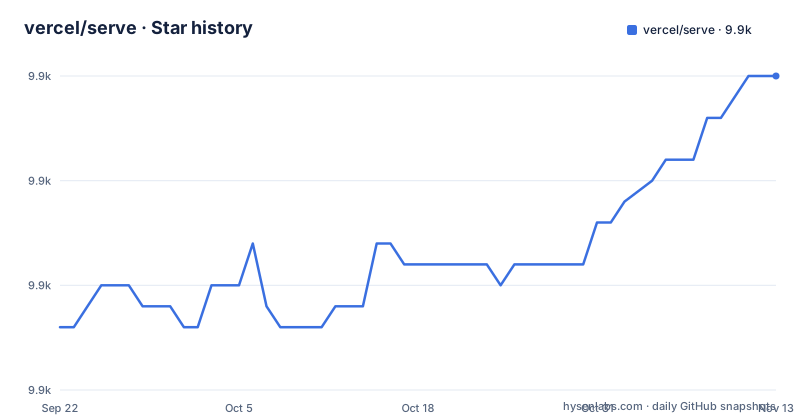
Star history
- vercel/serve9,915 ★ · +12
| Repository | 2026-09-22 | 2026-11-13 |
|---|---|---|
| vercel/serve | 9.9k | 9.9k |
12 Stars in the last 52 days, measured from the daily GitHub snapshot. Compare with other projects
Editorial analysis
npx serve is the quick start, and Node 14 is the floor
The fastest path is one command in your project directory: `npx serve`, which runs the package without installing it anywhere permanent. If you would rather have the command on your PATH, the global install is:
> npm install --global serveAfter that, point it at the current folder or at a named one:
> serve> serve folder-name/The Node requirement is stated twice, and both statements matter. Version 14 onwards requires Node v14 to run, and the global route asks for at least Node LTS. The escape hatch is explicit: use serve v13 if you cannot upgrade. So the version of the tool and the version of your runtime are the first thing to line up.
The production verdict sits in one line of the readme
Once it is time to push your site to production, the project's answer is to use Vercel instead. That single sentence tells you what the package is for, and the rest of the readme agrees: serve helps you serve a static site, single page application, or just a static file, on your device or on the local network.
Read the consequences through rather than around. There is no HTTPS story here, no certificate handling, no deployment step, and no shareable preview URL. The dependency list confirms the shape: compression 1.8.1 is there to gzip responses on the wire, but nothing in the tree negotiates TLS or claims a domain. So if you serve a build to a colleague across the office LAN and they assume it is the production endpoint, that is a misreading this project has already warned you against in writing. The tool is a preview instrument, and its honest scope is the machine it runs on.
Configuration is a serve.json dropped into the public folder
To change behaviour you create a serve.json file in the public folder and insert any of the properties listed in the serve-handler options. Two consequences follow.
First, the config location is a path inside the folder being served, not a file sitting next to your package.json, so a project served from a different root needs that file carried along with it or the behaviour silently reverts to defaults. Second, the option vocabulary does not live in this repository: serve pins serve-handler 6.1.7 and points you at that project's documentation, so the serve.json properties are not listed in this repository's readme. The dependencies include @zeit/schemas 2.36.0 and ajv 8.18.0, which suggests the config is checked against a schema you did not author.
The bin is a CLI wrapper and serve-handler is the server
package.json points the bin entry at ./build/main.js, and the README's API example shows the core of serve: create an HTTP server and hand every request to the handler.
const handler = require('serve-handler');
const http = require('http');

const server = http.createServer((request, response) => {
  // You pass two more arguments for config and middleware
  // More details here: https://github.com/vercel/serve-handler#options
  return handler(request, response);
});

server.listen(3000, () => {
  console.log('Running at http://localhost:3000');
});
The comment says you can pass two more arguments, config and middleware. If you already run a Node server, you can mount the same handler instead of running the CLI, and micro is offered as a replacement for http.createServer. What you inherit in that arrangement is exactly what serve-handler provides, no more, and nothing this project adds on top of it.
An exact pin on serve-handler means fixes arrive on the CLI's schedule
serve 14.2.6 depends on serve-handler 6.1.7, with types coming from @types/serve-handler 6.1.1. That dependency is pinned to an exact version rather than a range, and the same style runs through most of the tree, from ajv 8.18.0 to chalk 5.0.1, with only tinyclip carrying a caret.
The upside is predictable installs. The cost is timing: a fix published in serve-handler reaches you when the CLI bumps its pin, not when the handler releases. Upgrading serve does not move the handler on its own either, so the two versions have to be checked together whenever you bump. For a tool that lives on your own laptop that is a minor annoyance. For a build image you refresh on a schedule, the date the pin last moved is the date your serving behaviour last changed, and nothing in the tool will announce it to you. The inventory of what you can even configure is likewise one step away, which is why `serve --help` plus the serve-handler options page is the complete reference.
Only build/ is published, so the source is not on your machine
The npm tarball is narrower than the repository. The files array contains build/ and nothing else, the type field is set to module, and engines asks for node >= 14. So after installing serve, the TypeScript under source/, the tests under tests/, and the config/ directory holding the vitest setup are all absent.
That bites at exactly the moment you want to debug. You can read serve-handler's implementation inside node_modules, but serve's own source has to come from a git checkout, and the project structure you would inspect there is a pnpm workspace with a pnpm-lock.yaml and a pnpm-workspace.yaml at the top level. The prepare script runs `husky install config/husky && pnpm compile`, and the release script runs `pnpm compile && changeset publish`, so the published build/ comes from a compile step.
Release gaps stretch to eleven months with no support window attached
The tag history is thin and widely spaced: 14.2.4 on 2024-10-15, v14.2.5 on 2025-09-04, and v14.2.6 on 2026-03-03, with the last push to main dated 2026-06-30. Between 14.2.4 and 14.2.5 there is a gap of close to eleven months. A project pinned to 14.2.4 can therefore sit on an old tree for a long stretch with nothing in the tool telling you that it has.
There is no support window and no security policy file among the top-level entries. What you find instead is a .changeset directory, a CHANGELOG.md, and the workspace and lock files, which describes a changesets driven release flow rather than a promise about backports. If your team's rule is that dependencies stay inside a year of current, this one needs an exception and a written reason.
One more thing for readers arriving from older tutorials: the package used to be called list and micro-list, and took the name serve when TJ Holowaychuk handed over a new one. Author credit sits with Leo Lamprecht. A tutorial that tells you to run an older command name is describing a package version, not a mistake on your part.
Editorial conclusion
Use serve when the job is to look at a build, hand a folder to someone on the same network, or mount static file serving inside a server you already control. Do not use it as the thing that faces the internet, because the project points you at Vercel for that and the dependency tree has no TLS in it. Before pinning a version, check the Node floor against your runtime, since v14 onwards needs Node 14 and the escape hatch is v13, then read the serve-handler options rather than this project's documentation, because the option vocabulary lives one repository away and only build/ is published.
Frequently asked questions
What is meant by serve in this repository?
In vercel/serve it is a static file server and directory listing tool that serves a static site, a single page application, or a single file, on your device or the local network. The package was formerly called list and micro-list before taking the name serve.
What Node version does serve need?
serve v14 onwards requires Node v14 to run, and the global install asks for at least Node LTS. The package engines field asks for node >= 14. If you cannot move to Node 14, the project points you at serve v13.
How do I install and start serve?
Run `npx serve` in your project's directory for the quick path, or install it globally with `npm install --global serve` and then run `serve`, or `serve folder-name/` to pick a directory. `serve --help` shows the available options.
How is serve configured?
Create a serve.json file in the public folder and insert any of the properties listed in the serve-handler options. serve 14.2.6 pins serve-handler 6.1.7, and @zeit/schemas 2.36.0 with ajv 8.18.0 are among its dependencies.
Can serve be used inside an existing Node server?
Yes. The core is serve-handler, which works as middleware in an existing HTTP server, and micro can replace http.createServer. The README example passes only request and response, with two further arguments available for config and middleware.
Official sources
Add this badge to your README
If you maintain this project, the badge below links readers to this analysis and shows its maintenance status from the daily GitHub snapshot. Paste the markdown into your README; add ?metric=license or ?metric=stars to the image URL for a different field.

[](https://hysenlabs.com/projects/vercel-serve)Star history chart for your README
[](https://hysenlabs.com/projects/vercel-serve)Was this useful?