elk-docker packs Elasticsearch, Logstash and Kibana into one container, and its tag list mixes five naming schemes
Elasticsearch, Logstash, Kibana (ELK) Docker image
At a glance
- What is it?
- spujadas/elk-docker builds a single Docker image that runs a centralised log server and log management web interface. This review covers the build and run commands, the published ports, the tag naming, the Dockerfile's base image and the version mismatch between the README and the Dockerfile.
- Who is it for?
- Use elk-docker for a single-host log server in development or a lab, where one container holding all three services is a convenience. Do not treat it as a multi-node deployment: the repository builds one image, not a cluster.
- Can I use it commercially?
- Check first. The repository uses a licence we do not classify automatically, so read its LICENSE file before any commercial use.
- Is it still maintained?
- Yes. The repository last received commits 15 days ago.
- What is it written in?
- Mainly Shell, according to GitHub's language statistics.
Answers come from the project's GitHub data, last synced on November 25, 2026, and from our analysis. They are not legal advice.
Star history
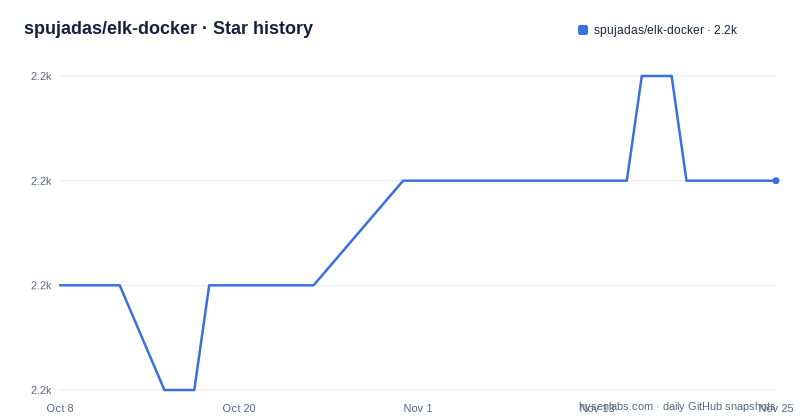
- spujadas/elk-docker2,165 ★ · +1
| Repository | 2026-10-08 | 2026-11-25 |
|---|---|---|
| spujadas/elk-docker | 2.2k | 2.2k |
1 Stars in the last 48 days, measured from the daily GitHub snapshot. Compare with other projects
Editorial analysis
One image starts three services, and three ports are the whole interface
The image packages Elasticsearch, Logstash and Kibana, collectively known as ELK, as a convenient centralised log server and log management web interface. All three run in one container, which is the opposite of the usual one-service-per-container layout.
The docker-compose.yml in the repository defines a single service named elk, built from the current directory, with three ports published. Its header comments give the commands:
docker-compose build elkdocker-compose upThe Dockerfile comments give the plain Docker equivalents:
docker build -t <repo-user>/elk .docker run -p 5601:5601 -p 9200:9200 -p 5044:5044 -it --name elk <repo-user>/elkThe ports are 5601, 9200 and 5044. The compose file and the run command both publish all three. The README does not label them, and the Dockerfile comments do not either. Complete instructions live on the documentation site at elk-docker.readthedocs.io, which is where the README sends you for usage.
The tag list uses five naming schemes, and some entries repeat
The image is hosted on Docker Hub at sebp/elk, and the README lists its tags at length. The names change shape as the versions climb. The 8.x line uses dotted tags such as 8.18.4, each paired with an oss- variant. The 7.x line is dotted from 7.10.0 upward but drops the dots below that, with tags like 793, 781 and 700. The 6.x line has no dots at all, such as 680 and 6.8.22 as the one exception. The 5.x line uses 5615 and 560, and the oldest 5.x tags look like es501_l501_k501. The 2.x line spells out all three versions in the tag, for example es241_l240_k461 for Elasticsearch 2.4.1, Logstash 2.4.0 and Kibana 4.6.1. The oldest tag is E1L1K4, for Elasticsearch 1.7.3, Logstash 1.5.5 and Kibana 4.1.2.
The 9.x line is short. latest and 9.0.4 point to ELK 9.0.4, with oss-9.0.4 as the OSS build. The 7.17 entries are inconsistent: the tag 7.17.1 appears labelled both ELK 7.17.5 and 7.17.1, and 681 appears twice for 6.8.1 and 6.8.2. Anyone scripting against tags should pin a full tag and pull it to check which version it contains. The README points to the documentation page for pulling specific combinations of Elasticsearch, Logstash and Kibana versions.
The oss- tags run past 7.11.0, although the Dockerfile says no OSS version exists after it
Many tags come in pairs. A tag like 8.17.8 has a twin, oss-8.17.8, labelled OSS 8.17.8 in the README. The Dockerfile comment says there is no OSS version since 7.11.0 for Elasticsearch and Kibana, and the file defines a separate ELK_BASE_VERSION for that reason: it is the base version with the OSS prefix removed.
The README and the Dockerfile comment therefore pull in different directions. The README lists oss- tags for versions well beyond 7.11.0, up to oss-9.0.4, while the comment treats the OSS split as ended at 7.11.0. If your choice depends on getting the OSS flavor, do not rely on the tag name alone. Pull the tag and check what it contains.
The pairs also double the length of the tag list. Between 8.0.0 and 8.18.4 nearly every version appears twice, once plain and once with the oss- prefix, and a few, such as 8.14.3, have no OSS twin in the list. Check that the twin you want exists before scripting against it.
The Dockerfile builds on phusion/baseimage focal-1.1.0 and installs OpenJDK 11 for Logstash
The base image is phusion/baseimage, with the tag set by an ARG named IMAGE that defaults to focal-1.1.0. A comment says to replace it with master-arm64 for ARM64. The architecture is a second ARG, ARCH, which defaults to x86_64, and the comment says to replace it with aarch64 for ARM64 systems. Running on an ARM machine therefore means changing two build arguments, not one.
Prerequisites installed with apt are ca-certificates, curl, gosu, tzdata and openjdk-11-jdk-headless. The comment attributes the JDK to Logstash. Elasticsearch is downloaded from artifacts.elastic.co as a tar.gz named elasticsearch-${ES_VERSION}-linux-${ARCH}.tar.gz and unpacked under /opt/elasticsearch, with a dedicated elasticsearch group and user at UID and GID 991, and a login shell of /usr/sbin/nologin.
Two details date the file. An environment variable REFRESHED_AT is set to 2020-06-20, and the maintainer line is the old MAINTAINER instruction naming Sebastien Pujadas. The README does not explain either.
The README says latest is 9.0.4, but the Dockerfile header says 9.5.5
Two files in the repository disagree about the current version. The README lists latest and 9.0.4 as ELK 9.0.4. The Dockerfile begins with the comment Elasticsearch, Logstash, Kibana 9.5.5 and sets ELK_VERSION and ELK_BASE_VERSION to 9.5.5.
Neither file says which one is ahead. The practical advice is to build from the repository when you want the Dockerfile version, and pull a numbered tag when you want a published image. Do not assume the two match.
The GitHub releases tell a third story. The three most recent GitHub releases are es233_l232_k451 from 24 May 2016, es232_l232_k450 from 29 April 2016 and logstash-2.2.0 from 3 February 2016. The repository was still being pushed to in October 2026, so the GitHub releases page does not track current versions.
Configuration files sit at the repository root, next to a committed key and certificate
The top-level listing shows how the image is configured. Each of the three services has its own set of files: elasticsearch.yml, elasticsearch-default, elasticsearch-init and elasticsearch-logrotate for Elasticsearch, and kibana.yml, kibana-init and kibana-logrotate for Kibana. Logstash has logstash-init, logstash-logrotate, pipelines.yml and a logstash-conf directory. A start.sh script launches the services, and a nginx-filebeat directory with an nginx.pattern file sits beside them.
Two files stand out: logstash-beats.crt and logstash-beats.key. They are a certificate and private key for the Beats input, committed to the repository. A key stored in a public repository is known to everyone who clones it, so an image that keeps using it for Beats traffic offers no secrecy for that channel. The README does not discuss replacing them.
A docs directory and mkdocs.yml build the documentation site, and .readthedocs.yaml configures its hosting. README-short.txt is also present at the top level.
One author, an Apache 2 license that GitHub does not detect, and a push on 7 October 2026
The README closes with a single line: written by Sébastien Pujadas, released under the Apache 2 license. GitHub reports the license field as NOASSERTION, so rely on the README statement and the LICENSE file in the top-level listing rather than the repository badge.
The repository is not archived, and the last push was on 7 October 2026. The Dockerfile's maintainer line names the same author, and the repository lists no other maintainers.
ELK is the name for Elasticsearch, Logstash and Kibana together, so Elasticsearch is one of the three, and the image runs all three. Whether any given host can run all three comfortably is a question for the documentation, since the README gives no memory or disk requirements.
Editorial conclusion
Use elk-docker for a single-host log server in development or a lab, where one container holding all three services is a convenience. Do not treat it as a multi-node deployment: the repository builds one image, not a cluster. Before pulling, decide which tag you want, because the README names 9.0.4 as latest while the Dockerfile header says 9.5.5, and check the project license text since GitHub reports it as NOASSERTION.
Frequently asked questions
What is elk and how does it work?
ELK is the collective name for Elasticsearch, Logstash and Kibana. This image packages the three as a centralised log server and log management web interface.
Is elk the same as Elasticsearch?
No. ELK stands for Elasticsearch, Logstash and Kibana together, so Elasticsearch is one of its three components. The image runs all three.
Which ports does the elk-docker image publish?
The docker-compose.yml publishes 5601, 9200 and 5044. The docker run command in the Dockerfile comments publishes the same three.
Official sources
Add this badge to your README
If you maintain this project, the badge below links readers to this analysis and shows its maintenance status from the daily GitHub snapshot. Paste the markdown into your README; add ?metric=license or ?metric=stars to the image URL for a different field.

[](https://hysenlabs.com/projects/spujadas-elk-docker)Star history chart for your README
[](https://hysenlabs.com/projects/spujadas-elk-docker)Was this useful?