DB Browser for SQLite: the grid that logs every statement it runs
Official home of the DB Browser for SQLite (DB4S) project. Previously known as "SQLite Database Browser" and "Database Browser for SQLite". Website at:
At a glance
- What is it?
- DB Browser for SQLite puts a spreadsheet-style grid in front of a SQLite file and records the SQL behind each edit. This looks at how the build is packaged across Windows, macOS and Linux package managers, what the maintainers deliberately left out of the grid, and where the tool stops short.
- Who is it for?
- DB Browser for SQLite fits a developer who needs one SQLite file open for an afternoon: no server, no driver, and a statement log to check what the grid just did to the data. It does not fit anyone who needs formula-driven sheets, recorded schema migrations, or a single client for several database engines.
- Can I use it commercially?
- Check first. The repository uses a licence we do not classify automatically, so read its LICENSE file before any commercial use.
- Is it still maintained?
- Yes. The repository last received commits 3 days ago.
- What is it written in?
- Mainly C++, according to GitHub's language statistics.
Answers come from the project's GitHub data, last synced on November 13, 2026, and from our analysis. They are not legal advice.
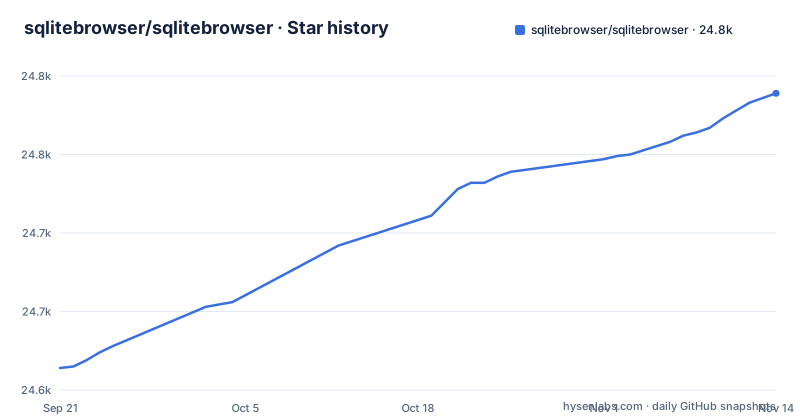
Star history
- sqlitebrowser/sqlitebrowser24,786 ★ · +172
| Repository | 2026-09-21 | 2026-11-13 |
|---|---|---|
| sqlitebrowser/sqlitebrowser | 24.6k | 24.8k |
172 Stars in the last 53 days, measured from the daily GitHub snapshot. Compare with other projects
Editorial analysis
Every grid edit turns up in the SQL log
DB Browser for SQLite, shortened to DB4S by its own README, opens a SQLite database file directly. There is no server to start and no connection string to fill in, and rows arrive in a spreadsheet-style grid. That layout is the reason the project exists in this form: the README says the grid is there so that complicated SQL commands do not have to be learned, and the wizards behind it cover creating and compacting database files, defining and deleting tables and indexes, browsing and editing records, importing and exporting CSV and SQL dump files, and running queries.
The part worth knowing about is the statement log. The README lists examining a log of all SQL commands issued by the application as one of its controls. That turns a grid edit into something you can audit instead of something you have to trust. Alongside it sit the query feature, where you issue SQL and inspect the results, and plotting of simple graphs from table or query data.
The spreadsheet features the maintainers refused to build
The README carries a section titled What it is not, and it is blunt about the boundary. Even though the interface looks like a spreadsheet, DB4S is not meant to replace a spreadsheet application. Convenience functions get added only when they make sense in a database context, and the team adds that it is small with limited time, which is why anything too complex to implement well gets left out on purpose.
For a reader, the consequence is practical. If your work is a monthly rollup that has to recompute as rows change, the honest path is to export the table as CSV through the wizard and do the arithmetic in the application you already use. Rebuilding that inside the grid would only ever be a poor imitation, and poor imitations are the exact thing this project decided not to ship.
Five package managers, five different builds
Choosing an install method is also choosing a version, and the README documents the channels separately. On Windows, releases are listed at sqlitebrowser.org/dl/#windows and three package managers are offered. Chocolatey and winget are two of them:
choco install sqlitebrowserwinget install -e --id DBBrowserForSQLite.DBBrowserForSQLiteScoop is listed as a third option:
scoop install sqlitebrowserOn macOS the released binary comes from a Homebrew Cask:
brew install --cask db-browser-for-sqliteLinux is the widest spread and the widest version skew. Arch ships an up to date package, Debian deliberately ships an older but well tested one, and Fedora and openSUSE each have a single line:
sudo pacman -S sqlitebrowsersudo dnf install sqlitebrowsersudo zypper install sqlitebrowserUbuntu needs a PPA added before the same two apt commands work:
sudo add-apt-repository -y ppa:linuxgndu/sqlitebrowserThat last detail matters more than it looks. A machine on Debian, a machine on the Ubuntu PPA and a Mac on the Cask can be running three different amounts of code under the same name.
SQLCipher exists as a separate nightly cask, and only there
The macOS section splits the released build from the rolling ones, and only the rolling ones are split by encryption. Tapping the cask-versions tap exposes two nightly casks, and the difference is stated in the comments inside the block itself:
brew tap homebrew/cask-versions

# for the version without SQLCipher support
brew install --cask db-browser-for-sqlite-nightly

# for the version with SQLCipher support
brew install --cask db-browser-for-sqlcipher-nightly
Read that carefully before you install. SQLCipher support is a property of the binary, not a setting you can turn on later. The README attaches those two names to the nightly casks and says nothing about whether the stable cask carries SQLCipher, which leaves a gap: if your databases are encrypted, verify the build before you rely on it rather than finding out when a file refuses to open.
Platform support is stated just as narrowly. macOS 10.15 Catalina through 14.0 Sonoma are tested and known to work, and the README makes no claim beyond Sonoma. The table of contents also lists Snap packages, Nix packages and a Flox section, and the repository carries a snap directory.
Continuous builds are cut on every commit to master
Two rolling release tags sit above the numbered releases, and they behave differently. A continuous build is generated whenever a new commit lands on the master branch, and those builds are published for AppImage, macOS and Windows under the continuous release tag. Nightly builds for Windows and macOS are a separate stream under the nightly release tag.
The consequence for anyone installing is that continuous is a build of whatever was last committed to master, and the dates in the release list show the gap it creates. The nightly tag was rebuilt on 2026-11-02 and the continuous tag on 2026-11-01, while the newest numbered release, v3.13.1, was published on 2024-10-16. The last push to the repository was on 2026-11-02 and the project is not archived, so the code is moving, and the release you receive depends entirely on which of those channels your package manager points at.
Maintenance signals do have a named home. The repository root carries SECURITY.md for reporting a problem, MAINTAINERS.md, CHANGELOG.md and a currentrelease file, alongside five separate licence files: LICENSE, LICENSE-GPL-3.0, LICENSE-MIT, LICENSE-MPL-2.0 and LICENSE-PLUGINS. With several licence files in one tree, check which file covers the part you intend to modify.
A single-file editor with no server, no migrations and no way to undo a schema change
Three absences shape what you can do with DB4S, and none of them is patched over by the grid.
There is no server and no network path. The tool opens a database file you already have. A database that lives on a colleague's laptop has to be sent to you before you can look at it.
There is no migration tooling in the feature list. Tables are created, defined, modified and deleted through wizards and SQL.
The statement log records the SQL that ran rather than a state you can roll back to. Take your own copy before compacting or importing.
Where DBeaver and SQLiteStudio draw a different line
Two comparisons are worth making, and both turn on scope rather than quality.
DBeaver is a client for many database engines, reaching PostgreSQL, MySQL and others through drivers. DB4S does the opposite: it targets SQLite files only, opens them with no server and no driver layer, and offers the row grid, the query tab and the statement log in exchange. A team that already runs every engine through one client gains little by adding a second binary that reads one file format. A developer who only ever touches SQLite gets a tool with no connection setup at all.
SQLiteStudio stays closer to this starting point, since it also works on single database files. DB4S has no scripting layer in its feature list; its automation story is the query tab plus the log of statements the application issued, which is a record of what happened rather than a place to write a repeatable script. Neither project reintroduces the spreadsheet model, so that gap is the same in both.
Editorial conclusion
DB Browser for SQLite fits a developer who needs one SQLite file open for an afternoon: no server, no driver, and a statement log to check what the grid just did to the data. It does not fit anyone who needs formula-driven sheets, recorded schema migrations, or a single client for several database engines. Before adopting it, check which build your platform gives you by default, because a Debian or Ubuntu package, a Homebrew Cask and a continuous build can all carry different code, and confirm SQLCipher support if the files you open are encrypted.
Frequently asked questions
Is sqlitebrowser safe?
The project publishes its own downloads at sqlitebrowser.org, and on Windows the README offers installs through Chocolatey, winget and scoop, so a binary from an unknown mirror is not required. The repository is not archived, and its last push was on 2026-11-02.
What is the best SQLite browser?
DB Browser for SQLite is a visual, open source tool that works on SQLite files through a spreadsheet-style grid, and it says plainly that it is not meant to replace a spreadsheet application. Tools aimed at scripting a database or at reaching several engines cover different jobs.
Can I download DB Browser for SQLite for Windows 11?
Windows releases are listed at sqlitebrowser.org/dl/#windows, with continuous builds under the continuous release tag and nightly builds under the nightly release tag. The README does not state a minimum Windows version, so it will not confirm Windows 11 as a tested target.
how to install sqlite browser in ubuntu
Add the ppa:linuxgndu/sqlitebrowser PPA, refresh the package cache with apt-get update, then install with apt-get install sqlitebrowser. Nightly builds come from a separate Launchpad PPA, and the README keeps builds for older Ubuntu releases in the first PPA.
sqlitebrowser vs dbeaver
DB Browser for SQLite opens SQLite files with no server and no drivers, while DBeaver is a client for many database engines. DB4S gives you a row grid, a query tab and a log of the SQL it issued, which is what a single-file workflow needs.
how to use sqlitebrowser
The README sends user and developer documentation to the project Wiki at github.com/sqlitebrowser/sqlitebrowser/wiki, rather than documenting the interface itself. The feature list in the README is the short version: edit tables, indexes and records, import and export CSV and SQL dumps, run queries, and plot simple graphs.
Official sources
Add this badge to your README
If you maintain this project, the badge below links readers to this analysis and shows its maintenance status from the daily GitHub snapshot. Paste the markdown into your README; add ?metric=license or ?metric=stars to the image URL for a different field.

[](https://hysenlabs.com/projects/sqlitebrowser-sqlitebrowser)Star history chart for your README
[](https://hysenlabs.com/projects/sqlitebrowser-sqlitebrowser)Was this useful?