Tencent/MMKV: two release lines, three size numbers, and a container that builds Go
An efficient, small mobile key-value storage framework developed by WeChat. Works on Android, iOS, macOS, Windows, POSIX, and OHOS.
At a glance
- What is it?
- MMKV is the key-value store WeChat uses, built on mmap and protobuf, and the README is organised as a series of per-platform sections that each repeat the same three claims with different numbers. The details worth knowing are in the seams: a 1.x long term support line still shipping alongside 2.x, an experimental Kotlin Multiplatform package that reaches only Android and iOS, size figures that differ per platform, benchmark charts measured with different write counts, and a Dockerfile that builds the Go binding rather than the library.
- Who is it for?
- Use MMKV if you are writing a mobile or desktop application and want a synchronous key-value store that saves on every write, because the absence of a commit step is the whole API and it removes an entire class of bug. Do not use it as a cross-platform shared store, since the Kotlin Multiplatform package is experimental, reaches only Android and three iOS architectures, and warns that its API and artifact layout may change.
- Can I use it commercially?
- Check first. The repository uses a licence we do not classify automatically, so read its LICENSE file before any commercial use.
- Is it still maintained?
- Yes. The repository last received commits 1 day ago.
- What is it written in?
- Mainly C++, according to GitHub's language statistics.
Answers come from the project's GitHub data, last synced on November 14, 2026, and from our analysis. They are not legal advice.
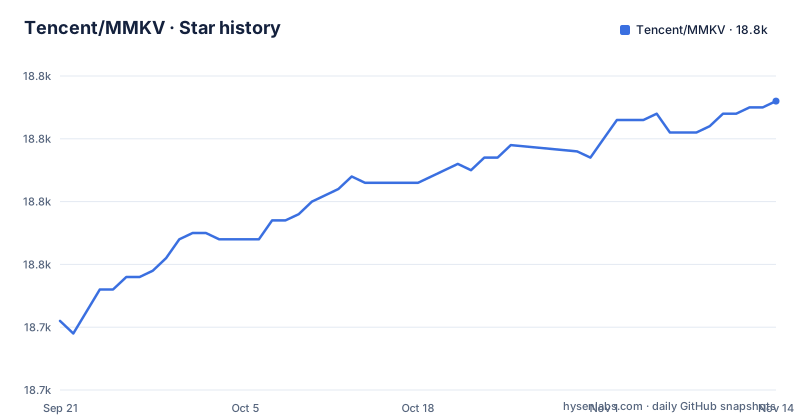
Star history
- Tencent/MMKV18,776 ★ · +35
| Repository | 2026-09-21 | 2026-11-14 |
|---|---|---|
| Tencent/MMKV | 18.7k | 18.8k |
35 Stars in the last 54 days, measured from the daily GitHub snapshot. Compare with other projects
Editorial analysis
Version 1.3.x is still shipping, and it is the only line that runs on 32-bit
The Android installation section contains the single most consequential sentence in the README, and it is a floor rather than a feature. Starting from v2.0.0, MMKV no longer supports 32-bit architectures or API level 22 or 21. If you want 32-bit or API level 21 through 22, use the v1.3.x long term support series.
The release list shows that this is not a courtesy. The three recent tags are v1.3.17 on 2026-08-03, v2.4.2 on 2026-08-21, and v2.4.3 on 2026-10-16. So a maintenance release on the older line landed less than three weeks before a release on the newer one.
That means the project runs two supported lines, and the older one is the long term support line rather than a dead branch. For a team on an old minimum API level, the choice is a version pin rather than a workaround, and the pin has to be maintained deliberately.
The dependency snippet itself is deliberately unopinionated about this, since it carries a comment telling you to replace the version with any available one, which means the person choosing the line is the person choosing the floor.
The Kotlin Multiplatform package is experimental and reaches Android plus three iOS architectures
The README puts the Kotlin Multiplatform package first, before the per-platform sections, and it opens with two warnings. The v2.4.3 package is experimental and currently targets Android and iOS, and its API and artifact layout may change in a future release.
The dependency snippet shows a different artifact coordinate from the Android one, on the same version:
kotlin {
    sourceSets {
        commonMain.dependencies {
            implementation("com.tencent:mmkv-kmp:2.4.3")
        }
    }
}
Then the target list, which is where the scope becomes clear: Android, and three iOS architectures, a device arm64 binary, a simulator arm64 binary, and an x64 simulator binary.
So the multiplatform package is not a way to reach the other four platforms the project supports. Windows, POSIX and HarmonyOS are absent from it, and the initialization and packaging details live in a separate guide rather than on this page. Combined with the warning about the artifact layout changing, the practical instruction is to treat this entry point as one that will cost you a migration, and to keep your own usage behind a thin wrapper so that migration is cheap.
The size claim is three different numbers, one per platform, all per architecture
Each platform section repeats the same three headings, and under the third one the number changes every time.
For Android the README says about 50K in binary size, adding about 50K per architecture on app size, and much less when zipped as an APK. For iOS and macOS it says less than 30K in binary size, per architecture, and much less when zipped as an IPA. For Windows it says about 10K on application size, and much less when zipped.
So the headline is not one number. It is fifty kilobytes for an Android architecture, under thirty for an Apple one, and about ten for a Windows binary, and each of those shrinks again under compression.
The installation paths differ just as much, and the Windows one is the outlier. Android installs from a repository with a dependency line, and Apple platforms install through CocoaPods with six steps ending in a header import. The Windows section installs from source: the instructions are to get the source from the git repository, add a Visual Studio project file to your solution, add the project as a dependency of yours, add an include directory and a library directory, and add the static library to the linker input. Several project settings, by hand, per project.
The two benchmark charts count different numbers of writes
Both platform sections have a Performance heading, and both are a chart rather than a table.
The Android one says: writing a random int for 1000 times, we get this chart. The iOS one says the same thing with 10000 times. Ten times the workload, one chart per platform, and no shared axis.
That detail is easy to miss and it matters if you are trying to reason about the library rather than admire it. Two charts of the same operation, on two platforms, at two different iteration counts, cannot be read against each other, and neither can be quoted as a number because the numbers are in the images. The underlying data is behind a separate benchmark page in the wiki, linked from both sections.
What the charts do support is a relative claim within a platform: writes of a random integer, at a stated count, on a stated device. The mmap and protobuf design is what makes the shape of those curves possible, since the file is memory mapped and values are encoded with a compact format, but the size of the win over a conventional preferences file is not stated in the platform sections' text.
No sync and no apply, which is a different API vocabulary on each platform
The second heading in every platform section is the same promise, phrased in the vocabulary of the platform it replaces. On Android: all changes are saved immediately, no sync and no apply calls needed, and both of those words come from the conventional preferences API. On iOS and macOS: no synchronize calls are needed, and synchronize is the Objective-C spelling of the same idea. On Windows: no save and no sync calls are needed, with one word added.
The underlying design is the same on all three: mmap keeps memory synced with the file, so a write is a write to the mapped region and the file follows. The absence of a commit step is the reason the library is described as easy to use, and it is a real behavioural difference from a store with an explicit flush.
The cost is that the three APIs do not line up. The Android tutorial shows an initialize call in the application class, a global default instance, and encode and decode methods that take a key and a typed value, including an integer minimum value in the example. The Apple tutorial shows initialization in the application delegate with a comment about doing it on the main thread, then a global default instance, and set and get methods with an explicit type in the name, using a fixed negative integer in the example.
So the concept is portable and the spelling is not, which is the integration cost of a library that presents itself as one thing across six platforms.
The Dockerfile builds the Go binding and exports a scratch image
The container definition at the repository root is not about the C++ library, and reading it tells you which language it is actually for.
It starts from a pinned GCC image as a builder stage, installs cmake, copies the whole tree, and then changes its working directory into the POSIX subdirectory for Go. It creates a build directory, runs cmake with a release build type and an install prefix, and builds with eight jobs and installs. It then writes a build information file by redirecting the output of three commands into it: the kernel name and version, the compiler version, and the cmake version.
The final stage is declared from scratch, meaning an image with no operating system in it, and it copies exactly one directory from the builder.
The Makefile confirms the scope. It has two targets. One formats the code by running a Python script from the script directory. The other builds, and it does so by invoking a container build with buildx, writing the output to a local directory, and taking an optional platform variable that changes the target platform passed to the build.
So the only build target in the top-level Makefile is a Go binding in a container, and the C++ library that everything else depends on has no make target there.
Two script directories, four podspecs, and more platform folders than the README lists
The top level of the repository is worth reading as a map of what the project actually contains.
There are platform directories for Android, the shared core, iOS, OpenHarmony, POSIX, Win32, and the Kotlin Multiplatform package, plus a Flutter directory and a Python directory. There are two directories whose names differ only by a trailing letter, one singular and one plural, both for scripts, which is the kind of thing that makes a build step's relative path the only way to tell them apart.
On the Apple side there are four pod specifications: one for the main library, one for the core, one for a watch extension, and one for an application extension, plus a workspace directory. So a CocoaPods consumer is choosing between four integration units rather than adding one pod, and the README's six-step tutorial only covers the main one.
There is a Swift package manifest, so the Apple surface is reachable from two build systems, and a podspec is the older of the two.
Taken together, the tree describes more surfaces than the README's platform list advertises. A Go binding is there under POSIX, and a Flutter directory and a Python directory are there, none of which is named in the README's opening platform list. The platform list in the prose is the supported set; the directory list is the built set, and they are not the same.
Editorial conclusion
Use MMKV if you are writing a mobile or desktop application and want a synchronous key-value store that saves on every write, because the absence of a commit step is the whole API and it removes an entire class of bug. Do not use it as a cross-platform shared store, since the Kotlin Multiplatform package is experimental, reaches only Android and three iOS architectures, and warns that its API and artifact layout may change. Check four things before you commit: which line you need, because version 2 dropped 32-bit architectures and API levels 21 and 22 and the older line is the one to use if you need them; which platform's size figure you are quoting, since the numbers differ by platform and are per architecture; which package you integrate on Apple platforms, because there are four podspecs including extensions; and whether the platform you deploy to is in the README's list at all, since a Go binding, a Flutter directory and a Python directory exist in the tree but are not in the README's opening platform list. The repository is not archived, the last push was 2026-10-26, and the newest release is v2.4.3 dated 2026-10-16.
Frequently asked questions
What is mmkv?
MMKV is an efficient, small and easy to use mobile key-value storage framework used in the WeChat application. It is available on Android, iOS and macOS, Windows, POSIX and HarmonyOS NEXT, with experimental Kotlin Multiplatform support, and it uses mmap to keep memory synced with files and protobuf to encode and decode values. It also supports concurrent read-read and read-write access between processes.
What is mmkv on my iPhone?
The README describes nothing user-visible on a device, because MMKV is a library inside an application rather than an app. On Apple platforms it is added to a Podfile as a pod, installed with a package manager step, initialised in the application delegate, and then used through a global instance. Anything named MMKV that a person could see on a phone would come from an application that uses this library.
What platform is Tencent?
The repository says nothing about the company beyond naming WeChat as the application where MMKV is used. What it states about platforms is its own: Android, iOS and macOS, Windows, POSIX and HarmonyOS NEXT, plus experimental Kotlin Multiplatform support targeting Android and iOS. Version 2 dropped 32-bit architectures and API levels 21 and 22, with the 1.3.x line kept for those.
Official sources
Add this badge to your README
If you maintain this project, the badge below links readers to this analysis and shows its maintenance status from the daily GitHub snapshot. Paste the markdown into your README; add ?metric=license or ?metric=stars to the image URL for a different field.

[](https://hysenlabs.com/projects/tencent-mmkv)Star history chart for your README
[](https://hysenlabs.com/projects/tencent-mmkv)Was this useful?