certstrap replaces openssl config files with three commands, and a release gap separates v1.3.0 from v1.4.0
Tools to bootstrap CAs, certificate requests, and signed certificates.
At a glance
- What is it?
- certstrap is a Go tool from Square that bootstraps a private certificate authority with init, request-cert and sign. It writes keys, requests and certificates into an out/ depot folder, and it documents nothing beyond those three steps.
- Who is it for?
- Use certstrap for internal PKI where you want a CA, a few host or client certificates and ECDSA or Ed25519 keys without writing an openssl configuration. Skip it if you need revocation workflows, certificate lifetimes you can set from documented flags, or automated issuance over a protocol.
- Can I use it commercially?
- Yes. Apache-2.0 is a permissive licence: you can use, modify and sell software built on it, as long as you keep its copyright and licence notices.
- Is it still maintained?
- Yes. The repository last received commits 6 days ago.
- What is it written in?
- Mainly Go, according to GitHub's language statistics.
Answers come from the project's GitHub data, last synced on November 7, 2026, and from our analysis. They are not legal advice.
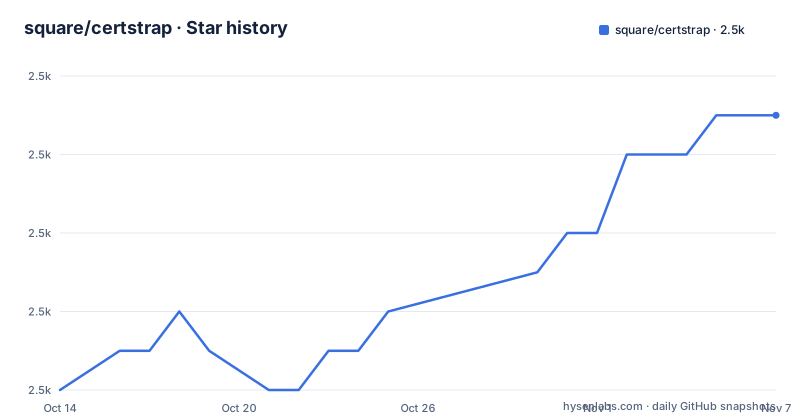
Star history
- square/certstrap2,463 ★ · +7
| Repository | 2026-10-14 | 2026-11-07 |
|---|---|---|
| square/certstrap | 2.5k | 2.5k |
7 Stars in the last 24 days, measured from the daily GitHub snapshot. Compare with other projects
Editorial analysis
Three commands cover the whole CA lifecycle the tool documents
certstrap is a certificate manager written in Go that bootstraps your own certificate authority and public key infrastructure. It was adapted from etcd-ca. The pitch is avoidance: a convenient app for people who do not want to deal with openssl, its long list of options or config files.
The work is three steps. Initialize a certificate authority with init. Create an identity and a certificate signing request for a host with request-cert. Sign the request and produce the certificate with sign.
No other subcommand appears in the documentation. Revoking a certificate, listing what a CA has issued, renewing and inspecting are not described, so you do those with other tools. The init command does write a .crl file next to the key and the certificate, which shows a revocation list is created at CA setup, but no command for adding entries to it is documented.
The repository layout reflects the small surface: certstrap.go at the root, cmd/ for the commands, pkix/ and depot/ for the certificate and storage code, and tests/. Dependencies are few: urfave/cli v1.22.17, gopass and go.step.sm/crypto v0.91.0 are the direct ones in go.mod.
Building from source needs Go, and the stated version disagrees with go.mod
There is no download step in the documentation. You build from source:
$ git clone https://github.com/square/certstrap
$ cd certstrap
$ go build
This generates a binary called certstrap under the project root folder. The README says certstrap must be built with Go 1.24 or newer. The go.mod file says go 1.27.3, and the Dockerfile builds from golang:1.27-alpine. The two numbers disagree, and the tighter one is the one that your toolchain enforces, so install a Go 1.27 toolchain for a clean build.
The Dockerfile gives a second route. It builds with CGO_ENABLED=0 and go build -buildvcs=false, then copies the binary into a distroless static image with /usr/bin/certstrap as the entrypoint. Its comments show the image name squareup/certstrap and a check with docker run --rm squareup/certstrap --version. The README does not state whether that image is published, so build it locally if you want it.
A static binary in a distroless image is a reasonable shape for a CA tool that runs in a pipeline, since the image carries nothing else.
init requires a common name, names the files from it, and writes a key, certificate and CRL
Creating a certificate authority is one command:
$ ./certstrap init --common-name "CertAuth"
Created out/CertAuth.key
Created out/CertAuth.crt
Created out/CertAuth.crl
The common name flag is required and names the output files. It also generates a new keypair for the authority, though a pre-existing private PEM key can be used through the -key flag.
If the common name has spaces, certstrap changes them to the _ character in the filename and keeps the spaces inside the fields of the generated files:
$ ./certstrap init --common-name "Cert Auth"
Created out/Cert_Auth.key
Created out/Cert_Auth.crt
Created out/Cert_Auth.crl
The consequence is that two authorities whose names differ only by a space or an _ would write to the same filenames, so pick distinct names. Everything lands in the depot directory, out/ by default, which means a CA private key sits in a folder in your working directory until you move it. For anything beyond a lab, relocate the .key file to protected storage right after init.
request-cert needs a common name or a domain, and takes lists of IPs, domains and URIs
A host or user certificate starts with a request:
$ ./certstrap request-cert --common-name Alice
Created out/Alice.key
Created out/Alice.csr
certstrap requires either the common name flag or the domain flag in order to generate a certificate signing request, and the certificate's CN is taken from whichever you give. A keypair is generated unless you pass an existing private PEM key with -key.
For a server with more than one address or name, the README shows comma separated lists: ./certstrap request-cert -ip $ip1,$ip2 -domain $domain1,$domain2 -uri $uri1,$uri2. Separate flags exist for IP addresses, domains and URIs, so one request can carry all three kinds of subject alternative name.
The documentation does not cover validity period, key usage or extended key usage options. If a client library insists on a particular extended key usage, or a service demands a short lifetime, check the output with openssl before deployment. The tool's own examples stay on identity and names.
sign turns a request into a certificate under a named CA, and chains can run deeper than one level
Signing takes the request name and the authority:
$ ./certstrap sign Alice --CA CertAuth
Created out/Alice.crt from out/Alice.csr signed by out/CertAuth.key
The output line shows exactly which files were used: the request out/Alice.csr and the CA key out/CertAuth.key, producing out/Alice.crt.
The design allows more than a flat tree. certstrap can initialize multiple certificate authorities to sign with, and users can make arbitrarily long certificate chains by using signed hosts to sign later certificate requests. That is how an intermediate authority is built here: sign a request, then use that signed identity as the signer for the next one.
The cost of an arbitrarily long chain is that nothing in the documentation limits path length or marks which certificate may act as a CA. Whether a host certificate signed this way carries CA basic constraints is not stated. Chain depth also increases what a verifier must trust, so keep it short and test validation with the clients you run.
Keys can be P-224, P-256, P-384, P-521 or Ed25519, picked with --curve
The supported key algorithms are the elliptic curves P-224, P-256, P-384 and P-521, plus Ed25519. Curve names are given as part of init and request-cert:
$ ./certstrap init --common-name CertAuth --curve P-256
Created out/CertAuth.key
Created out/CertAuth.crt
Created out/CertAuth.crl

$ ./certstrap request-cert --common-name Alice --curve P-256
Created out/Alice.key
Created out/Alice.csr
No RSA option is listed. If a legacy system accepts only RSA keys, certstrap as documented cannot produce them, and openssl remains the fallback. P-224 is also on the list, though many validators reject it, so P-256 or Ed25519 are safer picks for compatibility in current software. Ed25519 support depends on the verifying library, and older TLS stacks may not accept it.
Private key material is generated through go.step.sm/crypto and golang.org/x/crypto, per go.mod, and not through openssl. That affects only which code you audit.
PKCS12 export is left to openssl, and the release history has a gap from 2022 to 2026
certstrap does not write PKCS12 files. To convert a certificate and key, the documentation sends you back to openssl:
$ openssl pkcs12 -export -out outputCert.p12 -inkey inputKey.key -in inputCert.crt -certfile CA.crtinputKey.key and inputCert.crt are the leaf private key and certificate pair from a sign command, and CA.crt is the authority certificate that signed it. The output is outputCert.p12. So a Java keystore or Windows import workflow still needs openssl installed, which dilutes the promise of avoiding it.
On project activity, the releases are v1.3.0 on 2022-07-01, v1.4.0 on 2026-10-07 and v1.4.1 on 2026-10-23. The last push was on 2026-10-23, and the repository is not archived. Between v1.3.0 and v1.4.0 the list shows nothing, so a four year gap precedes two releases in sixteen days. The license is Apache-2.0, with a NOTICE file in the repository, and CONTRIBUTING.md covers patches. Read the v1.4.0 and v1.4.1 release notes before upgrading from v1.3.0, since the list does not describe what changed.
Editorial conclusion
Use certstrap for internal PKI where you want a CA, a few host or client certificates and ECDSA or Ed25519 keys without writing an openssl configuration. Skip it if you need revocation workflows, certificate lifetimes you can set from documented flags, or automated issuance over a protocol. Before relying on it, build v1.4.1 yourself, run init and sign once, and check the certificates with openssl.
Frequently asked questions
How do I create a certificate authority with certstrap?
Build the binary with go build, then run ./certstrap init --common-name "CertAuth". It writes CertAuth.key, CertAuth.crt and CertAuth.crl into the out/ depot directory.
Which key types does certstrap support?
The curves P-224, P-256, P-384 and P-521, and Ed25519, chosen with the --curve flag on init and request-cert. No RSA option is listed.
Where does certstrap put its output files?
In the depot directory, which is out/ by default. Keys, certificate requests and certificates are all written there.
Official sources
Add this badge to your README
If you maintain this project, the badge below links readers to this analysis and shows its maintenance status from the daily GitHub snapshot. Paste the markdown into your README; add ?metric=license or ?metric=stars to the image URL for a different field.

[](https://hysenlabs.com/projects/square-certstrap)Star history chart for your README
[](https://hysenlabs.com/projects/square-certstrap)Was this useful?