ssnhd/rime: a Rime Squirrel configuration set for Mingyue Pinyin, Xiaohe and Ziranma double pinyin
Config files for Rime Squirrel, covering the Mingyue Pinyin, Xiaohe Double Pinyin and Ziranma Double Pinyin input schemes.
At a glance
- What is it?
- ssnhd/rime is a macOS-oriented set of Rime Squirrel configuration files covering Mingyue Pinyin, Xiaohe Double Pinyin and Ziranma Double Pinyin, with a large imported dictionary, Emoji and dynamic date input. It overwrites your user settings, has no stated license and was last pushed on 2026-03-22.
- Who is it for?
- ssnhd/rime suits Mac users who already run Rime Squirrel and want a ready configuration for Mingyue Pinyin or one of two double pinyin layouts, with simplified output, Emoji and a large imported dictionary. It does not suit anyone who needs a stated license, a tagged release or recent maintenance, since the last push was on 2026-03-22 and GitHub detects no license.
- Can I use it commercially?
- The repository metadata does not identify a licence. Check the project’s published terms and any component-specific licences before reuse.
- Is it still maintained?
- Activity is slowing. The repository last received commits 8 months ago.
- What is it written in?
- Mainly Lua, according to GitHub's language statistics.
Answers come from the project's GitHub data, last synced on November 24, 2026, and from our analysis. They are not legal advice.
Star history
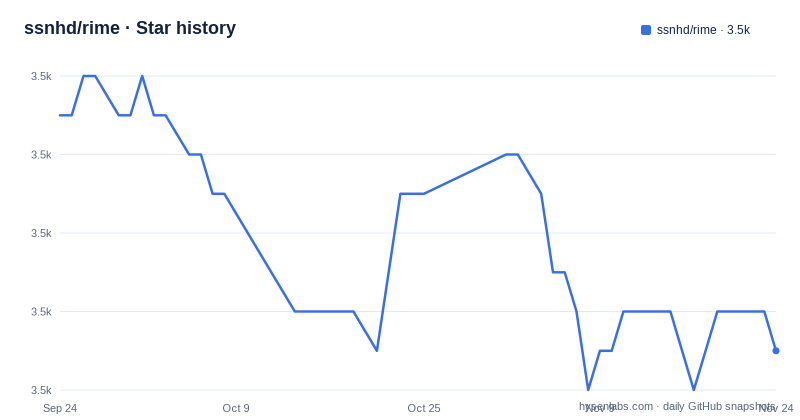
- ssnhd/rime3,529 ★ · -6
| Repository | 2026-09-24 | 2026-11-24 |
|---|---|---|
| ssnhd/rime | 3.5k | 3.5k |
-6 Stars in the last 61 days, measured from the daily GitHub snapshot. Compare with other projects
Editorial analysis
Three input schemes in one set of Squirrel files
The repository holds configuration files for Rime Squirrel, the macOS front end of the Rime input method engine. It covers three schemes: Mingyue Pinyin, which is the default, Xiaohe Double Pinyin and Ziranma Double Pinyin. Other listed features are a user dictionary that is not lost and can sync across platforms, a million-word dictionary converted from Sogou, Emoji, dynamic input of time, date and weekday, and a description of the result as fast, open source, privacy protecting and highly customisable.
The default output is traditional Chinese. You switch schemes with Control and the backtick key, or with F4, and choosing the simplified variant of Mingyue Pinyin gives simplified output. If you want simplified Chinese from the first launch, expect to make that switch yourself.
Install Squirrel, back up the Rime folder, then overwrite it
The steps begin with downloading Squirrel from rime.im, installing it and switching to the Rime input method. The README recommends turning on Squirrel notifications on the Mac, so that each deployment reports whether it succeeded.
Before changing anything you can back up the initial configuration with one Terminal command, which creates a Rime.bak folder:
cp -r ~/Library/Rime ~/Library/Rime.bakTo restore, empty the Rime folder, copy the files from Rime.bak back in, and choose Redeploy from the menu bar. The backup matters because the next step pastes all of the repository's files into your user settings and chooses to overwrite. Anything you customised earlier with the same file names is replaced, so the backup is the only way back.
A bundled font fills in rare characters that macOS lacks
The customisation starts with downloading the repository as a ZIP. It contains the configuration files and a font called Huayuan Mingchao, in the original Chinese Garden Ming. The README asks you to install the font in Font Book because the Mac lacks some rare characters.
After that you open the menu bar icon, choose User Settings, paste every file from the configuration folder into it and overwrite. Then choose Redeploy, which also has the keyboard shortcut Control, Option and backtick. Without the font, rare characters may show as missing glyphs in candidate lists and in the apps you type into. Redeploy is needed after every edit to a YAML file, since Rime reads the compiled result.
Edit custom patch files, because plain schema files are replaced on update
The global settings file is default.custom.yaml, which holds the schemes, the number of candidates, the English and Chinese switch and the shortcuts. The schema list controls which input methods appear when you press Control and backtick:
schema_list:
  - schema: luna_pinyin_simp      # 朙月拼音
  - schema: double_pinyin_flypy   # 小鹤双拼
  - schema: double_pinyin         # 自然码双拼
  - schema: numbers               # 大写数字
If you do not use double pinyin or the capital-numbers scheme, you can delete it together with its files, and you can add others such as Wubi or Terra Pinyin. Scheme files are named with .schema.yaml, and editing one directly is a trap: when the input method updates, that file updates too and your changes are lost. The fix is to create a file named after the scheme with .custom.yaml, such as luna_pinyin_simp.custom.yaml, and put your patch there.
Caps, Shift and paging keys each have a configurable action
The candidate count is a single value, menu/page_size, set to 9 in the sample. For switching between Chinese and English, the example sets good_old_caps_lock to true so that Caps only toggles letter case, and maps Caps_Lock, left Shift and right Shift to commit_code, while left and right Control are set to noop, which blocks them as switch keys.
If Caps does not toggle case on the Mac, the README says to open the keyboard input source settings and untick the option that uses Caps Lock to switch the US input mode. Two other strategies exist: inline_ascii lets you type in a temporary English composition area and returns to Chinese after Enter, and commit_text commits the candidate text and switches to English mode. The paging rules bind Tab, minus, equal, comma, period and the square brackets. Tab can page down or select pinyin segmentation, but not both.
Dictionaries are separate files that must be imported by name
A new dictionary is a file named after the dictionary with .dict.yaml. Its header declares a name that must match the file name, a version, sort by weight and whether to use the preset vocabulary. After a line of three dots and a blank line, each entry is the characters, a Tab, the pinyin with spaces between syllables, another Tab and a weight.
Creating the file is not enough. You then open luna_pinyin.extended.dict.yaml and add the dictionary name under import_tables, next to luna_pinyin, luna_pinyin.chat and luna_pinyin.sogou. A dictionary left out of that list is never loaded. Because entries must be separated by real Tab characters, the README suggests editing in VSCode and changing its Tab handling, since the wrong separator silently breaks entries.
Emoji, English words and mode switches are patched in luna_pinyin_simp.custom.yaml
That patch file loads the Chinese and English dictionaries, filters candidates and defines the mode switches. The filters list includes a simplifier, an Emoji conversion that reads emoji.json, a uniquifier, a GBK character set filter and a single character filter. It also changes a speller rule so that words containing English do not affect abbreviated pinyin, and it loads the extended dictionary and an English table translator that depends on easy_en.
The switches define ascii mode, full or half width, Emoji display, a traditional and simplified toggle with simplified as the default, and a character set choice between UTF-8, GBK and GB2312, defaulting to UTF-8. Emoji is on by default. If your applications mishandle Emoji, flip that switch off in the menu.
No license, no releases and a last push in March 2026
GitHub detects no license for the repository, so nothing states under what terms you may reuse or redistribute the files. The repository has no GitHub releases, which means no tagged versions to pin, and the only distribution is the master branch ZIP.
The last push was on 2026-03-22, more than seven months old, so do not assume it tracks recent Squirrel or Rime changes. The README also invites you to a Telegram group for Rime on Mac, noting that you must message a group administrator privately to be admitted. Because the files patch file names that may change between Rime versions, test your deployment after any Squirrel upgrade.
Editorial conclusion
ssnhd/rime suits Mac users who already run Rime Squirrel and want a ready configuration for Mingyue Pinyin or one of two double pinyin layouts, with simplified output, Emoji and a large imported dictionary. It does not suit anyone who needs a stated license, a tagged release or recent maintenance, since the last push was on 2026-03-22 and GitHub detects no license. Back up your existing Rime folder before you paste anything over it.
Frequently asked questions
What is ssnhd/rime?
It is a set of Rime Squirrel configuration files for Mingyue Pinyin, Xiaohe Double Pinyin and Ziranma Double Pinyin on macOS, with a Sogou-based dictionary, Emoji and dynamic time and date input.
How do I back up my Rime settings before applying ssnhd/rime?
Run cp -r ~/Library/Rime ~/Library/Rime.bak in Terminal. To restore, empty the Rime folder, copy the Rime.bak files back, and choose Redeploy from the menu bar.
How do I get simplified Chinese output with ssnhd/rime?
The default output is traditional. Press Control and the backtick key, or F4, and choose the simplified variant of Mingyue Pinyin to switch to simplified output.
Official sources
Add this badge to your README
If you maintain this project, the badge below links readers to this analysis and shows its maintenance status from the daily GitHub snapshot. Paste the markdown into your README; add ?metric=license or ?metric=stars to the image URL for a different field.

[](https://hysenlabs.com/projects/ssnhd-rime)Star history chart for your README
[](https://hysenlabs.com/projects/ssnhd-rime)Was this useful?