AAFTF runs twelve fungal assembly steps and argues with samtools
Automatic Assembly For The Fungi
At a glance
- What is it?
- A short read genome assembly pipeline for fungi, built on SPAdes, BBMap and sourmash. Its real documentation is a list of dependency conflicts: samtools versions, a polca script that needs patching, and a database directory you have to create yourself.
- Who is it for?
- AAFTF fits a lab that assembles fungal genomes from short reads and wants cleanup, vector screening, contaminant purging, polishing and coverage in one repeatable command set, since each step names the tool it calls and the README is candid about which tools are optional.
- Can I use it commercially?
- Yes. MIT is a permissive licence: you can use, modify and sell software built on it, as long as you keep its copyright and licence notices.
- Is it still maintained?
- Yes. The repository last received commits 1 day ago.
- What is it written in?
- Mainly Python, according to GitHub's language statistics.
Answers come from the project's GitHub data, last synced on October 24, 2026, and from our analysis. They are not legal advice.
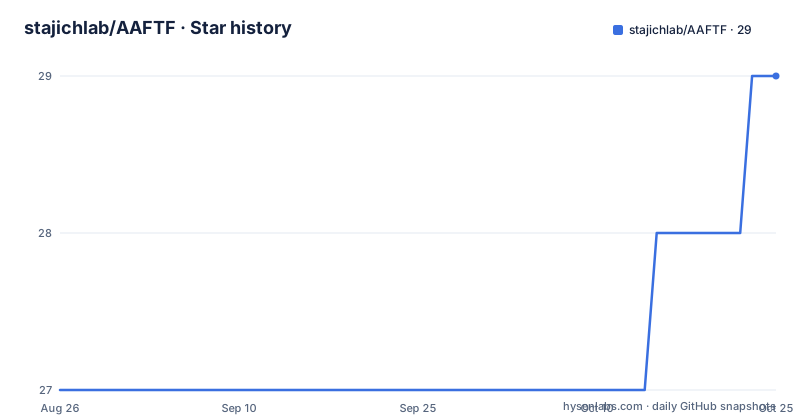
Star history
- stajichlab/AAFTF29 ★ · +2
| Repository | 2026-08-26 | 2026-10-24 |
|---|---|---|
| stajichlab/AAFTF | 27 | 29 |
2 Stars in the last 59 days, measured from the daily GitHub snapshot. Compare with other projects
Editorial analysis
Twelve subcommands, and one that runs all of them
AAFTF is a pipeline broken into named steps, each of which maps to one external tool, and reading the list tells you the shape of the work. Step 1, trim, trims FASTQ input reads with BBMap. Step 2, mito, does a de novo mitochondrial genome assembly. Step 3, filter, removes contaminating reads with BBMap. Step 4, assemble, runs SPAdes. Step 5, vecscreen, screens assembled contigs for vector and contaminant sequence using a BlastN based method to replicate NCBI screening. Steps 6a and 6b are alternatives rather than a sequence: sourpurge purges contigs using sourmash results, while fcs_gx_purge does the same with the NCBI fcs-gx tool, and the note on that one says it runs much faster with large memory. Step 7, rmdup, removes duplicate contigs using minimap2. Step 8, polish, runs POLCA, Pilon or NextPolish. Step 9, sort, sorts contigs by length and renames FASTA headers. Step 10, assess, checks assembly completeness, step 11, depth, calculates read depth of coverage across contigs, and step 12, pipeline, runs the whole thing in one go.
samtools is the dependency that fights back
The version warning at the top of the requirements section is not boilerplate. Most tools can come from conda, but different tools expect different samtools versions: the bioconda install of samtools is version 0.2 while the version expected by most other tools is 1.17, and that mismatch can cause problems. AAFTF prefers samtools 1.0 or newer. The suggested fix is to install a newer samtools, 1.22.1 for example, after installing the other dependencies or from a separate environment, so that the markduplicates step can still run, and the README calls this relatively minor. There is a second reason to bother: the later samtools does not require writing temporary unsorted BAM files to disk, which is described as a slight performance improvement. In practice the samtools problem surfaces as a step that worked yesterday failing on a dependency upgrade, so the environment is worth pinning before a long run rather than after it.
polca polishing needs its script patched by hand
Assembly polishing has three options: polca from MaSuRCA, Pilon, and NextPolish. The first one carries a caveat with its own fix. The polca that comes with MaSuRCA uses an old version of samtools and will not work with the samtools installed by default. Two remedies are offered: apply patches/polca.patch to fix your local version, or copy patches/polca.sh over the installed version in your environment or system. What the patch does is specific and worth knowing: it corrects one bug so that the samtools sort step uses the -o outfile option when saving BAM. So the failure is not about a missing binary but about a command line the surrounding samtools no longer accepts. Pilon and NextPolish are listed without such a note, which makes them the lower friction choices for a fresh environment, and the polish step lets you pick which one runs.
Trimming and filtering are two separate steps
Reads are cleaned twice, and the two steps take different tools and different flags. The trim step's option surface starts like this:
usage: AAFTF trim [-h] [-q] [-o BASENAME] [-c cpus] [-ml MINLEN] -l LEFTThe full usage adds -r for the right read, -m for memory, -v, --pipe, and a --method that takes either bbduk or trimmomatic, plus a group of trimmomatic specific options covering the jar, adaptors, clip, leading and trailing windows, sliding window and quality thresholds. A typical invocation sets its variables first:
MEM=128 # 128gb
BASE=STRAINX
READSDIR=reads
TRIMREAD=reads_trimmed
CPU=8
Trimmomatic is marked optional and not the default, and fastp is named as the preferred alternative for read trimming and quality control. BBTools is the component that supports read level filtering for contamination and vector and primer sequence, and the filter step takes its own --aligner option, with bbduk used in the example. Note the comment on that step: trimming can take a lot of memory depending on how many filtering libraries you use.
Contaminant screening is sourmash or fcs-gx, and fcs-gx wants memory
Two screening paths are supported and they sit in adjacent steps, 6a and 6b. sourmash at version 3.5 or newer, installed through conda or pip, drives sourpurge. The alternative is NCBI fcs-gx, which the README notes is much faster on a large memory machine and requires either large memory or an SSD drive. Vector screening on its own is ncbi-fcs. Running ncbi-fcs or ncbi-fcs-gx inside AAFTF through singularity means having those tools installed in the system or environment, and the fcs gx database must be downloaded separately, which is why a database location has to exist before anything runs. The database path is set by an environment variable rather than a command line flag:
$ mkdir -p ~/lib/AAFTF_DB # or make a place that is systemwide
$ export AAFTF_DB=~/lib/AAFTF_DB
# fill in download procedure / add to AAFTF
That last comment is unfinished in the README, which is a fair signal that the database download procedure is the least settled part of the setup.
One conda command, then pip install AAFTF
The authors describe the install as a work in progress, with PyPI and bioconda packaging still being sorted out, and give a conda environment as the working path:
conda create -n aaftf -c bioconda "python>=3.6" bbmap trimmomatic bowtie2 bwa pilon sourmash \
    blast minimap2 spades megahit novoplasty biopython fastp masurca unicycler
That single line pulls in most of the dependency surface, including the optional bowtie2 and trimmomatic. After the environment exists, AAFTF itself comes from pip:
$ conda activate aaftf
$ pip install AAFTF
# or install latest from github
$ python -m pip install git+https://github.com/stajichlab/AAFTF.git
The assemblers behind the assemble step are also pluggable: SPAdes, megahit, dipspades for SPAdes 3.11.1 which is not part of later SPAdes packages and whose legacy documentation is no longer online, NOVOplasty for the mitochondrial genome, and unicycler, which runs spades itself. The project is a partial Python re-write of JAAWS, the unix shell cleanup and assembly tool written by Jon Palmer.
Compose mounts data and databases as two volumes
There is a container path, described in the repository as a convenience wrapper for the AAFTF Docker image, which mounts two host directories and defaults to the ghcr.io/stajichlab/aaftf image:
docker compose run --rm aaftf AAFTF --help
docker compose run --rm aaftf AAFTF trim --left /data/R1.fq.gz --right /data/R2.fq.gz
docker compose run --rm aaftf AAFTF download --AAFTF_DB /opt/aaftf_db --sourdb-type gbk
DATA_DIR maps to /data and is the working directory inside the container, AAFTF_DB maps to /opt/aaftf_db and is exported as the AAFTF_DB environment variable, and IMAGE_TAG selects the image tag with latest as the default. One build argument matters more than it looks: PIXI_ENV decides whether you get the local editable checkout or, when set to release, the tag pinned version. The container is created with stdin and a tty open and is removed after each run unless you pass --no-rm, which matters when a step fails and you want to read the logs afterwards.
Packaging carries two Python version answers
The packaging metadata answers the Python version question twice, differently. pyproject.toml sets requires-python to 3.9 or newer, while setup.py still declares python (>=3.6.0), and the conda example above asks for python 3.6 or newer. Three numbers for one interpreter is the kind of thing that decides whether an install fails quietly. Version numbers are derived from git tags in the vX.Y.Z form plus the short commit hash, written into AAFTF/_version.py at build time by hatch-vcs, with a fallback of 0.0.0+unknown for checkouts with no tags, and the comment in the file notes that the version scheme settings there must match those in AAFTF/__version__.py so a source checkout reports an identical string. The wheel ships two packages, AAFTF and scripts, and installs one console entry point, AAFTF, pointing at AAFTF.AAFTF_main:main. Runtime dependencies are thin in requirements.txt, which lists biopython alone, because everything else arrives as an external command.
Editorial conclusion
AAFTF fits a lab that assembles fungal genomes from short reads and wants cleanup, vector screening, contaminant purging, polishing and coverage in one repeatable command set, since each step names the tool it calls and the README is candid about which tools are optional. It is a poor fit for a long read workflow, for anyone who cannot satisfy the samtools and polca version constraints, or for a machine without the memory that ncbi-fcs-gx asks for, where sourmash is the fallback. Before your first run, install a modern samtools after the conda dependencies, copy patches/polca.sh over the installed one if you want polca polishing, create the AAFTF_DB directory and point the variable at it, pick bbduk or Trimmomatic for trimming deliberately, and set --memory to something your machine can back on the trim and filter steps.
Frequently asked questions
How do I install AAFTF and its dependencies?
Create a conda environment first: conda create -n aaftf -c bioconda "python>=3.6" bbmap trimmomatic bowtie2 bwa pilon sourmash blast minimap2 spades megahit novoplasty biopython fastp masurca unicycler. Then activate it and install the package with pip install AAFTF, or install the latest from GitHub with python -m pip install git+https://github.com/stajichlab/AAFTF.git.
What are the AAFTF pipeline steps in order?
trim, mito, filter, assemble, vecscreen, then either sourpurge or fcs_gx_purge, then rmdup, polish, sort, assess, depth, and pipeline to run everything in one go. Each step names its tool: BBMap for trim and filter, SPAdes for assembly, minimap2 for duplicate contigs, and POLCA, Pilon or NextPolish for polishing.
How do I fix polca polishing in AAFTF?
The polca from MaSuRCA expects an old samtools and will not run against a default install. Apply patches/polca.patch to your local copy, or copy patches/polca.sh over the installed polca.sh, which corrects one bug so the samtools sort step uses the -o outfile option. Pilon and NextPolish are the other polishing options.
Official sources
Add this badge to your README
If you maintain this project, the badge below links readers to this analysis and shows its maintenance status from the daily GitHub snapshot. Paste the markdown into your README; add ?metric=license or ?metric=stars to the image URL for a different field.

[](https://hysenlabs.com/projects/stajichlab-aaftf)Star history chart for your README
[](https://hysenlabs.com/projects/stajichlab-aaftf)Was this useful?