statsigstatus stores its own uptime data in git history
Statsig's Status Page, forked from our open-source template.
At a glance
- What is it?
- Statsig's open-source status page is a static page plus a shell script. An hourly GitHub Actions job curls every URL in a config file, appends the result to a log file and commits it. Three capabilities are listed as deliberately absent: incident management, outage duration tracking and root cause.
- Who is it for?
- statsigstatus suits anyone who wants a status page with no database, no server and no vendor, and who is content with an hourly picture rather than a live one. It does not suit anyone who needs incident management, outage duration tracking or a stated root cause, since all three are listed as missing.
- Can I use it commercially?
- Yes. ISC is a permissive licence: you can use, modify and sell software built on it, as long as you keep its copyright and licence notices.
- Is it still maintained?
- Yes. The repository received new commits within the last day.
- What is it written in?
- Mainly JavaScript, according to GitHub's language statistics.
Answers come from the project's GitHub data, last synced on October 22, 2026, and from our analysis. They are not legal advice.
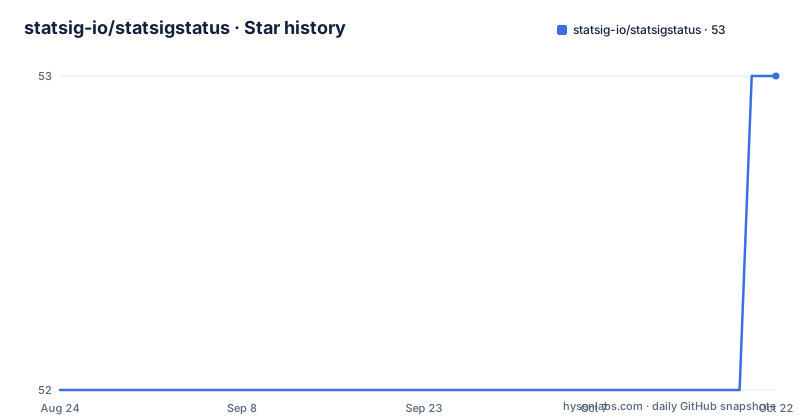
Star history
- statsig-io/statsigstatus53 ★ · +1
| Repository | 2026-08-24 | 2026-10-22 |
|---|---|---|
| statsig-io/statsigstatus | 52 | 53 |
1 Stars in the last 59 days, measured from the daily GitHub snapshot. Compare with other projects
Editorial analysis
The status page keeps its data in the repository
The mechanism is the whole design, and it is worth understanding before anything else. There is no database and no server. An hourly scheduled job runs a shell script, the script issues a request against every URL in a configuration file, and the result of each run is appended to a log file. Then the script commits that log file back to the repository. The page itself pulls the log dynamically and renders it. So the operational history of your services lives in the commit history of a public repository, one commit per check, which has two consequences. You get durability and auditability for free, since a commit log is a time series you can diff. And you get unbounded growth in the same repository that holds the page, because nothing in the process rotates or prunes those log files.
The check is curl and a commit, once an hour
The README describes the check in one sentence: the script runs curl on every URL in the config and appends the result of that run to a log file. That is the whole check, and the omissions are as informative as the description. No flags are documented, which means nothing about how the request is made, whether output or errors are captured, or what counts as a failure. No timeout is mentioned, so an endpoint that accepts a connection and never responds is a question the hourly job has to answer. And there is no retry or threshold logic described, so whether a single failed request marks a service down is not something this document tells you. One thing the README does offer: the script is yours to run, so you can schedule it more often from your own infrastructure than the hourly workflow does.
Three things it will not do, stated up front
There is a section headed with what the project does not do yet, and it lists three things. Incident management is the first: this page observes, it does not let you declare, acknowledge or resolve an incident. Outage duration tracking is the second, which follows from the first, since without an incident record there is nothing to measure a duration against. Updating a status root cause is the third, so there is no place to write the sentence explaining why. That list is short, honest and specific, and it is the fastest way to know whether this fits your process. For a team that wants a single visible signal per endpoint it is complete. For a team whose on-call process depends on an acknowledged incident state, it is a dashboard rather than a status page, and no amount of configuration will change that.
The config format has nowhere to put a token
Configuring the page is one file, and the format is deliberately minimal. Each line is a key and an address, with no other fields:
key1=https://example.com
key2=https://statsig.com
The key becomes the label shown for that service, so it has to be something a customer will recognise. What the format does not have is a place for credentials, a header, a method or an expected response body. That is fine for a public status page, where checking that a marketing site or a documentation host returns something at all is the whole job. It means you cannot monitor an authenticated endpoint with this project as it stands, and it also means there is no way to tell a redirect to a login page from a healthy response without changing the script. If you need either, the script is the place to extend, and the fact that it is a single readable shell file rather than a framework is an argument for doing exactly that.
history.html exists and the readme never mentions it
The repository root is small and mostly self-explanatory: a configuration file, the shell script, the log directory, an index page with its stylesheet and script, a logo, and two extra HTML pages of which only one is accounted for. The readme describes how the index page pulls the log and renders it, and it links a workflow badge at the top for the health check. It never mentions the second page. Since the data being collected is a per-hour log, a history view is the obvious next thing to want, so the file's presence suggests the capability exists in some form even though nobody has documented when it is current, how far back it goes, or whether it reads the same log file. If you are evaluating this project, open that page before deciding the feature is missing, and treat the documentation as the thing that needs work rather than the code.
Setup is four steps and no build
Setting up your own instance is short enough to quote. Fork the repository. Add your addresses to the configuration file, one key and address per line. Change the title and the heading in the index page. Then turn on GitHub Pages for the repository. There is no package to install, no bundler, no framework and no lockfile, because the page is three static files with a stylesheet and a script. The only markup the readme asks you to change is the document title and a heading, which tells you the intention: the page is meant to be a copy-and-adapt starting point rather than a configurable product.
<title>My Status Page</title>
<h1>Services Status</h1>
The one thing the readme does not mention is how the fork keeps running its scheduled job, which is the detail that decides whether an instance keeps updating after you set it up once.
It is also a shop window for a product
The last section of the readme is a recommendation. If you are looking for a developer-friendly feature flag and A to B experimentation service for your product, the readme points you at the company's commercial site. That reframes what this repository is. The status page itself is described as a hobby project built after trying various status pages and wanting them simpler, and the template is open source so that other people can do the same. But the repository sits under the organisation's account, the demo instance is a real company status page, and the tool that makes the page look the way it does is not part of the repository. So there are two things being distributed here: a small template you can fork, and a pointer to a paid product. Neither is a criticism; it just means the page and the business are separable, and reading the readme in that order is more accurate than reading it as documentation for a service.
Editorial conclusion
statsigstatus suits anyone who wants a status page with no database, no server and no vendor, and who is content with an hourly picture rather than a live one. It does not suit anyone who needs incident management, outage duration tracking or a stated root cause, since all three are listed as missing. Before you fork it, check two things: whether your endpoints are reachable without authentication, because the config format has nowhere to put a token, and whether you are happy with the check running once an hour from a scheduled job rather than on demand.
Frequently asked questions
What is Statsig used for?
The README points readers looking for a developer-friendly service to the company's commercial product: feature flags and A to B experimentation for a product. The status page repository itself is described as a hobby project built to make status pages as simple as possible.
How does the statsigstatus page collect its data?
A GitHub Actions workflow wakes up every hour and runs a shell script that runs curl on every URL in your configuration file, appends the result to a log file and commits it to the repository. The page pulls that log dynamically, and you can run the same script from your own infrastructure to update more often.
What does statsigstatus deliberately not do?
Three things, listed in the README: incident management, outage duration tracking and updating a status root cause. Everything else is out of scope because the project is described as a hobby project built to keep status pages as simple as possible.
How do I set up my own statsigstatus page?
Fork the repository, add your addresses to the configuration file as key and address pairs, change the title and heading in the index page, and turn on GitHub Pages. There is no build step and nothing to install, since the page is static files with a stylesheet and a script.
Official sources
Add this badge to your README
If you maintain this project, the badge below links readers to this analysis and shows its maintenance status from the daily GitHub snapshot. Paste the markdown into your README; add ?metric=license or ?metric=stars to the image URL for a different field.

[](https://hysenlabs.com/projects/statsig-io-statsigstatus)Star history chart for your README
[](https://hysenlabs.com/projects/statsig-io-statsigstatus)