Unit: a visual language where the program is a graph of state machines
Next Generation Visual Programming System
At a glance
- What is it?
- Unit packages a TypeScript implementation of its own visual programming spec together with a web environment served from npm, and its npm scripts include one that reaches for sudo to free port 4000.
- Who is it for?
- Unit is worth a look if you want to read a real implementation of a visual programming spec, or if the shell analogy in its design is the shape your own tooling needs, since units with named ports and piped graphs map onto commands and pipes. It is not a dependency to reach for today: the environment it serves is marked beta, TCP and HTTP for units are still backlog, and the npm version has moved to 1.0.137 with no GitHub release to anchor it.
- Can I use it commercially?
- Yes. MIT is a permissive licence: you can use, modify and sell software built on it, as long as you keep its copyright and licence notices.
- Is it still maintained?
- Yes. The repository received new commits within the last day.
- What is it written in?
- Mainly TypeScript, according to GitHub's language statistics.
Answers come from the project's GitHub data, last synced on November 22, 2026, and from our analysis. They are not legal advice.
Star history
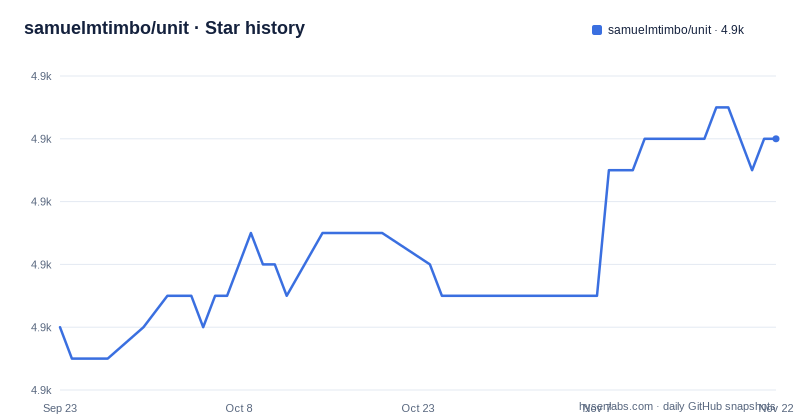
- samuelmtimbo/unit4,922 ★ · +6
| Repository | 2026-09-23 | 2026-11-22 |
|---|---|---|
| samuelmtimbo/unit | 4.9k | 4.9k |
6 Stars in the last 60 days, measured from the daily GitHub snapshot. Compare with other projects
Editorial analysis
A unit is a state machine with named ports, and a program is a graph
The formal model is stated in one sentence: units are Multi Input Multi Output finite state machines, and a program in Unit is represented as a graph. Everything else in the design follows from that.
Inputs and outputs are ports you push into and take from, and a unit has to be running before it does anything, which is what play() is for. The README's own example is a Merge Sort unit loaded from a JSON bundle:
export const [system] = boot()

const bundle = require('./MergeSort.json')

const MergeSort = fromBundle(bundle, _specs, {})

const mergeSort = new MergeSort(system)

mergeSort.play()

mergeSort.push('a', [2, 1])

console.log(mergeSort.take('a')) // [1, 2]
The design intent is Unix rather than object oriented. The README compares Unit to a two dimensional command line where each unit behaves like a command and its stdin, stdout and stderr can be piped into a graph, and calls it a re-exploration of the Unix philosophy in a modern context.
fromBundle turns a JSON file into a class, against the system specs
That example hides three pieces of the library's shape. boot() comes from '@_unit/unit/client/platform/node/boot' and returns the system. fromBundle() comes from '@_unit/unit/spec/fromBundle' and is handed the JSON bundle plus _specs, imported from '@_unit/unit/system/_specs'. Only after fromBundle does MergeSort exist as something you can instantiate.
So a Unit program on disk is data, and the specs shipped with the package are what give that data its classes.
The browser path is a different set of imports. Rendering goes through renderBundle from '@_unit/unit/client/platform/web/render', which returns both the system and the graph, after which graph.getUnit('helloworld') hands you a unit you can push into, for instance helloworld.push('style', { color: '#ffdd00' }). The README states that Unit source can be used as a general purpose library in any JavaScript project, on the Web and in Node.js, and the two import paths are where that split shows.
Two installs, two commands, and a server on port 4000
Working from a clone takes five commands, and npm run setup is the expensive one:
git clone [email protected]:samuelmtimbo/unit.git
cd unit
npm install
npm run setup
npm start
npm run setup is not a database migration or a key generation step. In package.json it is run-s lib build, and build fans out into build:system, build:client and build:web, each a ts-node script under src/script. npm run watch runs the server and the client watchers together with run-p, and the server side runs under tsx watch.
Serving an environment without a clone is one line, and the port defaults to 4000:
npx @_unit/unit
npx @_unit/unit --port 8042
Then the README tells you to visit http://localhost:4000. To get the unit command permanently you install globally with npm install --global @_unit/unit; to use Unit inside a project you use npm install --save @_unit/unit.
npm run stop calls sudo to free port 4000
Two entries in the scripts block explain more about how the project is developed than any design document would.
"stop": "sudo node_modules/kill-port/cli.js 4000",The stop script runs a port killer with sudo. The README never asks for it and never explains it, so a developer who runs npm run stop on a workstation grants root to a script inside node_modules in order to close a socket that the project itself opened. If the development server usually runs as your own user, the kill should not need root, and if it does, something else is holding the port.
The second entry is prepare, whose value is an empty string. For a package that publishes lib/, an empty prepare means the compiled output is never rebuilt on install, so a consumer who installs from git rather than from the npm tarball gets whatever lib/ was committed or built locally. Use the published package, or run npm run setup yourself, and know which one you did.
Version 1.0.133 with no GitHub release to anchor it
package.json says version 1.0.137. The repository has no GitHub releases, no tags in the README and no changelog, so npm is the only place a version is published and 1.0.137 is the only handle you have on what you installed.
The floor is explicit, and it is a modern one:
"engines": {
    "node": ">=20.9"
}
The package is MIT licensed and published under the scoped name @_unit/unit, with an underscore in the scope. main points at lib/index.js, the bin entry at ./lib/server/index.js is what makes the unit command appear after a global install, and the exports map exposes both the root and a wildcard pattern with separate import, types and require targets.
The last push was on 2026-11-02, so the code moves, and the web environment at unit.land is still labelled beta by the README itself.
unit build emits an index.js that expects one div id
The build route produces a single file to drop into a page:
unit build bundle.unitThe output is an index.js, and the HTML that loads it has to contain a div with the id __SYSTEM__ROOT__ carrying a fixed set of inline styles, position absolute at the top with full width, full height and overflow hidden, followed by a plain script tag pointing at index.js.
That div is the contract. The system root takes over the viewport, so a page that wants the unit to sit inside a smaller region has to contain the element or override the styles, and the README's only further guidance is to look at public/index.html in the repository for a more complete template. Tree-shaking and partial mounting are not part of this contract: you either hand the system the root or you edit the template.
unit.land subdomains are separate systems, and unit.moe opens a page in the editor
The web side is split across several domains, and the split is functional rather than cosmetic. unit.land is the fully local version of the environment, and the README states that any *.unit.land subdomain represents a completely isolated instance of the Unit system. unit.tools is a marketplace for open live visual programs built in Unit, also marked beta. unit.software is the landing page for the vision, and unit.md redirects to the source code.
unit.moe is the odd one out and the most useful for anyone maintaining someone else's unit. Appending #url to https://unit.moe attempts to encapsulate the unit served at that URL in a graph editor, so https://unit.moe#https://unit.land shows the code behind unit.land. The word to notice is attempts.
For a project whose whole pitch is that it can read the programs running on a page, that is the honest limit: the editor does its best with whatever is served there. Nothing in the README says what happens when a site is not a Unit program at all.
The backlog still lists TCP and HTTP as work to come
The backlog section is short and it is the most useful part of the README for judging scope. The system API is composed of logical units, platform units split into frontend and backend, and what it calls operating system units.
Then the direction of growth: a solid basic interface, and feature parity with the Web plus a subset of NodeJS, naming TCP and HTTP as examples of the subset that is not native to the Web. Those two protocols are therefore on the to-do list, not in the language.
So a unit that needs to open a socket, make an HTTP request or listen on a port of its own is asking for something the project has scheduled rather than shipped. The environment itself is served over HTTP, at localhost:4000 and on the unit.land instances, which is a different thing from a unit being able to use HTTP. Anyone evaluating Unit for automation that has to talk to the network should read the Evolution document before planning around it.
Editorial conclusion
Unit is worth a look if you want to read a real implementation of a visual programming spec, or if the shell analogy in its design is the shape your own tooling needs, since units with named ports and piped graphs map onto commands and pipes. It is not a dependency to reach for today: the environment it serves is marked beta, TCP and HTTP for units are still backlog, and the npm version has moved to 1.0.137 with no GitHub release to anchor it. Verify two things first, that node >=20.9 is available to you, and that unit build output still expects the __SYSTEM__ROOT__ div, before you build a page around it.
Frequently asked questions
What is Unit by samuelmtimbo?
A general purpose visual programming language and environment written in TypeScript, where units are Multi Input Multi Output finite state machines and a program is a graph. The README compares it to a two dimensional command line where unit inputs and outputs are piped into a script, and the web environment lives at unit.land.
How do I run a local Unit server?
Run npx @_unit/unit and then visit http://localhost:4000, or pass a port with npx @_unit/unit --port 8042. From a clone the route is git clone, cd unit, npm install, npm run setup, then npm start, with npm run watch for development mode.
How do I install Unit as a library?
Use npm install --save @_unit/unit for a project dependency, or npm install --global @_unit/unit to get the unit command on your path. The package requires node >=20.9, its main entry is lib/index.js and its binary entry is ./lib/server/index.js.
Can a Unit program make HTTP requests or open sockets?
Not as a shipped capability. The backlog names feature parity with the Web and a subset of NodeJS, with TCP and HTTP given as examples of the subset that is not native to the Web, so those are scheduled rather than implemented. The Unit environment itself is served over HTTP on port 4000.
How does unit build produce a page?
unit build bundle.unit writes an index.js file. The HTML that loads it needs a div with the id __SYSTEM__ROOT__, styled to fill the viewport, plus a script tag pointing at index.js. The repository's public/index.html holds a more complete template.
Official sources
Add this badge to your README
If you maintain this project, the badge below links readers to this analysis and shows its maintenance status from the daily GitHub snapshot. Paste the markdown into your README; add ?metric=license or ?metric=stars to the image URL for a different field.

[](https://hysenlabs.com/projects/samuelmtimbo-unit)Star history chart for your README
[](https://hysenlabs.com/projects/samuelmtimbo-unit)Was this useful?