SteamKit ships a strong-name key file at its root and no documentation beyond XML comments
SteamKit2 is a .NET library designed to interoperate with Valve's Steam network. It aims to provide a simple, yet extensible, interface to perform various actions on the network.
At a glance
- What is it?
- SteamRE/SteamKit is an LGPL C# library for talking to Valve's Steam network, distributed as a NuGet package and as release binaries. Its root carries a signing key file, a lowercase readme, and a submodules reference, while its fourteen sample projects are numbered with gaps that suggest reserved slots.
- Who is it for?
- SteamKit suits a .NET developer who needs to speak the Steam network protocol directly rather than through a game's own client, and the sample set is the actual specification, since fourteen projects walk through authentication, sessions, and the web interface in numbered order. Two things to know before you build on it.
- Can I use it commercially?
- Yes, with conditions. LGPL-2.1 is a weak copyleft licence: you can use it inside commercial and closed-source software, but if you distribute changes to its own files, you must publish those changes under the same licence.
- Is it still maintained?
- Yes. The repository last received commits 3 days ago.
- What is it written in?
- Mainly C#, according to GitHub's language statistics.
Answers come from the project's GitHub data, last synced on November 14, 2026, and from our analysis. They are not legal advice.
Star history
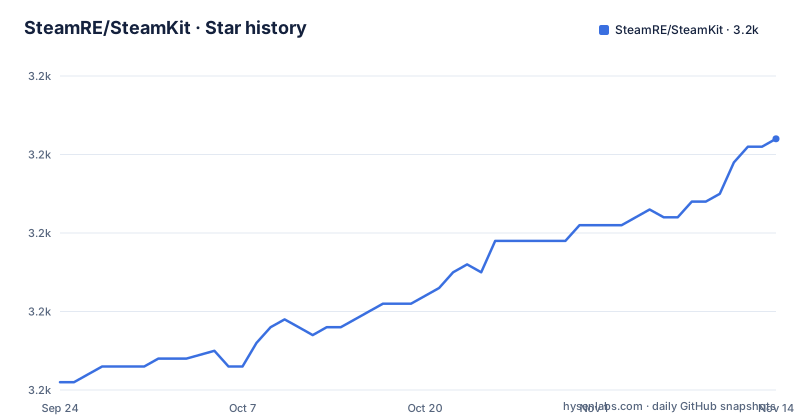
- SteamRE/SteamKit3,232 ★ · +31
| Repository | 2026-09-24 | 2026-11-14 |
|---|---|---|
| SteamRE/SteamKit | 3.2k | 3.2k |
31 Stars in the last 51 days, measured from the daily GitHub snapshot. Compare with other projects
Editorial analysis
Three names for one library and no version prefix on the tags
One library carries three identifiers, and the release tags carry a fourth convention.
The repository is called SteamKit. The project calls itself SteamKit in the heading and then adds, in parentheses, that it is also known as SteamKit2. The NuGet package is published under the name SteamKit2. And the source lives in a directory of that same name at the root.
The release tags use a third style again. The three most recent are `3.4.0`, `3.3.1`, and `3.3.0`, which is a bare version number with no letter prefix and no product name in front of it.
That is not unusual for a project with a long history, since a library that has been renamed once and has been distributed under two package names for years accumulates exactly this kind of drift. It does mean that a build script or a dependency rule written from the repository name will not find the package, and that a tag filter written for prefixed tags will find nothing.
The NuGet package is the name that matters for a consumer, and the README is explicit that the package manager in the development tool resolves all required dependencies and references for you when you install it.
Running it needs .NET 10 while the newest tag is nine months older
The dependency section is three sentences and two of them are version floors.
To use the library at runtime, a .NET 10.0 runtime or higher is required. To compile it, the .NET 10 SDK is required.
That is a floor on a specific major version rather than a general modern-runtime requirement, so a project still targeting an older framework cannot take this version. The runtime and compiler requirements are stated separately, which is the correct distinction for a library: consumers need only the runtime.
The release dates tell a different story about cadence. The newest tag is 3.4.0, published on 2026-01-14. Before it, 3.3.1 in August 2025 and 3.3.0 in June 2025.
The last push to the master branch was on 2026-10-03, which is roughly nine months after the newest tag. So a consumer pinning to the newest release is pinning to code from the start of the year, and everything merged since then exists only on the branch.
Binaries are attached to the releases page as well as being published to the package registry, and the wiki has a separate installation guide for the details the README leaves out.
A strong-name key file sits at the repository root
The root of the repository contains a file with a `.snk` extension, which is the file format for a strong-name key.
A strong-name key is the identity an assembly is signed with. When a project ships assemblies signed with a key, that key is normally the private half, kept out of the repository, with the public half distributed alongside the assemblies so consumers can verify.
This one is in the repository root, next to the solution file and the build properties, which means anyone who clones the project has it. The README does not mention the file, does not explain what it is used for, and does not say whether it is the public half, a development key, or the real one.
That ambiguity is the finding. A checked-in key file is not automatically a problem, since plenty of open source projects commit a public key so that consumers can verify signatures, and plenty more commit a development key deliberately. What is worth checking before building against this is which of the three it is, because the answer determines whether the assemblies this project produces can be verified by anything downstream.
The rest of the root is more conventional: a directory of build properties, a directory of resources, the source directory, a global JSON file that pins the SDK, and a solution file in the newer XML format.
Submodules and a lowercase readme at the root
Two root entries are easy to miss and both affect someone building from source.
The first is a submodules reference file. Its presence means the repository depends on other repositories checked out alongside it, and a fresh clone without submodule initialisation will have directories that exist but are empty.
Nothing in the README mentions submodules. The getting-started material covers the package manager and the releases page, and the documentation section points at the XML comments and the wiki. So the one step that is required for a source build and is not mentioned is the step that decides whether the build works.
The second is the readme, which is named in lowercase. Every other prose file in the root uses a capitalised name, so the one file a reader is most likely to open from a file listing is the one that does not match the convention.
There is an editor configuration at the root as well, which for a project with one primary language is a smaller commitment than the mixed-language projects that usually need one.
Fourteen numbered samples with gaps that look reserved
The sample directory is the most substantial documentation in this project, and it is organised by number rather than by name.
There are fourteen numbered projects and a solution file beside them. They run from zero to five, then from ten to thirteen, then from twenty to twenty-two, and then to nine hundred and ninety-nine.
So the sequence skips six through nine, fourteen through nineteen, and twenty-three onwards. Those gaps are almost certainly deliberate: a numbering scheme with reserved blocks lets a new sample be added to a category without renumbering anything.
That is a good convention and it is also the only index of the API a reader has, because the numbering tells you nothing about what a project does. The names have to be read one by one.
What the names show is a progression. Two of the earliest are authentication, plain and by QR code. Then a web cookie sample, a server list sample, and two named for older paths. A later block covers extending the library, debug logging, asynchronous jobs, and the unified messaging interface. A third block covers friends, the web interface, and one game-specific request. The last project is named as a test bed, which is the conventional name for a sample that exists to exercise everything at once.
Two samples are named for the legacy login path, and one for a single game
Three of the sample names carry information that the rest do not.
Two of them are named for a legacy path rather than for a topic: one covers the legacy login flow and the next covers the legacy second-factor flow. In a protocol library, a sample named for a legacy path is a statement about what the library still carries.
Authentication in this protocol has been through more than one shape over the years, and a library that still ships both a modern and an older route has made a choice to keep compatibility rather than to narrow its surface. That choice has a cost: two code paths to maintain, two to test, and a caller who has to know which one a given account accepts.
The third name is a request against a single game, and it is the only sample in the set that is not about the protocol layer. Everything else is transport, authentication, the session, or the web interface. A per-game sample in a protocol library is usually there because someone needed it, and it is a reasonable place to look for the shape of a request-and-response exchange.
There is also a sample covering the unified messaging interface, which is the protocol family that game-specific requests ride on, so the two are connected even though only one of them is named generically.
The documentation is XML comments and a wiki, with no prose guide
The documentation section is one sentence and it is a decision rather than a description.
It says the documentation consists primarily of XML code documentation provided with the binaries, and a wiki.
So there is no long-form guide, no tutorial, and no migration document in the repository. The reference is the IntelliSense-style comment attached to each public member, which means the documentation travels with the binary and is as current as the last commit that touched the signature.
That approach has one real advantage and one real cost. The advantage is that a member cannot be documented for a version it does not exist in. The cost is that a question about how two things fit together is not answered anywhere, because XML comments describe one member at a time.
The community channels are given separately. Questions go to the discussions section, with a suggestion to search first, and there is also an IRC channel on a public network with a web client link for it.
The licence is the LGPL, version 2.1, linked to a licence chooser rather than reproduced in the README, and the project publishes to the package registry and to release binaries from the same source tree.
Editorial conclusion
SteamKit suits a .NET developer who needs to speak the Steam network protocol directly rather than through a game's own client, and the sample set is the actual specification, since fourteen projects walk through authentication, sessions, and the web interface in numbered order. Two things to know before you build on it. It requires .NET 10 as a hard floor, which rules out anything still on an older runtime. And the documentation is XML comments plus a wiki, so the samples are where you have to read to understand the API, including the parts named for the older login path, which tells you which authentication routes the library still carries.
Frequently asked questions
What is SteamKit and what does it do?
It is a .NET library for interoperating with Valve's Steam network, also known as SteamKit2, aiming to provide a simple and extensible interface for performing actions on that network. It is distributed as a NuGet package and as binaries attached to release pages.
What version of .NET does SteamKit require?
A .NET 10.0 runtime or higher is required to use it at run time, and the .NET 10 SDK is required to compile it. That is a floor on a specific major version rather than a general modern-runtime requirement.
How is SteamKit documented?
The README says the documentation consists primarily of XML code documentation provided with the binaries, plus a wiki. There is no prose guide or tutorial in the repository, and there is a separate installation guide on the wiki. Questions go to the discussions section, and there is also an IRC channel.
What sample projects does SteamKit ship?
Fourteen numbered sample projects plus a solution file. They cover authentication plain and by QR code, web cookies, the server list, two named for legacy paths, extending the library, debug logging, asynchronous jobs, unified messages, friends, the web interface, a request against one specific game, and a test bed project.
What is the latest SteamKit release?
Version 3.4.0, published on 2026-01-14, preceded by 3.3.1 in August 2025 and 3.3.0 in June 2025. The tags are bare version numbers with no letter or product prefix, while the repository, the project name, and the NuGet package use two different names.
Official sources
Add this badge to your README
If you maintain this project, the badge below links readers to this analysis and shows its maintenance status from the daily GitHub snapshot. Paste the markdown into your README; add ?metric=license or ?metric=stars to the image URL for a different field.

[](https://hysenlabs.com/projects/steamre-steamkit)Star history chart for your README
[](https://hysenlabs.com/projects/steamre-steamkit)Was this useful?