Ancestry stores a Rails tree as a path string in one column, and moves rewrite every descendant
Organise ActiveRecord model into a tree structure
At a glance
- What is it?
- Ancestry is a Ruby gem that turns an ActiveRecord model into a tree using the materialized path pattern. This page covers the migration helper, the path formats, the navigation methods and the places where the pattern and the docs can trip you up.
- Who is it for?
- Pick Ancestry when a Rails table needs a hierarchy and every read should be one indexed query on a single column. Skip it if you want a separate closure table or cannot tolerate descendant rows being rewritten on a move.
- Can I use it commercially?
- Yes. MIT is a permissive licence: you can use, modify and sell software built on it, as long as you keep its copyright and licence notices.
- Is it still maintained?
- Yes. The repository last received commits 154 days ago.
- What is it written in?
- Mainly Ruby, according to GitHub's language statistics.
Answers come from the project's GitHub data, last synced on November 26, 2026, and from our analysis. They are not legal advice.
Star history
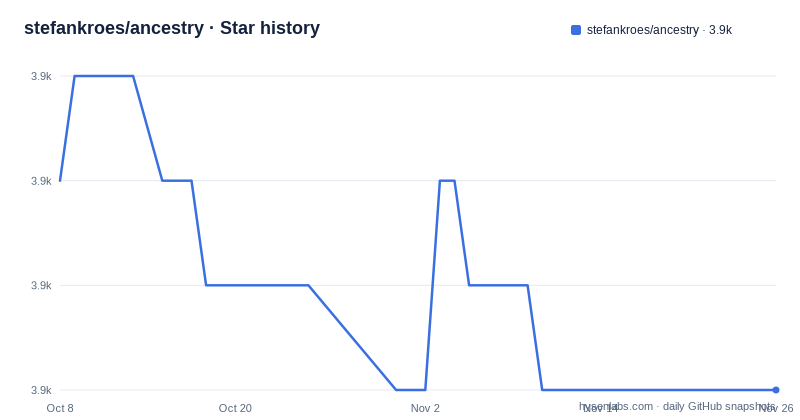
- stefankroes/ancestry3,882 ★ · -2
| Repository | 2026-10-08 | 2026-11-26 |
|---|---|---|
| stefankroes/ancestry | 3.9k | 3.9k |
-2 Stars in the last 49 days, measured from the daily GitHub snapshot. Compare with other projects
Editorial analysis
One column carries the whole ancestor chain
Ancestry keeps a tree inside a single column on the table you already have. Each record stores its ancestor chain as a path such as 1/2/3/, so a node with that value has ancestors 1, 2 and 3 above it. Nothing else is created: no join table, no second table for edges.
The repository lists the payoff as a single btree indexed query for any relation, covering ancestors, descendants, siblings, children and leaves. Its benchmarks live in a separate repository, kbrock/tree-bench, and the project states they show Ancestry ahead of alternatives on most single-node operations. That claim comes from the maintainers and is not something to take as measured on your data.
The license is MIT, the primary language is Ruby, and the default branch is master. The repository is not archived, and its last push was on 2026-06-25.
t.ancestry builds the column, type, collation and indexes for you
Installation is a Gemfile line, a bundle install, and a generated migration. The migration body uses a helper on the table definition instead of a hand-written column:
class AddAncestryToTable < ActiveRecord::Migration[7.0]
  def change
    change_table(:table) do |t|
      t.ancestry
      # t.ancestry format: :materialized_path3, cache_depth: true, parent: true, counter_cache: true
    end
  end
end
The helper picks the column type, collation and indexes for your database. Its options cover the ancestry format and the cached columns: depth, a parent column and a counter cache. Anyone who needs a different column layout is sent to the Ancestry Database Column section for manual setup, which means the helper is a convenience and the schema is still yours to own. After the migration runs with rake db:migrate, the model only needs has_ancestry.
Three path formats, and the newer one is opt-in
The ancestry_format option decides how the path string looks. The default, materialized_path, writes 1/2/3 and leaves ancestry as nil for root nodes. The preferred value, materialized_path2, writes /1/2/3/ and stores / for roots. An ltree format is also listed, and the migration comment above names materialized_path3.
Because the default is the older shape, a project that wants the newer one has to ask for it. The initializer is optional:
# config/initializers/ancestry.rb (optional)

# use the newer format
Ancestry.default_ancestry_format = :materialized_path3
# Ancestry.default_update_strategy = :sql
# Ancestry.primary_key_format = :uuid
The same keys can go on each has_ancestry call instead. Changing the format on a table that already holds data is a data question the visible docs do not walk through, so settle the format before the first real row is written.
Setting parent builds the path without touching the column
Application code never writes the path string. Nodes join a tree through parent or parent_id, set as attributes or passed to new, create and update. The documented example creates a child and its parent in one expression:
TreeNode.create! :name => 'Stinky', :parent => TreeNode.create!(:name => 'Squeeky')Children can also come from the relation on a node, as in node.children.create :name => 'Stinky'. Newer versions add real ActiveRecord associations, belongs_to :parent and has_many :children, with eager loading. Those need the cached parent column that t.ancestry creates when you pass parent: true, so a table migrated without that option does not get them for free. The associations are marked New in the feature list, which ties back to the branch warning covered below.
Every relation has a method, an ids method and a predicate
The navigation table gives each relation three handles. For ancestors: ancestors, ancestor_ids and ancestor_of?. For descendants: descendants, descendant_ids and descendant_of?. The same pattern holds for children, siblings, subtree, path, root and leaves, with has_children?, is_leaf?, is_root?, in_subtree_of? and similar predicates.
Two definitions deserve attention. Siblings excludes the node itself, and root nodes count as siblings of each other, so a call to siblings on a root returns the other roots. Indirects means descendants minus children, which is everything two or more levels down. Leaves are descendants with no children.
The ids variants return identifiers rather than loaded records, which matters when a page only needs to know membership. Depth caching and depth-based selection are listed too, and they depend on the cache_depth column from the migration.
A move rewrites every descendant row
Moving a node in this pattern means changing the path stored on the node and on everything beneath it. The project describes this as an advantage: a move only updates the node's descendants and not the whole tree. The flip side is that a node high in a large tree touches every row below it, and each of those rows carries the full ancestor chain in its own column.
That is the cost of having no extra tables. Reads stay as one indexed query, and writes that restructure the tree pay for it. The default_update_strategy setting, shown commented out with the value :sql, is the knob in the initializer that relates to how those updates are applied. The visible docs do not say what the other value or the default is, so check CONFIGURATION.md before reorganising a big subtree in production.
master documents features that may not be in your installed gem
The top of the documentation carries a warning: master reflects bleeding-edge development and may describe features not yet released. Readers are told to switch to the tag that matches the gem version they have installed. The repository has no GitHub releases, so tags are the only reference point for a version.
In practice, copy nothing from the master docs until you know your version. The ActiveRecord associations marked New, the t.ancestry helper options and the materialized_path3 format are the kind of thing that can differ between a tag and master. A mismatch shows up as a method that does not exist or a migration option that is ignored.
STI has its own rule. All classes come back from scopes unless you filter with where(:type => "ChildClass"), so a tree of mixed subclasses returns every type by default.
Editorial conclusion
Pick Ancestry when a Rails table needs a hierarchy and every read should be one indexed query on a single column. Skip it if you want a separate closure table or cannot tolerate descendant rows being rewritten on a move. Before adopting, check which tag matches your installed gem, because master documents features that may not be released.
Frequently asked questions
How does the Ancestry gem store a tree in ActiveRecord?
It uses the materialized path pattern, where each record keeps its ancestor chain in one column such as 1/2/3/. No additional tables are needed.
How do I install the Ancestry gem in a Rails app?
Add gem 'ancestry' to the Gemfile, run bundle install, generate a migration that calls t.ancestry inside change_table, run rake db:migrate, and add has_ancestry to the model.
Which Ancestry docs match the gem version I have installed?
Use the repository tag that matches your installed version. The master branch reflects bleeding-edge development and may describe features that are not yet released.
Official sources
Add this badge to your README
If you maintain this project, the badge below links readers to this analysis and shows its maintenance status from the daily GitHub snapshot. Paste the markdown into your README; add ?metric=license or ?metric=stars to the image URL for a different field.

[](https://hysenlabs.com/projects/stefankroes-ancestry)Star history chart for your README
[](https://hysenlabs.com/projects/stefankroes-ancestry)Was this useful?