steipete/agent-scripts: one repo of shared agent rules, skill symlinks and shell helpers for Codex and Claude Code
Scripts for agents, shared between my repositories. scripts/sync-skills Builds the per-machine skill mirror: Codex whole-root links, Claude flat per-skill links, shared AGENTS.MD pointers.
At a glance
- What is it?
- Peter Steinberger's agent-scripts repository holds the shared AGENTS.MD, a skills/ directory and a sync script that mirrors those skills into Codex and Claude Code. It is a personal workspace layout published under MIT, and it is not the Salesforce Agent Script language.
- Who is it for?
- Use it if you run Codex and Claude Code on the same Mac and want one skills directory and one AGENTS.MD behind both, and be ready to adopt the ~/Projects layout and the sibling repos it links to. Skip it if you came looking for Salesforce Agentforce scripting, or if you need a drop-in package, because the repo is a private layout that you read and adapt rather than install.
- Can I use it commercially?
- Yes. MIT is a permissive licence: you can use, modify and sell software built on it, as long as you keep its copyright and licence notices.
- Is it still maintained?
- Yes. The repository received new commits within the last day.
- What is it written in?
- Mainly Shell, according to GitHub's language statistics.
Answers come from the project's GitHub data, last synced on November 14, 2026, and from our analysis. They are not legal advice.
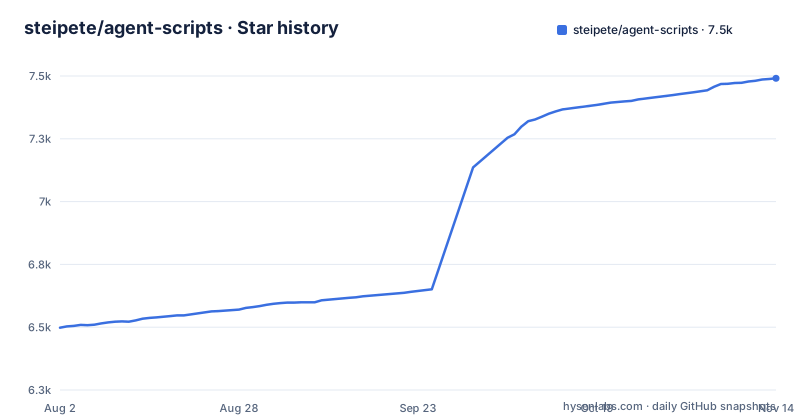
Star history
- steipete/agent-scripts7,491 ★ · +993
| Repository | 2026-08-02 | 2026-11-14 |
|---|---|---|
| steipete/agent-scripts | 6.5k | 7.5k |
993 Stars in the last 104 days, measured from the daily GitHub snapshot. Compare with other projects
Editorial analysis
Claude Code only sees skills exactly one folder deep, so sync-skills flattens everything
The reason this repo has a sync script at all is a difference in how two agents discover skills. Codex scans nested directories, so it can be handed an entire skills root. Claude Code loads only ~/.claude/skills/<name>/SKILL.md, exactly one level deep. Per-entry symlinks are followed, but category subfolders are not scanned, and the README says this was verified on Claude Code 2.1.197.
So scripts/sync-skills builds a flat per-skill link mirror for Claude. It covers both the agent-scripts and manager repos, plus any machine-local extras found in ~/.codex/skills/<name>. The consequence for you is that putting a skill inside a nested category folder in skills/ will not make it visible to Claude Code through this mirror. Each skill needs to be a direct child with its own SKILL.md.
Codex gets two whole-root links, and name collisions are settled by a fixed order
On the Codex side nothing is flattened. The sync creates ~/.codex/skills/agent-scripts pointing at ~/Projects/agent-scripts/skills and ~/.codex/skills/manager pointing at ~/Projects/manager/skills. Two links cover every skill in both repos, including skills added later.
The flat Claude mirror is where two skills with the same name can collide, and the rule is agent-scripts first, then manager, then codex-local. The loser is not silently dropped: the script prints the skipped duplicates. It also prunes broken or stale managed links. The sync is idempotent and the README says to run it on every Mac after cloning or adding skills, so adding a skill on one machine does nothing for the others until you repeat the run there.
sync-skills never overwrites real files, and it fails when it finds one in the way
The helper prints changes only, prunes broken or stale managed links, and never clobbers real files. With no arguments it runs an ordinary sync, and --help prints usage. Only the scoped --repair-nested-self-links mode accepts --dry-run.
The protection has a cost. Real destination files and directories are preserved, and a real Claude skill directory with a Codex backlink to that same directory counts as locally owned. Any other real destination conflict is reported and makes the sync fail. If you already keep hand-made skill folders under ~/.claude/skills with names that match a repo skill, expect a failed run and a report to resolve by hand, not an automatic replacement.
The nested self-link repair is allowlisted, non-atomic and has no rollback
One legacy layout gets special treatment: ~/.claude/skills/NAME/NAME pointing to ~/.codex/skills/NAME, which points back to ~/.claude/skills/NAME. The repair is invoked directly from the absolute path of the script, with an explicit allowlist after a double dash. Dry run first:
/absolute/path/to/agent-scripts/scripts/sync-skills --repair-nested-self-links --dry-run -- boxd-cli boxd-setup-deployThen the real run:
/absolute/path/to/agent-scripts/scripts/sync-skills --repair-nested-self-links -- boxd-cli boxd-setup-deployIt validates every candidate before unlinking only the extra nested leaves, and it exits before creating roots, building mirrors, pruning or touching instruction pointers. Names must start with an ASCII letter or digit and contain only letters, digits, a dot, an underscore or a hyphen. Duplicates, missing names and unknown arguments are rejected, and redirected or inaccessible roots make it refuse.
The limit to plan around: rechecks before each unlink are not atomic concurrency protection. A later error stops the batch and reports the removals already completed, without rollback. Do not run it while another process is rewriting the same skill links.
The audit script detects nested loops narrowly, and its repair flag is a broad sync
skills/fleet-maintenance/scripts/agent-skill-links-audit.sh is read-only and reports same-name nested ancestor loops as reason=nested-self-link. The README calls this narrow detection, not an exhaustive graph validator, so a clean audit does not prove the link graph is sound. Other kinds of breakage fall outside what it reports.
There is also a trap in its --repair option. That option remains a broad sync through ~/Projects/agent-scripts/scripts/sync-skills. It is not the scoped repair above, so using it to fix one skill will rebuild the whole mirror. For the two-skill allowlist case, call sync-skills directly. For fixture coverage, scripts/test-sync-skills runs isolated tests, and scripts/test-sync-skills --recurrence-only /absolute/path/to/old-sync-skills runs the unchanged recurrence assertion against an original helper.
Downstream repos get a one-line pointer, and the shared rules resolve through ~/Projects
Shared hard rules live in AGENTS.MD. The sync keeps three global links: ~/.codex/AGENTS.md, ~/.claude/CLAUDE.md and ~/.claude/AGENTS.md all point at ~/Projects/agent-scripts/AGENTS.MD. Claude Code reads CLAUDE.md only, which is why it gets a link of its own.
A downstream repo does not copy the rules. Its AGENTS.MD starts with this pointer and keeps repo-specific rules below it:
READ ~/Projects/agent-scripts/AGENTS.MD BEFORE ANYTHING (skip if missing).The skip-if-missing clause means a teammate without the checkout is not blocked, but their agent also gets none of the shared rules. Every path is written against ~/Projects, so a clone anywhere else means editing the links and the pointer. For submodules the pointer check is repeated inside each subrepo, the changes are pushed, and the submodule SHAs are bumped in the parent.
Symlinked skills resolve only when the sibling repositories sit next to this one
Not every skill here is a real folder. Shared personal skills are real folders in skills/. Public OpenClaw shared skills live in ../agent-skills, and repo-owned skills stay canonical in their own repo, exposed by tracked relative symlinks:
skills/autoreview -> ../../agent-skills/skills/autoreview
skills/discrawl -> ../../discrawl/.agents/skills/discrawl
skills/peekaboo -> ../../peekaboo/skills/peekaboo
The current symlinked set includes birdclaw, discrawl, gog, imsg, peekaboo, slacrawl, wacli and wacrawl. Because the targets are relative paths into sibling directories, cloning only agent-scripts leaves those entries pointing at nothing. Peekaboo has an extra step: keep ~/Projects/peekaboo cloned and current before syncing, since its skills/peekaboo/SKILL.md owns the command, permission, capture and interaction guidance. Edit that source instead of adding a second copy here, then run scripts/sync-skills and check that the skill resolves through both the Codex and Claude mirrors.
validate-skills and docs-list enforce front matter only, and browser-tools needs Chrome and Bun
Each skill carries YAML front matter with a name and a quoted, short, generic description meant for routing, not documentation:
---
name: skill-name
description: "Short generic trigger phrase."
---
scripts/validate-skills checks every skills/*/SKILL.md for valid front matter and the required name and description. It can run as a local hook with git config core.hooksPath hooks. It checks structure, so a description that is long or vague still passes, and the terseness rules stay a convention you enforce yourself. scripts/docs-list.ts walks docs/, enforces summary and read_when front matter and prints onboarding summaries for repos that wire it in.
scripts/browser-tools.ts is a standalone Chrome DevTools helper. The package.json lists commander ^15.0.0 and puppeteer-core ^25.14.0 as dependencies. Common commands are start --profile, nav <url>, eval '<js>', screenshot, console, network, search --content "<query>", content <url>, inspect and kill --all --force. The content and search commands fail on navigation errors, though a loaded article stays readable when only network idle times out, and individual search --content failures are reported per result. The optional compiled binary is built with:
bun build scripts/browser-tools.ts --compile --target bun --outfile bin/browser-toolsThe repo is Shell by primary language, MIT licensed, not archived, with release 0.12.0 tagged on 2026-07-17 and the last push on 2026-10-30.
Editorial conclusion
Use it if you run Codex and Claude Code on the same Mac and want one skills directory and one AGENTS.MD behind both, and be ready to adopt the ~/Projects layout and the sibling repos it links to. Skip it if you came looking for Salesforce Agentforce scripting, or if you need a drop-in package, because the repo is a private layout that you read and adapt rather than install.
Frequently asked questions
How to write an agent Script in steipete/agent-scripts?
In this repo you add a skill: a skills/<name>/SKILL.md with YAML front matter holding a name and a quoted, short, generic description, then put repeatable commands in skills/<name>/scripts/. Run scripts/validate-skills after editing.
Is steipete/agent-scripts the same as Agent Script in Salesforce?
No. This repo is a Shell project of shared AGENTS.MD rules, skills and helper scripts for Codex and Claude Code style agents in Peter's local workspaces, and nothing in it concerns Salesforce.
What is an agent with an example in steipete/agent-scripts?
The repo targets Codex and Claude Code, which are the agents that read the shared AGENTS.MD and load the skills that scripts/sync-skills links into ~/.codex/skills and ~/.claude/skills.
Official sources
Add this badge to your README
If you maintain this project, the badge below links readers to this analysis and shows its maintenance status from the daily GitHub snapshot. Paste the markdown into your README; add ?metric=license or ?metric=stars to the image URL for a different field.

[](https://hysenlabs.com/projects/steipete-agent-scripts)Star history chart for your README
[](https://hysenlabs.com/projects/steipete-agent-scripts)Was this useful?