StemDeck runs stem separation locally, and four pins hold the model together
Stemdeck is an modern stem extraction platform for musicians,producers and hobbyists, designed to isolate vocals, drums, bass, piano and guitar for practice, transcription, remixing, and creative audio workflows through a modern and interactive interface
At a glance
- What is it?
- StemDeck is a desktop stem-separation app that runs the model locally, so your audio never leaves the machine. Its Python manifest is more interesting than the README: four dependency pins each carry a comment explaining which upstream release broke something, and one of them is a security advisory.
- Who is it for?
- StemDeck suits a musician, producer or practice-teacher who wants to isolate parts of a song they already have the right to use, and who wants that to happen without uploading anything to a service. Four things to know before you commit.
- Can I use it commercially?
- Yes, with strict conditions. AGPL-3.0 is a network copyleft licence: if people use a modified version over a network, for example as a hosted service, you must offer them its source code under the same licence.
- Is it still maintained?
- Yes. The repository last received commits 6 days ago.
- What is it written in?
- Mainly JavaScript, according to GitHub's language statistics.
Answers come from the project's GitHub data, last synced on November 21, 2026, and from our analysis. They are not legal advice.
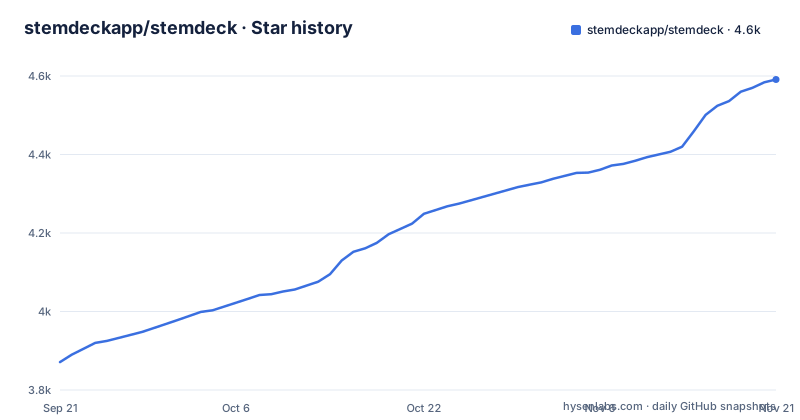
Star history
- stemdeckapp/stemdeck4,591 ★ · +720
| Repository | 2026-09-21 | 2026-11-21 |
|---|---|---|
| stemdeckapp/stemdeck | 3.9k | 4.6k |
720 Stars in the last 61 days, measured from the daily GitHub snapshot. Compare with other projects
Editorial analysis
The dependency pins are archaeology, and the comments explain each break
Most projects pin a version and say nothing. This one pins four and writes an essay for each, and the reasons are worth reading because they describe a chain of unrelated upstream problems. The video download library has a floor raised past a security advisory published this year, with a note that the lock file alone is not enough because the container build installs from the constraints rather than the lock. The separation model is capped below a specific point release because the newer one added a dependency on a native package built with Rust and CMake that has no Intel macOS wheel, so the x64 macOS build compiles it from source and fails. And the two deep learning runtime pins exist because a newer audio library removed its built-in writer and moved it to a separate package with ABI issues against torch 2.11, while the separation model calls the removed writer directly to save stems. So that pin is not preference, it is the thing standing between you and an application that cannot write its output. Each comment names the release and the symptom.
Two different runtime pins for two different Mac architectures
Read the dependency list as pairs and a platform matrix appears. The deep learning runtime and its audio library each appear twice. One declaration applies everywhere except Intel Macs, and a second, older declaration applies only to Intel Macs. So an Apple Silicon Mac and a Windows machine get the 2.6.x line, and an Intel Mac gets the older 2.2.x line. The reason is given: the project does not publish wheels for that architecture at the newer version, so Intel Macs are held back to keep a runtime package buildable. That is a real constraint rather than neglect. Separately, the README lists lead and backing vocal lanes as not available on Intel Macs, without giving a reason. If you are packaging for a mixed audience you are shipping two different runtime stacks from one source tree.
The app has no build step, and the package manifest exists only to test it
There is a package manifest at the root, and its own description explains why it should not be mistaken for the application. It is named for frontend tests, marked private, and the description says the application itself has no build step and no runtime dependencies, and that this manifest exists only so continuous integration can drive a real browser, with an issue number attached. So the entire JavaScript side of a desktop application ships as files that are served as written. The manifest declares one dependency, a browser automation library, and four scripts: the end-to-end suite, the same suite headed for watching it, a separate acceptance configuration, and a loop that runs plain unit test files one at a time through the runtime. The root also holds a shell script, run.sh, and a Playwright configuration, which fits an application whose interface is exercised through a real browser rather than a unit-level abstraction. Nothing is bundled, nothing is transpiled, and the JavaScript lock file covers only the test tooling; the Python side has its own uv.lock.
Local processing is a design constraint with consequences, not a privacy slogan
The central claim appears three times: no account, no subscription, and your audio is not uploaded. Separation runs on your own machine, and there is a bolded note stating this is a separation tool rather than a downloader, that it is for processing audio you have the right to use, and that imported files and the stems made from them are saved in a local library folder. That is a stronger claim than most software makes and it has engineering consequences you can see in the tree. The first launch downloads a media tool and the separation model, and on an NVIDIA card it also sets up GPU support. So the model is fetched once and then runs locally. It also means the model is a versioned asset that has to be kept compatible with the pinned runtime, which is exactly the coupling described in the dependency comments. What happens when a new model is published is the question worth asking before relying on this for long-term archival work.
Six download builds for four platforms, split by whether you have a GPU
The download table has three rows and two columns, and the columns are the interesting part: one headed NVIDIA or Apple Silicon, and one for everything else. So Windows gets two builds, macOS gets two, and Linux gets two, six artefacts for three platforms. The macOS pair is split by processor: Apple Silicon (M1 and later) in the first column and Intel Mac in the second. Each link points at the latest release, so the table cannot go stale, and there is a separate link for every historical version. The container image is called out separately with the note that it runs on the processor as shipped and needs a runtime flag to use a discrete card, plus a note that on Unraid you search "StemDeck" in Apps. What the table does not say is what the non-accelerated builds cost you. Feature notes in the README do differ by hardware: lead and backing vocal lanes are not available on Intel Macs, and writing lyrics down from the vocals needs an NVIDIA GPU.
A portable install cannot run from Program Files, and macOS needs a quarantine override
Two installation notes are more specific than most. On Windows and Linux the application is portable: unzip, run the executable, no installer.
On macOS the application is not code-signed yet, so the operating system reports it as damaged and the documented fix is one command:
xattr -dr com.apple.quarantine /Applications/StemDeck.appBut it must live in a folder you can write to, and the reason given is that a portable install keeps its runtime, models and settings in a data folder beside itself, so it cannot run from Program Files. That is a coherent design for an application that must not need administrator rights, and it means a user who installs it conventionally, into Program Files, gets a failure rather than a degraded mode. The release notes for the current version mention that portable Windows installs in a folder they cannot write to now say so clearly, which tells you this was a confusing failure that now reports itself. An unsigned application requiring users to run a system command is the current cost of not having signing in place.
The release notes credit the people who reported each problem
The current release notes are unusually well constructed as a document, and the pattern is worth naming because it costs nothing. The version summary opens with a guide button that turns the studio into its own manual, pointing at anything to explain what it does, and a note that every number in the song facts now says what it measures. That second clause is the interesting one: it is an admission that unexplained numbers are a defect. Then a recoverable delete with a count on its icon, holding to restore, and multi-select. Then two behaviour fixes, one where deleting a song during extraction stops the work but keeps the files until the bin is emptied, and one where an import stays in the background so the song you have open stays open. Both are the kind of change that only matters if you have hit the bug. And the closing line says all of it, with credits to the people who reported each problem, is in the release notes. A roadmap file sits at the repository root, and there is a security file and a code of conduct file alongside it.
Editorial conclusion
StemDeck suits a musician, producer or practice-teacher who wants to isolate parts of a song they already have the right to use, and who wants that to happen without uploading anything to a service. Four things to know before you commit. Check which build you need, since the README lists separate NVIDIA, Apple Silicon and non-accelerated builds. On an Intel Mac, expect an older runtime line and no lead and backing vocal lanes. On macOS, you will have to clear the quarantine attribute by hand because the application is not code-signed. And read the dependency comments if you plan to package this, because four pins hold the current build together and each one records an upstream release that broke something, so an unattended rebuild will not simply pick up newer versions.
Frequently asked questions
What is StemDeck and what does it do?
It is a desktop application that splits a song into up to six stems, vocals, drums, bass, guitar, piano and other, using an open separation model, then opens them in a studio where you can mute, solo, slow down, loop, change the key and play along with a click. You can drop in an audio file or paste a YouTube or SoundCloud link.
Does StemDeck upload my music?
No. Separation runs on the machine it is installed on, and the README states in a bolded note that imported files and the stems made from them are saved in a local library folder and are neither uploaded nor shared. The first launch does download a media tool and the separation model, but that is fetching the software, not your audio.
Do I need a subscription or an account for StemDeck?
The README states no account and no subscription. It is licensed under Apache 2.0 and distributed as downloads from the project's release page plus a container image, with no account step in any of the documented install paths.
Which platforms does StemDeck support?
Windows, macOS and Linux, each with two builds: one for a supported graphics accelerator and one for everything else. The macOS pair is split by processor generation, with separate builds for Apple Silicon and Intel Macs. There is also a container image that runs on the processor alone unless you pass a runtime flag for a discrete card.
Why does StemDeck not run from Program Files on Windows?
Because the Windows and Linux builds are portable and keep their runtime, models and settings in a data folder beside the executable, so it has to be in a folder you can write to. The README suggests a folder such as one at the root of the drive. The release notes say installs in a folder they cannot write to now report this clearly.
Official sources
Add this badge to your README
If you maintain this project, the badge below links readers to this analysis and shows its maintenance status from the daily GitHub snapshot. Paste the markdown into your README; add ?metric=license or ?metric=stars to the image URL for a different field.

[](https://hysenlabs.com/projects/stemdeckapp-stemdeck)Star history chart for your README
[](https://hysenlabs.com/projects/stemdeckapp-stemdeck)Was this useful?