react-ideal-image: two required props the only example never passes
GitHub describes it as 🖼️ An Almost Ideal React Image Component. The repository metadata lists JavaScript as its primary language. The metadata lists the MIT license. This article stays within the project description and details documented in the GitHub repository README.
At a glance
- What is it?
- react-ideal-image is an adaptive React image component with twelve props, a generated table of contents and a solution section that is one link to another document. Its last commit is dated 2023-06-10, its peer range still claims React 0.14, its manifest holds three version ranges that are not valid semver, and two props it calls required are missing from its own example.
- Who is it for?
- react-ideal-image fits someone maintaining an older React codebase who wants a component that defers image loading and switches format by connection, and it does not fit anyone starting fresh. Verify four things before you install it.
- Can I use it commercially?
- Yes. MIT is a permissive licence: you can use, modify and sell software built on it, as long as you keep its copyright and licence notices.
- Is it still maintained?
- Probably not. The repository last received commits 41 months ago, on June 10, 2023.
- What is it written in?
- Mainly JavaScript, according to GitHub's language statistics.
Answers come from the project's GitHub data, last synced on October 23, 2026, and from our analysis. They are not legal advice.
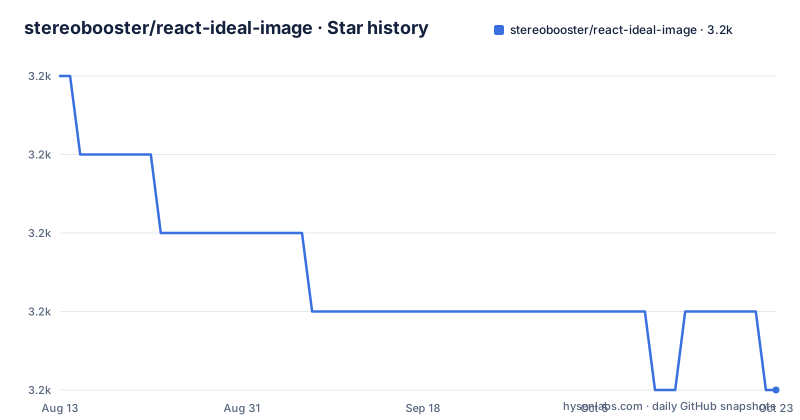
Star history
- stereobooster/react-ideal-image3,242 ★ · -4
| Repository | 2026-08-13 | 2026-10-23 |
|---|---|---|
| stereobooster/react-ideal-image | 3.2k | 3.2k |
-4 Stars in the last 71 days, measured from the daily GitHub snapshot. Compare with other projects
Editorial analysis
Last committed June 2023, with a peer range admitting React 0.14
The repository was last pushed on 2023-06-10 and has no releases, so there is no version history to consult and no announcement to trace. What the manifest still declares is a peer range that admits anything from React 0.14 upward, along with a property-types floor of 15 and a viewport-detection package from 8. Meanwhile the development stack the component was actually built against is several years behind that: the runtime and its test renderer sit at one React minor, the type definitions for React are pinned to a patch behind even that, the TypeScript compiler is from 2018, and the bundler is a major version that stopped receiving updates years ago. So the compatibility statement is an accident of a range that was never narrowed, not a claim anyone has verified against a current React.
Three version ranges in the manifest are not well-formed
The manifest is small enough to read in full, and three of its version constraints are malformed. The engine floors are written with an operator, a space and a bare number, which is not a valid range form, and they clearly mean a minimum rather than a maximum. The React peer dependency is written with a wildcard after an operator, which is the same class of mistake, since a wildcard cannot sit on the far side of a comparison. The third is not malformed but is the thing that makes the other two matter: everything in the development dependencies is pinned exactly, to the patch. So the manifest is exact where it does not need to be and approximate where it does, and a resolver will treat the malformed entries as absent rather than as the floors they appear to be.
Two required props are missing from the only usage example
Five props are documented as required. The single usage example:
import React from 'react'
import lqip from 'lqip.macro'
import IdealImage from 'react-ideal-image'

import image from './images/doggo.jpg'
const lqip = lqip('./images/doggo.jpg')

const App = () => (
  <IdealImage
    placeholder={{lqip}}
    srcSet={[{src: image, width: 3500}]}
    alt="doggo"
    width={3500}
    height={2095}
  />
)
passes four of them and omits the icon map and the theme, both of which the prose then describes as having defaults. So the documentation contradicts itself twice: the type line says required, the paragraph below it says there is a default, and the example relies on that default without saying so. Three further things in that example are worth knowing. It is introduced as a create-react-app example that needs version two for macros, tying the only usage snippet to a scaffolding tool that no longer ships in that form. It imports a macro package that appears in no dependency list at all. And it imports an image once as a value and once as a macro argument, binding the macro's name to a local variable of the same name in the same line. The source set in the example holds a single candidate at full size, which is the degenerate case of a prop built for several.
The typings field points outside the published file list
The manifest sets its entry point to a built file inside the output directory and then whitelists only that directory for publication. The type declarations, however, are a hand-written file at the repository root, and the typings field points there. A whitelist of the built directory does not include a root-level declaration file, so the published package contains the runtime and describes types it does not carry. TypeScript consumers are therefore reading a field that resolves to nothing. The declarations are hand-maintained rather than generated, which makes the omission more consequential: there is no build step that could be failing, the file simply is not in the set. This is the kind of defect that passes review because the manifest looks correct field by field.
Two documented shapes are shown with one key and an ellipsis
The icon map is demonstrated with a single key for the loading state followed by a comment, and the theme object is demonstrated with a single nested object for the placeholder followed by the same comment. Neither key set is listed anywhere in the visible page, so overriding an icon or restyling a theme means reading the source. Two more examples are placeholders in the literal sense: the solid-colour form of the placeholder prop is shown as an empty string, and the low-quality-image form is shown as an empty string as well, with the real values deferred to the document the front page links to. In the source set shape, only the width is required, a size field appears with no explanation of what it means, and the format field accepts exactly two values with no third listed.
A fallback callback the example never reaches, linked under a different heading
The URL-generating callback is documented as firing as soon as the component enters the viewport, and as being used only when the source set does not supply a source field. The example supplies a source field, so that callback never runs in the code the page offers as the reference. The loader prop points at the same external document but the anchor it links to is about cancelling a download rather than about loading, so the one mechanism that decides how bytes arrive is documented under a heading about how to stop them. The loader itself takes exactly two values, an XMLHttpRequest path and an image-element path. The auto-download default is decided by the connection type, and the page documents only three of them.
deploy means publish the styleguide, and the version field is a placeholder
Fifteen scripts sit in the manifest and nearly all of them forward to a third-party toolkit that supplies the build, the lint, the test run, the validation and the pre-commit hook. That is a sensible choice and it means the project's build behaviour is defined elsewhere. Two consequences show in the names. The deploy script publishes the component documentation to a pages branch rather than publishing a package, which is not what the word usually means. And the version field is a sentinel string of the kind used when a release tool substitutes the real number at publish time, yet no configuration for such a tool appears in the tree, and no release has ever been cut. So the repository has a placeholder version, no mechanism on disk to replace it, and no tag history.
The recorded homepage is a file in the repository
The repository's recorded homepage address is a link to its own introduction document on the master branch, which is unusual and means there is no independent site to point at. That document is also where the front page sends you for the substance: the solution section is one sentence and a link, and three of the prop descriptions end with a link to a named anchor inside it. The rest of the front page is a generated table of contents, wrapped in comments instructing the reader not to edit it, and twelve badges across three rows, one of which is an empty anchor and two of which are rendered as badges for pull request guidance and a code of conduct. The problem statement above all of it is written in the first person as a personal need, with a comma splice in the middle of it.
Editorial conclusion
react-ideal-image fits someone maintaining an older React codebase who wants a component that defers image loading and switches format by connection, and it does not fit anyone starting fresh. Verify four things before you install it. Check the commit date, which is 2023-06-10, against the peer range that still admits React 0.14: the declaration is far wider than anything that has been tested against it. Check that the type declarations actually ship, because the manifest whitelists the built directory while its typings field points outside it. Read the two prop shapes the page never finishes, since the icon map and the theme map are each shown with one key and an ellipsis. And plan your own version pinning for the runtime, since three of the ranges in the manifest are not well-formed and will not constrain a resolver the way they appear to.
Frequently asked questions
What is stereobooster/react-ideal-image?
A React component that loads images asynchronously and adapts what it fetches to the connection, letting the user control which candidate image is chosen. It exposes twelve props covering the source set, placeholder, icons, theme, a loader switch between an XMLHttpRequest and an image element, an auto-download decision and the threshold that defines a slow download. It depends on the React runtime, the property-types package and a viewport-detection package as peers.
Is react-ideal-image still updated?
The repository was last pushed on 2023-06-10 and has no releases, so there is no version history and no tag to consult. The manifest still declares a peer range accepting React from 0.14 upward, while the development stack it was built against sits several years behind that, including a type-definition package pinned below the runtime it describes. Continuous integration is configured for a hosted service that is no longer free for open source.
How do I install and use react-ideal-image?
The install is one package-manager command with a save flag, and the front page states that the runtime, the property-types package and the viewport-detection package must also be installed, which the manifest declares as peers rather than dependencies. The usage example is tied to a version-two create-react-app setup for macros and needs a fourth package for low-quality image placeholders that appears in no dependency list.
Which react-ideal-image props are required?
Five are marked required: height, icons, placeholder, the source set and theme. The single usage example passes four and omits the icon map and the theme, both of which the prose describes as having defaults, so the documentation contradicts itself on exactly those two. The prop table also shows the icon map with one key and the theme object with one nested object, so neither full shape is listed on the page.
What alternatives to react-ideal-image does the project list?
Thirteen, of which several share the same lazy prefix and two of those differ only by a hyphen, so the names are easy to confuse. One entry is a static-site generator plugin rather than a React component, and one link's label contains two literal backticks that render as text. The list carries no dates and no notes about which alternatives still work with a current React version.
Official sources
Add this badge to your README
If you maintain this project, the badge below links readers to this analysis and shows its maintenance status from the daily GitHub snapshot. Paste the markdown into your README; add ?metric=license or ?metric=stars to the image URL for a different field.

[](https://hysenlabs.com/projects/stereobooster-react-ideal-image)Star history chart for your README
[](https://hysenlabs.com/projects/stereobooster-react-ideal-image)Was this useful?