StikDebug puts JIT on the device, but only for builds that carry get-task-allow
An on-device debugger/JIT enabler for iOS versions 17.4+, powered by idevice.
At a glance
- What is it?
- StikDebug is an on-device debugger for iOS 17.4 and newer that talks to the phone through idevice and is distributed by sideload rather than by the App Store. Its JIT path needs a pairing file and a loopback VPN, it reaches only apps signed with the developer entitlement, and its step list skips a number.
- Who is it for?
- StikDebug fits a developer who sideloads their own builds, already has a pairing file for the device in hand, and wants to attach a debugger without a computer attached to the phone. It does not fit anyone looking for a way to run store apps with JIT, because the entitlement check puts those out of reach, and it does not cover anything below iOS 17.4.
- Can I use it commercially?
- Yes, with strict conditions. AGPL-3.0 is a network copyleft licence: if people use a modified version over a network, for example as a hosted service, you must offer them its source code under the same licence.
- Is it still maintained?
- Yes. The repository last received commits 2 days ago.
- What is it written in?
- Mainly Swift, according to GitHub's language statistics.
Answers come from the project's GitHub data, last synced on November 14, 2026, and from our analysis. They are not legal advice.
Star history
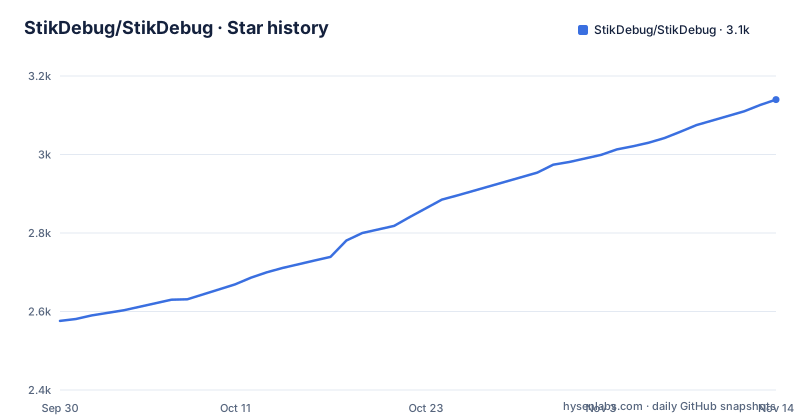
- StikDebug/StikDebug3,140 ★ · +564
| Repository | 2026-09-30 | 2026-11-14 |
|---|---|---|
| StikDebug/StikDebug | 2.6k | 3.1k |
564 Stars in the last 45 days, measured from the daily GitHub snapshot. Compare with other projects
Editorial analysis
JIT is scoped to sideloaded builds with get-task-allow
The feature list leads with the constraint rather than the capability. JIT is for sideloaded apps that have the `get-task-allow` entitlement, which is the entitlement a development build carries to permit a debugger to attach. That single clause decides who can use the headline feature: your own test builds, not the version of an app a customer downloaded from the store, because a store build does not carry that entitlement and StikDebug has no documented path for one.
The rest of the inventory is broader than JIT and does not mention the entitlement. App launching will launch every app installed on the device. The console shows live app and system logs. Processes inspects running apps and processes and terminates them. Device info exposes device metadata. A location simulator reports a GPS location for the device. App expiry shows when apps will expire and installs or removes profiles. Scripts manages automation scripts, and the parenthetical note says those are mainly used for iOS 26 JIT.
Read as a whole, that is a small device management console with a debugger attached, not a debugger alone. The process list and the profile installer are the two capabilities that reach beyond your own build, so treat the install as a debugging tool and not as a device admin panel.
The compatibility table skips from 18.x to 26.0+
Three rows cover the whole device range. iOS 1.0 to 17.3.X is marked not supported, with the note that it uses different connection protocols. iOS 17.4 to 18.x is marked fully supported and stable. iOS 26.0 and later is marked supported, with limited app availability and a parenthetical explaining that developers need to update their apps to work.
The first row is a protocol statement rather than a stability judgement, and it lines up with what the project says it is built on: the header describes StikDebug as powered by idevice and links that project. Devices before 17.4 speak a different pairing and connection scheme, so no amount of tuning on this side is going to reach them. The second row is the one to sit on if you want a stable target.
The 26.0 row is the more interesting one, because support is qualified rather than clean. StikDebug can talk to a device on 26.0 and later, but the apps it can act on are limited until their developers ship updates, which is also why the automation scripts feature exists and why its description says those scripts are mainly used for iOS 26 JIT. If your testing device is on 26.0 and your build predates the update, the tool being able to launch and inspect does not imply your app will run under it.
The setup steps are numbered 1, 2 and 4
The JIT section lists its steps and the third number is missing. Step 1 is obtaining a pairing file, step 2 is setting up the VPN, and then the list jumps straight to step 4, which enables JIT for an app. Nothing in the document explains whether a step was removed or simply never written.
The steps themselves are short. For the pairing file, the document links a guide hosted in a separate repository, StikDebug/StikDebug-Guide, at `pairing_file.md`, and suggests asking in Discord otherwise. For the VPN, it says to launch LocalDevVPN and enable the VPN. For step 4, it says to launch StikDebug and tapp the `Enable JIT` button, then pick the sideloaded app from the list. The verb in that last line is misspelled in the source, and the heading says the step is for an app while the instruction has you choosing from a list of apps, so either one app at a time or many is left ambiguous.
For context on what comes after, the build-from-source section closes by telling you to follow the JIT setup steps above, pairing import included, so those three numbered items are the whole runtime procedure the project documents.
A pairing file and a loopback VPN are the whole trust surface
The requirements list for enabling JIT is four items. StikDebug itself has to be installed, through AltSource, a direct .ipa, or a self-build. A valid pairing file for your device is required, in .plist or .mobiledevicepairing form. A sideload tool such as SideStore or AltStore is required for app refreshing. And a loopback VPN such as LocalDevVPN is required. The project's own summary adds that once the initial pairing setup is done, a computer is no longer needed, which places the pairing file at the center of the arrangement.
That file is a record of trust between the device and a host, and the troubleshooting section treats it as the first thing to suspect when heartbeat errors appear. Its fix for pairing problems is to replace the file with the device unlocked and trusted. Anyone producing that file is producing a credential for your phone, which is why the guide lives in its own repository and why the alternative offered is the project's Discord.
Installation itself has moved off the App Store. A note at the top of the document says StikDebug is no longer available there and to use the official download methods, which are an AltSource redirect reading an index file and a direct archive link:
https://altdirect.app/?url=https://stikdebug.xyz/index.json
https://github.com/StikDebug/StikDebug/releases/download/3.1.13/StikDebug-3.1.13.ipa
The second of those is pinned in the README text to 3.1.13, while the first asks a listing file on the project's site which build to serve, so the two routes are not the same promise about which version you get.
Heartbeat errors are blamed on Wi-Fi, connection drops on version mismatch
The troubleshooting list is three lines long and each one names a different suspect. A connection dropped message or a loopback error is attributed to iOS version compatibility and beta warnings. Heartbeat errors are attributed to the VPN being on and to being connected to Wi-Fi, with a note that it may also be a pairing file issue. Pairing file problems get their own line, fixed by replacing the file with the device unlocked and trusted. Anything unresolved goes to the Discord with logs and screenshots.
The Wi-Fi condition is the part worth noticing. Nothing in the requirements list asks for a network, and the loopback VPN is by definition local, yet heartbeat errors are resolved by checking that the device is on Wi-Fi. Read strictly, the document offers no offline procedure: a device with no usable connection is outside what these three lines cover, and the fallback is a support channel rather than a documented step.
The same section has a misspelling in the line it uses most often, with the instruction to be connected spelled wrong. It is a small thing, and it matters only because the whole troubleshooting list is three sentences long, so the typos are proportionally more visible than they would be in a longer document.
A self-build signs with your account under a bundle id you choose
Building from source takes macOS with the latest release recommended, Xcode 16 or newer with Xcode 26 preferred for iOS 26 support, an iOS device on 17.4 or newer for testing, and Git. The clone is the ordinary two lines:
git clone https://github.com/StikDebug/StikDebug.git
cd StikDebug
After that the steps move into Xcode. Open `StikDebug.xcodeproj`, select the StikDebug target, go to Signing and Capabilities, sign in with an Apple ID that may be free or paid, and set a bundle identifier of your own, with `com.yourname.StikDebug` given as the example. Selecting the device and pressing Cmd+R builds and installs it, and the certificate then has to be trusted on the phone under Settings, General, VPN and Device Management.
The consequence is that a self-built StikDebug is not the same artifact as the released one. Different bundle identifier, different signer, different provisioning profile. That is also the context for the App Expiry feature, which reports when apps will expire and installs or removes profiles, and for the requirement that you keep a sideload tool around to refresh apps.
The repository ships the Xcode project, an app directory, both unit and UI test targets, an assets directory and an `info.md`, with no package manifest and no documented command for running those tests from a terminal. One more detail: the note about integrating the project points to an INTEGRATION guide inside a different repository, StikDebug/StikJIT, and no such directory exists in this tree.
Patch releases on consecutive days, with the .ipa link pinned in the README
The recent tags are three patch releases in six days: 3.1.11 on 2026-09-23, 3.1.12 on 2026-09-27, and 3.1.13 on 2026-09-28, which is the same timestamp as the most recent push to the default branch. The repository is not archived, and the license is AGPL-3.0 with the text at the root as a LICENSE file.
For an end user the cadence is invisible and mostly irrelevant, since the app updates through the sideload channel you already chose. For anyone automating the install it matters, because the direct download link in the document is written into the README with a version in it, 3.1.13 in this case, so every release is a README edit, and the AltSource route serves whatever the index file on the project's site lists. Those two mechanisms can point at different builds, and the README does not say which one to prefer.
The copyleft license is the other thing to settle early. AGPL-3.0 is what the manifest and the license section both state, and the document's own note sends anyone embedding StikDebug or StikJIT into their own project to a separate integration guide. Whether that obligation fits your product is a question for your own counsel, not something this repository answers.
Editorial conclusion
StikDebug fits a developer who sideloads their own builds, already has a pairing file for the device in hand, and wants to attach a debugger without a computer attached to the phone. It does not fit anyone looking for a way to run store apps with JIT, because the entitlement check puts those out of reach, and it does not cover anything below iOS 17.4. Before you install it, check three things: that your build carries get-task-allow, that you have a pairing file you trust, and which channel you will download from, because the README links one .ipa pinned to 3.1.13 while the AltSource route reads an index file on the project's own site. Anyone planning to embed it or StikJIT in a product should read the AGPL-3.0 license first, since the integration guide lives in a separate repository.
Frequently asked questions
What is StikDebug used for?
It is an on-device debugger for iOS 17.4 and newer, powered by idevice. Its features include enabling JIT for sideloaded apps that carry the get-task-allow entitlement, launching installed apps, live app and system logs, process inspection and termination, a GPS location simulator, app expiry and profile handling, device metadata, and automation scripts mainly used for iOS 26 JIT.
Why was StikDebug removed?
The document says only that StikDebug is no longer available on the App Store and asks readers to use the official download methods, which are an AltSource listing and a direct .ipa from the releases. It gives no reason for the removal.
Can I use StikDebug without Wi-Fi?
No offline procedure is documented. Heartbeat errors are resolved by making sure the loopback VPN is on and the device is connected to Wi-Fi, with a pairing file issue named as the other possible cause, and anything unresolved is directed to the project Discord.
How do I use StikDebug to enable JIT?
Obtain a pairing file for your device, launch LocalDevVPN and enable the VPN, then open StikDebug and use the Enable JIT button to pick a sideloaded app from the list. The target app has to be sideloaded and carry the get-task-allow entitlement.
Official sources
Add this badge to your README
If you maintain this project, the badge below links readers to this analysis and shows its maintenance status from the daily GitHub snapshot. Paste the markdown into your README; add ?metric=license or ?metric=stars to the image URL for a different field.

[](https://hysenlabs.com/projects/stikdebug-stikdebug)Star history chart for your README
[](https://hysenlabs.com/projects/stikdebug-stikdebug)Was this useful?