Delta hosts seven other people's emulator cores behind a seven day install clock
Delta is an all-in-one classic video game emulator for non-jailbroken iOS devices.
At a glance
- What is it?
- Delta is a Swift iOS emulator that wraps existing cores for seven classic systems and reaches devices through AltStore rather than the App Store. The interesting engineering is the framework split, and the interesting constraint is the weekly refresh.
- Who is it for?
- Delta fits an iOS user with AltStore already set up who wants one native app covering several classic systems, accurate cores and save states with backups, and who will keep it refreshed at least once every 7 days. It does not fit someone who wants automatic updates without going through AltStore, someone who needs Genesis support today, or someone who wants to build without pulling submodules and vendored pods.
- Can I use it commercially?
- Yes, with strict conditions. AGPL-3.0 is a network copyleft licence: if people use a modified version over a network, for example as a hosted service, you must offer them its source code under the same licence.
- Is it still maintained?
- Yes. The repository last received commits 21 days ago.
- What is it written in?
- Mainly Swift, according to GitHub's language statistics.
Answers come from the project's GitHub data, last synced on November 14, 2026, and from our analysis. They are not legal advice.
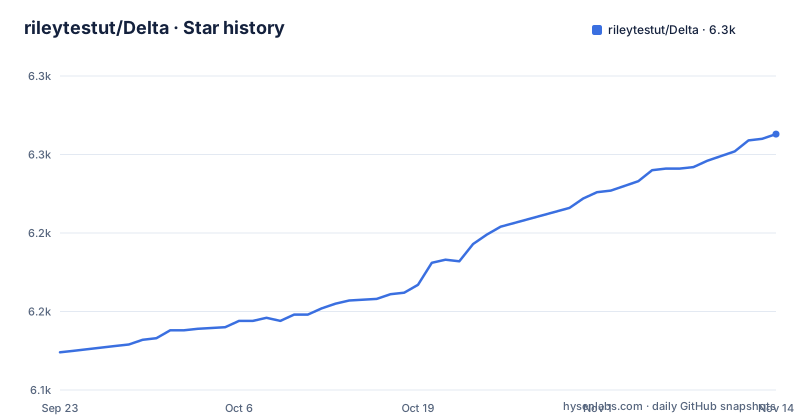
Star history
- rileytestut/Delta6,263 ★ · +139
| Repository | 2026-09-23 | 2026-11-14 |
|---|---|---|
| rileytestut/Delta | 6.1k | 6.3k |
139 Stars in the last 52 days, measured from the daily GitHub snapshot. Compare with other projects
Editorial analysis
Seven systems, seven borrowed cores, Genesis still in beta
The supported list is explicit: Nintendo Entertainment System, Super Nintendo Entertainment System, Nintendo 64, Game Boy and Game Boy Color, Game Boy Advance, Nintendo DS, and Sega Genesis / Mega Drive marked in beta. Underneath each one the README names a core it did not write. NES runs on Nestopia, SNES on Snes9x, N64 on mupen64plus, GBC on Gambatte, GBA on visualboyadvance-m, DS on melonDS, GEN on Genesis Plus GX. That is the architectural decision stated in a single line: Delta is a shell that hosts other people's emulation, and the claim of accurate, full speed emulation is credited to those cores rather than earned here. The contrast with the project's own ancestor is sharp. Delta is described as the spiritual successor to GBA4iOS, a Game Boy Advance emulator the author and Paul Thorsen wrote together in high school, rebuilt from the ground up with modern iOS features and more systems. The application is Swift. The emulation is not. Adding a system means finding a core to wrap, not writing an emulator.
Every Delta Core lives in its own repository, wired in as a submodule
Delta was designed to be modular from the beginning, and the layout proves it. Each Delta Core has its own GitHub repository and is added as a submodule to the main project, which is why .gitmodules and a Cores/ directory sit at the top level next to Delta.xcodeproj/, Delta.xcworkspace/, Delta/, DeltaFeatures/, DeltaPreviews/, External/, Systems/, Resources/, Artwork/ and Docs/. The division of labour is spelled out. This repository is just a regular sandboxed iOS application holding the storyboards, app specific view controllers and database logic. DeltaCore is the middle-man between the high level app code and the specific emulation cores, and it is where emulation, controller skins, save states and cheat codes are reached from; the README expects other emulator apps to build on that framework too. Delta also uses Roxas and Harmony, which the README calls the author's own private frameworks for sharing common functionality between his apps; Roxas is linked to its own GitHub repository.
Apple declined the App Store, so the author built the installer
Delta was originally developed under the impression Apple would let it into the App Store. Apple later changed its mind, and the author's response was to build AltStore, which the README now calls the official way to install Delta. Emulator and installer are one product from one author, which is worth knowing before you judge either. It also puts a clock inside the install path. Once Delta is on the device through AltStore you must refresh it at least once every 7 days or it expires and needs installing again. AltStore attempts those refreshes in the background when the device is on the same WiFi as AltServer, and a Refresh All control forces them by hand. The same paragraph says AltStore tells you when a new update is released, so upgrading Delta happens inside AltStore rather than inside Delta.
Five steps, one button labelled FREE, and no command to copy
The installation section has no command line. Installation runs through AltStore in five steps. Download AltServer for Mac or PC from https://altstore.io. Connect the iOS device to your computer with a lightning cable, or USB-C for iPads. Follow the instructions at altstore.io/faq to install AltStore onto the device with AltServer. Open AltStore on the device and navigate to the Browse tab. Find Delta and press the FREE button, which starts installing the app. What you can copy instead is the tree you should end up with, including the submodule wiring and the vendored CocoaPods, since Podfile, Podfile.lock and a populated Pods/ directory are part of the checkout rather than something a build step fetches for you:
.gitmodules
Artwork/
Cores/
Delta.xcodeproj/
Delta.xcworkspace/
Delta/
DeltaFeatures/
DeltaPreviews/
Docs/
External/
Podfile
Podfile.lock
Pods/
Resources/
Systems/
Sideloading the .ipa is the other route and it costs you updates
The page offers a second path: download the compiled `.ipa` files from Releases and sideload them with whatever sideloading method you prefer. The cost is named in the same paragraph. You will not receive automatic updates, and Delta has to be updated manually by re-sideloading each new version. So the real decision is between a maintenance ritual that hands you in-app updates and a manual install you fully control. Neither path removes the versioning question, because the newest tag is v1.6 from 2024-07-11, with v1.5 from 2024-02-01 and v1.4 from 2023-02-28 behind it, while the last push to this repository landed on 2026-10-24. A build taken from Releases can therefore be more than a year behind the source.
Save states carry locks, backups and one button, but Quick Saves need hardware
The save state handling is the most defensive corner of the feature list. You can save and load states for any game from the pause menu, lock a state so it cannot be accidentally overwritten, and rely on automatic backup states so progress is not lost. A second tier exists for the ones you touch constantly: Quick Saves, which can be saved or loaded with a single button press, and the README attaches a condition, an external controller. Fast forwarding follows the same pattern, toggleable from the pause menu or bound to a mapped button on that controller. Hold Button attacks the opposite problem by choosing buttons for Delta to hold down for you, with the README's own examples being the run button in Mario games and the A button in Mario Kart. Mappings are customizable per system and per controller, so a PS5 pad and an Xbox Series X pad do not have to share one layout. Bluetooth and wired keyboards and the Apple Smart Keyboard are supported too.
Delta Sync carries cheats and skins, while the hardware support has hard edges
Delta Sync is the least emulator-shaped feature and the one with the widest reach. It syncs games, game saves, save states, cheats, controller skins and controller mappings between devices, keeps a version history of everything it syncs, and lets you restore earlier versions. Two cloud back ends are supported, one of them Dropbox. Cheat support is enumerated per system and named by device: Game Genie for NES, SNES and GBC, GameShark for N64, GBC and GBA, Pro Action Replay for SNES, Action Replay for GBA and DS, Code Breaker for GBA. Peripheral support is narrower, and the README marks the limits plainly: gyroscope support for WarioWare: Twisted! only, microphone support for DS only. Hardware controllers are named too, PS4, PS5, Xbox One S, Xbox Series X and MFi, alongside bluetooth and wired keyboards and the Apple Smart Keyboard. Tapping the screen with 3D or Haptic Touch peeks at games, states and cheat codes, and app icon shortcuts jump back to recently played titles. One of the seven systems remains flagged beta.
Editorial conclusion
Delta fits an iOS user with AltStore already set up who wants one native app covering several classic systems, accurate cores and save states with backups, and who will keep it refreshed at least once every 7 days. It does not fit someone who wants automatic updates without going through AltStore, someone who needs Genesis support today, or someone who wants to build without pulling submodules and vendored pods. Verify three things before you commit: that AltStore can reach your device for the 7 day refresh, whether the build you install is v1.6 from 2024-07-11 or something newer, and whether the systems you actually play are on the supported list or still in beta.
Frequently asked questions
How do you install Delta the emulator on an iOS device?
Download AltServer for Mac or PC from https://altstore.io, connect the device with a lightning cable or USB-C for iPads, and install AltStore using the instructions at altstore.io/faq. Then open AltStore on the device, go to the Browse tab, find Delta and press the FREE button.
Which classic systems does the Delta iOS emulator support?
NES, SNES, N64, Game Boy and Game Boy Color, GBA, and DS, with Sega Genesis / Mega Drive marked in beta. Each one is backed by an existing core such as Nestopia for NES, Snes9x for SNES, mupen64plus for N64, Gambatte for GBC, visualboyadvance-m for GBA and melonDS for DS.
How often does a Delta install need refreshing?
At least once every 7 days, otherwise it expires and has to be installed again. AltStore tries to refresh apps in the background when the device is on the same WiFi as AltServer, and pressing Refresh All does it manually.
Does Delta receive automatic updates?
Through AltStore, which lets you know when a new update is released so you can update Delta directly inside AltStore. If you sideload the compiled .ipa files from Releases instead, there are no automatic updates and each new version must be re-sideloaded by hand.
What license does the Delta emulator ship under?
AGPL-3.0, with the licence text stored in the COPYING file at the top level of the repository.
Official sources
Add this badge to your README
If you maintain this project, the badge below links readers to this analysis and shows its maintenance status from the daily GitHub snapshot. Paste the markdown into your README; add ?metric=license or ?metric=stars to the image URL for a different field.

[](https://hysenlabs.com/projects/rileytestut-delta)Star history chart for your README
[](https://hysenlabs.com/projects/rileytestut-delta)Was this useful?