proteinpaint: cohort-level genomics visualization with a dev server and a container
Data visualization and analysis framework focused on phenotype-molecular data integration at cohort level.
At a glance
- What is it?
- A TypeScript tool from St. Jude for exploring a cohort's genotype and phenotype data, installed either on the host with Node 24 and npm 11 or inside a Docker development container, with ten ordered npm workspaces, a marked-up documentation view served by the dev server, and releases driven by GitHub Actions.
- Who is it for?
- proteinpaint fits a bioinformatics developer who needs to run a cohort-level genomics viewer locally and iterate on both the server and the client, since the repository wires both halves to one command and documents itself in the browser. It is not a hosted product and not a pip-installable library: the server needs a serverconfig.json at the project root, the system dependencies live in an external document, and the container path assumes Docker Desktop.
- Can I use it commercially?
- Check first. The repository uses a licence we do not classify automatically, so read its LICENSE file before any commercial use.
- Is it still maintained?
- Yes. The repository received new commits within the last day.
- What is it written in?
- Mainly TypeScript, according to GitHub's language statistics.
Answers come from the project's GitHub data, last synced on October 22, 2026, and from our analysis. They are not legal advice.
Star history
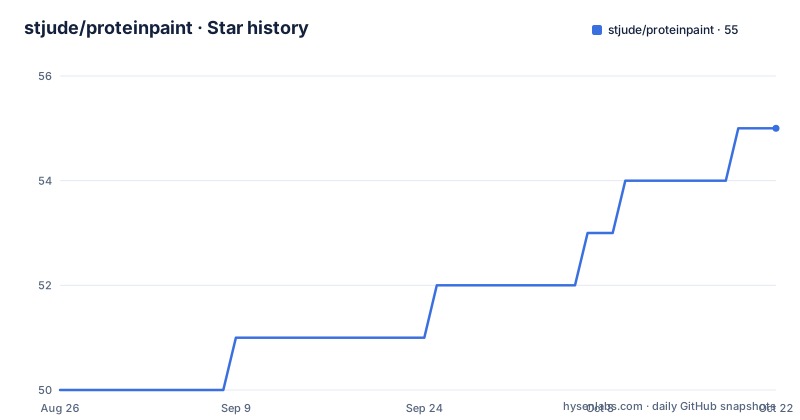
- stjude/proteinpaint55 ★ · +5
| Repository | 2026-08-26 | 2026-10-22 |
|---|---|---|
| stjude/proteinpaint | 50 | 55 |
5 Stars in the last 57 days, measured from the daily GitHub snapshot. Compare with other projects
Editorial analysis
A cohort viewer, and the name is misleading
The one-line description is a genomics visualization tool for exploring a cohort's genotype and phenotype data, and the repository description expands it into a data visualization and analysis framework focused on phenotype and molecular data integration at cohort level. The word in the name suggests protein structure, which is not what the tool draws; the subject is cohort data. It is published by St. Jude, the public site is proteinpaint.stjude.org, and the source is cloned with a plain git URL rather than installed from a registry, since the npm package is marked private. The primary language is TypeScript and the default branch is master, with the most recent release at version 2.215.0 and the last push dated September 30, 2026.
Two install paths: the host, or a container
The host path is four commands, and the first of them is a git hook setup:
cd proteinpaint
npm run sethooks
nvm use 24
npm install
The npm install step alone is not enough if you are working on the server code: the README points to system dependencies listed in an external installation document, and to a separate set of instructions inside the same document, so a host install means following two documents rather than one. The container path skips the host tooling and needs Docker Desktop on your machine:
cd proteinpaint
npm run sethooks
cd container/dev
./run.sh "/path/to/proteinpaint/"
The argument is the path to your checkout, which is how the container finds your source.
Development runs two terminals, or one with dev1
There are two documented ways to work. The explicit one uses two tabs: npm run dev, which rebundles the frontend code, and npm start in a separate terminal, which runs the ProteinPaint server and requires a serverconfig.json file at the project root. That requirement is the first thing that will stop you, and it is also the reason the container instructions copy a serverconfig into place. The single-window alternative is npm run dev1, which starts the bundler and the server together and displays both sets of logs, using a shell trap so an interrupt kills the background job rather than orphaning it. There is a third pointer for people who would rather use a container for development, which the README defers to build/dev/README.md.
The container picks up host edits and rebundles them
The container workflow is documented as automatic: changes made to the code on the host machine are reflected in the container and re-bundled without any step from you, and npm run dev1 runs inside the container when the image starts through the container/dev/run.sh script. So the loop is the same either way, with only the location of the processes changing. For editor integration there is a third option using the VSCode Dev Containers extension, and its command sequence is worth noting because it is not the same as either earlier path: npm install, then npm run build, then npm run sethooks, then copying container/dev/serverconfig.json into the project root, and finally npm run dev1.
Testing is one script, or a page served by the dev server
The documented test entry point is a single command:
npm testws # tests all workspacesThere is a second path through the dev server. Setting debugmode to true in your serverconfig gives you http://localhost:3000/testrun.html, a page listing the available client-side unit and integration tests. That is how you drive the client tests interactively rather than from the terminal. The package scripts go further and name the individual suites: a client workspace integration test, a container test that runs node's test runner over files in container/test, an eslint rule test under build/eslint, and a spec coverage script that aggregates per-workspace results through an evaluation script, with a combined coverage target that chains server and client coverage together.
Ten workspaces, listed in dependency order
The workspaces array in package.json carries an instruction in a comment: the list order of workspace entries should match the dependency graph direction. The entries are augen, the shared glob, rust, python, R, server, client, front, and two container packages for the server and the full image. That comment is the whole of the build documentation for a repository with server, client, Rust, Python and R code in it, which means a newcomer learns the dependency order by reading the manifest rather than by inference from the directories. The tree is consistent with that manifest, holding server, client, front, shared, rust, python, R, utils, test, build, container, public, augen and docs-facing directories, along with lint and formatting configuration and a secrets baseline.
Releases go through GitHub Actions and a jump script
Packaging is not a manual sequence. The build and release steps are triggered through GitHub Actions using the Create Release workflow, and GitHub Actions is used to coordinate the release of related package updates across the workspaces, with standard npm tooling such as version and publish doing the work underneath. For a local version bump there is a script, invoked as build/jump.sh patch, and the README notes that you can undo the changes with git restore if the write option was used. Documentation is generated rather than written, with npm run doc producing output into public/docs, and two documentation TODOs are listed: organising the left sidebar links by API topic using TypeScript namespaces or a custom plugin, and showing test code specific to a documented type or interface.
Editorial conclusion
proteinpaint fits a bioinformatics developer who needs to run a cohort-level genomics viewer locally and iterate on both the server and the client, since the repository wires both halves to one command and documents itself in the browser. It is not a hosted product and not a pip-installable library: the server needs a serverconfig.json at the project root, the system dependencies live in an external document, and the container path assumes Docker Desktop. Before you start, read the linked installation instructions for the server dependencies, and expect the first build to compile several workspaces listed in a deliberate order.
Frequently asked questions
how to use proteinpaint locally?
Clone the repository, run npm run sethooks, switch to Node 24 with nvm use 24, and npm install. Then run npm run dev in one terminal and npm start in another, which requires a serverconfig.json at the project root. Marked-up documentation is served at http://localhost:3000/readme.html.
What is proteinpaint used for?
It is a genomics visualization tool for exploring a cohort's genotype and phenotype data, described as a framework focused on phenotype and molecular data integration at cohort level. It is published by St. Jude and the public site is proteinpaint.stjude.org.
What does proteinpaint require before it will run?
Node 24 and npm 11 or newer, since the development scripts require npm v11+ and are tested with Node v24+. If you are working on the server code you also need the system dependencies listed in the linked installation documents. The Docker path instead requires Docker Desktop on the host.
How do you test proteinpaint?
Run `npm testws` to test all workspaces. For the client side, set debugmode to true in your serverconfig and open http://localhost:3000/testrun.html, which lists the available client-side unit and integration tests.
Official sources
Add this badge to your README
If you maintain this project, the badge below links readers to this analysis and shows its maintenance status from the daily GitHub snapshot. Paste the markdown into your README; add ?metric=license or ?metric=stars to the image URL for a different field.

[](https://hysenlabs.com/projects/stjude-proteinpaint)Star history chart for your README
[](https://hysenlabs.com/projects/stjude-proteinpaint)Was this useful?