融光 ships default database passwords and a wildcard CORS origin
Rongguang (Fusing Light) - an agent-based, end-to-end AI creation platform for short dramas, motion comics and video, built on Java and AgentScope 2.0.
At a glance
- What is it?
- The platform bundles a Java backend, a Next.js frontend and four Compose files, and its README is unusually thorough about configuration. The defaults it ships are the opposite: both database passwords are a six digit string, the browser origin allowlist is a wildcard, and the notes telling you to change them are written in the imperative rather than enforced.
- Who is it for?
- 融光 is a substantial, unusually well documented deployment for anyone building AI video pipelines, and the configuration section is better than most projects manage. Two things to settle before it faces the internet.
- Can I use it commercially?
- Yes. MIT is a permissive licence: you can use, modify and sell software built on it, as long as you keep its copyright and licence notices.
- Is it still maintained?
- Yes. The repository last received commits 1 day ago.
- What is it written in?
- Mainly Java, according to GitHub's language statistics.
Answers come from the project's GitHub data, last synced on November 15, 2026, and from our analysis. They are not legal advice.
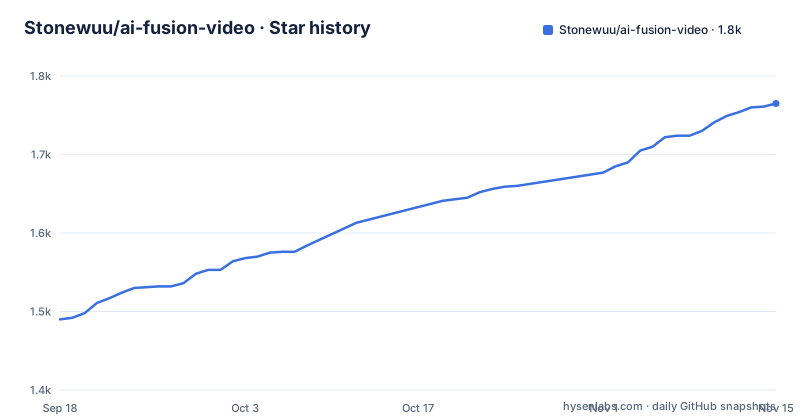
Star history
- Stonewuu/ai-fusion-video1,765 ★ · +275
| Repository | 2026-09-18 | 2026-11-15 |
|---|---|---|
| Stonewuu/ai-fusion-video | 1.5k | 1.8k |
275 Stars in the last 58 days, measured from the daily GitHub snapshot. Compare with other projects
Editorial analysis
Both database passwords default to 123456
The environment template ships two credentials and they are identical. The MySQL root password is `123456`, and the Redis password is `123456`. Both lines are marked in the template as something that must be changed before deploying to a public network, and the annotation uses emphasis marks around the word for must.
The Compose file repeats the same defaults inline rather than requiring them, so an operator who never copies the template still gets a working stack on those passwords. Both services also disable host port publishing by default, with the port mappings present but commented out and bound to loopback, which reduces the exposure to a machine-local attacker rather than a network one.
What remains is the single entry point, which by default reaches the frontend and proxies API and media requests to the backend through the bundled Nginx. So the credentials are not directly reachable, but they are reachable by anything that gets through that one door, and they are in a file that a careless deployment will ship unchanged.
The template is candid about all of this. The gap is enforcement, not documentation.
The browser origin allowlist is a wildcard by default
One variable governs who a browser will let call the backend. Its default is a single character meaning every origin, and the documentation is consistent about this being acceptable for a unified local entry point and inadvisable in production, where it recommends listing the actual frontend origins separated by commas.
The variable applies to every deployment mode, which the documentation states explicitly. Several other variables do not: the public API address and the separate frontend and backend ports take effect only when the separated Compose file is combined in, and the single entry point port is ignored in that mode. The page provides a table mapping each deployment mode to the Compose files it uses and the variables that matter for it, which is the kind of detail that usually goes undocumented.
One constraint deserves attention because it is enforced by composition rather than by validation: with the unified entry point, the public API address must stay empty. A deployment that sets it while using the default files will have that value silently ignored.
The application account is optional, and the ordering matters
The database account used by the application is configured through two variables that must be set together or left empty together, and the account cannot be the root user. When they are left empty, the backend continues to use the root account and the root password, which the documentation describes as consistent with the behaviour of earlier versions.
The ordering constraint is the important part, and it is spelled out. For a brand new database, filling in the two variables before the first start causes the database image to create an ordinary account and grant it access to the application database. For an existing database, changing the variables does nothing to the accounts that already exist, and the operator has to create and grant the user by hand first.
That is a one way door in practice. An operator who deploys, forgets about the optional account, and later adds the variables will find the backend trying to authenticate as a user the database does not have, and the fix is not visible from the configuration file alone.
Four Compose files cover one deployment and two build strategies
The deployment surface is wider than a single Compose file, and the variants are combined rather than chosen. The default path is:
git clone https://github.com/Stonewuu/ai-fusion-video.git
cd ai-fusion-video

cp .env.example .env

docker compose up -d
The default file pulls prebuilt images and starts the database, the cache, the backend, the frontend and Nginx together, with Nginx as the single entry point forwarding API and media paths to the backend. A second file produces the same topology with images built from the current source. A third file is not a topology of its own but an overlay that splits the frontend and backend onto different public domains, and the documentation is clear that this mode does not start the bundled Nginx, so the operator has to provide HTTPS reverse proxies for both sides and then confirm two public addresses in the system settings.
The documented commands reflect the overlay design, using the flags to combine a base file with the separated overlay in one invocation, and adding a build flag when building from source. There is also a separate file for starting only the database and cache during local development.
That is four ways to reach a running system, which is a maintenance surface in itself, but the mode-to-file-to-variable table makes it navigable.
Local development runs the database in Docker and the app on the host
The source development path splits the system in a way that is worth understanding before you start, because the port numbers will not match the deployment defaults.
The documented sequence starts the middleware containers, then runs the Spring Boot backend through the Maven wrapper. The requirements are a JDK 21, Node and a specific package manager major version, Docker for the two data services, and FFmpeg with FFprobe for video composition and media probing.
The backend listens on port 18080 by default under a local profile whose settings live in a resources file named for that profile. The frontend runs separately from a sibling directory on port 3000, reads its own environment file, and proxies API and media paths to the backend. The two local data services are published on non-default ports, 43306 for the database and 46379 for the cache, precisely because 3306 and 6379 are likely to be in use on a developer machine.
The FFmpeg requirement is called out separately, with two environment variables to point at the binaries if they are not on the default path. That is a good detail on its own, since a missing binary in a video pipeline produces a confusing failure much later.
The agent surface is configurable per session
The agent workspace is the feature the platform is built around, and the documentation describes it in terms of what an operator can constrain rather than what it can do.
The workspace holds a streaming conversation grounded in project content, accepts image, video, audio and file input, and displays reasoning output, tool calls and task status in the interface. Runtime support is provided by an agent framework, with support for skills, the Model Context Protocol and sub-agents. Session and run state is persisted rather than held in memory.
Two configuration points carry the operational weight. Model capabilities and tool permissions can be set per session, which is how you would let a drafting conversation read project files without letting a rendering task run shell commands. And session persistence means a stuck run survives a page reload and possibly a backend restart, so cancelling it has to be done deliberately.
Model access is configured entirely from the settings page with no keys in source, and the documentation is careful to say that which models actually work depends on the provider account, the endpoint and the permissions granted, rather than promising a fixed catalogue.
The repository is ahead of its newest release
Three releases are listed, all at 1.1.x, published within about a day of each other in early August. The most recent push is dated 2026-09-22 and the repository is not archived.
So there are roughly six weeks of commits after the newest tag. For a project whose headline deployment path pulls a prebuilt image rather than building from source, that gap is the thing to check first, since a fresh installation gets whatever the image tag points at and a source checkout gets something newer than any published release.
The three tags themselves are a clean sequence with no odd formatting, which is worth noting only because it is unusual in this batch of work.
Two other signals frame the project. The description and the documentation both carry English alongside Chinese, and the root listing includes separate files for agent instructions from two different tools, which suggests the contributor workflow expects an assistant to be part of the loop. The repository is MIT licensed with the license file present at the root.
Editorial conclusion
融光 is a substantial, unusually well documented deployment for anyone building AI video pipelines, and the configuration section is better than most projects manage. Two things to settle before it faces the internet. The default database passwords are six digits and the browser origin allowlist is a wildcard, and while the page tells you to change both, nothing prevents the stack from starting with them, so treat that step as mandatory rather than advisory. And the root application account is used unless you fill in the optional pair, which means the fix is to configure both variables together before the first start rather than after.
Frequently asked questions
What is 融光 used for?
It is an agent driven creation platform for short dramas, motion comics and video, organizing projects, scripts, storyboards and media in one workspace. Scripts are arranged by episode and scene, storyboards are derived from the script, and images and video are generated from text or reference material with background task progress tracked.
What database passwords does 融光 ship with?
The environment template sets both the MySQL root password and the Redis password to 123456. Both are documented as things to change before deploying to a public network, and neither is enforced at startup, so an unmodified template produces a running stack on those values.
Does the 融光 backend use the MySQL root account?
By default, yes. An optional pair of variables configures a non-root application account, and both must be set together or left empty together. For a new database they must be filled in before the first start, because changing them later does not create or alter accounts in an existing database.
How do I deploy 融光 with separate frontend and backend domains?
Combine the base Compose file with the separated overlay, and set the public API root address without an /api suffix plus the browser origin allowlist. This mode does not start the bundled Nginx, so you provide HTTPS reverse proxies for both sides and confirm both public addresses in the system settings.
What does 融光 need for local development?
JDK 21, Node 20 with pnpm 10, Docker for a local MySQL and Redis, and FFmpeg with FFprobe for video composition. The database and cache are published on ports 43306 and 46379, the backend on 18080, and the frontend on 3000.
Official sources
Add this badge to your README
If you maintain this project, the badge below links readers to this analysis and shows its maintenance status from the daily GitHub snapshot. Paste the markdown into your README; add ?metric=license or ?metric=stars to the image URL for a different field.

[](https://hysenlabs.com/projects/stonewuu-ai-fusion-video)Star history chart for your README
[](https://hysenlabs.com/projects/stonewuu-ai-fusion-video)Was this useful?