RuoYi AI: a Spring Boot and Langchain4j stack for multi-agent chat, RAG and visual workflows
An enterprise AI development framework for building AI agents. It provides unified management of multi-provider LLMs, secure enterprise knowledge bases with high-precision retrieval, visual workflow orchestration and multi-agent coordination. Compatible with mainstream Agent Skill standards, it enables developers to efficiently build production-gra
At a glance
- What is it?
- RuoYi AI bundles model routing, vector-backed knowledge bases, an MCP tool layer and a drag-and-drop workflow designer into one Java platform. It is a sensible fit if your team already runs Spring Boot and wants an admin panel around agents; the Docker Compose path is the part to inspect first.
- Who is it for?
- Adopt RuoYi AI if your team already operates Spring Boot services and wants an admin panel, model routing and a vector-backed knowledge base in one deployable unit, and you are willing to read docs/docker/ruoyi-ai/.env before anything else. Do not adopt it if you need a Python-native agent ecosystem, a hosted SaaS with no operational surface, or a framework small enough to read end to end.
- Can I use it commercially?
- Yes. MIT is a permissive licence: you can use, modify and sell software built on it, as long as you keep its copyright and licence notices.
- Is it still maintained?
- Yes. The repository last received commits 24 days ago.
- What is it written in?
- Mainly Java, according to GitHub's language statistics.
Answers come from the project's GitHub data, last synced on November 13, 2026, and from our analysis. They are not legal advice.
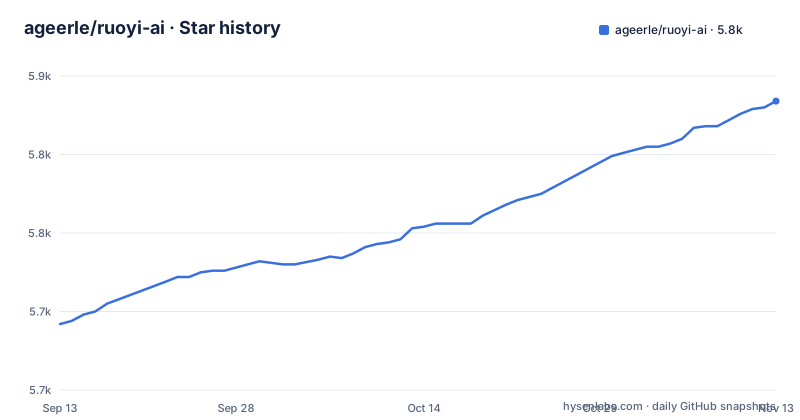
Star history
- ageerle/ruoyi-ai5,834 ★ · +142
| Repository | 2026-09-13 | 2026-11-13 |
|---|---|---|
| ageerle/ruoyi-ai | 5.7k | 5.8k |
142 Stars in the last 61 days, measured from the daily GitHub snapshot. Compare with other projects
Editorial analysis
The problem RuoYi AI addresses: agent plumbing scattered across five vendors
Most teams building an assistant do not start with an agent framework. They start with a chat box, then add a model key, then a second model key because the first one is rate limited, then a document upload, then a vector store, then a tool-calling loop, then an admin screen so someone other than the original developer can change the system prompt. RuoYi AI is aimed at that accumulated mess. The README describes it as an "Enterprise-Grade AI Assistant Platform" and lists the pieces it absorbs: multi-model integration, knowledge management with vector databases, MCP tool integration, a visual workflow designer, and a Langchain4j-based multi-agent layer with Supervisor mode orchestration. The target reader is a Java shop. The backend is Spring Boot 3.5.8 with Langchain4j, storage is MySQL 8.0 plus Redis plus one of Milvus, Weaviate or Qdrant, and the frontends are Vue 3 with Vben Admin. If your organisation already runs a RuoYi-style admin system, the vocabulary and the deployment shape will be familiar. If you are a Python team, you are the wrong audience, and the README does not pretend otherwise.
What actually runs: Spring Boot, Langchain4j, and a Supervisor that picks the decision model
The architecture section is short, so the mechanism has to be read from the module table. Model management is a routing layer: DeepSeek, Zhipu, MIMO, Bailian and OpenAI are named as integrations, alongside platform integrations for Coze, DIFY, FastGPT and RAGFlow. That means RuoYi AI can act either as the thing holding the model credentials or as a front end to an external orchestration platform you already pay for. Knowledge management is described as "Local RAG + Vector DB (Milvus/Weaviate/Qdrant) + Document parsing", with PDF, Word and Excel parsing and image analysis in the document processing line. Tool management covers the MCP protocol plus a Skills capability. The multi-agent module is "Agent framework based on Langchain4j, Supervisor mode orchestration, supports multiple decision models, can flexibly combine tools and skills". The word Supervisor is doing a lot of work there and the feature table does not explain the routing rule, so check the decision model selection in the docs or code. Workflow orchestration is a visual designer with drag-and-drop nodes and SSE streaming execution; the README says it currently supports model calls, email sending, manual review, and other nodes.
Getting it running: the Compose file, the .env pin, and the three ports
The documented path is Docker Compose, and the README marks one-click startup as recommended. Clone the v3.1.0 tag, copy the environment template, pin the image version, then pull and start. The commands are explicit. After `git clone --depth 1 --branch v3.1.0 https://github.com/ageerle/ruoyi-ai.git` and `cd ruoyi-ai`, you run `cp docs/docker/ruoyi-ai/.env.example docs/docker/ruoyi-ai/.env`, then `sed -i 's/^RUIYI_VERSION=.*/RUIYI_VERSION=v3.1.0/' docs/docker/ruoyi-ai/.env`. The compose invocation passes the env file explicitly twice, once for `pull` and once for `up -d`, using `-f docs/docker/ruoyi-ai/docker-compose-all.yaml`. Images are published to GHCR and the README states that public GHCR images do not require `docker login`. Windows users get a PowerShell variant using `Copy-Item` and a `(Get-Content ...) -replace ... | Set-Content` pipeline to do the same version pin. The README states that the default Compose file also publishes MySQL (23306), Redis (26379), Weaviate (28080) and MinIO (29000/29090).
The default credentials and the exposed ports are the first thing to fix
The README says the default Compose file also publishes MySQL (23306), Redis (26379), Weaviate (28080) and MinIO (29000/29090), and tells you to change the default MySQL and MinIO passwords for production and expose only the application ports through a firewall or reverse proxy. If you deploy this on a host with a public interface, those services are reachable before you have changed anything. Treat credential replacement as a manual step you must plan for and verify. The same applies to model provider keys: check where they are stored and whether they are encrypted at rest, given that the platform can hold credentials for DeepSeek, Zhipu, MIMO, Bailian and OpenAI simultaneously.
Where the documentation thins out: Supervisor routing, vector DB selection, and node coverage
Three gaps stand out. First, Supervisor mode is named as the multi-agent orchestration approach but the routing rule, the fallback behaviour when a decision model fails, and the cost implications of running a supervisor on every turn are not described in the README's feature table. If you are evaluating this for a high-volume assistant, that silence matters more than the feature list. Second, the vector database story is a menu: Milvus, Weaviate and Qdrant are all listed, while the default Compose file publishes Weaviate; check whether switching requires a schema migration and how the local RAG path relates to the external vector store. Third, the workflow designer currently supports model calls, email sending, manual review and other nodes, without a full node list in the feature table, so test your actual workflow against the designer before committing.
Choosing between RuoYi AI and a Python-native agent framework
The obvious alternative for this class of work is a Python agent framework such as LangChain or LangGraph, where you assemble the retrieval chain, the tool registry and the orchestration graph yourself. The difference in approach is not language preference, it is where the integration work sits. A Python framework gives you a library: you own the API surface, the persistence, the admin UI and the deployment. RuoYi AI gives you an application: the admin panel, the user frontend, the model credential store and the vector database wiring are already there, and you extend it through its module boundaries rather than composing your own. The trade is control against time. If your retrieval logic is unusual, or you need to instrument every model call with your own tracing, a library is easier to bend. If you need a working assistant with a management console that a non-developer can operate, and your team writes Java, assembling that on top of LangChain means rebuilding a substantial part of what this repository already ships. A second alternative worth naming is routing through DIFY, FastGPT or RAGFlow directly, since RuoYi AI lists integrations for all three. That path removes the Java layer entirely and leaves you with a platform you do not operate, at the cost of the customisation the Spring Boot backend provides.
Maintenance cost: a multi-repository project with a version pin you must manage
RuoYi AI is not one repository. The README lists six: the backend, ruoyi-web for the user frontend, ruoyi-admin for the admin panel, ruoyi-drama, ruoyi-copilot and ruoyi-uniapp, each mirrored across GitHub, Gitee and GitCode. If you deploy only the backend and the two frontends through the Compose file, you still inherit the release cadence of the backend plus whichever frontend images the compose file references. The version pin in docs/docker/ruoyi-ai/.env is the single lever: RUIYI_VERSION=v3.1.0 in the documented example. Upgrading means changing that value and re-pulling; the README warns not to use docker compose down -v unless you intend to delete persistent data volumes. What happens to existing vector data across versions is the operational risk to price in. On licensing, the repository is MIT, which permits commercial use and modification; confirm third-party licence obligations for the bundled components with your own legal review rather than treating the MIT badge as covering the whole product surface.
Editorial conclusion
Adopt RuoYi AI if your team already operates Spring Boot services and wants an admin panel, model routing and a vector-backed knowledge base in one deployable unit, and you are willing to read docs/docker/ruoyi-ai/.env before anything else. Do not adopt it if you need a Python-native agent ecosystem, a hosted SaaS with no operational surface, or a framework small enough to read end to end. Verify first that the pinned RUIYI_VERSION image exists in GHCR, that your chosen vector database is actually exercised by the compose file you plan to run, and that the default MySQL and MinIO passwords are changed before the published ports are reachable from anywhere.
Frequently asked questions
What does RuoYi AI need installed before it will run?
The documented quick path needs Docker Engine on Linux or macOS, or Docker Desktop on Windows, plus Docker Compose V2. Underneath the containers it runs Spring Boot 3.5.8 with Langchain4j, MySQL 8.0, Redis and a vector database from Milvus, Weaviate or Qdrant.
How do I deploy RuoYi AI with Docker?
Clone the v3.1.0 tag, copy docs/docker/ruoyi-ai/.env.example to .env, pin RUIYI_VERSION=v3.1.0 in it, then run docker compose pull and docker compose up -d against docs/docker/ruoyi-ai/docker-compose-all.yaml. Pre-built images come from GHCR and do not require docker login.
Which LLM providers can RuoYi AI connect to?
Model management names DeepSeek, Zhipu, MIMO, Bailian and OpenAI, plus multi-modal understanding. It also integrates with the Coze, DIFY, FastGPT and RAGFlow platforms, and the multi-agent layer adds MCP protocol tools and a Skills capability.
Which vector database should I choose for RuoYi AI?
Milvus, Weaviate and Qdrant are the three options named for the local RAG knowledge base. The default compose file publishes Weaviate on port 28080, so that is the one you get before changing anything.
Is RuoYi AI still being worked on, and under what licence?
The repository is not archived and its last push was on 2026-10-21, with v3.1.0 released on 2026-08-04 after v3.0.0 in April 2026 and v2.1.0 in May 2025. The licence is MIT.
Official sources
Add this badge to your README
If you maintain this project, the badge below links readers to this analysis and shows its maintenance status from the daily GitHub snapshot. Paste the markdown into your README; add ?metric=license or ?metric=stars to the image URL for a different field.

[](https://hysenlabs.com/projects/ageerle-ruoyi-ai)Star history chart for your README
[](https://hysenlabs.com/projects/ageerle-ruoyi-ai)Was this useful?