Mirage hides paths rather than denying them, and declares one credential block twice
The Unified Virtual Filesystem For AI Agents. **Embeddable:** the Python and TypeScript SDKs run in-process inside FastAPI, Express, browser apps, or any async runtime; no separate process required.
At a glance
- What is it?
- Mirage is a virtual terminal for coding agents: many backends mounted under one filesystem root, command line tools answered by the library itself, and a routed runtime for anything the agent needs to execute. It is published as two SDKs at version 0.0.x, and its environment template lists credentials for fourteen services with one of them duplicated.
- Who is it for?
- Mirage is interesting if you are building agent infrastructure and want every data source behind one interface with unix tools on top, because the claim is that pipelines compose across services rather than across separate interfaces. Three things to weigh before you adopt it.
- Can I use it commercially?
- Yes. Apache-2.0 is a permissive licence: you can use, modify and sell software built on it, as long as you keep its copyright and licence notices.
- Is it still maintained?
- Yes. The repository received new commits within the last day.
- What is it written in?
- Mainly TypeScript, according to GitHub's language statistics.
Answers come from the project's GitHub data, last synced on November 15, 2026, and from our analysis. They are not legal advice.
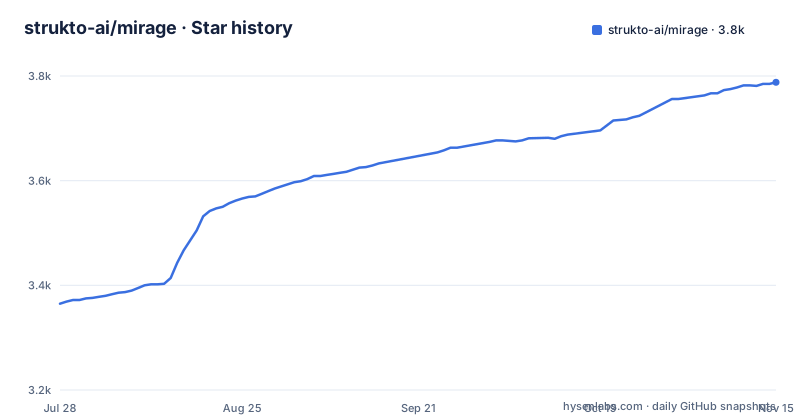
Star history
- strukto-ai/mirage3,788 ★ · +423
| Repository | 2026-07-28 | 2026-11-15 |
|---|---|---|
| strukto-ai/mirage | 3.4k | 3.8k |
423 Stars in the last 110 days, measured from the daily GitHub snapshot. Compare with other projects
Editorial analysis
Fourteen credential groups, and one declared twice
The environment template at the repository root is the clearest statement of the project's scope. It declares blank credentials for object storage on two clouds, a cloud drive, a chat workspace, a mail provider over both protocols, a note-taking service, two task trackers, a database, a development sandbox service, a model hub, a self-hosted file host and an API key for a spreadsheet service. Within that list one block appears twice: the cloud drive service is declared near the top with three fields and again further down with four, the second time adding a refresh token. A duplicate like that is harmless until you change one copy and not the other. Two other defaults are worth noticing, since they are filled in rather than blank: a model name and an object store bucket with a test suffix in it.
Hidden paths are absent rather than unreadable
The profiles feature is the most interesting design decision in the list, and it is worth reading slowly. Three levels govern commands and tools: allow, ask and deny. Two levels govern files and folders: hide and show. The distinction the README insists on is that a hidden path is not merely unreadable but absent from the filesystem the agent sees. That is a stronger guarantee than a permission check, because an agent that cannot enumerate a path cannot leak it, cannot grep it by accident, and cannot infer its existence from a directory listing. It also means the abstraction has to hide things at the mount layer rather than at the read layer, which is why hiding belongs to the filesystem rather than to a policy script.
The policy engine gates operations and environment variables
There is a second layer above profiles, and it is described as scriptable. A policy script can prohibit any dangerous action before it runs, and the README says the same stack gates every filesystem operation and every session write, so neither a file nor an environment variable leaks. Two things follow from that sentence. The gate is below the shell rather than beside it, so there is no path through the virtual terminal that skips it. And the environment is treated as data with the same sensitivity as a file, which is a more careful position than most tools take, since environment variables are where credentials usually sit. What the README does not describe is the cost of the gate or the failure mode when a policy script throws.
One shell binds the filesystem, the tools and the runtimes
The virtualised shell is the part that makes the rest usable rather than merely present. It binds three things into a single command line: the mounted filesystem, the virtual tools, and the runtimes. What that buys is stated as a list, and the list is the argument for the whole design, because pipes, redirection, variables, jobs and history all keep working across all three. An agent that already knows how to pipe output into a filter does not have to learn a per-backend API to do it. The runtimes layer is what keeps that cheap: a command can be routed to a configured runtime, whether that runs in process, sandboxed or on a remote machine, which is the project's claim that computation and storage can change independently.
The virtual tools are answered by the library, not installed
Three command line tools are described as virtual: version control, a chat tool and a notifications tool, all answered by Mirage itself rather than by anything installed on the machine. The stated consequence is that an agent drives the service with nothing present on the host, and that the same tool can be virtualised into two or more instances, each under its own name with its own credentials. That last capability is the interesting one, because it is how a single agent instruction reaches two different accounts or two different environments without the agent needing to know which is which. The filesystem feature is the mirror image of it, and the README frames the pair together: one interface over many services instead of many interfaces and many protocol adapters.
Two SDKs, two package names, two quickstart paths
The project is published twice, once per language, and the names do not match. The Python package carries the tool's name with an ai suffix, while the npm package sits under an organisation scope and ends in a platform suffix, which is the usual way to avoid colliding with an unscoped name on that registry. The documentation site carries a separate quickstart for each language, and the repository root holds both language directories side by side rather than one of them delegating to the other. The description also settles the deployment question in one sentence: both SDKs run in process inside a web framework, a browser application or any asynchronous runtime, with no separate process required. That is the difference between this and a tool you host.
The example mounts a memory store, a database and a chat channel
The one code sample is worth reading as documentation of the mount model. It constructs a workspace from a mapping of three paths: a temporary path backed by an in-memory filesystem in executable mode, a database path backed by a Redis filesystem in write mode, and a chat path backed by a chat filesystem holding a bot token in executable mode.
ws = Workspace(
    {
        "/tmp":   (RAMVFS(), MountMode.EXEC),
        "/redis": (RedisVFS(url=redis_url), MountMode.WRITE),
        "/slack": (SlackVFS(SlackConfig(token=slack_bot_token)), MountMode.EXEC),
    },
    # monty captures python, so scripts run sandboxed inside the workspace
    runtimes=[MontyRuntime(captures=["python", "python3"]), "workspace"],
)
It then passes a list of runtimes, one of which captures the Python interpreters so that scripts run sandboxed inside the workspace, and the last entry of that list is the workspace itself. The two shell calls that follow are the point of the whole design: one recursive search across the database and the memory store in a single command, and a second that runs a script stored as a file inside the chat service. The sample stops mid-line on that second call.
Version 0.0.x, six translations, and a citation file
The release history is three tags in the zero point zero line, dated about a month apart, which is the numbering of a project that has not yet committed to a stable interface. Against that, the repository is organised like something closer to a release: a citation file sits at the root, there are separate security and contributing documents, a lint configuration written for the Python side, a changelog-ignoring file for blame, a specification directory, an integration directory, a directory of collected licences, and a documentation site with per-language quickstarts. The readme is translated into six languages in a subdirectory, and the header links a chat community through a QR code image as well as a text invite. The gap between a 0.0.x version and that apparatus is the honest description of where this project is.
Editorial conclusion
Mirage is interesting if you are building agent infrastructure and want every data source behind one interface with unix tools on top, because the claim is that pipelines compose across services rather than across separate interfaces. Three things to weigh before you adopt it. It is pre-release software at version 0.0.x, so pin an exact version and expect change. Its security story rests on the filesystem and the policy engine rather than on the model, which means the configuration is where you should spend your review time. And the credential surface is broad: the environment template expects keys for fourteen services, so mount only what you use.
Frequently asked questions
What is Mirage?
A virtual terminal for AI agents: a virtual filesystem that mounts many backends under one root, command line tools answered by the library itself, and a routed runtime for executing code, all bound into one shell where pipes and redirection keep working.
Which sources can Mirage mount?
The README names object storage, a cloud drive, a chat service, mail and a cache among others, and the environment template in the repository declares credentials for fourteen services, including two cloud object stores, two file sync services, a self-hosted file host, a spreadsheet service, two task trackers, a mail provider, a model hub, a development sandbox and a hosted Redis.
How does Mirage control what an agent is allowed to do?
Profiles at three levels govern commands and tools, and two levels govern files and folders, with a hidden path absent from the filesystem the agent sees rather than merely unreadable. A policy script can prohibit an action before it runs, and the same stack gates every filesystem operation and session write so that neither files nor environment variables leak.
Do I have to run Mirage as a separate service?
No. The project description says the Python and TypeScript SDKs run in process inside a web framework, a browser application or any asynchronous runtime, with no separate process required.
How do I install Mirage?
From one of two published packages: a Python package whose name carries the tool name with an ai suffix, and a scoped npm package ending in a platform suffix. The documentation site carries a separate quickstart for each language.
Official sources
Add this badge to your README
If you maintain this project, the badge below links readers to this analysis and shows its maintenance status from the daily GitHub snapshot. Paste the markdown into your README; add ?metric=license or ?metric=stars to the image URL for a different field.

[](https://hysenlabs.com/projects/strukto-ai-mirage)Star history chart for your README
[](https://hysenlabs.com/projects/strukto-ai-mirage)Was this useful?