vscode-styled-components: the CSS grammar that makes styled template strings readable
Syntax highlighting for styled-components
At a glance
- What is it?
- vscode-styled-components gives VS Code syntax highlighting, CSS IntelliSense and error reporting inside styled-components template strings, using a grammar built on the Atom CSS and Sass grammars and a custom language id. The Styled Components team stopped supporting the extension in June 2024, so the last published version and the pinned TypeScript compatibility are the things to plan around.
- Who is it for?
- vscode-styled-components still earns its place in an editor for anyone writing styled-components in JavaScript or TypeScript, because the alternative is editing CSS inside a template literal with no grammar at all, and the setup cost is a single extension install. It does not suit a team that needs the extension to keep pace with new styled-components releases, since the team has stated it is no longer supported or updated and the newest published version is v1.7.8.
- Can I use it commercially?
- Yes. MIT is a permissive licence: you can use, modify and sell software built on it, as long as you keep its copyright and licence notices.
- Is it still maintained?
- Yes. The repository last received commits 54 days ago.
- What is it written in?
- Mainly JavaScript, according to GitHub's language statistics.
Answers come from the project's GitHub data, last synced on November 7, 2026, and from our analysis. They are not legal advice.
Star history
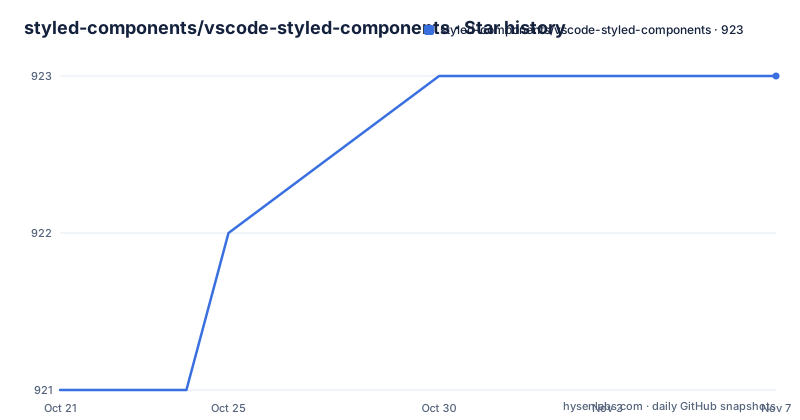
- styled-components/vscode-styled-components923 ★ · +2
| Repository | 2026-10-21 | 2026-11-07 |
|---|---|---|
| styled-components/vscode-styled-components | 921 | 923 |
2 Stars in the last 17 days, measured from the daily GitHub snapshot. Compare with other projects
Editorial analysis
A grammar that treats template literals as a language of their own
The core mechanism is a TextMate grammar. The extension contributes a language with the id source.css.styled and the alias CSS (Styled Components), configured by a separate css.styled.configuration.json file, and a grammar pointing at syntaxes/css.styled.json. That CSS grammar is built on top of the Atom language-sass and language-css grammars, so it inherits their token rules rather than redefining CSS from scratch. A second grammar, with scopeName styled and a path of syntaxes/styled-components.json, is injected into the JavaScript and TypeScript scopes, covering source.js, source.ts, source.jsx, source.js.jsx, source.tsx, source.vue and source.svelte. The embeddedLanguages entry maps source.css.scss to css and meta.embedded.line.ts to typescript, so a nested stylesheet still parses as CSS and a template expression still parses as TypeScript. That injection list is the mechanism that lets one extension cover styled-components across React, Vue and Svelte files.
Highlighting only works when the import is literally styled
The troubleshooting section states the constraint more bluntly than any feature list: syntax highlighting is specifically made to work with styled, so make sure your default import is styled and nothing else. That is not a stylistic preference on the part of the extension, it is how the grammar recognises the template literal that follows a styled call. If your project imports the library under a different name, or wraps styled in your own module, the grammar has no anchor to attach to and the highlighting quietly does not appear. The second requirement is that the file itself is set to the right language, typescriptreact or javascriptreact, and the README notes that using the correct extensions, jsx and tsx, helps. Both failures are silent, which is why they appear in a troubleshooting section rather than in the feature list: there is no error, only missing colour.
IntelliSense for CSS properties comes from MDN data, not from styled-components
The property completion inside a styled string is not generated from styled-components knowledge. It comes from the css language service in the vscode-css-languageservice project, which in turn takes its property list from MDN Data. That explains a common complaint, an unknown property error on a property the developer knows is valid. If the property is a custom one, or something MDN does not list, the fix is to add it yourself, following the approach documented in the typescript-styled-plugin issue thread. If the property is standard and genuinely missing from the list, the README says to raise the issue with the css language service or MDN projects instead, after checking whether it has already been raised. The split is worth understanding because it decides where you file things: a missing custom property is your configuration problem, a missing standard property is upstream.
TypeScript 5.0 broke IntelliSense for anyone still on an older TypeScript
The most concrete failure mode documented is a version clash. When VS Code released March 2023 it shipped with TypeScript 5.x set by default, and extension version 1.7.8 supports that while lower versions do not. So if IntelliSense stopped working, the likely cause is that the extension was updated but the project TypeScript was not. The README gives two routes: the quick option is to downgrade the extension to v1.7.5, and the long term option is to migrate to TypeScript 5.x. Two further issue threads are referenced for other causes. For a team pinned to an older TypeScript, this is the detail that decides whether the extension is usable at all, and it is worth checking the workspace TypeScript version before blaming anything else.
Installing is one command, but pick the right publisher
The install instructions are the shortest thing in the README. Inside VS Code, press Ctrl+P and enter:
ext install vscode-styled-componentsIt should be the top result. The important caveat sits above the instructions. Styled Components has moved, and the extension should be downloaded from the marketplace listing for styled-components.vscode-styled-components. The older jpoissonnier.vscode-styled-components version will receive no more updates. The publisher field in the package manifest matches the newer listing, since the manifest names the publisher as styled-components and the package as vscode-styled-components, with the license recorded as MIT. Getting the publisher right matters more than usual here, because the two listings have diverged and only one of them is still maintained.
Emmet tab completion needs one setting you have to add yourself
Two Emmet problems are documented and neither is the extension's fault. The first is that tab completion does not work unless you add the setting emmet.triggerExpansionOnTab to your VS Code settings. The second is that Emmet sometimes auto-completes HTML tags instead of CSS, and the README is blunt that this is an upstream issue in VS Code. The root cause is traced to a specific VS Code issue, which itself came from an earlier issue in the tracker, and the README says an issue was raised in this repository but that there is nothing that can be done on this end. So if you rely on Emmet inside styled template strings, the one setting is the whole fix, and the wrong-completion behaviour is something to work around rather than report here.
The team stopped maintaining this in June 2024, and the repository says so first
The README opens with the status before it opens with the product. It states that the repository is no longer supported or updated by the Styled Components team as of June 2024, invites contributors to reach out on Discord or in an issue, and says the team can unarchive the repository if contributors come forward but until then it will remain as it is. The topic tags include hacktoberfest, which is the seasonal contribution drive that the project leaned on. The release history backs this up. v1.7.8 was published on 2023-04-05, v1.7.5 on 2022-09-21 and v1.7.4 on 2022-03-25, so the published versions stopped well before the maintenance statement. The repository is not archived and the last push was on 2026-09-15, which means something still moved, but nothing in the repository describes that work as extension features. The manifest still requires VS Code at version 1.73.0 or above and activates on the typescriptreact and javascriptreact languages.
Building from source uses an esbuild script and husky for hooks
The development setup is visible in the package manifest and the tree. The extension entry point is dist/extension.js, produced by a build script at build.mjs, run through node ./build.mjs, with a watch variant behind the same script and a production build wired to the vscode:prepublish hook. The lint and format scripts are prettier, with a .prettierignore and a .editorConfig in the tree. Tests run through node ./src/tests/runTests.js, which is the standard VS Code extension test harness entry. A prepare script runs husky install, and the .husky directory plus .nvmrc pin the Node version used for development. The language server side is contributed through the typescriptServerPlugins entry in the manifest, which registers a TypeScript server plugin under the @styled scope, and the README points at the typescript-styled-plugin repository for how to configure the linter and the other language features.
Editorial conclusion
vscode-styled-components still earns its place in an editor for anyone writing styled-components in JavaScript or TypeScript, because the alternative is editing CSS inside a template literal with no grammar at all, and the setup cost is a single extension install. It does not suit a team that needs the extension to keep pace with new styled-components releases, since the team has stated it is no longer supported or updated and the newest published version is v1.7.8. Before you install it, read the note about the marketplace publisher, because the old jpoissonnier version receives no further updates and the two are not interchangeable, and check the TypeScript version in your workspace, since IntelliSense stopped working for some users after TypeScript 5.0 landed in VS Code in March 2023.
Frequently asked questions
How do I install vscode-styled-components in VS Code?
Press Ctrl+P inside VS Code and enter ext install vscode-styled-components; it should be the top result. The README also warns that the older jpoissonnier.vscode-styled-components version receives no more updates, so install the styled-components publisher listing.
Why is there no syntax highlighting in my styled components?
Highlighting is made to work specifically with styled, so your default import has to be styled and nothing else. The file also needs to be set to typescriptreact or javascriptreact, and using the jsx and tsx extensions helps.
What do I do if IntelliSense stopped working after updating the extension?
It is most likely a clash between TypeScript 5.0 and the extension, since VS Code shipped TypeScript 5.x by default from March 2023. The quick option is downgrading to v1.7.5, and the long term option is migrating to TypeScript 5.x.
Why does VS Code report an unknown property that is actually valid?
Property lookup comes from the css language service, which takes its data from MDN Data, so custom or unlisted properties are not recognised. The README explains how to add your own property, and says to raise the issue upstream with the css language service or MDN if the property is standard.
Official sources
Add this badge to your README
If you maintain this project, the badge below links readers to this analysis and shows its maintenance status from the daily GitHub snapshot. Paste the markdown into your README; add ?metric=license or ?metric=stars to the image URL for a different field.

[](https://hysenlabs.com/projects/styled-components-vscode-styled-components)Star history chart for your README
[](https://hysenlabs.com/projects/styled-components-vscode-styled-components)Was this useful?