Misconfiguration Manager: an attack and defence catalogue for SCCM
Misconfiguration Manager is a central knowledge base for all known Microsoft Configuration Manager tradecraft and associated defensive and hardening guidance.
At a glance
- What is it?
- Misconfiguration Manager is a SpecterOps project that catalogues known Microsoft Configuration Manager misconfigurations, the abuse cases they enable and the hardening that closes them, mapped to MITRE ATT&CK and shipped as a PowerShell script for checking a live hierarchy. It is documentation first and a scanner second, and it is GPL-3.0 licensed.
- Who is it for?
- Adopt Misconfiguration Manager if you run Microsoft Configuration Manager and want a maintained catalogue of the ways that hierarchy gets taken over, with the administrator roles that cause them and the fix for each. Do not adopt it as a scanning product, because the repository is a knowledge base with one script in it, and the matrix is only as current as its contributors.
- Can I use it commercially?
- Yes, with conditions. GPL-3.0 is a copyleft licence: if you distribute software that includes it, you must release that software's source code under the same licence. Running it internally without distributing it does not trigger that obligation.
- Is it still maintained?
- Yes. The repository last received commits 25 days ago.
- What is it written in?
- Mainly PowerShell, according to GitHub's language statistics.
Answers come from the project's GitHub data, last synced on November 7, 2026, and from our analysis. They are not legal advice.
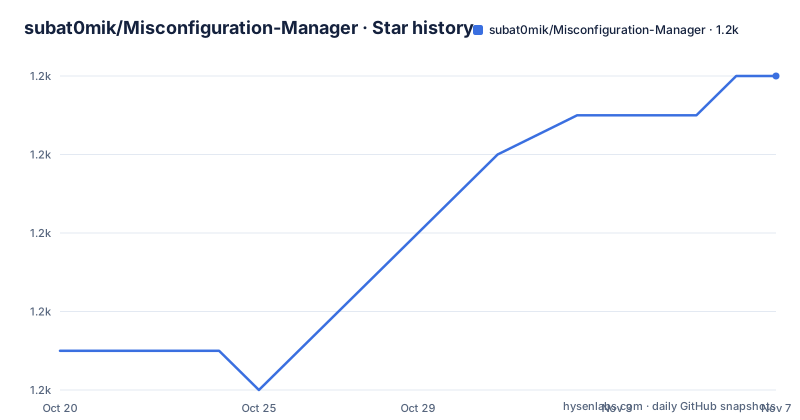
Star history
- subat0mik/Misconfiguration-Manager1,184 ★ · +7
| Repository | 2026-10-20 | 2026-11-07 |
|---|---|---|
| subat0mik/Misconfiguration-Manager | 1.2k | 1.2k |
7 Stars in the last 18 days, measured from the daily GitHub snapshot. Compare with other projects
Editorial analysis
A knowledge base first, a script second
Misconfiguration Manager is described as a central knowledge base for all known Microsoft Configuration Manager tradecraft and associated defensive and hardening guidance, and the repository description says the same thing in fewer words. The scope of the product is the SCCM attack surface, which the documentation calls nebulous, and the goal is to demystify that tradecraft and simplify SCCM attack path management for defenders while also educating offensive security professionals about it. The tree is a documentation repository, not a code repository. There are attack-techniques/ and defense-techniques/ directories, a SCCM_AttackDefenseMatrix.csv at the root, a GLOSSARY.md, a RESOURCES.md, a CONTRIBUTING.md, a presentations/ directory with conference decks, a LICENSE file, and one script, MisconfigurationManager.ps1. The project is sponsored by SpecterOps, where the maintainer works, and it is published under the GPL-3.0 licence with the project site at misconfigurationmanager.com. For a defender, the value is the catalogue; the script is a convenience on top of it.
The two matrices, and how they map to ATT&CK
The way to use the project is through the SCCM Attack Matrix and the SCCM Attack and Defense Matrix, which map attack techniques to their MITRE ATT&CK framework tactics and to their detection and prevention strategies. The project says it draws inspiration from the ATT&CK framework with a few deviations, and that it was strongly influenced by Push Security's SaaS attack techniques matrix and by the Certified Pre-Owned whitepaper by Will Schroeder and Lee Chagolla-Christensen. The two entry points are aimed at different audiences. Offensive practitioners are pointed at the list of known and documented attack techniques, which for each item identifies the security context and the network access required. Defenders and IT administrators are pointed at the defense techniques list, which identifies the administrator roles the project thinks are most likely to be involved in implementing each item. That second view is the more useful one for an administrator, because the misconfiguration is usually a consequence of a role assignment rather than a bug.
The takeover list, the glossary and the reference page
Three supporting documents do a lot of the work. The TAKEOVER techniques list is the one to read first if you want the sharpest version of the problem: it is the collection of cases where a hierarchy can be completely compromised under certain, mostly default, conditions. The GLOSSARY.md exists because the descriptions use a lot of SCCM-specific vocabulary, and a technique that reads as gibberish to an administrator is a technique that will not be fixed. RESOURCES.md is the central reference for SCCM attack and defence resources the project is aware of, including the lab environments used to test techniques and the material that informed the repository, and the documentation points there for anyone who wants to test the techniques themselves in a lab or learn more about the attack and defence side. The supporting files referenced from the documentation are these:
./attack-techniques/README.md
./defense-techniques/README.md
./GLOSSARY.md
./RESOURCES.md
The repository also ships a changelog-free but versioned presentation history in the presentations/ directory, with an administrator's guide to preventing SCCM attacks as a PDF deck, alongside the SO-CON 2024 and TROOPERS24 talks and two blog posts, one from 2024 and a follow-up from 2025.
Checking a live hierarchy with the script and with ConfigManBearPig
The remediation quick start is a four-step path, and the order matters because you want to know what to look for before you start looking. First, review the list of known and documented attack techniques and the corresponding defense techniques to identify issues that may be present in your environment and how to remediate them. Second, run ConfigManBearPig from SpecterOps and visualise the results in BloodHound, which the documentation describes as being for free, with a walkthrough and a SpecterOps blog post on it as an OpenGraph collector for SCCM. Third, as an alternative, run the MisconfigurationManager.ps1 script included in the repository, with its own walkthrough. Fourth, implement the mitigations for the misconfigurations you identified, with an administrator's guide PDF and a conference recording linked for that stage. The two scanning paths are not equivalent. The script reports against the checks in the repository, so it answers the question the catalogue asks. ConfigManBearPig and BloodHound answer a different question, by showing you the actual paths through your own graph, which catches misconfigurations that the catalogue does not enumerate.
Why offensive research is documented alongside the fixes
The project is explicit that its approach extends beyond cataloguing the tactics of known adversaries, and it openly invites contributions from the realm of penetration testing, red team operations and security research. It also draws a careful line about evidence, saying that at SpecterOps many of the misconfigurations highlighted in the repository have been leveraged in real-world environments, while others represent experimental and exploratory research projects proved out in a lab environment. That distinction is stated plainly, and it is the one an adopter should hold on to, because a technique proved out in a lab may behave differently against a production hierarchy that has been customised since. The submission policy follows the same honesty. The project invites both proven and exploratory SCCM-focused attack techniques and defensive strategies, and the goal is stated as going beyond the static nature of whitepapers, with a living repository and community contributions intended to keep it relevant. The project is also careful to describe itself as designed to raise awareness, and it maintains a Slack channel for the community.
Where this repository fits, and where it does not
Four limits are worth stating. The first is that this is a catalogue, and a catalogue is only as current as its last contribution. The repository is alive, with the last push on 2026-10-13, but there is no release cadence and no versioned artefacts, so there is no way to pin a known-good snapshot of the knowledge base for an audit. The second is that a checklist of misconfigurations is a floor, not a ceiling. The catalogue describes misconfigurations the community has documented, and a hierarchy hardened against every listed technique can still be taken over through something nobody wrote down, which is exactly why the project also points at ConfigManBearPig and BloodHound, where the graph of your own environment can show a path the checklist does not know about. The third is that scanning is an active operation. Running the script or a collector against a live management server touches the thing that manages your fleet, so the tool should be pointed at a lab first, and the documentation is careful to point at lab resources for that. The fourth is scope. This is about one product. If your management estate is a mix of Configuration Manager, Intune and other tooling, the coverage stops at the boundary of what this project catalogues.
Editorial conclusion
Adopt Misconfiguration Manager if you run Microsoft Configuration Manager and want a maintained catalogue of the ways that hierarchy gets taken over, with the administrator roles that cause them and the fix for each. Do not adopt it as a scanning product, because the repository is a knowledge base with one script in it, and the matrix is only as current as its contributors. Before you run anything against production, read the TAKEOVER list and the glossary to understand which conditions are described, and plan for the fact that a scan of a live hierarchy is an active operation against your management server, not a read-only report.
Frequently asked questions
What is Misconfiguration Manager?
It is a SpecterOps project serving as a central knowledge base for known Microsoft Configuration Manager tradecraft and the defensive and hardening guidance that goes with it, mapping attack techniques to MITRE ATT&CK tactics and to detection and prevention strategies. The project is GPL-3.0 licensed.
How do I check my own SCCM hierarchy with this project?
The remediation quick start has you review the attack and defense technique lists first, then either run ConfigManBearPig from SpecterOps and visualise the results in BloodHound, or run the MisconfigurationManager.ps1 script included in the repository, and finally implement the mitigations for what you found.
What are the TAKEOVER techniques?
They are the cases where an SCCM hierarchy can be completely compromised under certain, mostly default, conditions, and the documentation points anyone curious about how that happens to the takeover techniques list specifically.
Who is the Misconfiguration Manager project aimed at?
Both sides. Offensive practitioners are pointed at the attack techniques list, which gives the security context and network access each technique requires, while defenders and IT administrators are pointed at the defense techniques list, which identifies the administrator roles most likely to be involved in implementing each item.
How current is the Misconfiguration Manager knowledge base?
The repository is a living document with community contributions, and the last push was on 2026-10-13, but it publishes no GitHub releases and no versioned artefacts, so there is no way to pin a known-good snapshot. The project also links RESOURCES.md for lab environments to test techniques in before applying them to a live hierarchy.
Official sources
Add this badge to your README
If you maintain this project, the badge below links readers to this analysis and shows its maintenance status from the daily GitHub snapshot. Paste the markdown into your README; add ?metric=license or ?metric=stars to the image URL for a different field.

[](https://hysenlabs.com/projects/subat0mik-misconfiguration-manager)Star history chart for your README
[](https://hysenlabs.com/projects/subat0mik-misconfiguration-manager)Was this useful?