kubecm: a kubeconfig switcher that also merges files and shares them over Git
Manage your kubeconfig more easily.
At a glance
- What is it?
- kubecm is a Go command line tool for managing kubeconfig: switching between clusters and namespaces, merging several kubeconfig files, and distributing them through a Git-backed registry. The README documents installation well and usage barely at all.
- Who is it for?
- Adopt kubecm if your day is spent moving between clusters and you want one binary for context switching, file merging and shell completion. Do not adopt it if you need a documented, offline command reference today, because the README stops at installation and pushes the full usage guide to kubecm.cloud.
- Can I use it commercially?
- Yes. Apache-2.0 is a permissive licence: you can use, modify and sell software built on it, as long as you keep its copyright and licence notices.
- Is it still maintained?
- Yes. The repository last received commits 3 days ago.
- What is it written in?
- Mainly Go, according to GitHub's language statistics.
Answers come from the project's GitHub data, last synced on November 7, 2026, and from our analysis. They are not legal advice.
Star history
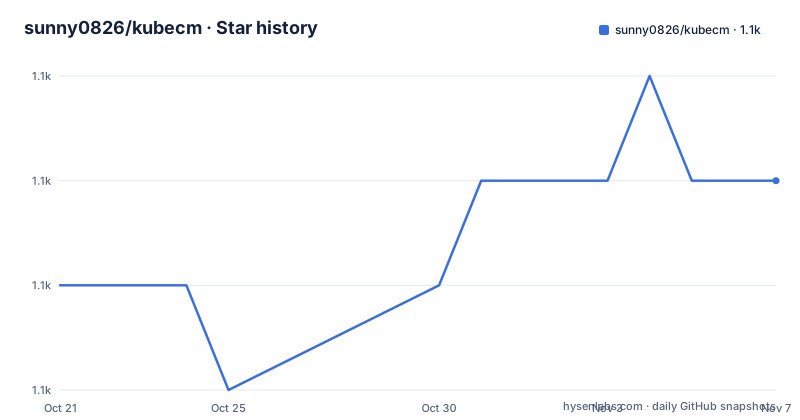
- sunny0826/kubecm1,147 ★ · +1
| Repository | 2026-10-21 | 2026-11-07 |
|---|---|---|
| sunny0826/kubecm | 1.1k | 1.1k |
1 Stars in the last 17 days, measured from the daily GitHub snapshot. Compare with other projects
Editorial analysis
The README is an install guide, not a usage manual
The most useful thing to know about kubecm before you read further is how little its README says about what the commands are called. The project describes itself in one line, "Manage your kubeconfig more easily", and then covers installation, a features list, a link to the website, a demo recording and a contribution section. The full documentation lives at kubecm.cloud.
That split has consequences. The feature list is clear enough to judge fit: switch between clusters and namespaces in a single command, merge multiple kubeconfig files into one, an interactive mode for picking a context, a Git-backed registry for distributing kubeconfigs across teams, Linux, macOS and Windows support, and auto-completion for Bash, Zsh and Fish. What is missing is the invocation syntax for any of it. The README gives no subcommand names, no flags and no example session, so an evaluation of the tool's ergonomics has to happen against the website or by installing the binary and reading its own help output.
For a tool whose entire purpose is to shorten a command you type many times a day, that is a real gap in the documentation, not a nitpick. It also means the interactive mode is doing more work than the feature list suggests, because a picker does not need to be spelled out in flag notation to be useful.
Two install paths give you two different command names
Krew installs kubecm as a kubectl plugin, which is the pattern most Kubernetes CLI users already follow:
kubectl krew install kcHomebrew installs it as a standalone binary:
brew install kubecmThe plugin name and the formula name are not the same, so a team that mixes installation methods across laptops ends up with two habits. Worth deciding up front which one you standardize on, because the plugin route puts the tool in the same namespace as kubectl and lets it be invoked through `kubectl`, while the Homebrew route gives a normal standalone command.
The third route is the release page, where the README links a download of the binary rather than describing per-platform archives. The repository root carries a `.goreleaser.yml` and the Makefile defines `GORELEASER_DIST=dist`, so the releases are produced by GoReleaser, and the Makefile's build rule compiles a static binary with `CGO_ENABLED=0` and stamps the version, git revision and build date into the `github.com/sunny0826/kubecm/version` package.
$(GO) build $(GO_FLAGS) -o $(BUILD_TARGET_PKG_DIR)/kubecm .A static build matters for a tool that is copied between machines, and the `go 1.24.2` directive in `go.mod` sets the floor for anyone building from source.
Why the go.mod pulls in four cloud provider SDKs
The dependency list in `go.mod` is more revealing than the README. Alongside the expected Kubernetes libraries `k8s.io/client-go`, `k8s.io/api` and `k8s.io/apimachinery`, it includes `github.com/spf13/cobra` for the command tree, `github.com/manifoldco/promptui` and `github.com/pterm/pterm` for terminal output, `github.com/lithammer/fuzzysearch` for fuzzy matching, `github.com/imdario/mergo` for merging, and `github.com/cli/safeexec` for shelling out to other binaries safely.
Then there are the cloud SDKs: `github.com/alibabacloud-go/cs-20151215/v2`, the Tencent Cloud `tke` client, the Azure `armcontainerservice` package, and the AWS `eks` service with `sts` and `credentials`. A kubeconfig manager does not need provider SDKs for its core job of switching contexts, so the presence of these four is consistent with the tool also being able to enumerate clusters from those providers and present them as choices rather than as raw context names you have to remember.
That is an inference from the dependency list, and the README does not spell the feature out. It is still a meaningful signal about what the binary links against: a multi-cloud cluster lister is a much heavier thing to download and keep current than a plain context switcher, and the credential-related dependencies come along with it.
The merge step is the part that changes your files
Two of the listed features touch your kubeconfig on disk rather than just your shell state: merging multiple kubeconfig files into one, and the Git-backed registry for distributing kubeconfigs across teams.
Merging is the more predictable of the two. kubeconfig is a YAML document with a list of clusters, users and contexts, and `github.com/imdario/mergo` is the library the project depends on for combining configuration. The consequence for a user is that a merged file is a new artifact, and the question of what happens to the originals is the kind of detail the README does not answer. Nothing in the available documentation describes a dry run, a backup file, or a way to preview the result, so the sensible habit is to work on a copy the first time rather than to point the tool at your only kubeconfig.
The registry feature carries more weight. A kubeconfig holds cluster endpoints and the credentials needed to reach them, so "distribute kubeconfigs across teams using a Git-backed registry" means putting that material into a Git repository, with a Git history behind it. The README states the feature exists and links to the registry documentation on the website, but it says nothing about encryption, access control or how a revoked credential is purged from history. Teams that have a policy against credentials in version control need to read that page before turning the feature on.
A tool that is a plugin, a binary and a registry client
The repository layout explains why kubecm takes more than a weekend to understand. The root holds `main.go`, a `cmd/` directory for the command tree, `pkg/` for the implementation, `version/` for the build stamp, `hack/` for development scripts, `test/` for the test suite, and `docs/` which contains the site material and the demo animation referenced from the README.
The build system is split between two mechanisms. The Makefile owns the developer build, with `build`, `clean` and `e2e-test` targets and a `tag` target that runs `git tag -a` before pushing. The `.goreleaser.yml` file owns the published artifacts, and `.krew.yaml` declares the plugin metadata that Krew needs to expose it as `kubectl krew install kc`.
.PHONY: build clean e2e-testTwo other files describe how the project is held to external standards: `.golangci.yml` configures the linter, and `codecov.yml` together with a `test/` directory points to coverage reporting. The `SECURITY.md` and `CODE_OF_CONDUCT.md` files at the root indicate that a reporting path and a code of conduct exist, which matters for a tool that touches cluster credentials. The project is released under the Apache-2.0 licence, and the `LICENSE` file sits at the repository root.
Maintenance: recent commits, but release tags lag behind
The repository is not archived and the last push was on 2026-09-21, so work is still landing on the default branch. The release history tells a slightly different story. The tags show v0.35.1 on 2026-03-09, v0.35.0 on 2026-02-26 and v0.34.0 on 2025-12-24, which puts the most recent published binary more than six months behind the last commit on the branch.
That gap is worth noticing for anyone pinning a version in a bootstrap script. Commits on master and released binaries are not the same thing here, and the README offers no nightly or edge channel. The Krew install path pulls from the release page, so a Krew user gets the published artifact rather than the current state of the branch, which for a tool whose upstream dependency is `client-go` means you inherit the version of the Kubernetes API library that was current at release time.
The project is written in Go and built with GoReleaser across Linux, macOS and Windows, and it relies on the upstream `client-go` line at v0.31.1 in `go.mod`. Upgrading is a matter of pulling a new release and re-running the install, which is cheap, but it also means your kubeconfig tooling and your cluster client versions can drift apart if you upgrade one and not the other.
Where kubecm is the wrong choice
If your kubeconfig contains exactly one cluster and one context, none of this is for you. The cost of installing a binary, learning a second command namespace and accepting a dependency tree that includes four cloud SDKs does not pay for itself against a single `current-context` entry in a file you already know.
The second wrong case is a policy environment. A tool whose registry feature stores kubeconfigs in Git, in a project whose dependencies include credential and STS clients for AWS, needs a careful answer from your security reviewers before it is installed on a workstation with cluster access. The README does not offer a redaction mode, and it does not state whether the registry is self-hosted or a hosted service, so those are questions to answer before adoption rather than after.
The third case is documentation dependency. If you need to audit or automate this tool from the repository alone, the command surface is not in the README. The upstream `k8s.io/client-go` dependency at v0.31.1 and the `go 1.24.2` directive in `go.mod` set real constraints: building from source needs a recent Go toolchain, and the released binary carries a fixed view of the Kubernetes API. The tool is also built for people who have many clusters. A single-cluster team is the wrong audience.
Editorial conclusion
Adopt kubecm if your day is spent moving between clusters and you want one binary for context switching, file merging and shell completion. Do not adopt it if you need a documented, offline command reference today, because the README stops at installation and pushes the full usage guide to kubecm.cloud. Before you install, check which command name you will get, since the Krew plugin is named kc while the Homebrew formula installs kubecm, and decide whether your kubeconfigs are allowed to live in a Git repository before enabling the registry feature.
Frequently asked questions
How do I install kubecm on macOS?
The README lists Homebrew as one of the install paths, with the command `brew install kubecm`. A second path is Krew, which installs the tool as a kubectl plugin named `kc`.
Can kubecm switch between namespaces as well as clusters?
Yes. The README's feature list describes context management as the ability to switch between Kubernetes clusters and namespaces in a single command, and an interactive mode for selecting the context to switch to.
Does kubecm support shell auto-completion?
The README lists auto-completion support for Bash, Zsh and Fish among the highlights, alongside multi-platform support for Linux, macOS and Windows.
How does the kubecm registry work?
The README describes it as a way to distribute kubeconfigs across teams using a Git-backed registry, and links to the registry documentation on kubecm.cloud. The README does not detail how credentials are protected in that repository.
Official sources
Add this badge to your README
If you maintain this project, the badge below links readers to this analysis and shows its maintenance status from the daily GitHub snapshot. Paste the markdown into your README; add ?metric=license or ?metric=stars to the image URL for a different field.

[](https://hysenlabs.com/projects/sunny0826-kubecm)Star history chart for your README
[](https://hysenlabs.com/projects/sunny0826-kubecm)Was this useful?